
300A Osha PDF Template

300A Osha PDF Template

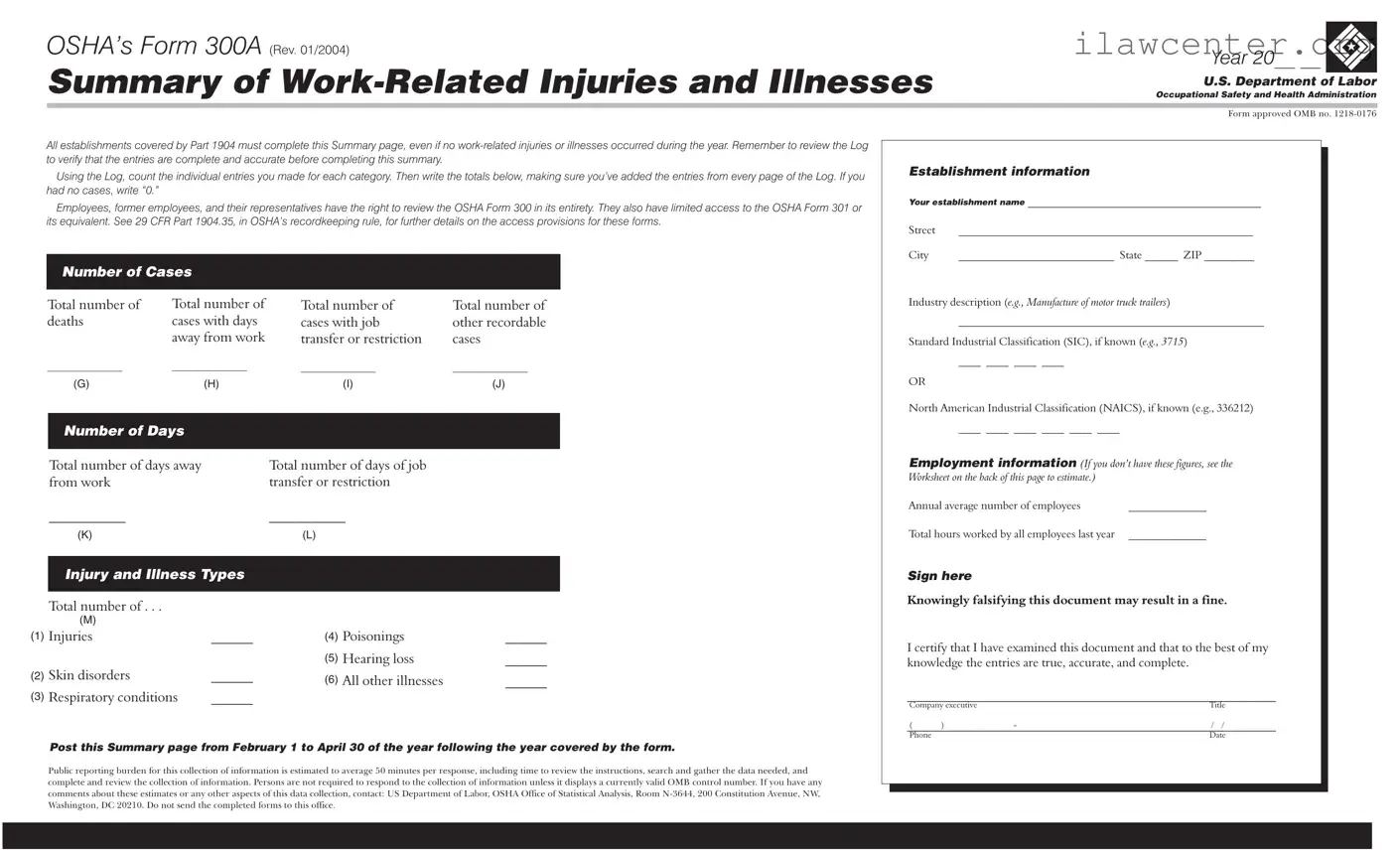
OSHA’s Form 300A is a crucial document that summarizes work-related injuries and illnesses within an establishment for a given year. Every business covered by OSHA regulations must complete this form, even if no incidents occurred. It’s essential to ensure accuracy and completeness, as this form plays a key role in workplace safety and compliance.

Ready to fill out your 300A form? Click the button below to get started!

Article Guide

The OSHA Form 300A serves as a crucial tool for documenting work-related injuries and illnesses within various establishments across the United States. Each year, employers must complete this summary, regardless of whether any incidents occurred. This requirement emphasizes the importance of maintaining a safe work environment. The form includes essential details such as the total number of deaths, cases involving days away from work, and cases with job transfer or restriction. Additionally, it captures the industry classification, either through the Standard Industrial Classification (SIC) or the North American Industrial Classification (NAICS) system. Employers must also report the annual average number of employees and the total hours worked, providing a comprehensive overview of workplace safety. To ensure accuracy, it is vital to review the Log of work-related injuries and illnesses before finalizing the summary. This document must be posted prominently from February 1 to April 30 of the following year, making it accessible for employees and their representatives. Transparency is a key aspect of workplace safety, and the Form 300A plays an important role in fostering an environment of accountability and awareness.

300A Osha Preview

U.S. Department of Labor
Occupational Safety and Health Administration
OSHA’s Form 300A
(Rev. 01/2004)
Year 20__ __
Summary of Work-Related Injuries and Illnesses
Form approved OMB no. 1218-0176
Total number of
deaths
__________________
Total number of
cases with days
away from work
__________________
Number of Cases
Total number of days away
from work
___________
Total number of days of job
transfer or restriction
___________
Number of Days
Post this Summary page from February 1 to April 30 of the year following the year covered by the form.
All establishments covered by Part 1904 must complete this Summary page, even if no work-related injuries or illnesses occurred during the year. Remember to review the Log
to verify that the entries are complete and accurate before completing this summary.
Using the Log, count the individual entries you made for each category. Then write the totals below, making sure you’ve added the entries from every page of the Log. If you
had no cases, write “0.”
Employees, former employees, and their representatives have the right to review the OSHA Form 300 in its entirety. They also have limited access to the OSHA Form 301 or
its equivalent. See 29 CFR Part 1904.35, in OSHA’s recordkeeping rule, for further details on the access provisions for these forms.
Establishment information
Employment information
Your establishment name
__________________________________________
Street _________________________ _______
City ____________________________ State ______ ZIP _________
Industry description ( )
_______________________________________________________
Standard Industrial Classification (SIC), if known ( )
____ ____ ____ ____
North American Industrial Classification (NAICS), if known (e.g., 336212)
e.g., Manufacture of motor truck trailers
e.g., 3715
(I ee the
Worksheet on the back of this page to estimate.)
_____________________
OR
____ ____ ____ ____ ____ ____
Annual average number of employees ______________
Total hours worked by all employees last year ______________
f you don’t have these figures, s
Sign here
Knowingly falsifying this document may result in a fine.
I certify that I have examined this document and that to the best of my
knowledge the entries are true, accurate, and complete.
___________________________________________________________
___________________________________________________________
Company executive Title
Phone Date
( ) - / /
Public reporting burden for this collection of information is estimated to average 50 minutes per response, including time to review the instructions, search and gather the data needed, and
complete and review the collection of information. Persons are not required to respond to the collection of information unless it displays a currently valid OMB control number. If you have any
comments about these estimates or any other aspects of this data collection, contact: US Department of Labor, OSHA Office of Statistical Analysis, Room N-3644, 200 Constitution Avenue, NW,
Washington, DC 20210. Do not send the completed forms to this office.
Total number of . . .
Skin disorders ______
Respiratory conditions ______
Injuries ______
Injury and Illness Types
Poisonings ______
Hearing loss
All other illnesses ______
______
(G) (H) (I) (J)
(K) (L)
(M)
(1)
(2)
(3)
(4)
(5)
(6)
Total number of
cases with job
transfer or restriction
__________________
Total number of
other recordable
cases
__________________

File Properties

Fact Name Description
Purpose of Form OSHA Form 300A summarizes work-related injuries and illnesses for a specific year.
Mandatory Completion All establishments covered by OSHA's Part 1904 must complete this form, regardless of whether injuries or illnesses occurred.
Review Requirement Before completing Form 300A, employers must review the Log of Work-Related Injuries and Illnesses to ensure accuracy.
Access Rights Employees and their representatives have the right to review the entire OSHA Form 300, as well as limited access to Form 301.
Reporting Period The summary must be posted from February 1 to April 30 of the year following the reporting year.
Annual Average Employees Employers must provide the annual average number of employees on the form, which can be estimated if exact figures are not available.
Injury and Illness Types The form categorizes injuries and illnesses into types such as skin disorders, respiratory conditions, and poisonings.
Falsification Penalties Knowingly falsifying the information on Form 300A can result in fines and legal repercussions.
Data Collection Burden OSHA estimates that completing the form takes an average of 50 minutes, including data gathering and review.
State-Specific Forms Some states may have additional requirements or specific forms governed by state laws, which can vary by jurisdiction.

Instructions on Utilizing 300A Osha

Completing the OSHA Form 300A is an essential task for all establishments, regardless of whether any work-related injuries or illnesses occurred during the year. This form summarizes the work-related injuries and illnesses that took place, allowing for a clear overview of workplace safety. After filling out this form, it should be posted in a visible location from February 1 to April 30 of the year following the reporting year.

  1. Gather necessary information: Collect data from your OSHA Form 300 Log, including the number of injuries, illnesses, and employee details.
  2. Establishment information: Fill in your establishment name, street address, city, state, and ZIP code.
  3. Record totals: Enter the total number of deaths, cases with days away from work, cases with job transfer or restriction, and other recordable cases.
  4. Industry description: Provide a brief description of your industry, such as “Manufacture of motor truck trailers.”
  5. SIC or NAICS code: If known, fill in the Standard Industrial Classification (SIC) or North American Industrial Classification (NAICS) code.
  6. Total days: Record the total number of days away from work and the total number of days of job transfer or restriction.
  7. Employment information: Enter the annual average number of employees. If unsure, refer to the worksheet on the back of the form for estimates.
  8. Injury and illness types: Fill in the total number of injuries, skin disorders, respiratory conditions, poisonings, hearing loss, and all other illnesses.
  9. Total hours worked: Enter the total hours worked by all employees in the last year.
  10. Certification: Sign and date the form, certifying that the information is true and accurate.
  11. Post the summary: Ensure the completed form is displayed from February 1 to April 30 of the following year.

Important Facts about 300A Osha

What is the OSHA Form 300A?

The OSHA Form 300A is a summary of work-related injuries and illnesses that employers must complete annually. It provides a snapshot of the safety record for a workplace and must be posted for employees to see.

Who is required to complete the OSHA Form 300A?

All establishments covered by OSHA’s recordkeeping regulations must complete this form, regardless of whether any work-related injuries or illnesses occurred during the year.

When should the OSHA Form 300A be posted?

The completed form must be posted in a visible location from February 1 to April 30 of the year following the year covered by the report.

What information is included in the OSHA Form 300A?

The form includes totals for deaths, cases with days away from work, job transfer or restriction cases, and various types of injuries and illnesses. It also requires establishment information, such as the name, address, and industry classification.

What should I do if there were no work-related injuries or illnesses?

If there were no cases, you must still complete the form and write “0” in the relevant sections. This ensures compliance with OSHA regulations.

Can employees access the OSHA Form 300?

Yes, employees, former employees, and their representatives have the right to review the OSHA Form 300 in its entirety. They also have limited access to the OSHA Form 301 or its equivalent.

What happens if the information on the form is falsified?

Knowingly falsifying the OSHA Form 300A can result in fines. It is crucial to ensure that all entries are true, accurate, and complete before submitting the form.

How can I estimate the annual average number of employees?

If you do not have the exact figures, you can refer to the Worksheet provided on the back of the form to estimate the annual average number of employees.

What is the public reporting burden for completing this form?

The public reporting burden for the OSHA Form 300A is estimated to average 50 minutes per response. This includes time spent reviewing instructions, gathering necessary data, and completing the form.

Where should I send the completed OSHA Form 300A?

You do not send the completed form to the OSHA office. Instead, you keep it on file and post it as required.

Common mistakes

Filling out the OSHA Form 300A is a crucial task for any establishment, but mistakes can easily happen. One common error is failing to include the establishment's name and address. This information is essential for identifying the location of the reported injuries and illnesses. Without it, the form may be deemed incomplete, leading to potential issues with compliance.

Another frequent mistake involves not accurately counting the number of cases. Each category on the form requires specific totals, such as the number of deaths or cases with days away from work. Neglecting to tally these correctly can result in misleading data. It's important to double-check the entries from the Log to ensure that every case is accounted for.

Some individuals also overlook the requirement to report cases even when there are none. If no work-related injuries or illnesses occurred during the year, it's still necessary to indicate this by writing “0” in the relevant sections. Failing to do so can create confusion and may trigger further scrutiny from regulatory bodies.

In addition, many people misinterpret the industry description and classification codes. Providing an accurate industry description and the correct Standard Industrial Classification (SIC) or North American Industrial Classification System (NAICS) code is vital. Incorrect classifications can misrepresent the establishment's operations and lead to compliance issues.

Another mistake is related to the employment information section. Individuals often forget to include the annual average number of employees or the total hours worked by all employees last year. This data is necessary for calculating rates of injuries and illnesses, which are crucial for understanding workplace safety.

It's also important to remember that the form must be signed by a company executive. Some individuals neglect this step, thinking that the information is sufficient on its own. A signature certifies that the entries are true and accurate, and without it, the form may be considered invalid.

Lastly, failing to post the Summary page as required can lead to additional complications. The form must be displayed from February 1 to April 30 of the year following the year covered by the report. Not adhering to this timeline can result in penalties and hinder transparency regarding workplace safety.

Documents used along the form

The OSHA Form 300A is an important document for summarizing work-related injuries and illnesses in the workplace. However, it is often used alongside several other forms and documents that help organizations maintain compliance and ensure safety. Here’s a list of common documents that you might encounter alongside the 300A form.

  • OSHA Form 300: This is the Log of Work-Related Injuries and Illnesses. It details each incident that occurred during the year, including the nature of the injury and the affected employee.
  • OSHA Form 301: This form provides a more detailed report of each individual injury or illness. It includes information about how the incident occurred and the circumstances surrounding it.
  • Incident Report: Companies often use this internal document to record specific details about workplace accidents. It helps in analyzing trends and preventing future incidents.
  • Safety Data Sheets (SDS): These documents provide information on the properties of hazardous substances. They are essential for understanding risks and ensuring safe handling in the workplace.
  • Employee Training Records: These records show that employees have received necessary safety training. They are crucial for demonstrating compliance with safety regulations.
  • First Aid Logs: These logs track all first aid treatments administered in the workplace. They help organizations monitor minor injuries and respond effectively to health issues.
  • Workplace Safety Policies: These documents outline the safety procedures and protocols that employees must follow. They serve as a guide for maintaining a safe work environment.
  • Risk Assessments: Conducting risk assessments helps identify potential hazards in the workplace. This document outlines the risks and suggests measures to mitigate them.
  • Return-to-Work Program Documentation: This includes plans and agreements for employees returning to work after an injury. It ensures a smooth transition and supports employee recovery.
  • Annual Safety Reports: These reports summarize safety performance over the year. They often include statistics on injuries and illnesses, helping organizations evaluate their safety programs.

Each of these documents plays a vital role in workplace safety and compliance. Together, they help organizations not only meet legal requirements but also foster a culture of safety and health for all employees.

Similar forms

The OSHA Form 300A is essential for summarizing work-related injuries and illnesses. Several other documents serve similar purposes, providing important information about workplace safety and health. Below is a list of documents that share similarities with the OSHA Form 300A:

  • OSHA Form 300: This is the Log of Work-Related Injuries and Illnesses. It records each incident in detail, similar to how the 300A summarizes those incidents.
  • OSHA Form 301: This is the Injury and Illness Incident Report. It provides a more detailed account of each individual case, much like the specific entries in the Form 300.
  • Workers' Compensation Claims: These documents track claims filed by employees for work-related injuries. They often reflect the same incidents reported on the OSHA forms.
  • First Aid Logs: These logs document minor injuries treated on-site. They can complement the information provided in the OSHA forms by capturing less severe incidents.
  • Accident Investigation Reports: These reports analyze the causes of workplace accidents. They often reference the same incidents reported in the OSHA forms, providing context and preventive measures.
  • Safety Meeting Minutes: Records from safety meetings may discuss incidents that are also reported on the OSHA forms, highlighting ongoing safety concerns and resolutions.
  • State-Specific Injury and Illness Reports: Some states require additional reporting of workplace injuries. These documents may align with the data collected in the OSHA forms, ensuring compliance with state laws.

Each of these documents plays a vital role in maintaining workplace safety and ensuring compliance with regulations.

Dos and Don'ts

When filling out the OSHA Form 300A, it's essential to follow specific guidelines to ensure accuracy and compliance. Here are ten important dos and don'ts to consider:

  • Do review the Log thoroughly to ensure all entries are complete before summarizing.
  • Do include totals for each category based on the Log's entries.
  • Do write “0” if no work-related injuries or illnesses occurred during the year.
  • Do ensure the establishment name and address are clearly stated and accurate.
  • Do post the Summary page in a visible location from February 1 to April 30 of the following year.
  • Don't forget to count entries from every page of the Log.
  • Don't leave any section blank unless it is not applicable; provide accurate data wherever possible.
  • Don't falsify any information on the form; this can result in penalties.
  • Don't send the completed forms to the OSHA office; keep them at your establishment.
  • Don't overlook the certification section; ensure it is signed by a company executive.

Misconceptions

Understanding OSHA’s Form 300A is essential for maintaining workplace safety and compliance. However, several misconceptions can lead to confusion. Here are eight common misunderstandings about this important form:

  • It’s only for companies with injuries. Many believe that only businesses with work-related injuries need to complete Form 300A. In reality, all establishments must fill it out, even if no injuries occurred during the year.
  • Form 300A is optional. Some employers think submitting Form 300A is optional. However, it is a requirement for all establishments covered by OSHA’s recordkeeping rules.
  • Form 300A is the same as Form 300. While both forms relate to workplace injuries, they serve different purposes. Form 300 is a detailed log of each incident, while Form 300A summarizes the data from the log.
  • Only injuries need to be reported. There’s a misconception that only physical injuries must be recorded. However, illnesses such as respiratory conditions and skin disorders also need to be included.
  • You can skip the summary if there are no cases. Some people think they can skip completing the summary if there are no cases. This is incorrect; the summary must still be completed with “0” entries.
  • Employees can’t access the forms. It’s a common belief that employees have no right to access these forms. In fact, employees and their representatives have the right to review Form 300 and have limited access to Form 301.
  • There’s no deadline for posting the summary. Some employers think there’s no urgency in posting Form 300A. However, it must be displayed from February 1 to April 30 of the year following the reporting year.
  • Falsifying information has no consequences. Some may believe that inaccuracies in the form won’t lead to serious repercussions. However, knowingly falsifying information can result in significant fines.

By clearing up these misconceptions, employers can better understand their responsibilities and ensure a safer workplace for everyone.

Key takeaways

Understanding how to accurately fill out and use OSHA's Form 300A is crucial for maintaining workplace safety records. Here are some key takeaways:

  • Mandatory Completion: Every establishment covered by OSHA regulations must complete the Form 300A, even if no work-related injuries or illnesses occurred during the year.
  • Review the Log: Before filling out the summary, review the Log to ensure all entries are complete and accurate.
  • Count Entries: Use the Log to count the individual entries for each category and write the totals in the appropriate sections of the form.
  • No Cases: If there were no cases to report, simply write “0” in the relevant fields.
  • Employee Access: Employees, former employees, and their representatives have the right to review the Form 300 and have limited access to Form 301.
  • Accurate Information: Ensure that all information, such as the establishment name and industry description, is accurate and up-to-date.
  • Post the Summary: The completed Form 300A must be posted from February 1 to April 30 of the year following the reporting year.
  • Certification: A company executive must sign the form, certifying that the information is true and complete.
  • Data Collection: The public reporting burden for filling out the form is estimated to take about 50 minutes, including data gathering and review.
  • Contact Information: If you have comments about the data collection process, you can contact the OSHA Office of Statistical Analysis.

By following these guidelines, you can ensure compliance and contribute to a safer workplace environment.