680 PDF Template

680 PDF Template

The Florida Certification of Immunization, commonly referred to as the 680 form, is a crucial document that verifies a child's immunization status for school attendance. It is governed by various Florida statutes and administrative rules, ensuring that children are adequately vaccinated before entering educational settings. For detailed guidance on completing this form, please click the button below to start filling it out.

Article Guide

The Florida Certification of Immunization, commonly referred to as the 680 form, plays a crucial role in ensuring that children receive the necessary vaccinations for school attendance. This form is mandated by several sections of Florida Statutes and is designed to provide a comprehensive record of a child’s immunization history. Parents or guardians are required to fill out essential information, including the child's name, date of birth, and optional identification numbers. The form also includes sections for documenting various vaccines, such as DTaP, Polio, and MMR, along with the corresponding dates of administration. It offers different certification options, allowing for complete immunization records, temporary exemptions, or permanent medical exemptions based on specific health conditions. Additionally, guidance is provided through the Immunization Guidelines for Florida Schools, which can be accessed online. Completing this form accurately is vital for ensuring that children are protected against preventable diseases and can safely participate in educational settings.

680 Preview

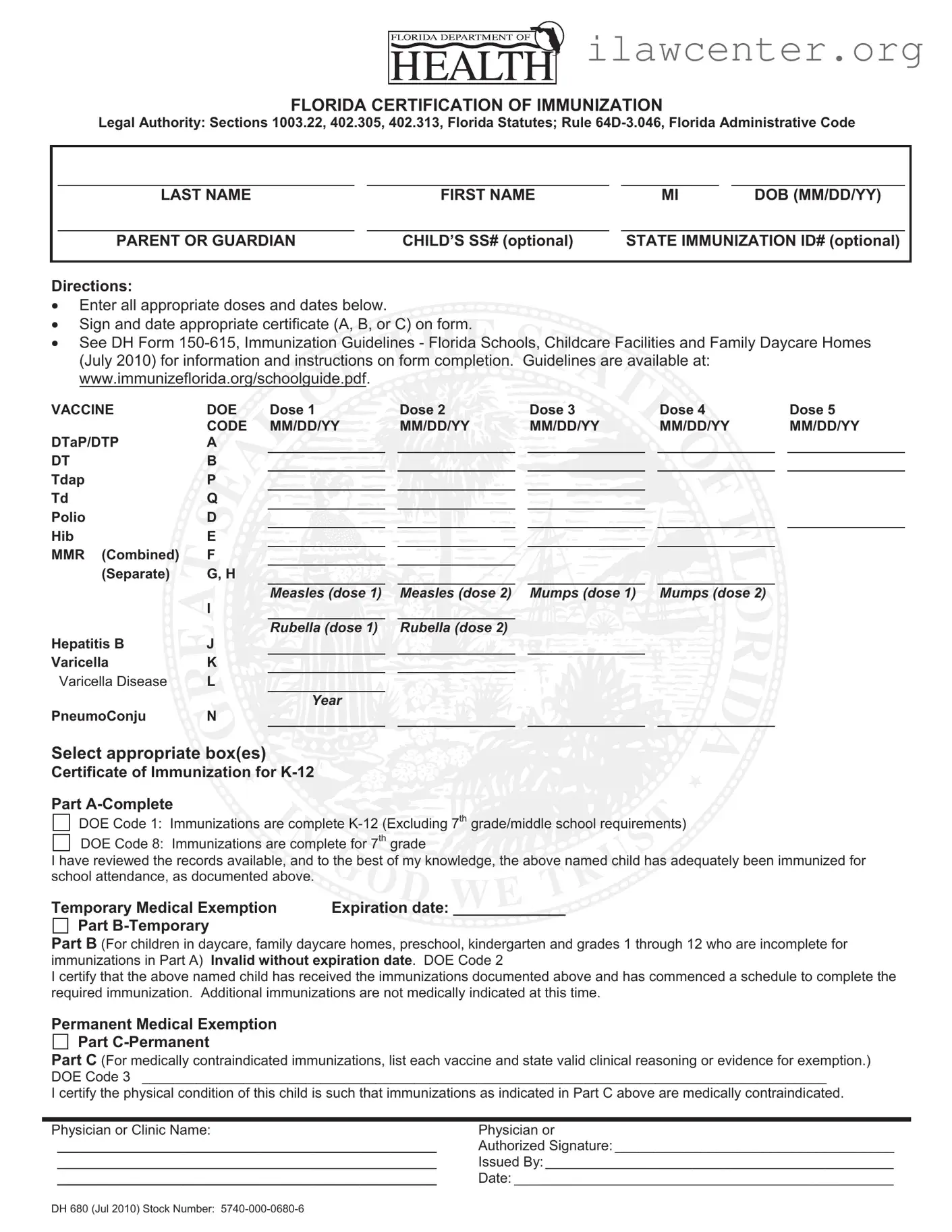
DH 680 (Jul 2010) Stock Number: 5740-000-0680-6
FLORIDA CERTIFICATION OF IMMUNIZATION
Legal Authority: Sections 1003.22, 402.305, 402.313, Florida Statutes; Rule 64D-3.046, Florida Administrative Code
LAST NAME FIRST NAME MI DOB (MM/DD/YY)
PARENT OR GUARDIAN CHILD’S SS# (optional) STATE IMMUNIZATION ID# (optional)
Directions:
x Enter all appropriate doses and dates below.
x Sign and date appropriate certificate (A, B, or C) on form.
x See DH Form 150-615, Immunization Guidelines - Florida Schools, Childcare Facilities and Family Daycare Homes
(July 2010) for information and instructions on form completion. Guidelines are available at:
www.immunizeflorida.org/schoolguide.pdf
.
VACCINE DOE Dose 1 Dose 2 Dose 3 Dose 4 Dose 5
CODE MM/DD/YY MM/DD/YY MM/DD/YY MM/DD/YY MM/DD/YY
DTaP/DTP A
DT B
Tdap P
Td Q
Polio D
Hib E
MMR (Combined) F
(Separate) G, H
Measles (dose 1) Measles (dose 2) Mumps (dose 1) Mumps (dose 2)
I
Rubella (dose 1) Rubella (dose 2)
Hepatitis B J
Varicella K
Varicella Disease
L
Year
PneumoConju N
Select appropriate box(es)
Certificate of Immunization for K-12
Part A-Complete
DOE Code 1: Immunizations are complete K-12 (Excluding 7
th
grade/middle school requirements)
DOE Code 8: Immunizations are complete for 7
th
grade
I have reviewed the records available, and to the best of my knowledge, the above named child has adequately been immunized for
school attendance, as documented above.
Temporary Medical Exemption Expiration date: _____________
Part B-Temporary
Part B
(For children in daycare, family daycare homes, preschool, kindergarten and grades 1 through 12 who are incomplete for
immunizations in Part A) Invalid without expiration date. DOE Code 2
I certify that the above named child has received the immunizations documented above and has commenced a schedule to complete the
required immunization. Additional immunizations are not medically indicated at this time.
Permanent Medical Exemption
Part C-Permanent
Part C
(For medically contraindicated immunizations, list each vaccine and state valid clinical reasoning or evidence for exemption.)
DOE Code 3 ________________________________________________________________________________________
I certify the physical condition of this child is such that immunizations as indicated in Part C above are medically contraindicated.
Physician or Clinic Name: Physician or
_________________________________________________ Authorized Signature: ____________________________________
_________________________________________________ Issued By: _____________________________________________
_________________________________________________ Date: _________________________________________________

File Properties

Fact Name Details
Legal Authority Sections 1003.22, 402.305, 402.313, Florida Statutes; Rule 64D-3.046, Florida Administrative Code
Purpose This form certifies that a child has received the required immunizations for school attendance in Florida.
Optional Information Child’s Social Security number and state immunization ID number can be provided but are not mandatory.
Immunization Records Parents or guardians must enter all appropriate doses and dates of immunizations on the form.
Exemption Types There are temporary and permanent medical exemptions available, with specific documentation required for each.
Completion Guidelines Refer to DH Form 150-615 for detailed instructions on completing the form and immunization guidelines.

Instructions on Utilizing 680

Completing the Florida Certification of Immunization (Form 680) is essential for ensuring that your child meets school requirements. Follow these steps to fill out the form accurately.

  1. Start by entering the child's last name, first name, and middle initial in the designated fields.
  2. Input the child's date of birth in the format MM/DD/YY.
  3. Provide the name of the parent or guardian.
  4. Optionally, fill in the child's Social Security number and state immunization ID number.
  5. In the vaccine section, list all appropriate doses and dates for each vaccine. Use the correct codes for each vaccine type:
    • DTaP/DTP
    • Polio
    • D Hib
    • MMR (Combined or Separate)
    • Measles
    • Mumps
    • Rubella
    • Hepatitis B
    • Varicella
    • PneumoConju
  6. For each vaccine, enter the dates of doses 1 through 5 in the format MM/DD/YY.
  7. Choose the appropriate certificate section (A, B, or C) based on the child's immunization status:
    • Part A: Complete immunizations for K-12
    • Part B: Temporary medical exemption
    • Part C: Permanent medical exemption
  8. If applicable, provide the expiration date for temporary exemptions.
  9. In the case of a permanent medical exemption, list each vaccine and provide valid clinical reasoning.
  10. Obtain the physician or clinic name and their authorized signature.
  11. Lastly, fill in the issued by section and the date of completion.

After filling out the form, review it for accuracy. Ensure that all required fields are completed. Once confirmed, submit the form to the appropriate school or daycare facility as needed.

Important Facts about 680

What is the purpose of the Florida Certification of Immunization Form 680?

The Florida Certification of Immunization Form 680, commonly known as Form 680, serves as an official record of a child's immunizations. It is required for school enrollment in Florida to ensure that children are protected against vaccine-preventable diseases. The form helps schools verify that students have received the necessary vaccinations according to state guidelines.

Who needs to complete Form 680?

Form 680 must be completed for all children entering K-12 schools, daycare facilities, and other educational settings in Florida. This includes children in preschool, kindergarten, and grades 1 through 12. Parents or guardians are responsible for obtaining and submitting the completed form to the appropriate educational institution.

What information is required on Form 680?

The form requires several key pieces of information, including the child's name, date of birth, and immunization history. Parents or guardians must provide the dates of each vaccine dose received, as well as any optional identification numbers. Additionally, the form includes sections for certifying complete immunizations, temporary exemptions, or permanent medical exemptions.

What are the different sections of Form 680?

Form 680 consists of three main parts: Part A, Part B, and Part C. Part A certifies that the child has received all required immunizations for school attendance. Part B allows for temporary exemptions for children who are in the process of completing their immunizations. Part C is for permanent medical exemptions, where a physician must provide clinical reasoning for why certain immunizations cannot be administered.

How do I obtain Form 680?

Form 680 can be obtained from healthcare providers, schools, or through the Florida Department of Health's website. Many pediatricians and clinics have the form available, and it can also be downloaded as a PDF from official state resources. Ensure that you have the most current version of the form to avoid any issues.

What should I do if my child has not completed their immunizations?

If your child has not completed their immunizations, you can still fill out Form 680, specifically Part B. This section allows you to certify that your child has begun the immunization process and is on a schedule to complete the required vaccinations. It's important to keep track of your child's immunization appointments and maintain communication with your healthcare provider.

Is there a deadline for submitting Form 680?

Yes, there is a deadline for submitting Form 680. Typically, schools require this form to be submitted before the start of the school year or upon enrollment. It is advisable to check with the specific school or childcare facility for their deadlines to ensure compliance and avoid any enrollment issues.

What happens if I do not submit Form 680?

If Form 680 is not submitted, your child may be unable to attend school or childcare facilities in Florida. Schools are mandated to ensure that all students are immunized according to state law. Failure to provide the necessary documentation may result in your child being excluded from attending classes until the requirements are met.

Where can I find more information about immunization requirements in Florida?

For more information about immunization requirements and guidelines in Florida, visit the Florida Department of Health's website or check the Immunization Guidelines for Florida Schools, Childcare Facilities, and Family Daycare Homes. These resources provide comprehensive information on the necessary vaccines, exemptions, and the completion of Form 680.

Common mistakes

Filling out the Florida Certification of Immunization form, commonly known as the 680 form, can be straightforward, but many people make mistakes that can delay the process. Understanding these common pitfalls can help ensure that your submission is accurate and complete.

One frequent error is failing to include the child's full name. The form requires the last name, first name, and middle initial. Omitting any part can lead to confusion and possible rejection of the form. Always double-check this information before submitting.

Another common mistake involves incorrect dates of birth. The form specifies that the date should be in the MM/DD/YY format. Entering the date in a different format can result in processing delays. It is essential to verify the date before finalizing the form.

People often overlook the importance of providing a complete immunization history. Each vaccine must be documented with the corresponding date of administration. Failing to list all doses or providing incomplete information can lead to complications in verifying immunization status.

Additionally, many individuals neglect to sign and date the appropriate certificate section. This step is crucial, as an unsigned form may be deemed invalid. Ensure that you sign where required and include the date to avoid this mistake.

Some parents mistakenly believe that they can leave optional fields blank. While the child’s Social Security number and state immunization ID are optional, providing this information can help streamline the process and avoid potential issues later.

Another error occurs when individuals select the wrong DOE code. Each code corresponds to specific immunization statuses. Misidentifying the code can lead to significant misunderstandings regarding the child's immunization requirements.

Moreover, when claiming a temporary or permanent medical exemption, people often forget to include the necessary details. For temporary exemptions, an expiration date is mandatory. For permanent exemptions, valid clinical reasoning must be provided. Omitting this information can invalidate the exemption.

Many people also fail to review the guidelines provided on the form. The instructions are there for a reason, and ignoring them can lead to mistakes. Familiarizing yourself with these guidelines can save time and prevent errors.

Lastly, some parents submit the form without confirming that all required vaccinations are up to date. Before filling out the 680 form, it is wise to consult with a healthcare provider to ensure that your child has received all necessary immunizations.

By being aware of these common mistakes, you can navigate the completion of the 680 form more effectively, ensuring a smoother process for your child's immunization certification.

Documents used along the form

The Florida Certification of Immunization (Form 680) is essential for documenting a child's immunization status. It is often accompanied by other important forms and documents that support the immunization process or provide additional context for school attendance. Here’s a brief overview of four commonly used documents alongside the 680 form.

  • DH Form 150-615: This document provides guidelines for immunization requirements in Florida schools, childcare facilities, and family daycare homes. It includes detailed instructions on how to complete the 680 form and outlines the necessary immunizations for different age groups.
  • Temporary Medical Exemption Form: This form is used when a child cannot receive certain vaccinations for medical reasons. It must be filled out by a physician and includes an expiration date, ensuring that the exemption is valid only for a specific period.
  • Permanent Medical Exemption Form: Similar to the temporary exemption, this form is for children who have permanent medical contraindications to vaccinations. It requires a physician’s signature and detailed reasoning for the exemption, ensuring that the child's health is prioritized.
  • School Admission Form: This form is often required by schools to gather information about the child, including immunization records. It may ask for details such as the child's medical history and emergency contacts, helping schools to maintain a safe environment.

These documents work together to ensure that children meet immunization requirements for school attendance while considering individual health needs. Proper completion and submission of these forms help facilitate a smooth enrollment process and promote public health within the community.

Similar forms

The Florida Certification of Immunization, commonly referred to as the 680 form, serves a crucial role in documenting a child's immunization status for school attendance. Several other documents share similarities with the 680 form in terms of purpose and content. Here are five such documents:

  • Certificate of Immunization (CIV): This document is used in many states to confirm that a child has received the required vaccinations. Like the 680 form, it includes details about each vaccine administered, the dates, and the child's identification information.
  • Immunization Record: Often provided by healthcare providers, this record details all vaccinations a child has received throughout their life. Similar to the 680 form, it tracks the specific doses and dates, ensuring that parents and schools have accurate immunization history.
  • School Health Assessment Form: This form typically includes a section for immunization records, similar to the 680 form. It assesses a child's overall health and readiness for school, ensuring that immunization requirements are met.
  • Vaccine Administration Record (VAR): This document is issued by healthcare providers at the time of vaccination. It lists the vaccines given, along with dates and the administering provider’s information, paralleling the detailed record-keeping of the 680 form.
  • Exemption Form for Immunizations: Used when a child cannot receive certain vaccines for medical or religious reasons, this form provides documentation similar to the exemption sections in the 680 form. It requires specific reasons for the exemption and may need a healthcare provider's signature.

Dos and Don'ts

When filling out the Florida Certification of Immunization (Form 680), it is essential to follow specific guidelines to ensure accuracy and compliance. Below are seven important do's and don'ts to keep in mind.

  • Do enter all required information accurately, including the child's full name and date of birth.
  • Do provide the correct immunization dates for each vaccine listed.
  • Do sign and date the appropriate certificate (A, B, or C) as required.
  • Do check for any additional documentation that may be needed, such as a physician's signature for exemptions.
  • Don't leave any sections blank; all applicable fields must be filled out.
  • Don't use abbreviations or unclear terms when listing immunizations.
  • Don't forget to review the completed form for errors before submission.

Following these guidelines will help ensure that the form is completed correctly and efficiently.

Misconceptions

Understanding the Florida Certification of Immunization, commonly referred to as the 680 form, is crucial for parents and guardians. However, several misconceptions can lead to confusion. Here are ten common misunderstandings about this important document:

  1. The 680 form is only for school-aged children. Many believe this form is exclusively for K-12 students, but it is also applicable for children in daycare and preschool settings.
  2. All vaccines must be completed before submitting the form. While complete immunization is ideal, the form allows for temporary exemptions and documentation of incomplete vaccination schedules.
  3. Only a physician can sign the 680 form. In fact, authorized clinic personnel can also sign the form, provided they have access to the child's immunization records.
  4. The form is only necessary for public schools. This is incorrect. Private schools and childcare facilities also require the 680 form to ensure compliance with state immunization laws.
  5. Once submitted, the form cannot be changed. Parents can update the form as needed, especially if additional immunizations are received after the initial submission.
  6. Immunization records are not needed if the child has a medical exemption. Even with a medical exemption, documentation must be provided on the form to validate the exemption.
  7. The expiration date for temporary exemptions is optional. This is false. An expiration date is mandatory for temporary medical exemptions to ensure compliance and tracking.
  8. Immunization records can be verbal. Written documentation of immunizations is required; verbal confirmations are not acceptable.
  9. The 680 form is only valid for one school year. The validity of the form can extend beyond one year, depending on the immunization schedule and requirements.
  10. Parents can ignore the form if their child is not attending school immediately. It is important to complete and submit the form even if school attendance is not immediate, as it ensures that the child’s immunization records are up to date.

Clarifying these misconceptions can help ensure that children receive the necessary immunizations and that parents are adequately prepared for school enrollment and childcare requirements.

Key takeaways

When filling out the Florida Certification of Immunization Form 680, consider the following key takeaways:

  • Accurate Information: Ensure that all personal details, including the child's name, date of birth, and parent or guardian information, are entered correctly.
  • Immunization Dates: Record all appropriate vaccine doses and their corresponding dates in the designated fields.
  • Optional Information: Providing the child's Social Security number and state immunization ID number is optional but can be helpful for record-keeping.
  • Certificate Selection: Choose the correct certificate (A, B, or C) based on the child's immunization status and needs.
  • Temporary Exemption: If applicable, fill out the temporary medical exemption section, including an expiration date.
  • Permanence of Exemption: For a permanent medical exemption, provide valid clinical reasoning and list each vaccine that is contraindicated.
  • Signature Requirement: The form must be signed by a physician or authorized clinic representative to validate the immunization records.
  • Review Guidelines: Refer to the Immunization Guidelines for Florida Schools for detailed instructions on completing the form.
  • Submission: Submit the completed form to the appropriate school or childcare facility as required.
  • Keep Copies: Retain a copy of the completed form for personal records and future reference.

Understanding these key points will help ensure that the immunization process is smooth and compliant with Florida's regulations.