Add Character Sheet PDF Template

Add Character Sheet PDF Template

The Add Character Sheet form is a comprehensive tool designed for players to record essential details about their characters in a role-playing game. This form includes sections for character class, ability scores, combat modifiers, and background information, ensuring that every aspect of a character's identity is captured. To get started, fill out the form by clicking the button below.

Article Guide

The Add Character Sheet form is a comprehensive tool designed for players to document and track their characters in a role-playing game. It captures essential information such as character class, race, and alignment, allowing players to define their character's identity. The form includes sections for ability scores, combat statistics, and saving throws, which are crucial for gameplay. Players can also note their character's equipment, movement rates, and experience points, ensuring they have a complete view of their character's capabilities. Additionally, the form allows for the inclusion of special powers, proficiencies, and even background details that enrich the character's story. With spaces dedicated to magic items and family history, the Add Character Sheet serves not only as a record of gameplay mechanics but also as a canvas for creativity and character development.

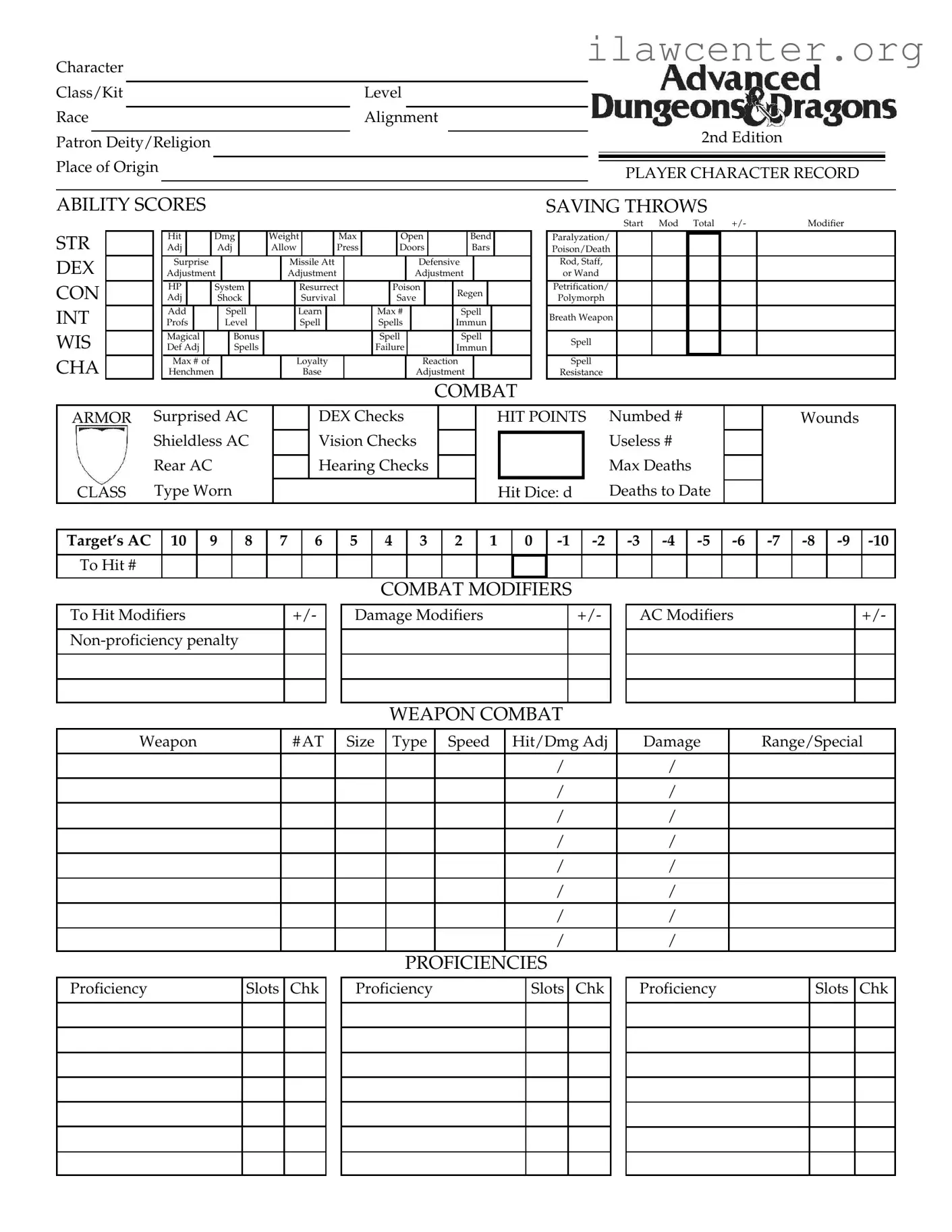
Add Character Sheet Preview

Character

Class/Kit

Level


Race

Alignment


2nd Edition


Patron Deity/Religion


Place of Origin


PLAYER CHARACTER RECORD


ABILITY SCORES

STR


Hit


Dmg


Weight


Max


Open


Bend


Adj


Adj


Allow


Press


Doors


Bars


DEX


Surprise


Missile Att


Defensive


Adjustment


Adjustment


Adjustment


CON


HP


System


Resurrect


Poison


Regen


Adj


Shock


Survival


Save


INT


Add


Spell


Learn


Max #


Spell


Profs


Level


Spell


Spells


Immun


WIS


Magical


Bonus


Spell


Spell


Def Adj


Spells


Failure


Immun


CHA


Max # of


Loyalty


Reaction


Henchmen


Base


Adjustment


COMBAT

SAVING THROWS

Start Mod Total +/-

Modifier

Paralyzation/

Poison/Death

Rod, Staff, or Wand

Petrification/

Polymorph

Breath Weapon

Spell

Spell

Resistance

ARMOR

Surprised AC


DEX Checks


HIT POINTS

Numbed #


Wounds


Shieldless AC


Vision Checks


Useless #


Rear AC


Hearing Checks


Max Deaths


CLASS

Type Worn


Hit Dice: d

Deaths to Date


Target’s AC


10

9

8


7

6

5

4

3

2

1

0

-1


-2

-3

-4

-5

-6


-7

-8

-9

-10


To Hit #


COMBAT MODIFIERS

To Hit Modifiers

+/-

Non-proficiency penalty

Damage Modifiers

+/-

AC Modifiers

+/-

WEAPON COMBAT

Weapon

# AT

Size

Type

Speed

Hit/Dmg Adj

Damage

Range/Special


/

/


/

/


/

/


/

/


/

/


/

/


/

/


/

/


PROFICIENCIES


Proficiency

Slots Chk

Proficiency

Slots Chk

Proficiency

Slots Chk

EQUIPMENT

Item


Location

Wt


Item


Location

Wt

Item

Location

Wt


Total Weight


Encumbrance


Movement Rate


MOVEMENT


EXPERIENCE


Movement

Rate


Movement


Rate


Total XPs


XPs Needed for Next Level


Base


Run (x 5)


Jog (x 2)


Day


Run (x 3)


Kit Modifier


Ability Bonus


Run (x 4)


Subrace Modifier


Level Limit


Encumbrance


Weight


Move


Attack

AC

Level Changes


By


At Levels


Category


Carried


Rate


Penalty

Penalty

THAC0


Light ( 23 MV)


Saving Throws


Moderate ( 12 MV)


- 1


Weapon Proficiencies


Heavy ( 13 MV)


- 2


+1

Non-weapon Proficiencies


Severe (MV=1)


1


- 4


+3


MAGIC ITEMS


TREASURE/OTHER POSSESSIONS

File Properties

Fact Name Description
Character Class/Kit This section allows players to define their character's class or kit, which influences their abilities and skills.
Ability Scores Players must fill in their character's ability scores, including Strength, Dexterity, Constitution, Intelligence, Wisdom, and Charisma.
Combat Mechanics Combat-related statistics, such as hit points, armor class, and saving throws, are essential for gameplay and are included in the form.
Proficiencies Players can track their character's proficiency slots for both weapon and non-weapon skills, crucial for character development.
Magic Items The form includes a section for listing magic items, which can enhance a character's abilities and gameplay experience.
Background Information Players can provide a detailed background for their character, including family history and noteworthy events that shape their story.
Movement Rates Movement rates are calculated based on various factors, including encumbrance and character class, impacting how characters navigate the game world.
Thieving Abilities This section details the character's skills in stealth and thievery, including percentages for actions like picking pockets and finding traps.
Character Description Players must fill out personal details about their character, such as name, age, race, and physical characteristics, to bring them to life.

Instructions on Utilizing Add Character Sheet

Completing the Add Character Sheet form is a straightforward process that requires attention to detail. Each section is designed to capture specific information about your character, ensuring a comprehensive profile that enhances gameplay. Follow these steps to fill out the form correctly.

  1. Character Information: Start by entering your character's name, player name, birth date, age, sex, alignment, and deity. Make sure to provide accurate details to reflect your character's identity.
  2. Character Class/Kit: Indicate your character's class or kit, level, race, and alignment. If applicable, specify the patron deity or religion and place of origin.
  3. Ability Scores: Fill in the ability scores for Strength (STR), Dexterity (DEX), Constitution (CON), Intelligence (INT), Wisdom (WIS), and Charisma (CHA). Include any adjustments and maximum values as needed.
  4. Combat and Saving Throws: Record combat-related stats, including hit points, armor class (AC), and saving throws. Ensure to note any modifiers that apply.
  5. Weapon Combat: List the weapons your character uses, including their type, size, speed, and damage details. Be thorough in documenting the specifics for each weapon.
  6. Proficiencies: Enter proficiency slots and checks for both weapon and non-weapon proficiencies, detailing any special skills your character possesses.
  7. Equipment: Document all items your character carries, including their locations and weights. Calculate the total weight for encumbrance purposes.
  8. Movement and Experience: Fill in the movement rates and total experience points (XPs). Include any modifiers that affect movement or experience gain.
  9. Magic Items and Treasure: List any magic items and treasures your character possesses, along with relevant details about their use and value.
  10. Character Description: Provide a detailed description of your character, including physical traits, personality, and background history. This section helps bring your character to life.
  11. Family Chart: Outline your character's family structure, including names, relationships, and any notable events or properties owned.
  12. Henchmen/Animal Companions: If applicable, document any henchmen or animal companions, noting their race, class, and abilities.
  13. Martial Arts: If your character practices martial arts, specify the style, attacks, and any special maneuvers associated with it.

Once you have completed the form, review all entries for accuracy and completeness. This thoroughness will ensure that your character is ready for the adventures ahead.

Important Facts about Add Character Sheet

What information do I need to fill out the Add Character Sheet form?

The Add Character Sheet form requires a variety of details to fully capture your character's essence. Start with basic information such as the character's name, race, class, and alignment. You’ll also need to provide ability scores, including Strength, Dexterity, Constitution, Intelligence, Wisdom, and Charisma. Additionally, fill in your character’s background, including their place of origin, patron deity, and any notable family history. Don’t forget to include combat statistics like hit points, armor class, and saving throws, as well as any equipment and magical items your character possesses. The more detail you provide, the richer your character will be in the game.

How do I calculate my character's ability scores?

Ability scores can be calculated using various methods, depending on the game rules you’re following. Typically, you can roll a set of dice (commonly 4d6, dropping the lowest die) for each ability score. Alternatively, some systems allow for point buy systems or standard arrays. Once you have your scores, make sure to apply any racial modifiers that might affect them. For instance, if your character is a dwarf, they may receive bonuses to Constitution. Understanding these scores is crucial as they directly influence your character's capabilities in combat, skill checks, and spellcasting.

What are combat modifiers, and how do they affect gameplay?

Combat modifiers are adjustments made to your character's attack rolls and damage based on various factors. These can include your character's proficiency with weapons, any bonuses from abilities or magical items, and situational factors like being surprised or attacking from a higher ground. For example, if your character is skilled with a particular weapon, they may receive a positive modifier to their attack rolls, making it easier to hit opponents. Understanding and calculating these modifiers is essential for effective combat strategy and can significantly impact the outcome of encounters.

Can I include my character's history and background in the form?

Absolutely! Including your character's history and background is not just encouraged; it adds depth to your character. The form provides sections for family history, notable events, and personal traits. You can outline your character's upbringing, significant life events, and motivations. This information enriches the storytelling experience and can influence how your character interacts with others in the game. A well-developed background can also lead to unique opportunities for role-playing and character development throughout your adventures.

Common mistakes

When filling out the Add Character Sheet form, people often overlook critical details that can lead to confusion or errors in gameplay. One common mistake is failing to accurately fill in the Character Class/Kit and Level. This information is crucial for determining a character's abilities and skills. Without this, a player may find themselves unprepared for challenges that require specific class-related skills.

Another frequent error involves the Ability Scores. Players sometimes enter scores that do not align with the character's race or class. For instance, a character with a high Dexterity score might not be accurately represented if the player mistakenly records a low value. This discrepancy can impact gameplay significantly, affecting combat and skill checks.

In the section for Combat Saving Throws, individuals may miscalculate or misunderstand the modifiers. It is essential to ensure that the total reflects any adjustments from class abilities, items, or other factors. An inaccurate saving throw can lead to unexpected character deaths or failures in critical situations.

Players also frequently neglect to update the Hit Points section. This can happen if they do not account for damage taken during gameplay or if they forget to apply bonuses from class features. Keeping track of hit points is vital for maintaining a character’s survivability in encounters.

Another mistake involves the Equipment section, where players may list items without noting their weights. This oversight can lead to exceeding the character's encumbrance limit, which affects movement and actions during play. Understanding how much weight a character can carry is crucial for effective gameplay.

Finally, some players may forget to detail their character's Background/History. While this may seem less important than statistics, a well-developed backstory can enhance role-playing experiences. A character without a history may feel less connected to the game world, reducing overall enjoyment.

Documents used along the form

When creating a character for a role-playing game, the Add Character Sheet form is just one of many documents that can enhance the gaming experience. These forms help keep track of various aspects of your character, ensuring a smooth and enjoyable gameplay. Below is a list of other commonly used forms and documents that complement the Add Character Sheet.

  • Character Backstory Template: This document allows players to flesh out their character's history, motivations, and relationships. It helps provide depth and context, enriching the role-playing experience.
  • Inventory List: An inventory list is essential for tracking items, weapons, and resources your character possesses. This ensures players know what they have at their disposal during gameplay.
  • Spell List: For characters who can cast spells, a dedicated spell list helps organize available spells, their effects, and any specific requirements for casting them. This is crucial for managing magical abilities effectively.
  • Combat Tracker: A combat tracker is useful for managing initiative, hit points, and combat actions during encounters. It keeps the flow of battle organized and helps players stay focused.
  • Character Sheet Summary: This is a condensed version of the Add Character Sheet, highlighting the most critical information. It serves as a quick reference during gameplay, allowing players to easily access key stats.
  • Quest Log: A quest log helps players keep track of objectives, completed quests, and any relevant notes. This is invaluable for maintaining continuity in the storyline and ensuring players stay engaged.
  • Character Relationship Map: This document outlines the connections between characters, including allies, enemies, and NPCs. It visually represents the social dynamics in the game, aiding in role-playing interactions.
  • Character Development Journal: A journal allows players to document their character's growth, experiences, and changes over time. This reflection can deepen the connection to the character and enhance storytelling.
  • Game Session Notes: Taking notes during game sessions can help players remember important events, decisions, and character interactions. This document serves as a personal record of the journey.

Utilizing these forms and documents alongside the Add Character Sheet can significantly enhance your gaming experience. They provide structure and clarity, allowing players to fully immerse themselves in their character's journey. Embracing these tools can lead to richer storytelling and more engaging gameplay.

Similar forms

  • Character Profile Sheet: This document collects essential information about a character, including their abilities, background, and skills. Like the Add Character Sheet form, it provides a comprehensive overview that helps players understand their character’s strengths and weaknesses.
  • Player Character Record: Similar to the Add Character Sheet, this record maintains detailed stats about a character, including health, combat abilities, and inventory. Both documents serve as a central reference for tracking a character's progress in the game.
  • Character Background Form: This form focuses on a character's history and personal details. It parallels the Add Character Sheet by gathering information that shapes a character’s story and motivations, enhancing the role-playing experience.
  • Combat Tracker: The Combat Tracker keeps track of a character's actions during battles. It is akin to the Add Character Sheet in that it highlights combat statistics and modifiers, allowing players to manage their character’s performance in real-time.
  • Spell List: This document outlines the spells a character can use, including their effects and limitations. It resembles the Add Character Sheet by organizing important information that influences gameplay, particularly for magic-using characters.

Dos and Don'ts

When filling out the Add Character Sheet form, it's important to keep a few best practices in mind. Here’s a list of things you should and shouldn't do:

  • Do read all instructions carefully before starting.
  • Do ensure that all information is accurate and up-to-date.
  • Do use clear and legible handwriting or type your responses.
  • Do double-check your ability scores for accuracy.
  • Do keep a copy of the completed sheet for your records.
  • Don't leave any required fields blank.
  • Don't use abbreviations that may confuse others.
  • Don't ignore the alignment section; it’s crucial for gameplay.
  • Don't forget to include your character's background details.
  • Don't rush through the form; take your time to fill it out correctly.

Misconceptions

Here are some common misconceptions about the Add Character Sheet form:

  • It's only for advanced players. Many believe that only seasoned players need to use the Add Character Sheet form. In reality, it is designed for players of all levels to help track their characters effectively.
  • All fields must be filled out. Some think that every single field on the form is mandatory. While it's important to provide as much information as possible, not all fields are required for every character.
  • The form is complicated. Many feel overwhelmed by the amount of information on the form. However, once you break it down, it becomes easier to understand and fill out.
  • It’s only for tabletop games. Some assume that the Add Character Sheet is exclusive to tabletop games. In fact, it can be useful for any role-playing game that requires character tracking.
  • Character sheets are only for combat. A common belief is that the form focuses solely on combat stats. However, it also includes details about character background, abilities, and personal traits.
  • You can’t make changes once submitted. Some players think that once they submit the form, they cannot make any changes. In reality, character sheets can often be updated as the game progresses.
  • It’s only necessary for new characters. Many players believe the form is only needed for new characters. Existing characters can also benefit from a well-maintained character sheet.
  • Only one character sheet is allowed per player. Some think that each player can only have one character sheet. However, players can create multiple sheets for different characters they wish to play.

Key takeaways

Filling out the Add Character Sheet form is a crucial step in your gaming experience. Here are some key takeaways to ensure you do it effectively:

  • Understand the Sections: Familiarize yourself with each section, such as ability scores, combat modifiers, and equipment. Each part plays a vital role in character development.
  • Accuracy is Key: Enter information accurately. Mistakes can lead to confusion during gameplay and affect your character’s performance.
  • Track Your Progress: Keep a record of your character’s hit points, experience points, and levels. This helps you monitor growth and development over time.
  • Use Clear Labels: Clearly label each item and section. This will make it easier to reference during gameplay and avoid miscommunication with other players.
  • Review Regularly: Regularly review your character sheet. Update it as your character evolves, especially after significant events or leveling up.
  • Communicate with Your Group: Share your character details with your gaming group. This helps everyone understand your character's abilities and background.
  • Utilize All Sections: Don’t overlook any sections, such as background history or family chart. They add depth to your character and can influence gameplay.
  • Seek Feedback: Ask for feedback from fellow players or your game master. They can provide insights that enhance your character’s development.

By following these guidelines, you can create a well-rounded character that contributes positively to your gaming experience.