Ata 106 PDF Template

Ata 106 PDF Template

The Ata 106 form is an important document used for certifying parts or materials in accordance with industry standards. It provides essential information about the seller, item descriptions, and verification of new or used parts. For those needing to fill out this form, click the button below to get started.

Article Guide

The ATA 106 form serves as a vital document in the aviation industry, specifically designed for certifying parts and materials. It captures essential details about the seller, including their name, contact information, and contract numbers. The form also requires a comprehensive description of the item being certified, along with its manufacturer and part number. Additionally, it specifies the quantity and serial or batch number, ensuring traceability of the components involved. Notably, the form includes sections for remarks and verification of new or used parts, emphasizing the importance of accurate documentation. The signatures of both the seller and the buyer bind them to the information provided, highlighting the legal responsibilities associated with any inaccuracies. By understanding the ATA 106 form, stakeholders can ensure compliance with industry standards and maintain the integrity of aviation operations.

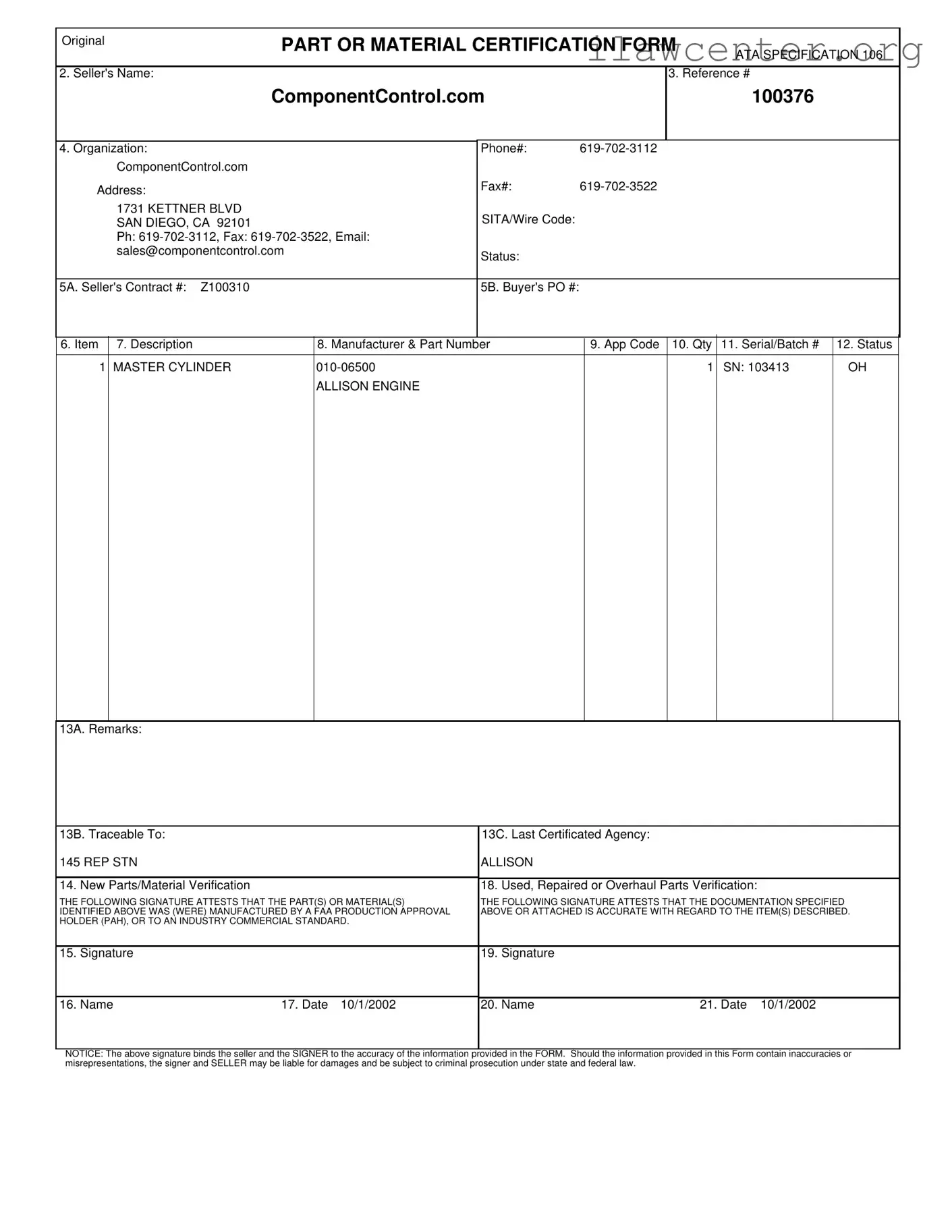
Ata 106 Preview

1731 KETTNER BLVD
SAN DIEGO, CA 92101
Ph: 619-702-3112, Fax: 619-702-3522, Email:
sales@componentcontrol.com
PART OR MATERIAL CERTIFICATION FORM
2. Seller's Name:
ATA SPECIFICATION 106
3. Reference #
ComponentControl.com
100376
4. Organization:
Phone#:
ComponentControl.com
Address:
Fax#:
SITA/Wire Code:
Status:
5A. Seller's Contract #:
Z100310
5B. Buyer's PO #:
6. Item
7. Description
8. Manufacturer & Part Number
9. App Code
10. Qty
11. Serial/Batch #
12. Status
Original
1
010-06500
1
SN:
OH
ALLISON ENGINE
103413
MASTER CYLINDER
13A. Remarks:
13B. Traceable To:
145 REP STN
ALLISON
14. New Parts/Material Verification
18. Used, Repaired or Overhaul Parts Verification:
THE FOLLOWING SIGNATURE ATTESTS THAT THE PART(S) OR MATERIAL(S)
IDENTIFIED ABOVE WAS (WERE) MANUFACTURED BY A FAA PRODUCTION APPROVAL
HOLDER (PAH), OR TO AN INDUSTRY COMMERCIAL STANDARD.
THE FOLLOWING SIGNATURE ATTESTS THAT THE DOCUMENTATION SPECIFIED
ABOVE OR ATTACHED IS ACCURATE WITH REGARD TO THE ITEM(S) DESCRIBED.
19. Signature
20. Name
16. Name
17. Date
10/1/2002
21. Date
10/1/2002
15. Signature
NOTICE: The above signature binds the seller and the SIGNER to the accuracy of the information provided in the FORM. Should the information provided in this Form contain inaccuracies or
misrepresentations, the signer and SELLER may be liable for damages and be subject to criminal prosecution under state and federal law.

File Properties

Fact Name Description
Form Purpose The ATA 106 form is used for certifying parts or materials in the aviation industry.
Seller Information The seller's name on the form is ComponentControl.com, located in San Diego, CA.
Contact Details Contact information includes a phone number (619-702-3112) and an email address (sales@componentcontrol.com).
Contract and PO Numbers The form includes a seller's contract number (Z100310) and a buyer's purchase order number.
Manufacturing Certification The form certifies that the parts were manufactured by a FAA Production Approval Holder or meet industry standards.
Legal Notice Signers are liable for the accuracy of the information and may face legal consequences for inaccuracies.

Instructions on Utilizing Ata 106

Filling out the ATA 106 form is a straightforward process, but accuracy is crucial. Once completed, this form serves as a certification for parts or materials related to aviation. Follow these steps to ensure you fill it out correctly.

  1. Begin with the seller's name. Enter ComponentControl.com.
  2. Fill in the reference number as 100376.
  3. In the organization section, write ComponentControl.com.
  4. Provide the address: 1731 KETTNER BLVD SAN DIEGO, CA 92101.
  5. Enter the phone number: 619-702-3112.
  6. Fill in the fax number: 619-702-3522.
  7. Include the email address: sales@componentcontrol.com.
  8. For the SITA/Wire code, leave it blank if not applicable.
  9. State the status as 5A.
  10. Input the seller's contract number: Z100310.
  11. Enter the buyer's purchase order number in the appropriate section.
  12. List the item description as MASTER CYLINDER.
  13. Provide the manufacturer and part number: 010-06500.
  14. Fill in the app code if applicable.
  15. Specify the quantity as 1.
  16. Enter the serial or batch number: SN: 103413.
  17. Indicate the status as OH (overhaul).
  18. In the remarks section, add any relevant notes.
  19. Traceable to: Enter 145 REP STN ALLISON.
  20. For the last certificated agency, write ALLISON.
  21. Check the box for new parts/material verification.
  22. Check the box for used, repaired, or overhaul parts verification.
  23. Sign the form where indicated.
  24. Print your name below your signature.
  25. Enter the date of signing: 10/1/2002.
  26. Have a second person sign where indicated.
  27. Print the second person's name below their signature.
  28. Enter the date of the second signature: 10/1/2002.

Once you have completed all these steps, review the form for any errors or missing information. Accuracy is essential, as the signatures bind the seller and signer to the information provided. After confirming everything is correct, submit the form as required.

Important Facts about Ata 106

What is the ATA 106 form?

The ATA 106 form is a certification document used in the aviation industry to verify the quality and authenticity of parts or materials. It serves as proof that the components meet the required standards set by the FAA or other relevant industry standards. This form is crucial for ensuring safety and compliance in aircraft maintenance and operations.

Who is responsible for filling out the ATA 106 form?

The seller of the parts or materials is responsible for completing the ATA 106 form. This includes providing accurate information about the item, such as the description, manufacturer, part number, and any relevant certifications. The seller must also sign the form, attesting to the accuracy of the information provided.

What information is required on the ATA 106 form?

The ATA 106 form requires several key pieces of information. This includes the seller's name and contact details, the buyer's purchase order number, a description of the item, the manufacturer's part number, and the quantity. Additionally, it may include serial or batch numbers and remarks regarding the part's traceability and certification history.

What happens if the information on the ATA 106 form is inaccurate?

If any information on the ATA 106 form is found to be inaccurate or misrepresented, both the signer and the seller may face serious consequences. This can include liability for damages and potential criminal prosecution under state and federal law. Therefore, it is essential to ensure that all details are correct before submitting the form.

How does the ATA 106 form impact the purchase of aircraft parts?

The ATA 106 form plays a vital role in the purchasing process of aircraft parts. It provides assurance to buyers that the parts they are acquiring are certified and compliant with industry standards. This helps prevent the use of substandard or counterfeit parts, thereby enhancing safety and reliability in aviation operations.

Where can I obtain the ATA 106 form?

The ATA 106 form can typically be obtained from aviation regulatory bodies, industry associations, or directly from sellers who provide certified parts. Many companies, including ComponentControl.com, may have the form available on their websites or can provide it upon request. Always ensure that you are using the most current version of the form to comply with regulations.

Common mistakes

Filling out the ATA 106 form can be a straightforward process, but several common mistakes can lead to complications. One frequent error is failing to provide complete information in all required fields. For instance, leaving out the Buyer's Purchase Order (PO) number or the Seller's Contract number can create confusion and delay in processing. Each field is designed to provide essential information that ensures accountability and traceability of parts or materials.

Another mistake often made is incorrect or inconsistent data entry. When entering the Manufacturer & Part Number, accuracy is crucial. A small typo can lead to significant issues down the line, including misidentification of parts. Additionally, using abbreviations or informal language can also lead to misunderstandings. It’s important to use the full name and details as they appear in official documentation.

Many individuals overlook the importance of signatures on the form. Both the seller and buyer must sign and date the document. Missing signatures can render the form invalid. Furthermore, not ensuring that the signatories are authorized representatives of their respective organizations can create legal complications. It is essential to verify that the individuals signing the form have the authority to do so.

Lastly, individuals often neglect to review the form for any discrepancies before submission. This includes checking for accuracy in the serial or batch numbers and ensuring that the remarks section is filled out appropriately. A thorough review can prevent potential liabilities that may arise from inaccuracies. Taking the time to double-check the information can save time and resources in the long run.

Documents used along the form

The ATA 106 form is essential for certifying parts or materials in aviation transactions. However, it is often accompanied by several other documents that support its validity and ensure compliance with industry standards. Below are six common forms and documents that are frequently used alongside the ATA 106 form.

  • ATA 105 Form: This document serves as a warranty and guarantee of the parts' quality. It provides assurance that the parts meet specified standards and have been properly maintained.
  • Certificate of Conformance: This certificate confirms that the supplied parts or materials conform to the required specifications and standards. It is crucial for verifying the authenticity of the items.
  • Manufacturer’s Certificate: Issued by the manufacturer, this certificate provides detailed information about the production process and the quality control measures taken during manufacturing.
  • FAA Form 8130-3: This form is used to certify that the part is airworthy. It is often required for parts that have been repaired or overhauled, ensuring they meet Federal Aviation Administration standards.
  • Purchase Order (PO): The buyer's purchase order outlines the terms of the sale, including quantities, prices, and delivery details. It serves as a binding agreement between the buyer and seller.
  • Traceability Documentation: This includes records that trace the history of the part, including previous ownership and maintenance. It is vital for ensuring compliance with safety regulations.

These documents collectively help ensure the integrity and safety of aviation parts and materials. They play a crucial role in maintaining compliance with industry regulations and protecting the interests of all parties involved in the transaction.

Similar forms

The ATA 106 form serves a specific purpose in the aviation industry, particularly in the certification of parts and materials. However, several other documents share similarities with the ATA 106 form in terms of their function and the information they convey. Here’s a look at four such documents:

  • Bill of Lading: This document serves as a receipt for goods and outlines the details of the shipment. Like the ATA 106, it includes critical information about the item, such as description, quantity, and origin. Both documents ensure accountability and traceability in the supply chain.
  • Certificate of Conformance: This certificate confirms that the supplied parts meet specified requirements. Similar to the ATA 106, it verifies that the items comply with industry standards and regulations, assuring buyers of their quality and authenticity.
  • Manufacturer's Certificate: This document is issued by the manufacturer and certifies that the parts are made according to specific standards. Like the ATA 106, it includes details about the manufacturer and the part, providing essential information for tracking and verification purposes.
  • FAA Form 8130-3: This form is used to document the airworthiness of aircraft parts. It shares similarities with the ATA 106 in that it certifies the compliance of parts with FAA regulations, ensuring that they are safe for use in aviation.

Understanding these documents can help you navigate the complexities of aviation parts and materials certification. Each one plays a crucial role in maintaining safety and compliance in the industry.

Dos and Don'ts

When filling out the ATA 106 form, attention to detail is crucial. Here are some key dos and don'ts to keep in mind:

  • Do ensure all information is accurate and up-to-date.
  • Do provide complete contact details for both the seller and buyer.
  • Do double-check the part numbers and descriptions for correctness.
  • Do sign and date the form to confirm the accuracy of the information.
  • Don't leave any required fields blank; this can lead to delays.
  • Don't use abbreviations that may confuse the reader.

By following these guidelines, you can help ensure that your ATA 106 form is filled out correctly and efficiently.

Misconceptions

Understanding the ATA 106 form is crucial for anyone involved in the aviation industry. However, several misconceptions persist about this important document. Here are six common misunderstandings:

  • The ATA 106 form is only for new parts. Many believe this form is exclusively for new parts. In reality, it is also used for used, repaired, or overhauled parts, ensuring that all types of components meet necessary standards.
  • Completing the form is optional. Some think that filling out the ATA 106 form is not mandatory. However, it is essential for compliance with regulations and for ensuring the safety and traceability of aircraft components.
  • The seller is solely responsible for the information. There is a misconception that only the seller is accountable for the accuracy of the information on the form. Both the seller and the signer of the form share responsibility for the accuracy of the details provided.
  • All signatures on the form are the same. People often assume that any signature will suffice. Each signature must come from authorized personnel, as it attests to the accuracy and compliance of the parts or materials listed.
  • The ATA 106 form is not legally binding. Some individuals believe the form carries no legal weight. In fact, it binds the signer and seller to the accuracy of the information, and inaccuracies can lead to legal consequences.
  • The form is only necessary for government contracts. Many think that the ATA 106 form is required only for government-related contracts. This is incorrect; it is essential for any transaction involving aviation parts, regardless of the buyer.

By clarifying these misconceptions, individuals and organizations can better navigate the requirements of the ATA 106 form and ensure compliance in their operations.

Key takeaways

When filling out and using the ATA 106 form, keep the following key takeaways in mind:

  • Accurate Information is Crucial: Ensure that all details, such as seller's name, part numbers, and descriptions, are filled out correctly. Inaccuracies can lead to liability issues.
  • Signatures Matter: The signatures on the form attest to the accuracy of the information provided. Both the seller and the signer are bound by this commitment.
  • Understand the Sections: Familiarize yourself with each section of the form, including new parts/material verification and used, repaired, or overhaul parts verification. Each section has specific requirements that must be met.
  • Keep Records: Retain a copy of the completed form for your records. This can be vital for future reference and compliance purposes.