Caregiver Daily Log PDF Template

Caregiver Daily Log PDF Template

The Caregiver Daily Log form is a crucial document used by caregivers to record the services provided during each visit. This form helps ensure accurate billing and compliance with insurance requirements. Complete the form diligently to facilitate smooth processing of claims by clicking the button below.

Article Guide

For caregivers, maintaining accurate records is essential to ensure proper care and facilitate smooth communication with clients and insurance providers. The Caregiver Daily Log form serves as a vital tool in this process, capturing key details about the services rendered during each visit. This form includes sections for essential information such as the claimant's name, policy number, and caregiver's name, ensuring that all parties are clearly identified. Caregivers must indicate where services are provided, whether at home or in a facility, and specify their qualifications, such as being a Certified Home Health Aide or a Registered Nurse. Each visit requires a complete entry, detailing the arrival and departure times, total hours worked, and the applicable hourly rate, which collectively determine the total charge for services rendered. The form also includes a checklist of services provided, ranging from assistance with daily activities like bathing and dressing to companionship and homemaking tasks. Additionally, caregivers must confirm whether the client was hospitalized during the week, which can impact the claims process. Completing this form accurately is crucial, as both the caregiver and the claimant must sign it to validate the information provided. This ensures transparency and accountability, ultimately supporting the quality of care delivered.

Caregiver Daily Log Preview

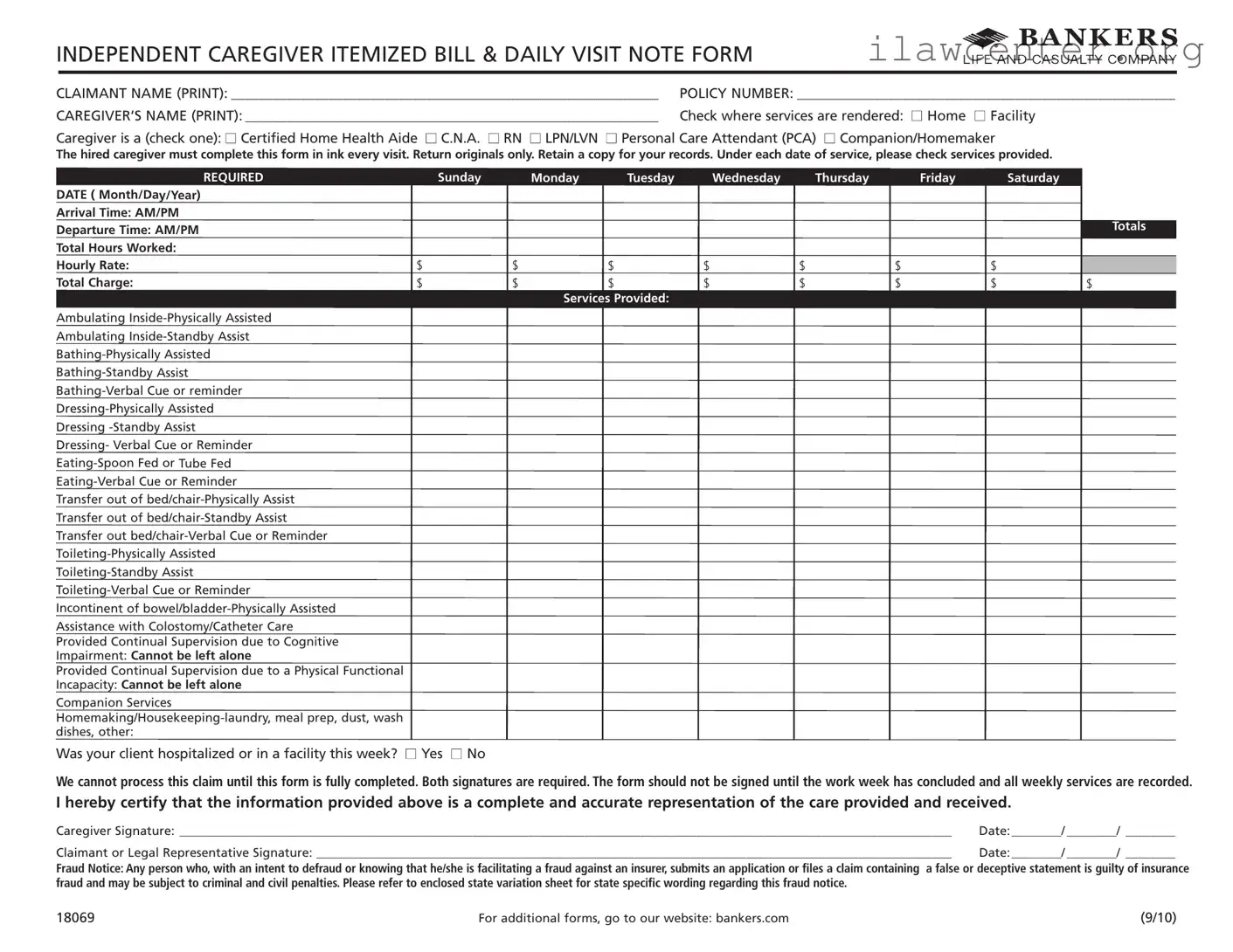
INDEPENDENT CAREGIVER ITEMIZED BILL & DAILY VISIT NOTE FORM
REQUIRED Sunday Monday Tuesday Wednesday
Thursday Friday
Saturday
DATE ( Month/Day/Year)
Arrival Time: AM/PM
Departure Time: AM/PM
Totals
Total Hours Worked:
Hourly Rate: $ $ $ $ $ $ $
Total Charge:
$ $
$ $ $ $ $ $
Services Provided:
Ambulating Inside-Physically Assisted
Ambulating Inside-Standby Assist
Bathing-Physically Assisted
Bathing-Standby Assist
Bathing-Verbal Cue or reminder
Dressing-Physically Assisted
Dressing -Standby Assist
Dressing- Verbal Cue or Reminder
Eating-Spoon Fed or Tube Fed
Eating-Verbal Cue or Reminder
Transfer out of bed/chair-Physically Assist
Transfer out of bed/chair-Standby Assist
Transfer out bed/chair-Verbal Cue or Reminder
Toileting-Physically Assisted
Toileting-Standby Assist
Toileting-Verbal Cue or Reminder
Incontinent of bowel/bladder-Physically Assisted
Assistance with Colostomy/Catheter Care
Provided Continual Supervision due to Cognitive
Impairment: Cannot be left alone
Provided Continual Supervision due to a Physical Functional
Incapacity: Cannot be left alone
Companion Services
Homemaking/Housekeeping-laundry, meal prep, dust, wash
dishes, other:
CLAIMANT NAME (PRINT): _____________________________________________________________ POLICY NUMBER: ______________________________________________________
CAREGIVER’S NAME (PRINT): ___________________________________________________________ Check where services are rendered:
n
Home
n
Facility
Caregiver is a (check one):
n
Certified Home Health Aide
n
C.N.A.
n
RN
n
LPN/LVN
n
Personal Care Attendant (PCA)
n
Companion/Homemaker
The hired caregiver must complete this form in ink every visit. Return originals only. Retain a copy for your records. Under each date of service, please check services provided.
Was your client hospitalized or in a facility this week?
n
Yes
n
No
We cannot process this claim until this form is fully completed. Both signatures are required. The form should not be signed until the work week has concluded and all weekly services are recorded.
I hereby certify that the information provided above is a complete and accurate representation of the care provided and received.
Caregiver Signature: ____________________________________________________________________________________________________________________________ Date:________/ ________/ ________
Claimant or Legal Representative Signature: ______________________________________________________________________________________________________ Date:________/ ________/ ________
Fraud Notice: Any person who, with an intent to defraud or knowing that he/she is facilitating a fraud against an insurer, submits an application or files a claim containing a false or deceptive statement is guilty of insurance
fraud and may be subject to criminal and civil penalties. Please refer to enclosed state variation sheet for state specific wording regarding this fraud notice.
18069 For additional forms, go to our website: bankers.com (9/10)

File Properties

Fact Name Details
Purpose The Caregiver Daily Log form is used to document the services provided by caregivers during their visits.
Completion Requirement The form must be completed in ink by the caregiver for each visit to ensure accuracy and authenticity.
Signatures Both the caregiver and the claimant or legal representative must sign the form to validate the information provided.
Service Documentation Caregivers must check off the services provided under each date of service, ensuring all care activities are recorded.
Hourly Rate and Charges The form requires caregivers to indicate their hourly rate and total charges for the services rendered.
Fraud Notice The form includes a fraud notice, warning that submitting false information can lead to criminal and civil penalties.
State Variations State-specific variations and wording regarding the fraud notice can be found on an enclosed sheet provided with the form.
Record Retention Caregivers are advised to retain a copy of the completed form for their records after submitting the original.

Instructions on Utilizing Caregiver Daily Log

Completing the Caregiver Daily Log form requires attention to detail to ensure accurate record-keeping of services rendered. Follow these steps to fill out the form correctly.

  1. Print Claimant Name: Write the name of the individual receiving care in the designated space.
  2. Policy Number: Enter the relevant policy number for the claim.
  3. Print Caregiver’s Name: Clearly write your name in the provided area.
  4. Select Service Location: Check the box indicating whether services were rendered at home or a facility.
  5. Select Caregiver Type: Check one box to identify your role (e.g., Certified Home Health Aide, C.N.A., etc.).
  6. Complete Each Visit Section: For each date of service, fill in the required fields:
    • Required Date: Enter the date in Month/Day/Year format.
    • Arrival Time: Specify the time of arrival (AM/PM).
    • Departure Time: Indicate the time of departure (AM/PM).
    • Total Hours Worked: Calculate and write the total hours worked for that day.
    • Hourly Rate: Input your hourly rate.
    • Total Charge: Calculate and record the total charge for the day.
  7. Check Services Provided: Under each date, check all services that were provided during the visit.
  8. Hospitalization Status: Indicate if the client was hospitalized or in a facility during the week by checking 'Yes' or 'No.'
  9. Signatures: Once all services for the week are recorded, sign the form and have the claimant or legal representative sign as well.
  10. Date Signatures: Record the date next to each signature.

After completing the form, return the original copy only and keep a copy for your records. Ensure all information is accurate before submission to avoid delays in processing your claim.

Important Facts about Caregiver Daily Log

What is the purpose of the Caregiver Daily Log form?

The Caregiver Daily Log form is designed to document the services provided by caregivers during their visits. It helps ensure accurate billing and provides a record of care for both the caregiver and the client or their legal representative.

Who is required to complete this form?

The hired caregiver must complete the form in ink for every visit. This ensures that all services rendered are properly recorded and can be verified if needed.

What information needs to be filled out on the form?

Caregivers must provide the claimant's name, policy number, their own name, the date of service, arrival and departure times, total hours worked, hourly rate, and total charge. Additionally, caregivers should check off the services provided during their visit.

How should the form be submitted?

Only original forms should be returned. Caregivers should retain a copy for their records. Ensure that both the caregiver and the claimant or legal representative sign the form before submission.

What happens if the form is not fully completed?

If the form is not fully completed, the claim cannot be processed. It is crucial to fill out every section accurately to avoid delays in payment.

When should the form be signed?

The form should not be signed until the work week has concluded and all services for that week are recorded. This helps ensure that the information is complete and accurate.

What types of services can be recorded on the form?

The form allows caregivers to document various services, including assistance with ambulation, bathing, dressing, eating, toileting, and supervision for clients with cognitive or physical impairments. It also includes homemaking and companionship services.

Is there a fraud notice associated with the form?

Yes, the form includes a fraud notice. It states that any individual who submits false information with the intent to defraud may face criminal and civil penalties. It is important to provide accurate information to avoid legal issues.

Where can additional forms be obtained?

Additional forms can be found on the website bankers.com. It is advisable to check for any updates or additional resources that may assist in the completion of the Caregiver Daily Log form.

Common mistakes

Filling out the Caregiver Daily Log form is crucial for ensuring that caregivers are properly compensated for their services. However, many individuals make common mistakes that can lead to delays or denials of claims. Here are ten frequent errors to avoid when completing this important document.

First, neglecting to fill in the claimant name and policy number can create significant issues. These fields are essential for identifying the correct account and ensuring that the claim is processed efficiently. Always double-check that this information is accurate and clearly printed.

Another common mistake is failing to indicate the services rendered for each date of service. Caregivers must check off the specific services they provided. Omitting this information can lead to confusion and may result in claims being rejected due to incomplete documentation.

Many caregivers also forget to record the arrival and departure times. These details are vital for calculating the total hours worked. Without precise times, it becomes challenging to justify the total charge, leading to potential disputes.

In addition, it's important to ensure that the hourly rate is filled in correctly. Mistakes in this area can result in underpayment or overpayment, complicating the reimbursement process. Always verify that the rate matches what was agreed upon before submitting the form.

Some caregivers mistakenly sign the form before the work week has concluded. This is a critical error. The form should only be signed after all services have been documented for the week. Signing prematurely can lead to discrepancies and claims being flagged for review.

Another frequent oversight involves failing to provide both required signatures. Both the caregiver and the claimant or legal representative must sign the form. Missing one of these signatures can halt the processing of the claim, causing unnecessary delays.

It's also common for caregivers to forget to retain a copy of the completed form for their records. Keeping a personal copy is essential for tracking services provided and can serve as a reference if any issues arise in the future.

Caregivers sometimes neglect to check whether their client was hospitalized or in a facility during the week. This information is crucial and must be accurately reported. Failing to disclose this can lead to complications in the claims process.

Additionally, some individuals overlook the importance of using ink when filling out the form. Using pencil or erasable ink can lead to alterations that may raise suspicion. Always use a pen to ensure that the information remains permanent and clear.

Lastly, caregivers may not read the fraud notice carefully. Understanding the implications of submitting false information is vital. Awareness of the legal consequences can help ensure that all entries on the form are truthful and accurate.

By avoiding these common mistakes, caregivers can facilitate a smoother claims process and ensure that they receive the compensation they deserve for their essential services.

Documents used along the form

When working with the Caregiver Daily Log form, several other documents are often needed to ensure proper care and billing. Each of these forms serves a specific purpose and helps maintain clear communication between caregivers, clients, and insurance providers. Here’s a brief overview of these additional forms:

  • Care Plan: This document outlines the specific needs and preferences of the client. It includes details about medical conditions, daily routines, and any special instructions for caregivers.
  • Authorization for Release of Information: This form allows caregivers to share necessary medical information with relevant parties, such as insurance companies or healthcare providers, ensuring compliance with privacy laws.
  • Incident Report: In case of any accidents or unusual events during caregiving, this form documents the incident. It includes details about what happened, who was involved, and any actions taken afterward.
  • Time Sheet: This form tracks the hours worked by the caregiver. It is essential for accurate billing and helps ensure that caregivers are compensated fairly for their time.
  • Client Satisfaction Survey: This document gathers feedback from clients about the care they received. It helps improve services and ensures that caregivers meet client expectations.
  • Emergency Contact Form: This form lists important contacts in case of an emergency. It includes family members, medical providers, and anyone else who should be notified if something goes wrong.
  • Service Agreement: This document outlines the terms of service between the caregiver and the client. It includes details about payment, responsibilities, and the duration of care.
  • Billing Statement: This form provides a detailed account of services rendered and associated charges. It is essential for clients to understand their billing and for caregivers to ensure timely payments.

Using these forms in conjunction with the Caregiver Daily Log helps streamline the caregiving process and ensures that all parties involved have the necessary information to provide quality care. Keeping everything organized can make a significant difference in the overall experience for both caregivers and clients.

Similar forms

The Caregiver Daily Log form is essential for documenting the services provided by caregivers. Several other documents serve a similar purpose, each with its own specific focus. Here are ten documents that share similarities with the Caregiver Daily Log form:

  • Patient Care Record: This document tracks the daily care activities for a patient, including medications administered and vital signs monitored, similar to how the Caregiver Daily Log records services provided.
  • Home Health Aide Daily Report: Like the Caregiver Daily Log, this report details the services rendered by home health aides during their visits, ensuring accountability and continuity of care.
  • Service Delivery Log: This log records the specific services provided during a visit, including the time spent on each task, much like the time tracking in the Caregiver Daily Log.
  • Patient Progress Notes: These notes document changes in a patient's condition or care plan, similar to how caregivers note the services and observations in the Daily Log.
  • Daily Activity Log: This document outlines daily activities and tasks completed for a client, paralleling the structure of the Caregiver Daily Log.
  • Billing Statement for Care Services: This statement provides a summary of charges for services rendered, akin to the total charges section in the Caregiver Daily Log.
  • Incident Report Form: While focusing on specific incidents, this form requires detailed documentation, similar to the thoroughness expected in the Caregiver Daily Log.
  • Medication Administration Record (MAR): This record tracks medications given to a patient, mirroring the Caregiver Daily Log's emphasis on documenting care activities.
  • Client Intake Form: This form gathers essential information about the client and their care needs, much like the initial details required in the Caregiver Daily Log.
  • Weekly Care Summary: This summary provides an overview of care provided throughout the week, similar to the weekly totals and services listed in the Caregiver Daily Log.

Dos and Don'ts

When filling out the Caregiver Daily Log form, attention to detail is crucial. Here’s a list of things to keep in mind to ensure accuracy and compliance.

  • Do: Fill out the form in ink. This ensures that your entries are clear and permanent.
  • Do: Include all required information, such as the claimant's name, policy number, and caregiver's name. Missing details can delay processing.
  • Do: Record the actual arrival and departure times accurately. This helps in calculating total hours worked.
  • Do: Check off all services provided during the visit. This gives a complete picture of the care rendered.
  • Do: Sign the form only after all services for the week have been recorded. Signing prematurely can lead to discrepancies.
  • Do: Keep a copy of the completed form for your records. This can be helpful for future reference or disputes.
  • Don't: Use pencil or erasable ink. Changes can lead to confusion and may raise questions about the authenticity of the log.
  • Don't: Leave any sections blank. Every field must be completed to avoid processing delays.
  • Don't: Forget to check the box indicating whether the client was hospitalized or in a facility that week. This information is essential for claims.
  • Don't: Sign the form without verifying that all information is accurate. An incorrect signature can invalidate the claim.
  • Don't: Submit the form without both required signatures. Claims cannot be processed without them.
  • Don't: Ignore the fraud notice. Understanding the implications of submitting false information is vital.

Misconceptions

There are several misconceptions surrounding the Caregiver Daily Log form. Understanding the facts can help ensure that caregivers and clients are on the same page. Here are eight common misconceptions:

  • It can be filled out later. Many believe they can fill out the form after the week is over. In reality, the caregiver must complete the form at the end of each visit.
  • Any ink will do. Some think any type of ink is acceptable. However, the form must be completed in ink, not pencil or other mediums.
  • All signatures can be obtained at any time. It’s a common belief that signatures can be gathered whenever. Both the caregiver and the client or legal representative must sign the form only after all services for the week are recorded.
  • Only certain caregivers can use the form. Some assume that only certified caregivers can complete the form. In fact, various types of caregivers, including companions and homemakers, can use it.
  • It’s optional to check all services provided. Many think they can skip checking the services rendered. However, it is crucial to check all services provided for accurate billing and record-keeping.
  • It doesn’t need to be returned immediately. Some caregivers believe they can hold onto the form for an extended period. The originals must be returned promptly to process claims.
  • Fraud notices are not serious. A misconception exists that fraud notices can be ignored. In truth, submitting false information can lead to severe penalties, including criminal charges.
  • It’s only for home care. Many think the form is exclusively for home care situations. However, it is also applicable for services rendered in facilities.

By clearing up these misconceptions, caregivers can better navigate the requirements of the Caregiver Daily Log form and ensure compliance with all necessary protocols.

Key takeaways

Here are key takeaways for filling out and using the Caregiver Daily Log form:

  • The form must be completed in ink during each visit.
  • Only original forms should be submitted; keep a copy for your records.
  • Fill in the claimant's name and policy number accurately at the top of the form.
  • Indicate where services were rendered by checking either "Home" or "Facility."
  • Specify the caregiver's title by checking the appropriate box (e.g., C.N.A., RN, PCA).
  • Record the date, arrival time, departure time, total hours worked, and hourly rate for each service day.
  • Check all services provided under each date of service to ensure completeness.
  • Both the caregiver and claimant must sign the form after all services for the week have been documented.