Instructions on Utilizing Ccis Employment Verification
Once the Ccis Employment Verification form is completed, it will be submitted to the Early Learning Resource Center (ELRC). This step is crucial for determining the employee's eligibility for subsidized child care. Ensure that all information is accurate and clearly presented to facilitate the verification process.
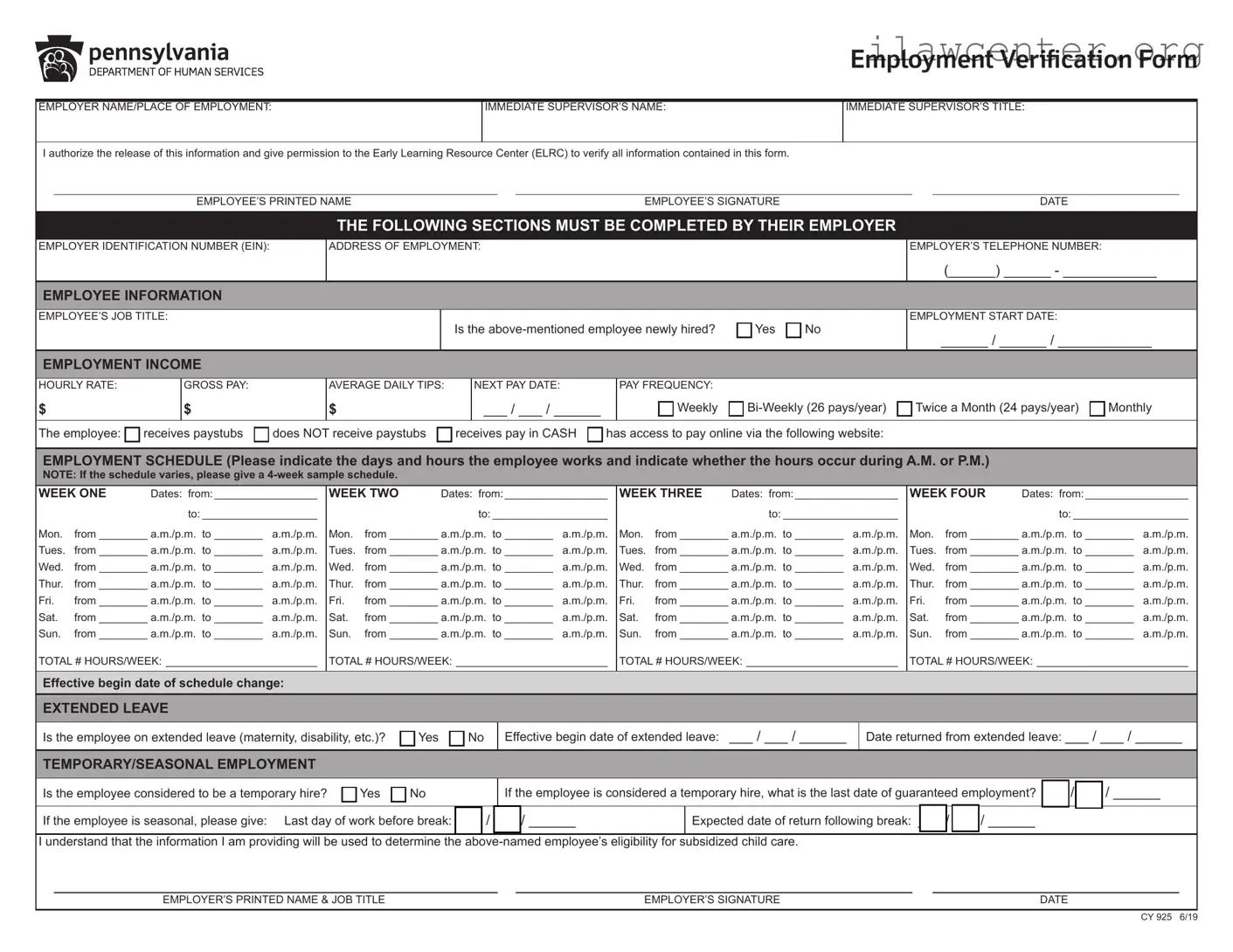
- Begin by entering the Employer Name/Place of Employment.
- Fill in the Immediate Supervisor’s Name.
- Provide the Immediate Supervisor’s Title.
- Authorize the release of information by signing and dating the section titled Employee’s Printed Name, Employee’s Signature, and Date.
- In the section for the employer, enter the Employer Identification Number (EIN).
- Fill out the Address of Employment.
- Provide the Employer’s Telephone Number.
- In the Employee Information section, write the Employee’s Job Title.
- Indicate whether the employee is newly hired by selecting Yes or No.
- Enter the Employment Start Date in the format of MM/DD/YYYY.
- Fill in the Hourly Rate, Gross Pay, and Average Daily Tips.
- Specify the Next Pay Date and Pay Frequency (Weekly, Bi-Weekly, Twice a Month, Monthly).
- Indicate the employee's pay status by checking the appropriate boxes for receives paystubs, does NOT receive paystubs, receives pay in CASH, or has access to pay online.
- Complete the Employment Schedule section by detailing the days and hours the employee works. If the schedule varies, provide a 4-week sample schedule.
- For each week, fill in the Dates, Monday through Sunday hours, and the Total # Hours/Week.
- If applicable, fill out the section for Extended Leave, indicating whether the employee is on leave and providing relevant dates.
- Complete the Temporary/Seasonal Employment section if applicable, indicating if the employee is a temporary hire and providing the last date of guaranteed employment.
- Finally, print and sign the Employer’s Printed Name & Job Title, and provide the Employer’s Signature and Date.