CMS-1763 Exp PDF Template

CMS-1763 Exp PDF Template

The CMS-1763 Exp form is a document used by individuals to request a special enrollment period for Medicare. This form allows eligible individuals to enroll in Medicare outside the usual enrollment periods. If you need to fill out this form, please click the button below.

Article Guide

The CMS-1763 Exp form plays a crucial role in the Medicare program, specifically in the context of beneficiaries who wish to appeal a decision regarding their Medicare coverage. This form is designed for individuals who have received a notice of termination of their coverage or a reduction in benefits. By completing the CMS-1763 Exp, beneficiaries can formally request a reconsideration of the decision, allowing them to present their case and provide any additional information that may support their appeal. The form requires essential details, including the beneficiary's personal information, the specific coverage being contested, and a clear statement outlining the reasons for the appeal. Understanding the importance of this form can empower beneficiaries to navigate the often complex Medicare system more effectively. By utilizing the CMS-1763 Exp, individuals ensure their voices are heard and their rights to coverage are upheld. This process not only fosters transparency but also encourages a fair evaluation of claims, ultimately contributing to a more equitable healthcare experience for all Medicare recipients.

CMS-1763 Exp Preview

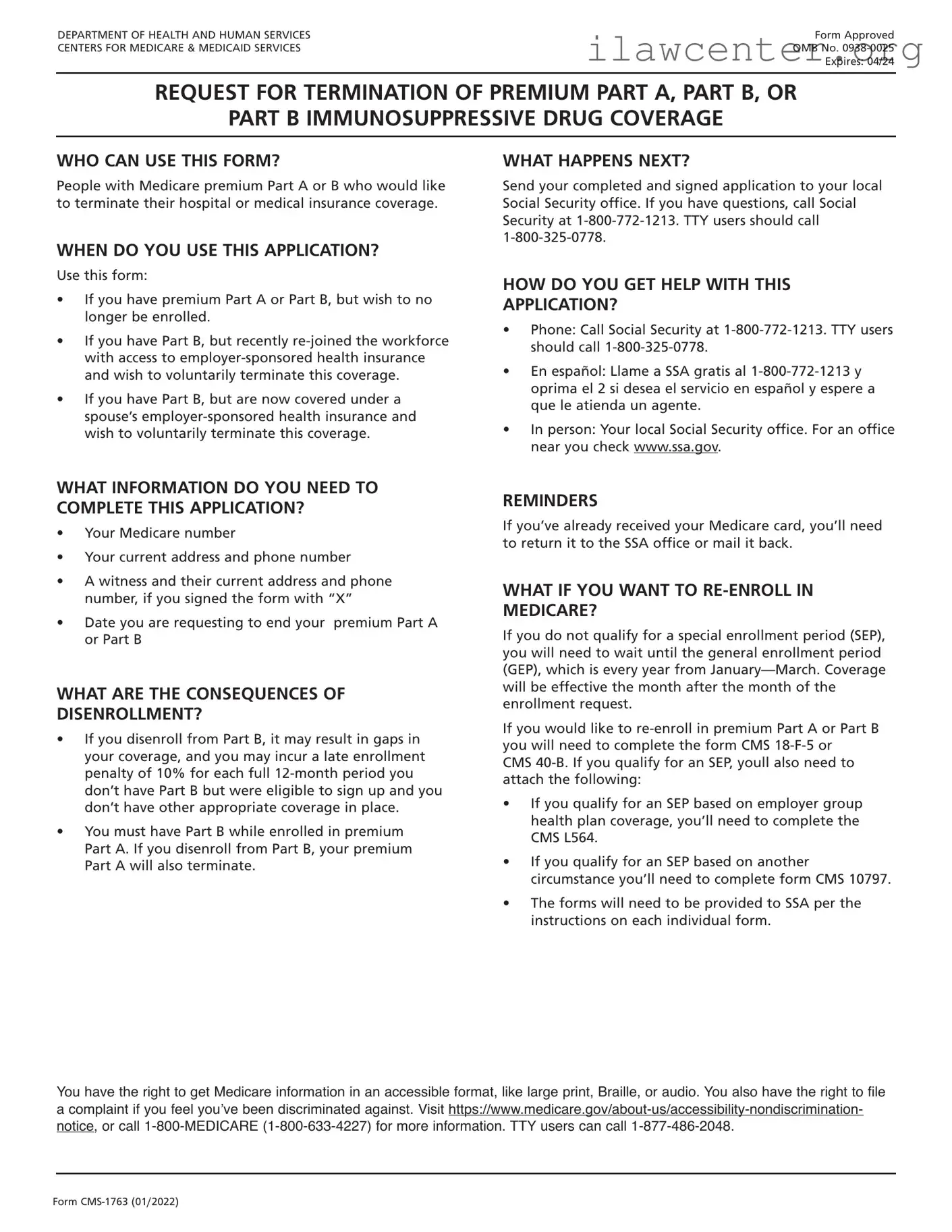
DEPARTMENT OF HEALTH AND HUMAN SERVICES
CENTERS FOR MEDICARE & MEDICAID SERVICES
Form CMS-1763 (01/2022)
Form Approved
OMB No. 0938-0025
Expires: 04/24
REQUEST FOR TERMINATION OF PREMIUM PART A, PART B, OR
PART B IMMUNOSUPPRESSIVE DRUG COVERAGE
WHO CAN USE THIS FORM?
People with Medicare premium Part A or B who would like
to terminate their hospital or medical insurance coverage.
WHEN DO YOU USE THIS APPLICATION?
Use this form:
If you have premium Part A or Part B, but wish to no
longer be enrolled.
If you have Part B, but recently re-joined the workforce
with access to employer-sponsored health insurance
and wish to voluntarily terminate this coverage.
If you have Part B, but are now covered under a
spouse’s employer-sponsored health insurance and
wish to voluntarily terminate this coverage.
WHAT INFORMATION DO YOU NEED TO
COMPLETE THIS APPLICATION?
Your Medicare number
Your current address and phone number
A witness and their current address and phone
number, if you signed the form with “X”
Date you are requesting to end your premium Part A
or Part B
WHAT ARE THE CONSEQUENCES OF
DISENROLLMENT?
If you disenroll from Part B, it may result in gaps in
your coverage, and you may incur a late enrollment
penalty of 10% for each full 12-month period you
don’t have Part B but were eligible to sign up and you
don’t have other appropriate coverage in place.
You must have Part B while enrolled in premium
Part A. If you disenroll from Part B, your premium
Part A will also terminate.
WHAT HAPPENS NEXT?
Send your completed and signed application to your local
Social Security office. If you have questions, call Social
Security at 1-800-772-1213. TTY users should call
1-800-325-0778.
HOW DO YOU GET HELP WITH THIS
APPLICATION?
Phone: Call Social Security at 1-800-772-1213. TTY users
should call 1-800-325-0778.
En español: Llame a SSA gratis al 1-800-772-1213 y
oprima el 2 si desea el servicio en español y espere a
que le atienda un agente.
In person: Your local Social Security office. For an office
near you check www.ssa.gov.
REMINDERS
If you’ve already received your Medicare card, you’ll need
to return it to the SSA office or mail it back.
WHAT IF YOU WANT TO RE-ENROLL IN
MEDICARE?
If you do not qualify for a special enrollment period (SEP),
you will need to wait until the general enrollment period
(GEP), which is every year from January—March. Coverage
will be effective the month after the month of the
enrollment request.
If you would like to re-enroll in premium Part A or Part B
you will need to complete the form CMS 18-F-5 or
CMS 40-B. If you qualify for an SEP, youll also need to
attach the following:
If you qualify for an SEP based on employer group
health plan coverage, you’ll need to complete the
CMS L564.
If you qualify for an SEP based on another
circumstance you’ll need to complete form CMS 10797.
The forms will need to be provided to SSA per the
instructions on each individual form.
You have the right to get Medicare information in an accessible format, like large print, Braille, or audio. You also have the right to file
a complaint if you feel you’ve been discriminated against. Visit https://www.medicare.gov/about-us/accessibility-nondiscrimination-
notice, or call 1-800-MEDICARE (1-800-633-4227) for more information. TTY users can call 1-877-486-2048.
DEPARTMENT OF HEALTH AND HUMAN SERVICES
CENTERS FOR MEDICARE & MEDICAID SERVICES
Form CMS-1763 (01/2022)
REQUEST FOR TERMINATION OF PREMIUM PART A, PART B,
OR PART B IMMUNOSUPPRESSIVE DRUG COVERAGE
DO NOT WRITE IN THIS SPACE
The completion of this form is needed to document your voluntary request for termination of
Medicare coverage as permitted under the Code of Federal Regulations. Section 1838(b) and
1818A(c)(2)(B) of the Social Security Act require filing of notice advising the Administration when
termination of Medicare coverage is requested. While you are not required to give your reasons
for requesting termination, the information given will be used to document your understanding
of the effects of your request.
NAME OF ENROLLEE (Please Print)
MEDICARE NUMBER
NAME OF PERSON, IF OTHER THAN ENROLLEE, WHO IS EXECUTING THIS REQUEST.
THIS IS A REQUEST FOR TERMINATION OF
HOSPITAL INSURANCE
MEDICAL INSURANCE
PART B IMMUNOSUPPRESSIVE DRUG COVERAGE
DATE PART A
WILL END
DATE PART B
WILL END
DATE PBID
WILL END
I request termination of my enrollment under the above sections of title XVIII of the Social Security Act, as amended, for the reason(s)
stated below:
I UNDERSTAND THAT IF I AM REQUIRED TO PAY FOR MY HOSPITAL INSURANCE, THE TERMINATION OF MY PART B COVERAGE WILL ALSO
END MY PART A COVERAGE.
If this request has been signed by mark (X), two witnesses who know the
applicant must sign below, giving their full addresses.
SIGNATURE (Write in Ink)
SIGN
HERE
1. NAME OF WITNESS
ADDRESS (Number and Street, City, State and Zip Code) MAILING ADDRESS (Number and Street)
2. NAME OF WITNESS CITY, STATE, ZIP CODE
ADDRESS (Number and Street, City, State and Zip Code) DATE (Month, Day and Year) TELEPHONE NUMBER
According to the Paperwork Reduction Act of 1995, no persons are required to respond to a collection of information unless it displays a valid OMB
control number. The valid OMB control number for this information collection is 0938-0025. The time required to complete this information collection
is estimated to average 10 minutes per response, including the time to review instructions, search existing data resources, gather the data needed,
and complete and review the information collection. If you have any comments concerning the accuracy of the estimate(s) or suggestions for
improving this form, please write to: CMS, Attn: PRA Reports Clearance Officer, 7500 Security Boulevard, Baltimore, Maryland 21244-1850.

File Properties

Fact Name Details
Form Purpose The CMS-1763 Exp form is used to request a reconsideration of the termination of Medicare coverage.
Eligibility Individuals who believe their Medicare coverage was wrongfully terminated can use this form.
Submission Method The completed form can be submitted via mail or fax to the appropriate Medicare Administrative Contractor (MAC).
Response Time Medicare typically responds to the request within 60 days of receiving the form.
State-Specific Forms Some states may have additional requirements under state law, including specific forms or processes.
Governing Law The governing laws for Medicare coverage and appeals are found in Title XVIII of the Social Security Act.

Instructions on Utilizing CMS-1763 Exp

Filling out the CMS-1763 Exp form requires careful attention to detail. Once completed, the form can be submitted to the appropriate agency for processing. Below are the steps to guide you through the process of filling out the form accurately.

  1. Obtain the CMS-1763 Exp form. You can find it online or request a physical copy from the relevant agency.
  2. Read the instructions provided with the form. Understanding the requirements will help you fill it out correctly.
  3. Begin with the personal information section. Enter your full name, address, and contact details as requested.
  4. Provide your Medicare number, if applicable. This information is essential for identification purposes.
  5. Complete the section regarding your request. Clearly indicate the reason for submitting the form.
  6. Review the eligibility criteria and ensure you meet all necessary conditions. This may involve checking specific guidelines related to your situation.
  7. Sign and date the form. Your signature confirms that the information provided is accurate to the best of your knowledge.
  8. Make a copy of the completed form for your records. Keeping a copy can be useful for future reference.
  9. Submit the form as directed in the instructions. This may involve mailing it to a specific address or submitting it online.

Important Facts about CMS-1763 Exp

What is the CMS-1763 Exp form?

The CMS-1763 Exp form, also known as the Request for Expedited Reinstatement of Medicare Coverage, is a document used by individuals to request a quick reinstatement of their Medicare benefits. This form is particularly important for those who may have lost their Medicare coverage due to certain circumstances, such as not paying premiums or other qualifying reasons. By submitting this form, individuals can initiate the process to regain their coverage in a timely manner.

Who should use the CMS-1763 Exp form?

This form is intended for individuals who have experienced a loss of Medicare coverage and believe they qualify for expedited reinstatement. It is especially beneficial for those who have had their coverage terminated due to non-payment of premiums or other specific situations outlined by Medicare guidelines. If you find yourself in this position, using the CMS-1763 Exp form can help you navigate the reinstatement process more efficiently.

How do I fill out the CMS-1763 Exp form correctly?

Completing the CMS-1763 Exp form requires careful attention to detail. First, gather all necessary personal information, such as your Medicare number, contact details, and any relevant documentation that supports your request. The form will ask for specific reasons for your reinstatement request, so be prepared to explain your situation clearly. After filling out the form, review it thoroughly to ensure all information is accurate before submitting it to the appropriate Medicare office.

What happens after I submit the CMS-1763 Exp form?

Once you submit the CMS-1763 Exp form, the Medicare office will review your request. They may contact you for additional information or clarification if needed. Typically, you will receive a decision regarding your reinstatement within a specified timeframe. If approved, your Medicare coverage will be reinstated, and you will receive notification of your new coverage status. If denied, you will also receive a notice explaining the reasons for the denial and any options you may have for appeal.

Common mistakes

Filling out the CMS-1763 Exp form can be a straightforward process, but many individuals make common mistakes that can lead to delays or complications. Understanding these pitfalls is essential for ensuring a smooth application experience. Here are nine frequent errors to avoid.

One of the most common mistakes is providing incomplete information. Applicants often forget to fill in all required fields, which can result in the form being returned for corrections. Always double-check to ensure that every section is filled out completely.

Another frequent error is failing to sign and date the form. Many people assume that submitting the form electronically or via mail negates the need for a signature. However, without a proper signature, the application may be deemed invalid.

Inaccurate personal information is also a significant issue. Applicants sometimes enter incorrect names, addresses, or Social Security numbers. Such discrepancies can lead to confusion and delays in processing. It’s crucial to verify that all personal details are accurate before submission.

Some individuals overlook the importance of providing supporting documentation. The CMS-1763 Exp form may require additional paperwork to substantiate claims or provide context. Neglecting to include these documents can hinder the approval process.

Another mistake involves misunderstanding the eligibility criteria. Applicants may not fully grasp the requirements for completing the form, leading them to apply when they do not qualify. It’s vital to review the eligibility guidelines thoroughly before proceeding.

Additionally, people often misinterpret the instructions. Each section of the form has specific guidelines that must be followed. Failing to adhere to these instructions can result in errors that delay processing.

Submitting the form without a proper review is another common error. Rushing through the application can lead to overlooked mistakes. Taking the time to review the form carefully can save significant time and effort in the long run.

Lastly, some applicants fail to keep copies of their submitted forms. Not retaining a copy can create challenges if there are questions or issues later on. Always make sure to keep a record of what has been submitted for future reference.

By being aware of these nine mistakes, individuals can enhance their chances of a successful application process. Careful attention to detail and a thorough understanding of the requirements will pave the way for smoother interactions with the CMS.

Documents used along the form

The CMS-1763 Exp form is an important document used in various healthcare and insurance processes. When completing this form, there are several other documents that may be required to ensure a smooth and efficient experience. Below is a list of related forms and documents that are often used alongside the CMS-1763 Exp form, each serving a specific purpose.

  • CMS-10114: This form is used to apply for Medicare benefits. It helps individuals enroll in Medicare Part A and Part B, ensuring they receive the healthcare coverage they need.
  • CMS-1500: This is a standard claim form used by healthcare providers to bill Medicare and other insurance companies for services rendered to patients. It details the services provided and the associated costs.
  • CMS-855I: This enrollment application is for individual healthcare providers who wish to enroll in Medicare. It collects essential information about the provider's qualifications and practice.
  • CMS-855B: Similar to the CMS-855I, this form is for organizations and group practices seeking to enroll in Medicare. It provides necessary details about the organization’s structure and services.
  • CMS-1763: This form is used to request a termination of Medicare Part B coverage. It is essential for individuals who no longer wish to maintain their Medicare Part B enrollment.
  • Medicare Summary Notice (MSN): This document provides beneficiaries with an overview of the services they received, the costs, and the payments made by Medicare. It helps individuals understand their coverage and any out-of-pocket expenses.
  • Medicare Enrollment Period Information: This document outlines the specific periods during which individuals can enroll in or make changes to their Medicare coverage. Understanding these timelines is crucial for maintaining proper coverage.

Gathering these documents can help facilitate a seamless process when dealing with Medicare-related matters. Each form plays a vital role in ensuring that individuals receive the benefits they are entitled to, while also keeping their healthcare records accurate and up to date.

Similar forms

The CMS-1763 Exp form, used for disenrollment from Medicare, shares similarities with several other documents in the healthcare and insurance landscape. Here are eight documents that are comparable to the CMS-1763 Exp form:

  • CMS-10106 - This form is used for Medicare enrollment and contains similar information about beneficiary status and choices.
  • CMS-40B - This application for Medicare Part B enrollment also requires personal information and reasons for enrollment, paralleling the information on the CMS-1763 Exp form.
  • CMS-855I - This form is for Medicare enrollment for individual providers, sharing the need for verification and personal details.
  • CMS-855B - Used by organizations to enroll in Medicare, this form also focuses on organizational structure and compliance, akin to the CMS-1763 Exp form.
  • CMS-1763 - The original disenrollment form, which is the foundation for the Exp version, shares the same purpose but may differ in context or additional requirements.
  • Form 1095-A - This health insurance marketplace statement includes details about coverage, similar to how the CMS-1763 Exp form outlines disenrollment from Medicare coverage.
  • Form 8962 - Used for premium tax credits, this form requires information about coverage that may relate to the information in the CMS-1763 Exp form.
  • Form 1040 - The individual income tax return may require information about healthcare coverage, paralleling the importance of the CMS-1763 Exp form in maintaining accurate records.

Dos and Don'ts

When filling out the CMS-1763 Exp form, it is important to follow certain guidelines to ensure accuracy and completeness. Here are seven things you should and shouldn't do:

  • Do read the instructions carefully before starting.
  • Do use clear and legible handwriting if filling out the form by hand.
  • Do double-check all personal information for accuracy.
  • Do keep a copy of the completed form for your records.
  • Don't leave any required fields blank; provide information for all sections.
  • Don't use correction fluid or tape on the form; this can lead to processing delays.
  • Don't submit the form without reviewing it for any errors or omissions.

By following these guidelines, you can help ensure that your CMS-1763 Exp form is processed smoothly and efficiently.

Misconceptions

The CMS-1763 Exp form is an important document for Medicare beneficiaries, but there are several misconceptions surrounding it. Here is a list of nine common misunderstandings:

  1. The CMS-1763 Exp form is only for those who want to cancel Medicare coverage. Many believe this form is solely for cancellation, but it can also be used to request a delay in coverage.
  2. Filling out the CMS-1763 Exp form is complicated. In reality, the form is straightforward and designed to be user-friendly, with clear instructions provided.
  3. You can only submit the CMS-1763 Exp form during specific enrollment periods. This is not true; beneficiaries can submit the form at any time when they need to make changes to their coverage.
  4. Once submitted, the CMS-1763 Exp form cannot be changed. Beneficiaries can request changes to their submission if needed, as long as they follow the proper procedures.
  5. The CMS-1763 Exp form is only for seniors. This form is available to any eligible Medicare beneficiary, regardless of age.
  6. You must have a reason to submit the CMS-1763 Exp form. While it helps to have a reason, beneficiaries can submit the form simply to change their coverage preferences.
  7. The CMS-1763 Exp form is the same as the regular CMS-1763 form. The Exp version is specifically for beneficiaries who are looking to expand or delay their coverage, which differs from the standard version.
  8. Submitting the CMS-1763 Exp form guarantees immediate processing. While it is processed promptly, there may be delays depending on the volume of requests and other factors.
  9. You cannot get assistance with the CMS-1763 Exp form. Many resources are available, including Medicare representatives and community organizations, to help beneficiaries fill out the form correctly.

Understanding these misconceptions can help beneficiaries navigate their Medicare options more effectively.

Key takeaways

The CMS-1763 Exp form is an important document for individuals who need to manage their Medicare coverage. Here are some key takeaways to consider when filling out and using this form:

  1. Understand the Purpose: The CMS-1763 Exp form is used to request a voluntary termination of Medicare coverage.
  2. Eligibility: Ensure that you are eligible to use this form. It is typically for those who no longer wish to maintain their Medicare benefits.
  3. Accurate Information: Fill out the form completely and accurately. Missing or incorrect information can delay processing.
  4. Signature Required: Don’t forget to sign the form. An unsigned form will not be processed.
  5. Submission Methods: You can submit the form by mail or fax. Choose the method that works best for you.
  6. Keep a Copy: Always keep a copy of the completed form for your records. This can be helpful for future reference.
  7. Processing Time: Be aware that it may take some time for the request to be processed. Plan accordingly.
  8. Confirmation: After submission, you should receive a confirmation of your request. If you do not, follow up to ensure it was received.
  9. Consult Resources: If you have questions, consult the Medicare website or contact customer service for assistance.

Using the CMS-1763 Exp form effectively can help you manage your Medicare coverage in a way that best suits your needs.