Csi 13 1A PDF Template

Csi 13 1A PDF Template

The CSI 13 1A form is a crucial document used to request substitutions for specified products after the bidding or negotiating phase of a construction project. This form allows contractors to propose alternative materials or methods while ensuring that all parties are informed of the changes and their implications. To streamline your project and facilitate the substitution process, fill out the form by clicking the button below.

Article Guide

The Csi 13 1A form plays a crucial role in the construction industry, particularly during the substitution request phase after bidding and negotiation have taken place. This form facilitates communication between contractors and architects, allowing for the proposal of alternative materials or products that may better serve the project's needs. It includes essential information such as the project title, substitution request number, and contact details for the parties involved. The form requires a detailed description of the proposed substitution, including the manufacturer, model number, and any differences from the originally specified product. Additionally, it prompts the requester to provide the history of the proposed item, which helps assess its reliability and suitability. The form also addresses the impact of the substitution on the overall project, including potential savings for the owner and any changes to the contract timeline. Supporting data, such as drawings and product samples, must accompany the request to ensure a thorough evaluation. By standardizing this process, the Csi 13 1A form helps maintain clarity and efficiency in project management, fostering collaboration among all parties involved.

Csi 13 1A Preview

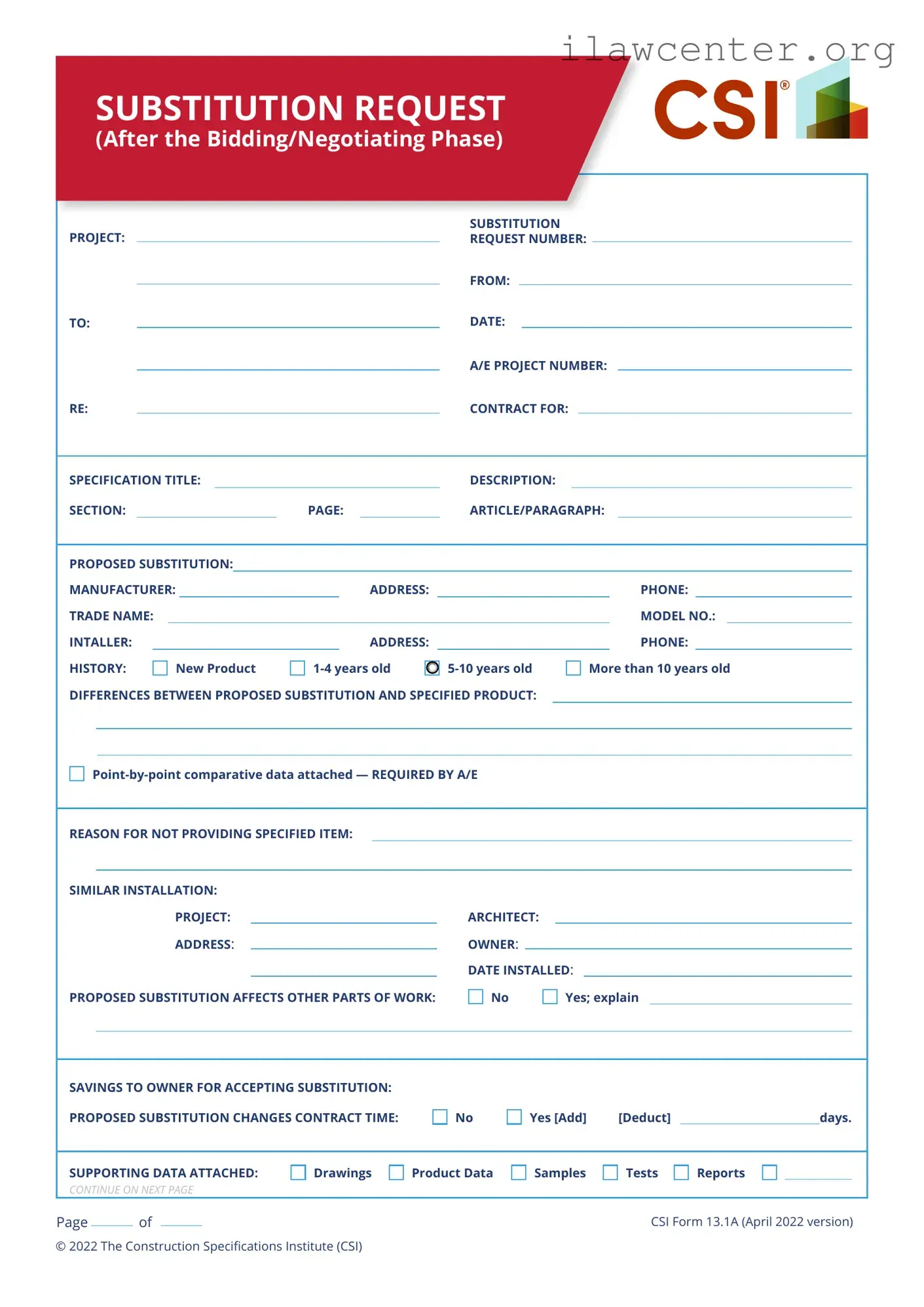
SUBSTITUTION REQUEST
(After the Bidding/Negotiating Phase)
SPECIFICATION TITLE:
PHONE:
MODEL NO.:
SECTION: PAGE:
ADDRESS:
PHONE:ADDRESS:
ARTICLE/PARAGRAPH:
DESCRIPTION:
SIMILAR INSTALLATION:
PROPOSED SUBSTITUTION:
PROJECT: ARCHITECT:
MANUFACTURER:
ADDRESS
: OWNER:
DATE INSTALLED:
TRADE NAME:
HISTORY:
INTALLER:
REASON FOR NOT PROVIDING SPECIFIED ITEM:
New Product 1-4 years old 5-10 years old More than 10 years old
DIFFERENCES BETWEEN PROPOSED SUBSTITUTION AND SPECIFIED PRODUCT:
SAVINGS TO OWNER FOR ACCEPTING SUBSTITUTION:
PROPOSED SUBSTITUTION CHANGES CONTRACT TIME:
SUPPORTING DATA ATTACHED:
PROPOSED SUBSTITUTION AFFECTS OTHER PARTS OF WORK: No Yes; explain
Point-by-point comparative data attached — REQUIRED BY A/E
PROJECT:
SUBSTITUTION
REQUEST NUMBER:
TO:
RE: CONTRACT FOR:
DATE:
A/E PROJECT NUMBER:
FROM:
No Yes [Add] [Deduct] days.
Drawings Product Data Samples Tests Reports
CONTINUE ON NEXT PAGE
CSI Form 13.1A (April 2022 version)
Page of
© 2022 The Construction Specifications Institute (CSI)
SUBSTITUTION REQUEST
(After the Bidding/Negotiating Phase—
Continued)
ADDITIONAL COMMENTS: Contractor Subcontractor Supplier Manufacturer A/E
The Undersigned certies:
· Proposed substitution has been fully investigated and determined to be equal or superior in all respects to
specied product.
· Same warranty will be furnished for proposed substitution as for specied product.
· Same maintenance service and source of replacement parts, as applicable, is available.
· Proposed substitution will have no adverse eect on other trades and will not aect or delay progress schedule.
· Cost data as stated above is complete. Claims for additional costs related to accepted substitution which may
subsequently become apparent are to be waived.
· Proposed substitution does not aect dimensions and functional clearances.
· Payment will be made for changes to building design, including A/E design, detailing, and construction costs caused by
the substitution.
· Coordination, installation, and changes in the Work as necessary for accepted substitution will be complete in
all respects.
SUBMITTED BY:
SIGNED BY:
FIRM:
ADDRESS:
TELEPHONE:
CSI Form 13.1A (April 2022 version)
Attachments
A/E’s REVIEW AND RECOMMENDATION:
Approve Substitution—Make submittals in accordance with Specication Section 01 33 00 Submittal Procedures.
Approve Substitution as noted—Make submittals in accordance with Specication Section 01 33 00 Submittal
Procedures.
Reject Substitution—Use specied materials.
Substitution Request received too late—Use specied materials.
OWNER’S REVIEW AND ACTION:
Substitution approved—Make submittals in accordance with Specication Section 01 33 00 Submittal Procedures.
Prepare Change Order
Substitution approved as noted—Make submittals in accordance with Specication Section 01 33 00 Submittal
Procedures. Prepare Change Order.
Substitution rejected—Use specied materials.
SIGNED BY: DATE:
SIGNED BY: DATE:
Page of
© 2022 The Construction Specifications Institute (CSI)

File Properties

Fact Name Description
Form Title The form is titled "Substitution Request (After the Bidding/Negotiating Phase)." It is used for requesting substitutions after the initial bidding phase.
Project Information It requires essential project details such as project name, substitution request number, and architect/engineer project number.
Manufacturer Details Information about the proposed substitution's manufacturer is needed, including name, address, and phone number.
Product Age The form allows the user to specify the age of the proposed substitution, ranging from new to over ten years old.
Comparative Data Requirement A point-by-point comparative data attachment is mandatory for the architect/engineer to assess the proposed substitution against the specified product.
Impact on Contract Time The form inquires whether the proposed substitution affects the contract time, allowing for additions or deductions in days.
Supporting Documentation Users can attach various supporting documents, including drawings, product data, samples, tests, and reports, to strengthen their request.
Governing Law This form is governed by the laws applicable in the state where the project is located, which may vary by jurisdiction.
Copyright Information The form includes a copyright notice from 2013, indicating it is a proprietary document from the Construction Specifications Institute (CSI).

Instructions on Utilizing Csi 13 1A

Filling out the Csi 13 1A form is a straightforward process that requires attention to detail. This form is used to request a substitution after the bidding or negotiating phase of a project. It is essential to provide accurate information to ensure a smooth review process.

  1. Begin by entering the Project name at the top of the form.
  2. Next, fill in the Substitution Request Number.
  3. In the From and To fields, specify the parties involved in the substitution request.
  4. Enter the Date on which you are submitting the form.
  5. Provide the A/E Project Number relevant to the project.
  6. In the Re section, indicate the Contract For details.
  7. Fill in the Specification Title related to the substitution.
  8. Complete the Description section with relevant details.
  9. Identify the Section and Page numbers where the specifications are found.
  10. In the Article/Paragraph field, specify the relevant article or paragraph number.
  11. Detail the Proposed Substitution including the Manufacturer, Address, and Phone number.
  12. List the Trade Name and Model No. of the proposed substitution.
  13. Provide information for the Installer, including their Address and Phone number.
  14. Indicate the History of the product by checking one of the boxes: New product, 1-4 years old, 5-10 years old, or more than 10 years old.
  15. Attach point-by-point comparative data that highlights the differences between the proposed substitution and the specified product.
  16. Explain the Reason for not providing specified item.
  17. For Similar Installation, provide details about the project, architect, address, owner, and date installed.
  18. Indicate whether the proposed substitution affects other parts of the work by checking No or Yes and providing an explanation if applicable.
  19. State the Savings to Owner for accepting substitution in dollar amount.
  20. Determine if the proposed substitution changes the Contract Time and check No or Yes. If yes, specify the number of days to add or deduct.
  21. Finally, indicate the Supporting Data Attached by checking the relevant boxes for drawings, product data, samples, tests, or reports.

Important Facts about Csi 13 1A

What is the purpose of the CSI 13 1A form?

The CSI 13 1A form is used to request a substitution for a specified product after the bidding or negotiating phase of a project. It allows contractors to propose alternative materials or products that differ from what was originally specified in the contract documents. This form facilitates communication between the contractor, architect, and owner regarding any changes that may impact the project.

What information is required to complete the CSI 13 1A form?

To complete the CSI 13 1A form, several key pieces of information must be provided. This includes the project name, substitution request number, dates, and details about the proposed substitution, such as the manufacturer, trade name, and model number. Additionally, a history of the proposed product, differences between it and the specified product, and the reason for the substitution must be included. Supporting documentation, such as drawings and product data, may also be required to substantiate the request.

How does a proposed substitution affect the project timeline?

The proposed substitution may impact the project timeline. The form allows the contractor to indicate whether the substitution will change the contract time. If it does, the contractor must specify whether it will add or deduct days from the project schedule. This information is crucial for project management and helps all parties understand the potential implications of the substitution on the overall timeline.

What types of supporting data should be attached to the form?

Supporting data is essential for a thorough evaluation of the substitution request. Attachments may include drawings that illustrate the proposed changes, product data sheets that provide specifications, samples for physical review, tests that demonstrate performance, and reports that validate the product's suitability. The architect or engineer will review these materials to assess the validity and feasibility of the proposed substitution.

What happens after submitting the CSI 13 1A form?

After the CSI 13 1A form is submitted, the architect or engineer will review the request and the attached documentation. They may approve or deny the substitution based on its compliance with project requirements, performance standards, and overall impact. Communication regarding the decision will follow, and if approved, the substitution will become part of the contract. Timely submission is critical to ensure that any changes can be incorporated without delaying the project.

Common mistakes

When filling out the Csi 13 1A form, people often make several common mistakes that can lead to delays or complications. One major error is failing to provide all required information. Each section of the form must be completed thoroughly. Incomplete submissions can result in the form being returned for additional information, which slows down the process.

Another frequent mistake is neglecting to attach the necessary supporting documentation. The form requires specific data, such as point-by-point comparative data and other supporting materials. Without these attachments, the request may be deemed insufficient, causing further delays.

Many individuals also overlook the importance of clearly explaining the differences between the proposed substitution and the specified product. This section is crucial for the architect and owner to understand why the substitution is being requested. Vague descriptions can lead to confusion and rejection of the request.

Additionally, some people fail to check the box indicating whether the proposed substitution affects other parts of the work. This oversight can lead to unexpected issues during the project, as stakeholders may not be aware of potential impacts.

Another common mistake is not providing a clear reason for not using the specified item. The form asks for a rationale, and if this is missing or unclear, it may weaken the case for the substitution. A well-articulated reason can help persuade decision-makers.

People sometimes forget to calculate and include the savings to the owner for accepting the substitution. This financial aspect can be a significant factor in the decision-making process. If this information is omitted, it may lessen the appeal of the substitution.

Moreover, failing to indicate whether the proposed substitution changes the contract time can create confusion. It is essential to specify if there will be any additions or deductions in days, as this affects the overall project timeline.

Lastly, individuals often neglect to double-check for any errors or inconsistencies before submitting the form. Simple mistakes in names, addresses, or numbers can lead to misunderstandings and delays. Taking the time to review the form carefully can prevent these issues.

Documents used along the form

The Csi 13 1A form is a crucial document used during the construction process, specifically for requesting substitutions after the bidding or negotiating phase. However, it often works in conjunction with several other forms and documents. Understanding these related documents can enhance the clarity and efficiency of the substitution request process.

  • Request for Information (RFI): This document is used to clarify uncertainties in the contract documents. It allows contractors to ask questions about specific details, ensuring that everyone is on the same page before moving forward.
  • Change Order: A change order is a formal proposal to modify the original construction contract. It outlines changes in the scope of work, costs, and timelines, and must be agreed upon by all parties involved.
  • Submittals: These are documents that provide detailed information about materials and products to be used in the project. Submittals ensure that the contractor's choices align with the specifications outlined in the contract.
  • Shop Drawings: Shop drawings are detailed drawings created by contractors or suppliers. They illustrate how specific components will be fabricated and installed, providing a clearer understanding of the construction process.
  • Change Directive: A change directive is a written order from the owner or architect to make changes to the project without a prior agreement on the cost. It allows work to proceed while negotiations are still ongoing.
  • Field Order: This document is issued by the architect to provide immediate instructions for minor changes in the work. Field orders do not require a formal change order and are often used for quick adjustments.
  • Contractor's Application for Payment: This form is submitted by the contractor to request payment for work completed. It includes details on the amount due and any adjustments based on change orders or other factors.
  • Project Schedule: A project schedule outlines the timeline for the construction project, detailing when specific tasks should be completed. It helps manage expectations and keeps the project on track.
  • Daily Log: A daily log is maintained by the contractor to record daily activities on the job site. It includes information about weather conditions, workforce, equipment, and any incidents that occur, serving as a historical record of the project.

Each of these documents plays a vital role in ensuring that construction projects run smoothly and that all parties involved are well-informed. Familiarity with these forms can help streamline communication and facilitate a successful project outcome.

Similar forms

The CSI 13 1A form is primarily used for requesting substitutions in construction projects after the bidding phase. Several other documents serve similar purposes in the construction and contract management process. Here are five documents that share similarities with the CSI 13 1A form:

  • Change Order Form: This document is used to request changes to the original contract. Like the CSI 13 1A, it outlines specific modifications and their impacts on project cost and timeline.
  • Request for Information (RFI): An RFI seeks clarification on project specifications or drawings. Both documents facilitate communication and ensure that all parties are on the same page regarding project details.
  • Submittal Form: This form is used to submit product data, samples, or shop drawings for approval. Similar to the CSI 13 1A, it requires detailed information about the proposed items and their compliance with project specifications.
  • Material Approval Request: This document requests approval for specific materials to be used in the project. Both the Material Approval Request and the CSI 13 1A focus on ensuring that substitutions meet project standards.
  • Notice of Delay: This document informs stakeholders about potential delays in project completion. Like the CSI 13 1A, it addresses changes that may affect the project timeline, ensuring transparency and communication among all parties involved.

Dos and Don'ts

When filling out the CSI 13 1A form, it’s important to follow specific guidelines to ensure accuracy and clarity. Here’s a list of things to do and avoid:

  • Do provide complete information in each section.
  • Do attach point-by-point comparative data as required.
  • Do clearly state the reason for the substitution.
  • Do indicate if the proposed substitution affects other parts of the work.
  • Do mention any potential savings to the owner.
  • Do ensure all supporting data is attached.
  • Do review the form for any errors before submission.
  • Don't leave any sections blank unless instructed.
  • Don't submit without the required comparative data.
  • Don't provide vague or unclear reasons for the substitution.
  • Don't forget to include contact information for the manufacturer.
  • Don't overlook the impact on contract time.
  • Don't submit the form without verifying all attachments.
  • Don't rush the process; take your time to ensure completeness.

Misconceptions

Misconceptions about the CSI 13 1A form can lead to confusion during the construction process. Here are seven common misunderstandings:

  • It's only for major changes. Many believe the form is only necessary for significant substitutions. In reality, it applies to any proposed change that deviates from the original specifications, regardless of size.
  • All substitutions are automatically approved. Some think that submitting the form guarantees acceptance. However, the architect or engineer must review and approve each request based on its merits and compatibility with the project.
  • Only the contractor can submit the form. While contractors typically handle submissions, anyone involved in the project, including subcontractors or suppliers, can propose a substitution using this form.
  • The form is optional. Some believe that the CSI 13 1A form is just a suggestion. It is, in fact, a required document for formal requests to change specified products after bidding.
  • Supporting data is not necessary. Many think they can submit the form without additional information. However, attaching supporting data, such as product data and tests, is crucial for a thorough evaluation.
  • There is no deadline for submission. Some assume they can submit the form at any time. In truth, there are often specific deadlines outlined in the contract documents that must be followed.
  • Changes will not affect project timelines. It is a common misconception that substitutions do not impact the overall schedule. In fact, proposed changes can alter contract time, which must be clearly indicated on the form.

Key takeaways

When filling out the CSI 13 1A form, keep these key takeaways in mind:

  • Provide Complete Information: Ensure all sections are filled out accurately. Missing details can delay the review process.
  • Attach Required Documentation: Always include point-by-point comparative data and any supporting materials like drawings or product data.
  • Clarify Differences: Clearly outline how the proposed substitution differs from the specified product. This helps the architect or engineer make informed decisions.
  • Understand Impact on Contract: Be aware of how the substitution may affect contract time and potential savings for the owner.

By following these guidelines, you can streamline the substitution request process and enhance communication with project stakeholders.