Instructions on Utilizing Da 31
Filling out the DA 31 form is a straightforward process that requires careful attention to detail. After completing the form, it will be submitted for approval, allowing you to proceed with your leave request. Follow these steps to ensure you fill it out correctly.
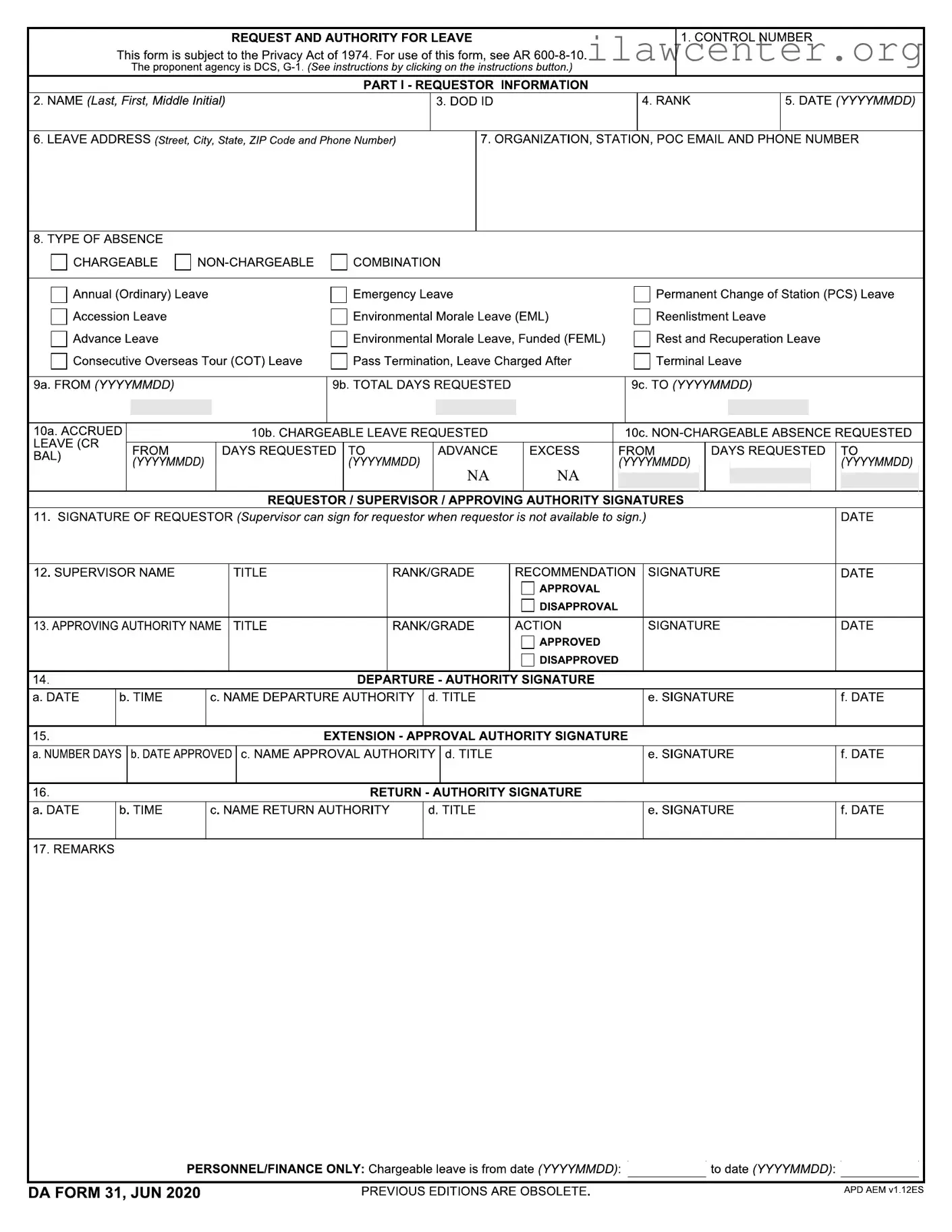
- Locate the CONTROL NUMBER section at the top of the form and fill it in if applicable.
- In the PART I - REQUESTOR INFORMATION section, enter your NAME (Last, First, Middle Initial).
- Provide your DOD ID number.
- Fill in your RANK.
- Enter the DATE in the format YYYYMMDD.
- Complete the LEAVE ADDRESS section with your street address, city, state, ZIP code, and phone number.
- Provide details for your ORGANIZATION, STATION, POC EMAIL AND PHONE NUMBER.
- Select the TYPE OF ABSENCE by checking the appropriate box. Options include:
- Annual (Ordinary) Leave
- Accession Leave
- Advance Leave
- Emergency Leave
- Environmental Morale Leave (EML)
- Permanent Change of Station (PCS) Leave
- Reenlistment Leave
- Environmental Morale Leave, Funded (FEML)
- Rest and Recuperation Leave
- Consecutive Overseas Tour (COT) Leave
- Pass Termination, Leave Charged After
- Terminal Leave
- Fill in the FROM date and TO date for your leave request in the format YYYYMMDD.
- Indicate the TOTAL DAYS REQUESTED.
- Complete the sections for ACCRUED LEAVE, CHARGEABLE LEAVE REQUESTED, and NON-CHARGEABLE ABSENCE REQUESTED as applicable.
- Sign and date the form in the REQUESTOR / SUPERVISOR / APPROVING AUTHORITY SIGNATURES section.
- Have your supervisor fill in their NAME, TITLE, and RANK/GRADE, and indicate their recommendation by checking either APPROVAL or DISAPPROVAL.
- Obtain the signature and date from the APPROVING AUTHORITY.
- Complete the sections for DEPARTURE, EXTENSION, and RETURN authority signatures as needed.
- Finally, fill in any remarks in the REMARKS section.