DD 2656 PDF Template

DD 2656 PDF Template

The DD 2656 form is a vital document used by service members to designate beneficiaries for their retirement benefits. This form ensures that loved ones receive the intended financial support in the event of a service member's passing. To get started on securing your benefits, fill out the form by clicking the button below.

Article Guide

The DD 2656 form plays a crucial role for service members and their families as they navigate the complexities of military benefits. This form is primarily used to establish eligibility for various benefits, including retirement pay and survivor benefits. Completing the DD 2656 accurately is essential to ensure that service members receive the financial support they deserve upon retirement or in the event of their passing. Additionally, the form collects vital information such as the member's personal details, marital status, and beneficiary designations. This information not only affects the member’s financial future but also impacts the well-being of their loved ones. Understanding the significance of the DD 2656 form is vital for all military personnel, as it serves as a foundational document in the benefits process. Proper completion and submission of this form can help prevent delays and complications in accessing critical resources during transitional periods in a service member's life.

DD 2656 Preview

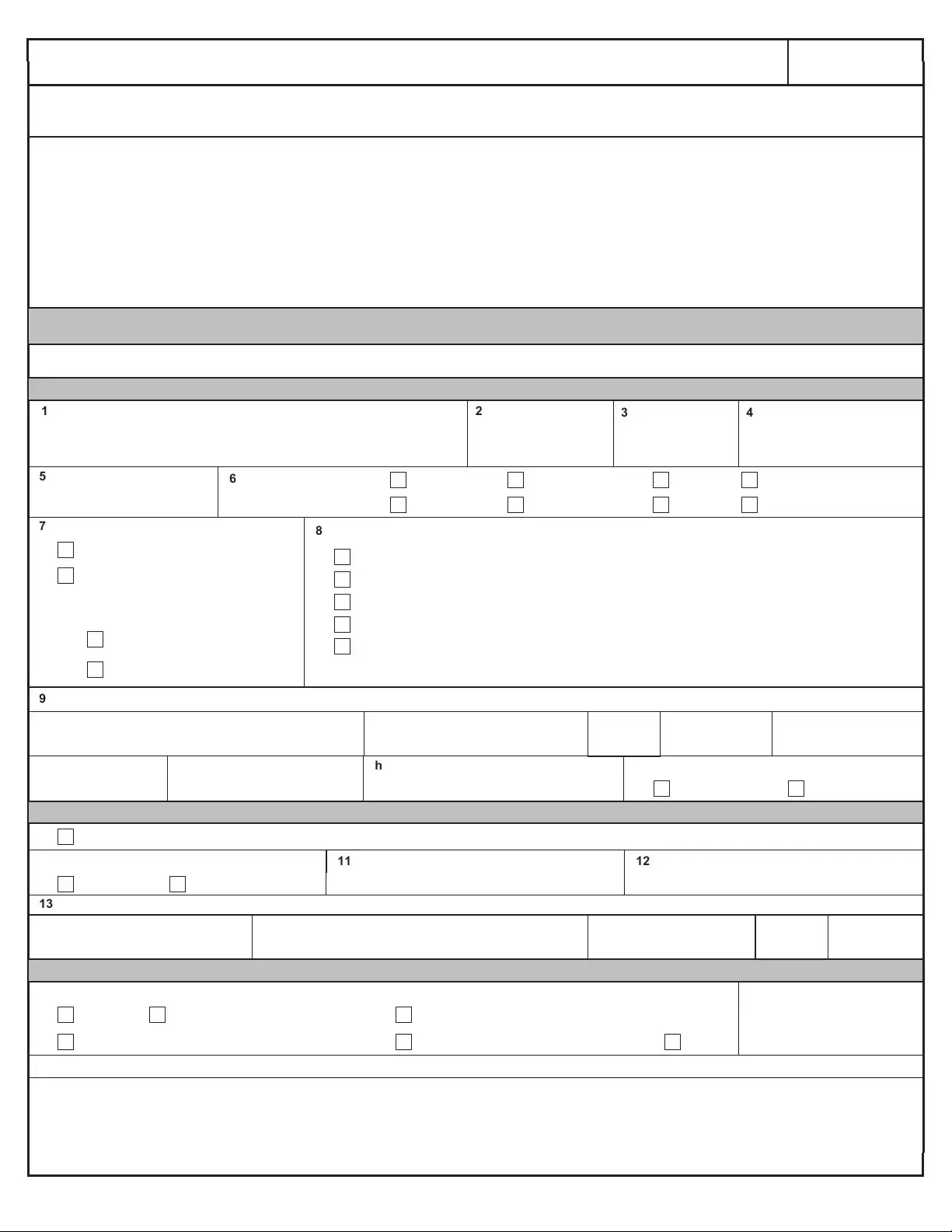
Page 1 of 6
DD FORM 2656, MARCH 2022
PREVIOUS EDITION IS OBSOLETE.
CUI (when filled in)
Controlled by: OUSD(P&R)
CUI Category: PRVCY
LDC: FEDCON
POC: osd.pentagon.ousd-p-r.mbx.forms@mail.mil
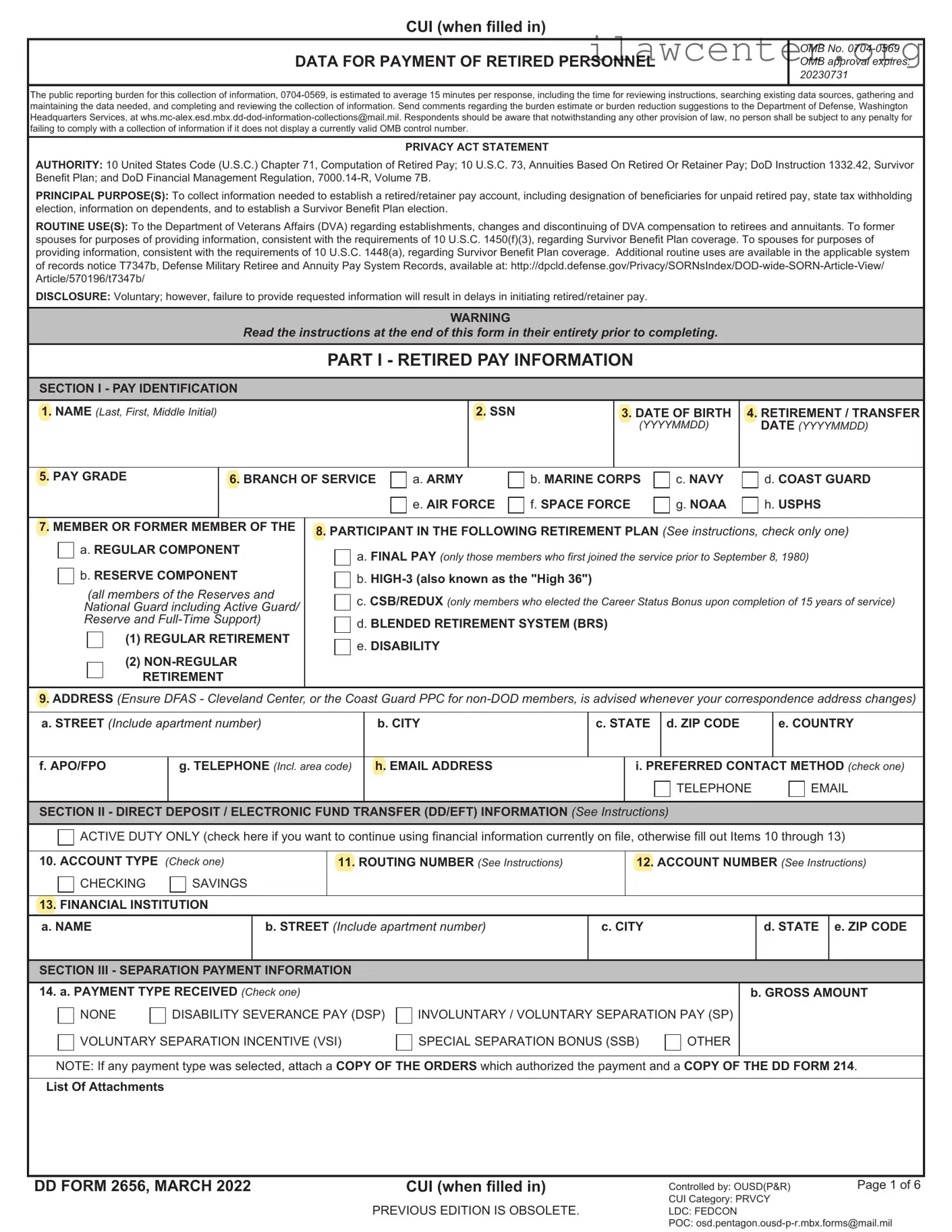
DATA FOR PAYMENT OF RETIRED PERSONNEL
OMB No. 0704-0569
OMB approval expires:
20230731
The public reporting burden for this collection of information, 0704-0569, is estimated to average 15 minutes per response, including the time for reviewing instructions, searching existing data sources, gathering and
maintaining the data needed, and completing and reviewing the collection of information. Send comments regarding the burden estimate or burden reduction suggestions to the Department of Defense, Washington
Headquarters Services, at whs.mc-alex.esd.mbx.dd-dod-information-collections@mail.mil. Respondents should be aware that notwithstanding any other provision of law, no person shall be subject to any penalty for
failing to comply with a collection of information if it does not display a currently valid OMB control number.
PRIVACY ACT STATEMENT
AUTHORITY: 10 United States Code (U.S.C.) Chapter 71, Computation of Retired Pay; 10 U.S.C. 73, Annuities Based On Retired Or Retainer Pay; DoD Instruction 1332.42, Survivor
Benefit Plan; and DoD Financial Management Regulation, 7000.14-R, Volume 7B.
PRINCIPAL PURPOSE(S): To collect information needed to establish a retired/retainer pay account, including designation of beneficiaries for unpaid retired pay, state tax withholding
election, information on dependents, and to establish a Survivor Benefit Plan election.
ROUTINE USE(S): To the Department of Veterans Affairs (DVA) regarding establishments, changes and discontinuing of DVA compensation to retirees and annuitants. To former
spouses for purposes of providing information, consistent with the requirements of 10 U.S.C. 1450(f)(3), regarding Survivor Benefit Plan coverage. To spouses for purposes of
providing information, consistent with the requirements of 10 U.S.C. 1448(a), regarding Survivor Benefit Plan coverage. Additional routine uses are available in the applicable system
of records notice T7347b, Defense Military Retiree and Annuity Pay System Records, available at: http://dpcld.defense.gov/Privacy/SORNsIndex/DOD-wide-SORN-Article-View/
Article/570196/t7347b/
DISCLOSURE: Voluntary; however, failure to provide requested information will result in delays in initiating retired/retainer pay.
WARNING
Read the instructions at the end of this form in their entirety prior to completing.
PART I - RETIRED PAY INFORMATION
SECTION I - PAY IDENTIFICATION
1. NAME (Last, First, Middle Initial) 2. SSN
3. DATE OF BIRTH
(YYYYMMDD)
4. RETIREMENT / TRANSFER
DATE (YYYYMMDD)
5. PAY GRADE
6. BRANCH OF SERVICE
a. ARMY b. MARINE CORPS c. NAVY d. COAST GUARD
e. AIR FORCE f. SPACE FORCE g. NOAA h. USPHS
7. MEMBER OR FORMER MEMBER OF THE
a. REGULAR COMPONENT
b. RESERVE COMPONENT
(all members of the Reserves and
National Guard including Active Guard/
Reserve and Full-Time Support)
(1) REGULAR RETIREMENT
(2) NON-REGULAR
RETIREMENT
8. PARTICIPANT IN THE FOLLOWING RETIREMENT PLAN (See instructions, check only one)
a. FINAL PAY (only those members who first joined the service prior to September 8, 1980)
b. HIGH-3 (also known as the "High 36")
c. CSB/REDUX (only members who elected the Career Status Bonus upon completion of 15 years of service)
d. BLENDED RETIREMENT SYSTEM (BRS)
e. DISABILITY
9. ADDRESS (Ensure DFAS - Cleveland Center, or the Coast Guard PPC for non-DOD members, is advised whenever your correspondence address changes)
a. STREET (Include apartment number)
b. CITY c. STATE d. ZIP CODE e. COUNTRY
f. APO/FPO g. TELEPHONE (Incl. area code) h. EMAIL ADDRESS
i. PREFERRED CONTACT METHOD (check one)
TELEPHONE EMAIL
SECTION II - DIRECT DEPOSIT / ELECTRONIC FUND TRANSFER (DD/EFT) INFORMATION (See Instructions)
ACTIVE DUTY ONLY (check here if you want to continue using financial information currently on file, otherwise fill out Items 10 through 13)
10. ACCOUNT TYPE (Check one)
CHECKING SAVINGS
11. ROUTING NUMBER (See Instructions) 12. ACCOUNT NUMBER (See Instructions)
13. FINANCIAL INSTITUTION
a. NAME
b. STREET (Include apartment number)
c. CITY d. STATE e. ZIP CODE
SECTION III - SEPARATION PAYMENT INFORMATION
14. a. PAYMENT TYPE RECEIVED (Check one)
NONE DISABILITY SEVERANCE PAY (DSP) INVOLUNTARY / VOLUNTARY SEPARATION PAY (SP)
VOLUNTARY SEPARATION INCENTIVE (VSI) SPECIAL SEPARATION BONUS (SSB) OTHER
b. GROSS AMOUNT
NOTE: If any payment type was selected, attach a COPY OF THE ORDERS which authorized the payment and a COPY OF THE DD FORM 214.
List Of Attachments
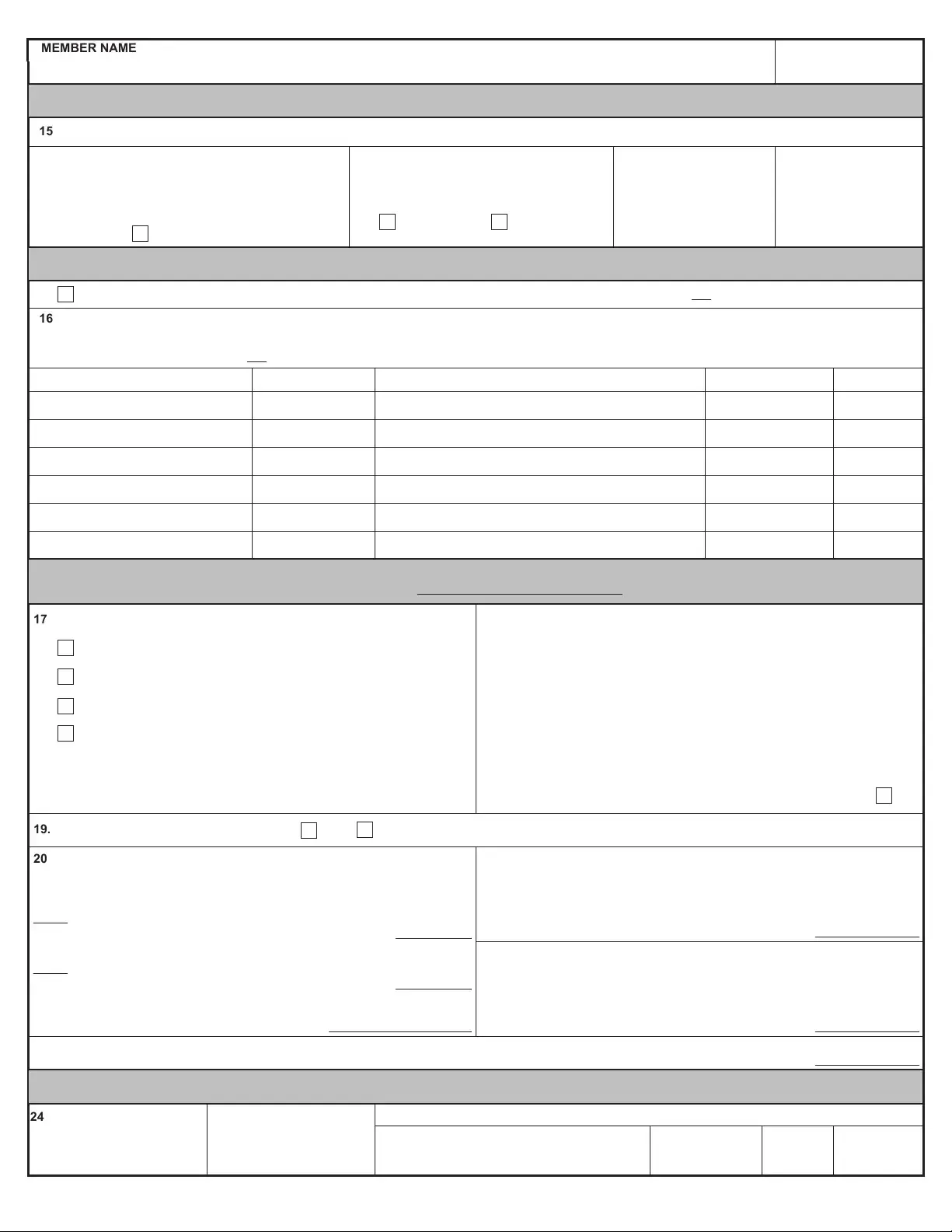
Page 2 of 6
DD FORM 2656, MARCH 2022
MEMBER NAME (Last, First, Middle Initial) SSN
PREVIOUS EDITION IS OBSOLETE.
CUI (when filled in)
SECTION IV - DEPARTMENT OF VETERANS AFFAIRS (VA) DISABILITY COMPENSATION INFORMATION
15. VA DISABILITY COMPENSATION
a. IN THE EVENT I AM AWARDED DISABILITY
COMPENSATION BY THE VA, I WILL NOTIFY
DFAS (OR THE COAST GUARD PPC FOR NON-
DOD MEMBERS) OF THE AMOUNT OF ANY
AWARD, AS IT MAY IMPACT MY RETIRED PAY
BENEFIT.
Agree
b. HAVE YOU APPLIED FOR OR ARE
YOU RECEIVING VA COMPENSATION
FOR A DISABILITY?
Yes No
c. EFFECTIVE DATE OF
PAYMENT
(YYYYMMDD)
d. MONTHLY AMOUNT
OF PAYMENT
SECTION V - DESIGNATION OF BENEFICIARIES FOR UNPAID RETIRED PAY (See Instructions)
Check this box if you want to designate your spouse as 100% beneficiary of any unpaid retired pay upon death OR complete Item 16.
16. BENEFICIARY OR BENEFICIARIES INFORMATION
Complete this section if you want to designate a beneficiary or beneficiaries to receive any unpaid retired pay you are due at death.
If you do not complete this section OR check the box above, your unpaid retired pay will be distributed to beneficiaries in accordance with 10 U.S.C. §2771.
a. NAME (Last, First, Middle Initial) b. SSN c. ADDRESS (Street, City, State, ZIP Code) d. RELATIONSHIP e. SHARE
1) %
2) %
3) %
4) %
5) %
6) %
SECTION VI - FEDERAL INCOME TAX WITHHOLDING INFORMATION (Submit information in Items 17 – 21 in lieu of IRS Form W-4 for tax purposes.)
Please refer to the following IRS hyperlink for withholding questions: https://www.irs.gov/forms-instructions
17. MARITAL STATUS (Check one)
SINGLE OR MARRIED FILING SEPARATELY
MARRIED FILING JOINTLY (Or qualifying widow/er)
MARRIED, BUT WITHHOLDING AT THE HIGHER SINGLE RATE
HEAD OF HOUSEHOLD
(Check only if you're unmarried and pay more than half the
costs of keeping up a home for yourself and a qualifying
individual)
18. MULTIPLE JOBS OR SPOUSE WORKS (Complete this step if you (1) hold
more than one job at a time, or (2) are married filing jointly and your spouse
also works. The correct amount of withholding depends on income earned
from all of these jobs)
Do only one of the following:
(a) Use the estimator at https://www.irs.gov/individuals/tax-withholding-
estimator for most accurate withholding,
or
(b) If there are only two jobs total, you may check this box. Do the
same on Form W-4 for the other job. This option is accurate for jobs
with similar pay; otherwise, more tax than necessary may be
withheld.
19. ARE YOU A UNITED STATES CITIZEN?
Yes
No (See instructions)
20. CLAIM DEPENDENTS
If your income will be $200,000 or less ($400,000 or less if married filing jointly)
Number of qualifying children under age 17
(Multiply the number of qualifying children under age 17 by $2,000)
Number of other dependents
(Multiply the number of other dependents by $500)
Add the amounts above and enter the total here:
21. OTHER INCOME (Not from jobs). If you want tax
withheld for other income you expect this year that won't
have withholding, enter the amount of other income here.
This may include interest, dividends, and retirement
income:
22. DEDUCTIONS If you expect to claim deductions other
than the standard deduction and want to reduce your
withholding, review the Deductions Worksheet on page 3
of the IRS Form W-4 and enter the result here:
(Estimate your deductions this year OR provide previous
year's total deductions)
23. EXTRA WITHHOLDINGS. Enter any additional tax you want withheld each month:
SECTION VII - VOLUNTARY STATE TAX WITHHOLDING INFORMATION (Complete only if monthly withholding is desired.)
24. STATE DESIGNATED TO
RECEIVE TAX
25. MONTHLY AMOUNT
(Whole dollar amount not less
than $10.00)
26. RESIDENCE ADDRESS (If different from address listed in Item 9)
a. STREET (Include apartment number)
b. CITY c. STATE d. ZIP CODE
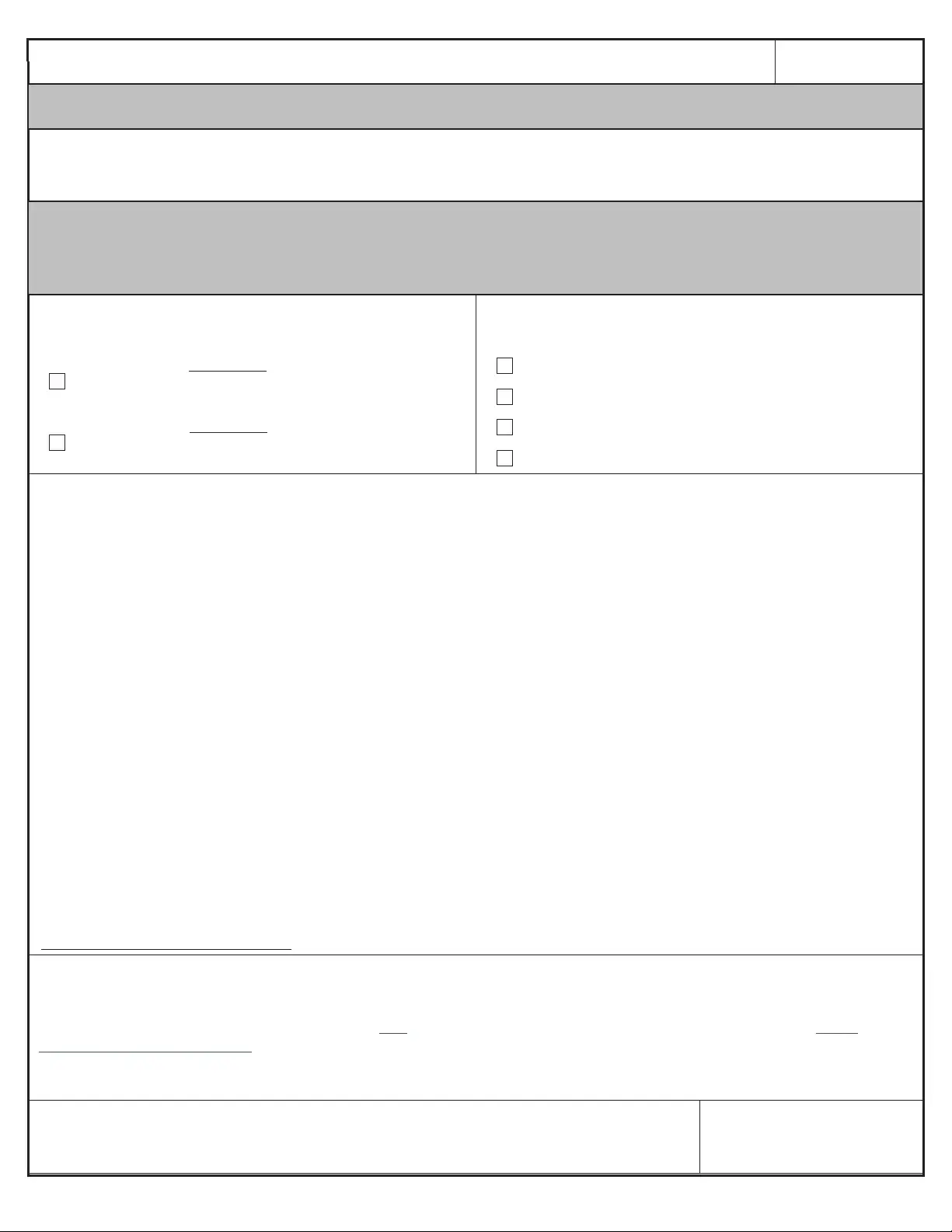
Page 3 of 6
DD FORM 2656, MARCH 2022
MEMBER NAME (Last, First, Middle Initial) SSN
PREVIOUS EDITION IS OBSOLETE.
CUI (when filled in)
DO NOT COMPLETE PART II,
If you ARE NOT covered by the Blended Retirement System OR DO NOT want to elect a lump sum of retired pay
PART II - LUMP SUM ELECTION
This election must be made NO LATER THAN 90 days prior to the date in Part I, Section I, Item 4, in accordance with 10 U.S.C. §1415
For example, if the date in Item 4 is June 1, 2018, the date in Item 30.b. must be on or before March 3, 2018
SECTION VIII - BRS LUMP SUM ELECTION
Members who participate in the BRS retirement plan may upon retirement (regular retirement or age of eligibility to receive retired pay for a non-regular
retirement) elect to receive a portion of their retired pay as a lump sum. Lump sum considerations are discussed below. Retiring members should consult with a
financial advisor before electing a lump sum of retired pay.
27. LUMP SUM PERCENTAGE
(Check one only, if electing to receive a LUMP SUM; if no choice is indicated you will
default to receiving your full retired pay on a monthly basis)
a. I elect to receive a 25 PERCENT lump sum that is a discounted
portion of my retired pay for the period from when I am eligible to begin
receiving retired pay until I reach full social security retirement age.
b. I elect to receive a 50 PERCENT lump sum that is a discounted
portion of my retired pay for the period from when I am eligible to begin
receiving retired pay until I reach full social security retirement age.
28. LUMP SUM PAYMENTS
(Check one only. Complete Item 28 only, if electing a LUMP SUM in Item 27)
I ELECT TO RECEIVE THE LUMP SUM IN
a. ONE INSTALLMENT
b. TWO EQUAL ANNUAL INSTALLMENTS
c. THREE EQUAL ANNUAL INSTALLMENTS
d. FOUR EQUAL ANNUAL INSTALLMENTS
29. LUMP SUM CONSIDERATIONS (Read the following carefully before signing in Item 30.)
• You are only eligible to elect a lump sum if you are qualified for a Regular or Non-Regular retirement under the Blended Retirement System.
If you are retiring with a disability retirement under 10 U.S.C., Chapter 61, you are not eligible to elect a lump sum.
A lump sum election must be made NO LATER THAN 90 days prior to the date of your retirement (for Regular Retirement) or 90 days prior
to the date you are eligible to begin receiving retired pay (for Non-Regular Retirement), as indicated in Part I, Section I, Item 4.
• You may elect to receive either a 25 percent or 50 percent discounted portion of your future estimated retired pay as a discounted lump sum
in exchange for reduced monthly retired pay until you reach your full Social Security Retirement Age.
As a result of electing a lump sum, your monthly retired pay will be reduced to either 75 or 50 percent of its normal amount depending on
whether you elect to receive 25 or 50 percent. At full Social Security Retirement Age, your monthly retired pay will be restored in full.
• The discount rate used to calculate your lump sum is the rate published by the Department of Defense in June of the year prior to the year
of your retirement or year you first become eligible for retired pay, based on the date in Part I, Section I, Item 4.
A lump sum payment is earned income for purposes of Federal Income Tax – receipt of it may have significant tax implications.
• The amount of the lump sum is based on your calculated military retired pay, the discount rate in effect for the year in which you retire or
become eligible to begin receiving retired pay, and the remaining amount of time until you reach full Social Security Retirement Age. Once
distributed, you do not have the ability to seek review of or challenge the amount of the lump sum with regard to any assumptions or factors
used to compute the amount of the lump sum.
• Survivor Benefit Plan premiums (Part III) will still be deducted from your remaining monthly retired pay should you elect the lump sum. The
premiums and your beneficiary’s coverage will be based on the unreduced amount of your monthly retired pay, as if you had not elected a
lump sum, unless you indicate otherwise in Item 37 of Part III.
• If you expect to receive a disability rating from the Department of Veterans Affairs, depending upon your rating, your ability to receive
disability compensation could be affected by the lump sum.
• It is important to understand that a lifetime of full monthly payments will most likely be worth more than the lump sum with reduced monthly
retired pay. It is highly recommended that you consult with a financial counselor before electing a lump sum of retired pay.
COMPARE YOUR ESTIMATED RETIREMENT BENEFITS WITH OR WITHOUT THE LUMP SUM:
http://militarypay.defense.gov/Calculators/
30. LUMP SUM ACKNOWLEDGEMENT
By signing below, I am indicating I am aware that I am electing to receive a discounted portion of my retired pay as a lump sum, and that this
lump sum will likely be less than I would have received if I had not elected to receive it. I am aware there are resources available to assist me
in making this decision, to include training available on JKO and the availability of financial counselors that can be located via https://
installations.militaryonesource.mil/ to discuss my personal situation. Additionally, I have reviewed a comparison of my retirement benefits with
and without a lump sum. I am aware that once accepted, I may not seek review of, or otherwise challenge the amount of the lump sum,
particularly in regard to deviations from future cost of living adjustments, actuarial assumptions, or other factors used in computing this amount.
a. MEMBER SIGNATURE (Sign only if electing a lump sum in Item 28) b. DATE SIGNED (YYYYMMDD)
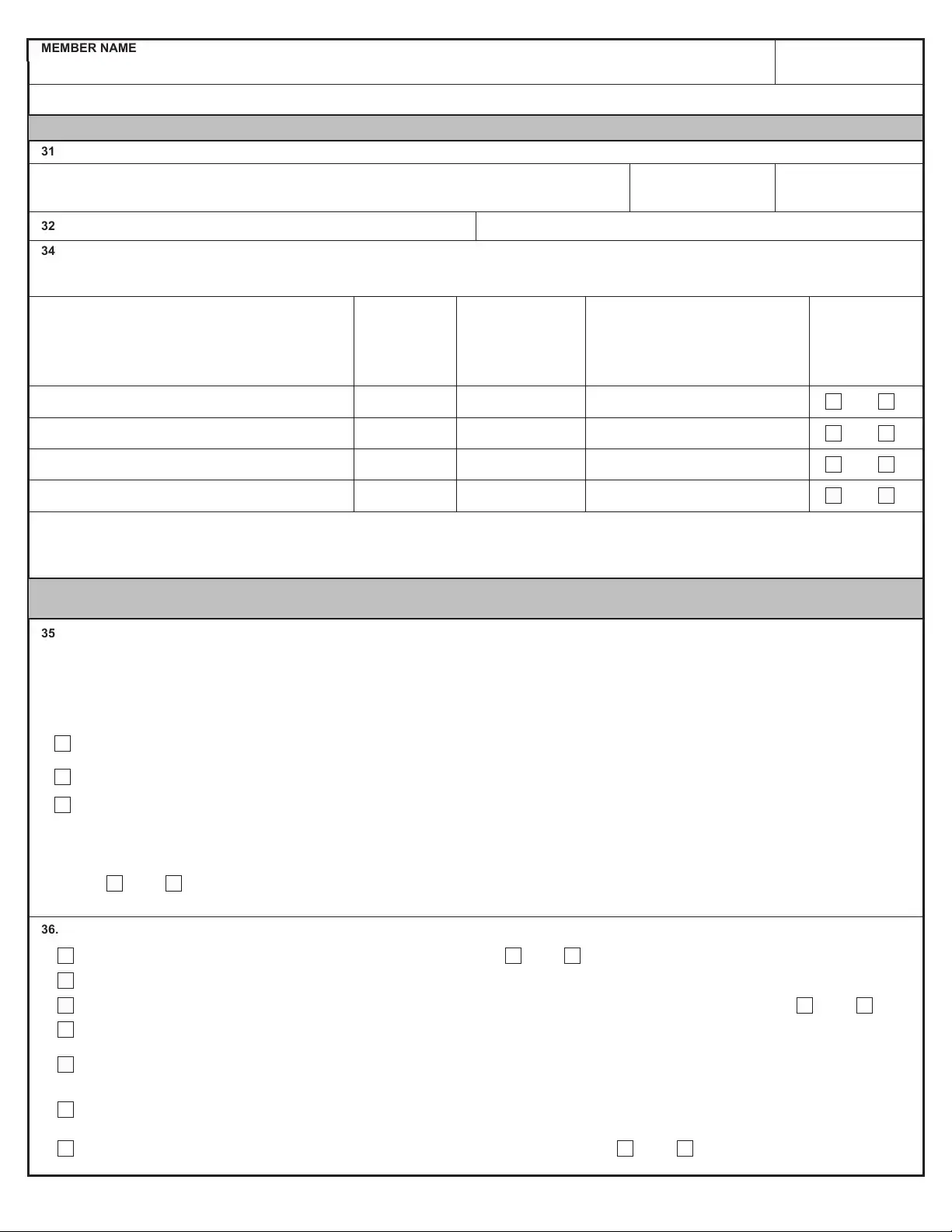
Page 4 of 6
DD FORM 2656, MARCH 2022
MEMBER NAME (Last, First, Middle Initial) SSN
PREVIOUS EDITION IS OBSOLETE.
CUI (when filled in)
PART III - SURVIVOR BENEFIT PLAN
SECTION IX - DEPENDENCY INFORMATION (This section must be completed regardless of SBP Election.)
31. SPOUSE (If no spouse enter N/A)
a. NAME (Last, First, Middle Initial) b. SSN
c. DATE OF BIRTH
(YYYYMMDD)
32. DATE OF MARRIAGE (YYYYMMDD)
33. PLACE OF MARRIAGE (See Instructions)
34. DEPENDENT CHILDREN (If no dependent children enter N/A)
Indicate which child or children resulted from marriage to a former spouse by entering (FS) after relationship in column d.
Add rows or continue on separate paper if necessary.
a. NAME (Last, First, Middle Initial) b. SSN
c. DATE OF BIRTH
(YYYYMMDD)
d. RELATIONSHIP
(Son, daughter, stepson, etc.)
Designate which children resulted from
marriage to a former spouse, if any, by
indicating (FS) after the relationship.
e. DISABLED?
(If yes,
substantiation of
disabling condition
and onset required.
See instructions).
1) Yes No
2) Yes No
3) Yes No
4) Yes No
SECTION X - SURVIVOR BENEFIT PLAN (SBP) ELECTION (You should consult a Survivor Benefit Plan counselor before making an election.)
If you make no election, maximum coverage will be established for your spouse and/or eligible dependent children
35. RESERVE COMPONENT ONLY
(This section refers to the decision you previously made on the DD Form 2656-5 or the old form, the DD Form 1883 when you were
notified of eligibility to retire, in most cases you do not have the right to make a new election on this form)
Reserve/National Guard members who achieve 20 qualifying years of service make the election to participate in the Reserve Component (RC) SBP on DD
Form 2656-5 within 90 days of being notified of eligibility for a non-regular retirement not when applying for retired pay, unless that member previously
elected to defer coverage. You must indicate your previous election in Item 35.a. through 35.c. before proceeding to Item 36. If you previously elected
Option B or Option C, DO NOT enter an election in Item 36. (Check only one in Item 35.a. through 35.c.) For Active Guard/Reserve and Full-Time Support
with a regular retirement, DO NOT enter an election.
a. OPTION A - Previously declined to make an election until eligible to receive retired pay (Proceed to Item 36 to make election)
b. OPTION B - Previously elected coverage to begin at age 60 (Do not make an election in Item 36, 37, or 39, you have already elected coverage.)
c. OPTION C - Previously elected or defaulted to immediate RC-SBP Coverage (Do not make an election in Item 36, 37, or 39, you have already elected
coverage.)
NOTE: If you were married and/or had eligible children at the time you were notified of eligibility for non-regular retirement (on or after January 1, 2001) and did not complete
DD Form 2656-5, you defaulted to full coverage under OPTION C – do not make an election in Item 36.
Marital status has changed since your initial election to participate in RC-SBP.
Yes No If Yes, Attach Page with Explanation
36. SBP BENEFICIARY CATEGORIES (Check one only. See Instructions and Section X.)
a. I ELECT COVERAGE FOR SPOUSE ONLY
I have Dependent Child(ren)
Yes No
b. I ELECT COVERAGE FOR SPOUSE AND CHILD(REN)
c. I ELECT COVERAGE FOR CHILD(REN) ONLY
(Spouse concurrence required in Part V if 'Yes' is selected)
I have a Spouse
Yes No
d. I ELECT COVERAGE FOR THE PERSON NAMED IN ITEM 39 WHO HAS AN INSURABLE INTEREST IN ME (See Instructions)
e. I ELECT COVERAGE FOR MY FORMER SPOUSE INDICATED IN ITEM 40 (See Instructions)
Complete DD Form 2656-1, "Survivor Benefit Plan (SBP) Election Statement for Former Spouse Coverage." Attach/Include court orders or agreements impacting on SBP
continuation after divorce.
f. I ELECT COVERAGE FOR MY FORMER SPOUSE INDICATED IN ITEM 40 AND DEPENDENT CHILD(REN) OF THAT MARRIAGE
(See instructions) Complete DD Form 2656-1, "Survivor Benefit Plan (SBP) Election Statement for Former Spouse Coverage." Attach/Include court orders or agreements
impacting on SBP continuation after divorce.
g. I ELECT NOT TO PARTICIPATE IN SBP
I have eligible dependents under the plan.
(If currently married spousal concurrence is required.)
Yes No
Page 5 of 6
DD FORM 2656, MARCH 2022
MEMBER NAME (Last, First, Middle Initial) SSN
PREVIOUS EDITION IS OBSOLETE.
CUI (when filled in)
37. SBP LEVEL OF COVERAGE (Check one only. Complete UNLESS Option B or Option C was selected in 35 OR Check Box 36.d. or 36.g. was selected. See Instructions.
Your base amount will increase by the same rate of increase as your retired pay)
a. I ELECT COVERAGE BASED ON FULL GROSS PAY
(If I elected the Career Status Bonus under REDUX or a lump sum of retired pay under the Blended Retirement System (Part II), full gross pay is the amount of retired pay
I would have received had I NOT elected the Career Status Bonus or Lump Sum.)
b. I ELECT COVERAGE WITH A REDUCED BASE AMOUNT OF
(Spouse concurrence is required in Part V)
c. CSB/REDUX MEMBERS ONLY
I elect coverage based on my actual Reduced Retired Pay Under REDUX.
I understand that this represents a Reduced Base Amount and requires Spouse Concurrence in part V.
(See Instructions)
d. I ELECT COVERAGE BASED ON THE THRESHOLD AMOUNT IN EFFECT ON THE DATE OF RETIREMENT.
(Spouse concurrence is required in Part V)
38. SPECIAL NEEDS TRUST (Check only if you intend to designate a special needs trust (SNT) as beneficiary for a child/children designated in Item 34.e. as disabled.
You must elect either 36.b., 36.c., or 36.f. to be eligible to designate an SNT. See DoDI 1332.42 for procedures for designating an SNT.)
I INTEND TO DESIGNATE AN SNT AS BENEFICIARY FOR THE CHILD OR CHILDREN DESIGNATED AS DISABLED IN ITEM 34.
(It is your responsibility to separately submit a written statement of the decision to have the annuity paid to the SNT, an attorney’s certification of that SNT,
and the name and tax identification number for the SNT)
39. INSURABLE INTEREST BENEFICIARY (See instructions prior to completing this section - DO NOT complete if you have an ELIGIBLE SPOUSE or FORMER SPOUSE)
a. NAME (Last, First, Middle Initial) b. SSN
c. DATE OF BIRTH
(YYYYMMDD)
d. RELATIONSHIP
e. STREET (Include apartment number)
f. CITY g. STATE h. ZIP CODE
i. TELEPHONE (Incl. area code) j. EMAIL ADDRESS
40. FORMER SPOUSE INFORMATION (Complete only if you have a former spouse)
a. NAME (Last, First, Middle Initial) b. SSN
c. DATE OF BIRTH
(YYYYMMDD)
d. DATE OF DIVORCE
(YYYYMMDD)
e. DATE OF MARRIAGE TO FORMER SPOUSE
(YYYYMMDD)
f. TELEPHONE (Incl. area code) g. EMAIL ADDRESS
h. HAS YOUR FORMER SPOUSE REMARRIED?
Yes No
Page 6 of 6
DD FORM 2656, MARCH 2022
MEMBER NAME (Last, First, Middle Initial) SSN
PREVIOUS EDITION IS OBSOLETE.
CUI (when filled in)
PART IV – CERTIFICATION
SECTION XI - CERTIFICATION
41. MEMBER (DATE SIGNED must be before the date of retirement listed in Part I, Section I, Item 4)
Under penalties of perjury, I certify that the number of claim dependents stated is accurate to my knowledge and does not exceed the number to which I
am entitled, and that all statements on this form are made with full knowledge of the penalties for making false statements (18 U.S.C. §287 and §1001) of
not more than a $10,000 fine, or 5 years in prison, or both. Also, I understand that if I am married and I elected less than full SBP coverage for my
spouse, with the exception of a former spouse or former spouse and child election, I will need my spouse’s notarized concurrence signed no earlier than
the date of my signature and prior to the date of my retirement; otherwise, by law, I will automatically be covered at the maximum spouse coverage.
a. NAME (Last, First, Middle Initial) b. SIGNATURE
c. DATE SIGNED
(YYYYMMDD)
42. WITNESS (This cannot be a spouse or dependent child or any other beneficiary listed on this form or anyone under the age of majority)
Witness date MUST match the member’s date.
a. NAME (Last, First, Middle Initial) b. SIGNATURE
c. DATE SIGNED
(YYYYMMDD)
d. RELATIONSHIP TO THE RETIRING MEMBER
e. ADDRESS f. CITY/BASE OR POST g. STATE
h. ZIP CODE
PART V – SPOUSE SBP CONCURRENCE
Required ONLY when the member is married and elects either: (a) child only SBP coverage, (b) does not elect full spouse SBP coverage; or (c) declines
SBP coverage. This is not required for any former spouse or former spouse and child elections. The date of the spouse's signature in Item 43.c. MUST NOT
be before the date of the member's signature in Item 41.c., or on or after the date of retirement listed in Part I, Section I, Item 4. The spouse's signature
MUST be notarized. Electronic signatures are allowed.
SECTION XII - SBP SPOUSE CONCURRENCE
43. SPOUSE
I hereby concur with the Survivor Benefit Plan election made by my spouse. I have received information that explains the options available and the
effects of those options. I know that retired pay stops on the day the retiree dies. I have signed this statement of my own free will.
a. NAME (Last, First, Middle Initial)
b. TELEPHONE (Incl. area code) c. EMAIL ADDRESS
d. SIGNATURE
e. DATE SIGNED
(YYYYMMDD)
44. NOTARY WITNESS (Please stamp using a notary seal)
On this
day of
, 20
, before me, the undersigned notary public, personally
appeared (Name of Spouse in Item 43.a.)
provided to me through satisfactory evidence of identification, which were
,
to be the person whose name is signed in Item 43.a. of this document in my presence.
Signature of Notary My Commission Expires
NOTARY SEAL
Page 1 of 3
DD FORM 2656 INSTRUCTIONS, MARCH 2022
INSTRUCTIONS
GENERAL
1. Read these instructions and Privacy Act Statement carefully before completing the data form.
2. The Defense Finance and Accounting Service (DFAS) - Cleveland Center will establish your retired/retainer pay account based on the data provided on this
form and your retirement/transfer orders. Your personnel office, disbursing/finance office, and SBP Counselor will assist you in the proper completion and
submission of this form. You should maintain these instructions along with a copy of the form as a permanent record. Please complete the form electronically
or by typing or printing in ink. The Coast Guard Pay and Personnel Center (CG-PPC) will establish the retired pay account for retiring Coast Guard, USPHS,
and NOAA members
3. Ensure that you promptly advise DFAS - Cleveland Center of changes to your marital/family status and any changes to your correspondence address or direct
deposit information. Gray Area retirees (retired reservists who are not yet eligible for retired pay) should contact their Reserve Component directly to report
changes. Retired members of the Coast Guard, USPHS or NOAA should contact the CG-PPC.
4. If completed electronically, this form automatically disables certain fields based on information you entered. If one of the items listed below does not appear on
the form, it is due to information you previously entered that indicates this item is not applicable to you.
PREVIOUS EDITION IS OBSOLETE.
CUI (when filled in)
PART I - RETIRED PAY INFORMATION
SECTION I - PAY IDENTIFICATION.
ITEMS 1 through 3. Self-explanatory.
ITEM 4. If you are retiring from active service, enter the date you will transfer
to the Fleet Reserve or date of retirement. If you are a Reserve/National
Guard member qualified to retire under 10 U.S.C., Chapter 1223, enter either
the date of your 60th birthday or, a later date on which you desire to begin
receiving retired pay. If you are eligible for reduced age retirement earlier
than your 60th birthday, you will need to enter that date.
ITEMS 5 and 6. Self-explanatory.
ITEM 7. Indicate whether you are (or were) a member of the Regular
Component or a member of the Reserve Component. The Reserve
Component includes all reserve and National Guard members, including full-
time reservists on active duty, such as Active Guard/Reserves (AGR) and
Full-Time Support (FTS). If in the Reserve Component, indicate the type of
retirement, regular or non-regular retirement.
ITEM 8. Indicate which retirement plan covers you:
If your Date of Initial Entry into Military Service (DIEMS) is prior to
September 8, 1980, you should enter “Final Pay” UNLESS you elected to
opt into the Blended Retirement System.
If your DIEMS is on or after September 8, 1980, but before January 1,
2018, you should enter “High-3” UNLESS you elected to participate in the
CSB/REDUX retirement plan or the Blended Retirement System (BRS).
If your DIEMS is on or after August 1, 1986, AND you elected to receive
the Career Status Bonus (CSB) upon completion of 15 years of service,
you should enter “CSB/REDUX.”
If you elected to opt into the Blended Retirement System, OR your DIEMS
is on or after January 1, 2018, you should enter “Blended Retirement
System.”
If you are retiring with a disability retirement, regardless of your DIEMS
enter “Disability.”
ITEM 9. Self-explanatory.
SECTION II - DIRECT DEPOSIT/ELECTRONIC FUND TRANSFER
INFORMATION.
ITEMS 10 through 13. Enter the routing and account information for your
bank or financial institution. Indicate whether your account is (S) for Savings
or (C) for Checking account in Item 10. Also, provide the nine digit Routing
Transit Number (RTN) of your financial institution in Item 11, your account
number in Item 12, and your financial institution name and address in Item
13. This section must be completed. Your net retired/retainer pay must be
sent to your financial institution by direct deposit/electronic fund transfer (DD/
EFT).
REGULAR COMPONENT RETIREES ONLY: If you are directing your retired
pay to the same account number and financial institution to which you
directed your active duty pay, check the box immediately below “Section II”.
If you have a copy of the Direct Deposit Authorization form used to establish
your DD/EFT for your active duty pay, attach a copy to this form.
SECTION III - SEPARATION PAYMENT INFORMATION.
ITEM 14. Indicate in 14.a. if you previously received separation or severance
pay. If you mark one of the boxes in 14.a., complete 14.b. by entering the
gross amount for Severance, (In)voluntary Separation, Separation Incentive
and Special Separation Bonus payments and the annual installment gross
amount for Voluntary Separation Incentive payments. Attach a copy of the
orders that authorized the payment and a copy of previous DD Form 214.
SECTION IV - VA DISABILITY COMPENSATION.
ITEM 15. All retirees must read and acknowledge Item 15.a. Note that if you
later apply for and are awarded VA disability compensation, you must notify
DFAS - Cleveland Center (Retired members of the Coast Guard, PHS or
NOAA should contact the CG-PPC) of the amount of the award. Indicate in
Item 15.b. if you are currently, or have previously, received or applied for VA
disability compensation. If you mark YES in 15.b., complete 15.c., and 15.d.
SECTION V - DESIGNATION OF BENEFICIARIES FOR UNPAID RETIRED
PAY.
ITEM 16. Upon your death, 10 U.S.C. §2771 provides that any pay due and
unpaid will be paid to the surviving person highest on the following list: (1)
beneficiary(ies) designated in writing; (2) your spouse; (3) your children and
their descendants, by representation; (4) your parents in equal parts, or if
either is dead, the survivor; (5) the legal representative of your estate, and (6)
person(s) entitled under the law of your domicile. You may choose to
designate your spouse as the primary beneficiary for 100% of your unpaid
retired pay by checking the box directly below “Section V” and leaving items
16.a. through 16.e. blank. If you choose to designate a different beneficiary or
beneficiaries, you must complete Items 16.a. through 16.e. If you designate
multiple beneficiaries, you can either provide a SHARE percentage to be paid
to each person or leave the SHARE percentage blank. If you leave the
SHARE percentage blank, any retired pay you are owed when you die will be
divided equally among your designated beneficiaries. If you list more than one
person with a 100% SHARE, the beneficiaries will be paid in the order as you
list them on the form. If, for example, you designate two beneficiaries, then the
SHARE percentage must either be 100% for each beneficiary, or the SHARE
percentages when added together must equal 100%. If you designate more
than one person, and the total percentage designated is greater than 100%,
the person listed first is considered the primary beneficiary. If you check the
box designating your spouse as 100% beneficiary, that election will take
precedence over any designation made in Items 16.a. through 16.e.
If you do not designate a beneficiary or beneficiaries in Item 16, or all
designated beneficiaries have died before the date of your death, any unpaid
retired pay will be paid to the living person or persons in the highest category
of beneficiary listed above, as required by law.
SECTION VI - FEDERAL INCOME TAX WITHHOLDING INFORMATION.
Complete this section after determining your dependents with the aid of your
disbursing/finance office, or from the instructions available on IRS Form W-4,
or other available IRS publications. Leave Items 17 through 19 blank if
completing Item 20.
ITEM 17. Mark the status you desire to claim.
Page 2 of 3
DD FORM 2656 INSTRUCTIONS, MARCH 2022
PREVIOUS EDITION IS OBSOLETE.
CUI (when filled in)
ITEM 18. This refers to the whole dollar amounts of total withholding(s)
claimed.
ITEM 19. If you are not a U.S. citizen, provide, on an additional sheet, a list of
all periods of ACTIVE DUTY served in the continental U.S., Alaska, and
Hawaii. Indicate periods of service by year and month only. List only service at
shore activities; do not report service aboard a ship.
For example:
FROM (Year/Month) DUTY STATION TO (Year/Month)
2021/06 NAVSTA, Norfolk, VA 2021/07
NOTE: This information may affect the portion of retired/retainer pay which is
taxable in accordance with the Internal Revenue Code if you maintain a
permanent residence outside the U.S., Alaska, or Hawaii.
ITEM 20. Enter the dollar amount as they relate to claim dependents.
ITEM 21. Enter other income that is not from jobs. This may include interest,
dividends, and retirement income.
ITEM 22. Enter deductions if you expect to claim deductions other than the
standard deduction and want to reduce your withholdings.
ITEM 23. Enter extra withholdings. Enter any additional tax you want withheld
each month. If exempt from Federal taxes, enter ‘EXEMPT’.
SECTION VII - VOLUNTARY STATE TAX WITHHOLDING.
Complete this section only if you want monthly state tax withholding. If you
choose not to have a monthly deduction, you remain liable for state taxes, if
applicable.
ITEM 24. Enter the name of the state for which you desire state tax withheld.
ITEM 25. Enter the dollar amount you want deducted from your monthly
retired/retainer pay. This amount must not be less than $10.00 and in whole
dollars (Example: $50.00, not $50.25).
ITEM 26. Enter only if different from the address in Item 9.
PART II - LUMP SUM ELECTION.
OPTIONAL. Only complete Part II if you are:
Covered under the Blended Retirement System; AND,
Want to elect a partial lump sum of retired pay
If you ARE NOT covered under the Blended Retirement System or DO NOT
want to elect a partial lump sum, proceed to PART III of the form.
SECTION VIII - BLENDED RETIREMENT SYSTEM LUMP SUM ELECTION.
ITEM 27. Indicate in Item 27.a. or 27.b. whether you intend to receive a 25
percent or 50 percent lump sum of retired pay.
ITEM 28. If indicating in Item 27.a. or 27.b. that you desire to receive a lump
sum of retired pay, indicate in 28.a. through 28.d. whether you would like that
in one payment or a series of equal, annual installments over 2, 3, or 4 years.
ITEM 29. Before signing in Item 30, you must read the considerations listed in
Item 29. You are highly encouraged to review your options with a financial
professional and compare your estimated retirement benefits with or without a
lump sum using the online calculator located at
https://militarypay.defense.gov/calculators/BRS.
ITEM 30. If you mark Items 27 and Items 28, you must sign Item 30.a., and
indicate the date you are signing in 30.b. The date in 30.b. must be at least 90
days prior to the date of your retirement or the date you transfer to the Fleet
Reserve (shown in Item 4, this is also the same date indicated on your DD 108
request for retirement). If you are a Reserve/National Guard member qualified
to receive retired pay with a non-regular retirement, the date in 27.b. must be
90 days prior to the date upon which you will be eligible to begin receiving
retired pay (shown in Item 4, this is also the same date indicated on your DD
108 request for retirement).
If you are NOT electing a lump sum of retired pay, DO NOT SIGN Item 30.
PART III - SURVIVOR BENEFIT PLAN.
It is very important that you are counseled and are fully aware of your options
under the Survivor Benefit Plan (SBP). SBP pays your eligible beneficiary or
beneficiaries an inflation-protected annuity, based on your retired pay, in the
event of your death. The cost of SBP is subsidized by the government, but
you will be required to pay a portion of the cost of SBP through deductions
from your retired pay. All retiring active duty members and all members of the
Reserves / National Guard who complete 20 qualifying years of service are
automatically fully covered under the SBP or the Reserve Component SBP
(RC-SBP) unless electing to reduce or decline this coverage. Special
requirements for reducing or declining coverage are provided in Part III.
SECTION IX - DEPENDENCY INFORMATION.
ITEM 31. Provide your spouse's name, SSN, and date of birth. If no current
spouse, enter "N/A" and proceed to Item 34.
ITEMS 32 and 33. Enter the date and location of your marriage to your current
spouse. In Item 32, if marriage occurred outside the United States, include
city, province, and name of country.
ITEM 34. If you do not have dependent children, enter "N/A" in this Item. If you
do have dependent children, provide the requested information. Designate
which children resulted from marriage to a former spouse, if any, by indicating
(FS) after the relationship in Item 34.d.
ITEM 34.e. Enter YES or NO as appropriate. A disabled child is an unmarried
child who meets one of the following conditions: a child who has become
incapable of self-support before the age of 18 or a child who has become
incapable of self-support after the age of 18 but before age 22 while a full-time
student. Substantiation is required. Submit a medical evaluation prepared by
a medical professional showing the disabling condition, the age of onset of the
condition, the past medical history and how the condition precludes the
potential beneficiary from being-self supporting now and in the future. If
answering yes, attach documentation.
SECTION X - SURVIVOR BENEFIT PLAN (SBP) ELECTION.
In this section, you will be able to indicate your desired SBP election and
designate the beneficiary for SBP in the event of your death. If you make no
election, you will automatically receive maximum coverage for all eligible
family members (spouse and/or children). If you elect to reduce or decline
your coverage, your spouse will have to concur with that decision, with the
exception of a former spouse or former spouse and child election. You may
discontinue your SBP participation within one year after the second
anniversary of the commencement of retired/retainer pay. Termination of SBP
is effective the first of the month after DFAS - Cleveland Center (or the Coast
Guard PPC for non-DOD members) receives the SBP disenrollment request.
There will be no refund of SBP costs paid for the period before the SBP
disenrollment. You are advised to consult with a SBP Counselor or
Retirement Services Officer prior to completing this section.
ITEM 35. RESERVE COMPONENT ONLY. Information to complete this
section can be found on the DD Form 2656-5 or the previous DD Form 1883,
you submitted when you were first notified that you had completed 20 years of
creditable service, known as your “Notification of Eligibility (NOE).” If you
received your NOE prior to January 1, 2001 and did not make an election
within 90 days of your NOE, RC-SBP was declined by default. Reserve or
National Guard members who previously completed 20 qualifying years of
service are automatically covered under the RC-SBP unless electing, within 90
days of receiving their Notification of Eligibility, to decline this coverage.
Indicate in Item 35.a., 35.b., or 35.c. your previous election. If you elected
immediate coverage (Item 35.c., or “Option C”), elected coverage to begin at
age 60 (Item 35.b., or “Option B”) or made no election previously, this remains
your coverage and cannot be changed. However, Reserve/National Guard
members who declined to make an election until reaching the age of eligibility
to receive retired pay (Item 35.a., or “Option A”), or who were unmarried and
had no eligible children at initial RC-SBP election and made no subsequent
RC-SBP election must complete Items 36 and 37 (and Items 38 through 40 if
applicable). If you elected either Immediate (Option C) or Deferred (Option B)
RC-SBP coverage and the elected beneficiary is no longer eligible, provide
supporting documentation with this form.
Page 3 of 3
DD FORM 2656 INSTRUCTIONS, MARCH 2022
PREVIOUS EDITION IS OBSOLETE.
CUI (when filled in)
ITEM 36. Enter your desired coverage in Items 36.a. through 36.g. You may
only select one Item. If you elect 36.a., 36.c., or 36.g., you MUST also
indicate whether you are declining coverage for other eligible dependents.
ITEM 36.d. Mark if you are not married, have no eligible children, and desire
coverage for a person with an insurable interest in you, and provide the
requested information about that person in Item 39. A person designated as
an insurable interest beneficiary must have a reasonable and lawful basis,
founded upon the relationship of parties to each other, either pecuniary or of
blood or affinity, to expect some benefit or advantage from the continuance of
the life of the retiree. Proof of financial benefit from the continuance of the life
of the member is required for persons other than your (former) spouse or
child(ren). An election of this type must be based on your full gross retired/
retainer pay. If the person is a non-relative or as distantly related as a cousin,
attach evidence that the person has a financial interest in the continuance of
your life. Under provisions of Public Law 103-337, you are permitted to
withdraw from insurable interest coverage at any time. Such a withdrawal will
be effective on the first day of the month following the month the request is
received by DFAS - Cleveland Center (or the Coast Guard PPC for non-DOD
members). Therefore, no refund of SBP costs collected before the effective
date of withdrawal will be paid.
ITEMS 36.e and 36.f. Mark Item 36.e. if you elect coverage for a former
spouse. Mark Item 36.f. if you desire coverage for a former spouse and
dependent child(ren) of that marriage, and provide the requested information
about these children in Item 34 as appropriate. Provide a certified photocopy
of final decree that includes separation agreement or property settlement
which discusses SBP for former spouse coverage. The DD Form 2656-1,
"Survivor Benefit Plan (SBP) Election Statement for Former Spouse
Coverage," must also be completed and accompany the completed DD Form
2656 to DFAS - Cleveland Center (or the Coast Guard PPC for non-DOD
members).
ITEM 36.g. Mark if you decline coverage under SBP. If married and declining
coverage, Items 43 and 44 of Part V, Section XI MUST be completed.
ITEM 37. This Item allows you to designate the amount of your retired pay
that will be the “base amount” for determining your SBP premiums and the
resulting SBP annuity. If you make no entry, you will default to the full base
amount.
ITEM 37.a. Mark if you desire the coverage to be based on your full gross
retired/retainer pay. For members who previously elected the Career Status
Bonus (CSB) or members covered by the Blended Retirement System who
elect a lump sum of retired pay, the full gross retired/retainer pay is what your
retired pay would have been had you not elected (CSB) or the lump sum.
ITEM 37.b. Mark if you desire the coverage to be based on a reduced portion
of your retired/retainer pay. This reduced amount may not be less than
$300.00. If your gross retired/retainer pay is less than $300.00, the full gross
pay is automatically used as the base amount. Enter the desired amount in the
space provided to the right of this Item.
ITEM 37.c. Used by a REDUX member who wants coverage based on actual
retired pay received under REDUX. If this option is selected, Items 43 and 44
of Part V must be completed, if married.
ITEM 37.d. Mark if you desire the higher threshold amount in effect on the
date of your retirement to be used as your base amount. If this option is
selected, Items 43 and 44 of Part V must be completed, if married.
ITEM 38. You may elect payment of the SBP benefit, for beneficiary
categories designated in Items 36.b., 36.c., or 36.f., to a special needs trust
(SNT) who meets the criteria of a disabled child for SBP, and is indicated as
such in Item 34.e. of these instructions. You must provide to DFAS -
Cleveland Center (or the Coast Guard PPC for non-DOD members) a copy of
the SNT established for the child, documents to support the child is incapable
of self-support, age when incapacitated, and if temporary or permanent, and
separate statement from an actively licensed attorney certifying that the Trust
is an SNT created for the benefit of the child and is in compliance with all
applicable federal and state laws. Additional procedures for establishing an
SNT as SBP beneficiary are in DoDI 1332.42.
ITEM 39. Enter the information for insurable interest beneficiary. See
instruction for Item 36.d.
ITEM 40. Enter the information for your former spouse, if applicable.
PART IV - CERTIFICATION.
SECTION XI - CERTIFICATION
ITEM 41. Read the statement carefully, then sign your name and indicate the
date of signature. For your SBP election to be valid, you must sign and date
the form prior to the effective date of your retirement/transfer, or the date you
are eligible to begin receiving retired pay. (Note: if you elected a lump sum of
retired pay in Part II, this form must be signed and dated no later than 90 days
prior to your retirement/transfer date, or the date you are eligible to begin
receiving retired pay).
ITEM 42. A witness to your signature must also sign and provide their
information in Items 42.a. through 42.g. A witness cannot be named as
beneficiary in Sections V, IX or X.
PART V - SPOUSE SBP CONCURRENCE
SECTION XII - SBP SPOUSE CONCURRENCE.
Completion of this section is required only in certain circumstances if you
declined to elect SBP coverage, elected less than the maximum coverage, or
elected child-only coverage while having an eligible spouse. If you are
completing this form electronically and this section does not appear, you do
not have to obtain spousal concurrence.
ITEM 43. 10 U.S.C. §1448 requires that an otherwise eligible spouse concur if
the member declines to elect SBP coverage, elects less than maximum
coverage, or elects child-only coverage. This is not required for any former
spouse or former spouse and child election. Therefore, a member with an
eligible spouse upon retirement, who elects any combination other than Items
36.a. or 36.b. AND 37.a. must obtain the spouse's concurrence in Section XII,
with the exception of an election of Item 36.e. or 36.f. If the current eligible
spouse concurs with declining the SBP election, that spouse will need to
provide their phone number and email address in boxes b. and c. By signing
Item 43, you are concurring with the Survivor Benefit Plan election made by
your spouse.
ITEM 44. A Notary Public must witness the signature of the spouse in Item
44. This witness cannot be a named beneficiary in Section V, IX, or X. The
spouse's concurrence must be obtained and dated on or after the date of the
member's election, but before the retirement / transfer date. If concurrence is
not obtained when required, maximum coverage will be established for your
spouse and child(ren) if appropriate.

File Properties

Fact Name Details
Purpose The DD Form 2656 is used to apply for retirement pay and benefits for military personnel.
Eligibility Active duty members of the Armed Forces, Reservists, and retirees can use this form.
Submission Method The form can be submitted electronically or via mail to the appropriate military finance office.
Required Information Personal details, service history, and beneficiary information must be provided on the form.
Governing Law The form is governed by the Department of Defense regulations.
Form Updates The DD Form 2656 is periodically updated to reflect changes in military retirement laws and policies.
Processing Time Processing times can vary, but it typically takes several weeks to receive confirmation of benefits.
Beneficiary Designation Individuals can designate beneficiaries for retirement benefits directly on the form.
Online Access The form can be accessed online through the official Department of Defense website.
Important Deadlines Submitting the form on time is crucial to ensure benefits begin on the intended retirement date.

Instructions on Utilizing DD 2656

After obtaining the DD 2656 form, you will need to complete it carefully. Make sure you have all the necessary information on hand. This form is essential for processing your request, so accuracy is key.

  1. Begin by filling out your personal information at the top of the form. This includes your name, Social Security number, and date of birth.
  2. Next, provide your contact information. Include your address, phone number, and email address.
  3. In the next section, indicate your military service details. This should include your branch of service, service number, and dates of service.
  4. Proceed to the section about your marital status. Indicate whether you are single, married, or divorced.
  5. If you are married, fill out your spouse's information. Include their name, date of birth, and Social Security number.
  6. Next, provide information about any dependent children. Include their names, dates of birth, and Social Security numbers.
  7. After completing the personal details, review the certification section. Sign and date the form to confirm that all information is accurate.
  8. Finally, check the entire form for any errors or missing information before submitting it.

Important Facts about DD 2656

What is the DD 2656 form?

The DD 2656 form, also known as the "Data for Payment of Retired Personnel," is used by members of the military to provide necessary information for the processing of retirement pay. This form collects personal details, including the retiree's address, Social Security number, and banking information for direct deposit. It ensures that retirees receive their benefits without delay.

Who needs to fill out the DD 2656 form?

Anyone who is retiring from military service and wishes to receive retirement pay must complete the DD 2656 form. This includes active duty members, reservists, and National Guard members who qualify for retirement benefits. It is crucial for ensuring that all necessary information is accurately captured for payment processing.

How do I obtain a DD 2656 form?

The DD 2656 form can be obtained online through the official Department of Defense website or from your branch's personnel office. It is also available at military installations. Ensure you have the most current version of the form to avoid any processing issues.

What information do I need to provide on the DD 2656 form?

You will need to provide several pieces of information, including your full name, Social Security number, date of birth, and contact information. Additionally, you must provide details about your military service, including your branch and dates of service. Banking information for direct deposit is also required.

Can I submit the DD 2656 form electronically?

Yes, many military branches allow for electronic submission of the DD 2656 form. Check with your specific branch's guidelines, as procedures may vary. Ensure that you follow all instructions carefully to avoid any delays in processing your retirement pay.

What happens if I do not submit the DD 2656 form?

If you fail to submit the DD 2656 form, you may experience delays in receiving your retirement pay. Without this form, the military cannot process your payment accurately. It is essential to complete and submit the form promptly to ensure a smooth transition into retirement.

Where can I get help if I have questions about the DD 2656 form?

If you have questions or need assistance with the DD 2656 form, you can contact your branch's personnel office or the retirement services office. They can provide guidance and clarify any doubts you may have about completing the form. Additionally, online resources and FAQs on the official military websites can be helpful.

Common mistakes

Filling out the DD 2656 form can be a daunting task for many individuals. This form is essential for ensuring that service members and their families receive the benefits they deserve. However, there are common mistakes that people often make, which can lead to delays or complications in processing their applications.

One frequent error is failing to provide accurate personal information. It's crucial to double-check names, Social Security numbers, and dates of birth. Even a small typo can cause significant issues down the line. Ensuring that this information matches official documents can save time and frustration.

Another mistake is overlooking the requirement for signatures. Many individuals forget to sign the form or fail to obtain the necessary signatures from witnesses. This can result in the form being returned or rejected, which delays the benefits process. Taking a moment to ensure all required signatures are present can prevent unnecessary setbacks.

People often misinterpret the instructions related to dependent information. It's vital to include all eligible dependents and provide the correct documentation to support their eligibility. Missing or incorrect information about dependents can lead to complications in benefit calculations.

Inaccurate financial information is another common pitfall. When reporting income or other financial details, individuals must ensure that they provide the most current and accurate figures. Discrepancies can lead to incorrect benefit amounts, which can be frustrating for everyone involved.

Some individuals neglect to review the form for completeness before submission. It’s easy to overlook sections that require attention. Taking a moment to review the entire form can help identify any missing information or errors that need correction.

Another mistake occurs when individuals submit the form without including required supporting documents. This may include proof of marriage, birth certificates for dependents, or other necessary paperwork. Failing to include these documents can lead to delays in processing.

People sometimes do not keep copies of their submitted forms. Having a copy of the completed DD 2656 form is essential for reference and follow-up. This can be particularly helpful if any issues arise during the processing of benefits.

Lastly, failing to follow up after submission can lead to uncertainty. Individuals should be proactive in checking the status of their application. If there are any delays or issues, addressing them promptly can help ensure that benefits are received in a timely manner.

By being aware of these common mistakes and taking the necessary steps to avoid them, individuals can ensure a smoother experience when filling out the DD 2656 form. Attention to detail and thoroughness can make a significant difference in the outcome of the benefits process.

Documents used along the form

The DD 2656 form is essential for service members and their families, primarily used to establish eligibility for retired pay and benefits. Alongside this form, several other documents may be required to ensure a complete application process. Below is a list of additional forms and documents that are often used in conjunction with the DD 2656.

  • DD 214: This document serves as a Certificate of Release or Discharge from Active Duty. It provides details about the service member’s military service, including dates of service and type of discharge.
  • SF 2809: This form is used for health benefits enrollment. It allows service members to enroll in the Federal Employees Health Benefits Program upon retirement.
  • DD 2656-1: This is the form for the Survivor Benefit Plan (SBP) election. It allows retirees to designate beneficiaries and choose coverage options for their survivors.
  • DD 2656-2: This document is the SBP spouse concurrence form. It is required if the service member elects to provide coverage for their spouse and must be signed by the spouse.
  • VA Form 21-526EZ: This application for disability compensation and related benefits is used by veterans to apply for VA benefits related to service-connected disabilities.
  • Form W-4P: This is the Withholding Certificate for Pension or Annuity Payments. It allows retirees to specify how much federal income tax should be withheld from their retirement pay.
  • Form 21-686c: This form is used to report a marriage, divorce, or other dependent changes to the VA, ensuring that benefits are updated accordingly.
  • DD 1172-2: This form is used to obtain a military identification card for dependents. It is essential for accessing military benefits and services.

Each of these documents plays a critical role in the retirement and benefits process for service members. Ensuring that all necessary forms are completed accurately can help facilitate a smoother transition to retirement and access to benefits.

Similar forms

The DD 2656 form is a crucial document used by military service members to apply for retirement pay and benefits. It shares similarities with several other important forms that serve various purposes within military and veteran benefits administration. Here’s a list of eight documents that are similar to the DD 2656 form:

  • DD Form 214: This form is known as the Certificate of Release or Discharge from Active Duty. It provides a summary of a service member's military service and is essential for accessing veterans' benefits.
  • VA Form 21-526EZ: This is the Application for Disability Compensation and Related Compensation Benefits. Like the DD 2656, it is used to apply for benefits, specifically for disability compensation from the Department of Veterans Affairs.
  • SF 50: The Standard Form 50 is used for Notification of Personnel Action. It documents changes in employment status and is important for federal employees, similar to how the DD 2656 documents retirement details.
  • DD Form 1172: This is the Application for Uniformed Services Identification Card/DEERS Enrollment. It allows service members to enroll their dependents in the Defense Enrollment Eligibility Reporting System, similar to the DD 2656 in managing benefits.
  • VA Form 21-527EZ: This is the Application for Pension. It serves a similar purpose as the DD 2656 by allowing veterans to apply for financial benefits, specifically pension benefits.
  • DD Form 1300: This is the Report of Casualty. It documents the death of a service member, and while it addresses a different aspect of military service, it is critical for benefits processing, much like the DD 2656.
  • DD Form 2656-1: This is the Survivor Benefit Plan (SBP) Election Statement. It is closely related to the DD 2656, as it also deals with retirement benefits and the allocation of survivor benefits.
  • VA Form 21-4138: This is the Statement in Support of Claim. It allows veterans to provide additional information to support their claims for benefits, similar to how the DD 2656 provides necessary information for retirement benefits.

Understanding these forms can help service members and veterans navigate the benefits process more effectively, ensuring they receive the support they deserve.

Dos and Don'ts

When filling out the DD 2656 form, it's important to follow certain guidelines to ensure accuracy and completeness. Here’s a list of things to do and avoid:

  • Do read the instructions carefully before starting.
  • Do use black or blue ink to fill out the form.
  • Do provide accurate personal information, including your Social Security number.
  • Do double-check all entries for any typos or mistakes.
  • Do sign and date the form where indicated.
  • Don't leave any required fields blank.
  • Don't use correction fluid or tape on the form.
  • Don't submit the form without a thorough review.
  • Don't forget to keep a copy of the completed form for your records.
  • Don't rush through the process; take your time to ensure everything is correct.

Misconceptions

The DD 2656 form, also known as the Data for Payment of Retired Personnel, is often misunderstood. Below are six common misconceptions about this form, along with clarifications.

  • Misconception 1: The DD 2656 form is only for military retirees.
  • This form is not limited to military retirees. It is used by any member of the uniformed services who is eligible for retirement benefits.

  • Misconception 2: Completing the DD 2656 is optional.
  • In reality, submitting this form is necessary to ensure that retirees receive their correct payment amounts. Failure to complete it can delay benefits.

  • Misconception 3: The form is only required once.
  • While the DD 2656 is typically completed at retirement, updates may be necessary if personal information changes, such as a change in marital status or dependent information.

  • Misconception 4: The form can be filled out by anyone on behalf of the retiree.
  • Only the retiree or an authorized representative can complete the form. This ensures that the information is accurate and personally verified.

  • Misconception 5: Submitting the DD 2656 guarantees immediate payment.
  • While submitting the form is essential, processing times can vary. It does not automatically result in immediate payment.

  • Misconception 6: The DD 2656 form is the same for all branches of the military.
  • Each branch may have specific instructions or additional forms that accompany the DD 2656. It is important to check the requirements for the specific branch of service.

Key takeaways

Filling out the DD 2656 form can seem daunting, but understanding its key aspects can make the process smoother. Here are some important points to remember:

  • Purpose of the Form: The DD 2656 form is used to apply for retirement pay and benefits for military members.
  • Accuracy is Crucial: Ensure all information is filled out accurately to avoid delays in processing.
  • Signature Required: Don’t forget to sign and date the form. An unsigned form may be rejected.
  • Submission Methods: You can submit the form electronically or via mail, depending on your situation.
  • Keep Copies: Always keep a copy of the completed form for your records. This can be helpful for future reference.

By keeping these takeaways in mind, you can navigate the DD 2656 form with confidence and ease.