Employee Availability PDF Template

Employee Availability PDF Template

The Employee Availability form is a document that helps employers understand when their employees are available to work. This form plays a crucial role in scheduling and ensuring that the right staff members are assigned to shifts. To streamline the process, consider filling out the form by clicking the button below.

Article Guide

The Employee Availability form is a vital tool for both employers and employees, streamlining the scheduling process and ensuring that workforce needs align with individual availability. This form captures essential information such as preferred working hours, days off, and any specific time constraints that an employee may have. By clearly outlining when an employee is available to work, the form helps managers create schedules that optimize productivity while respecting personal commitments. It also serves as a record for future reference, aiding in the planning of shifts and assignments. Furthermore, the form can facilitate open communication between employees and management, fostering a collaborative environment where everyone’s needs are considered. Understanding and utilizing this form effectively can lead to improved job satisfaction and operational efficiency.

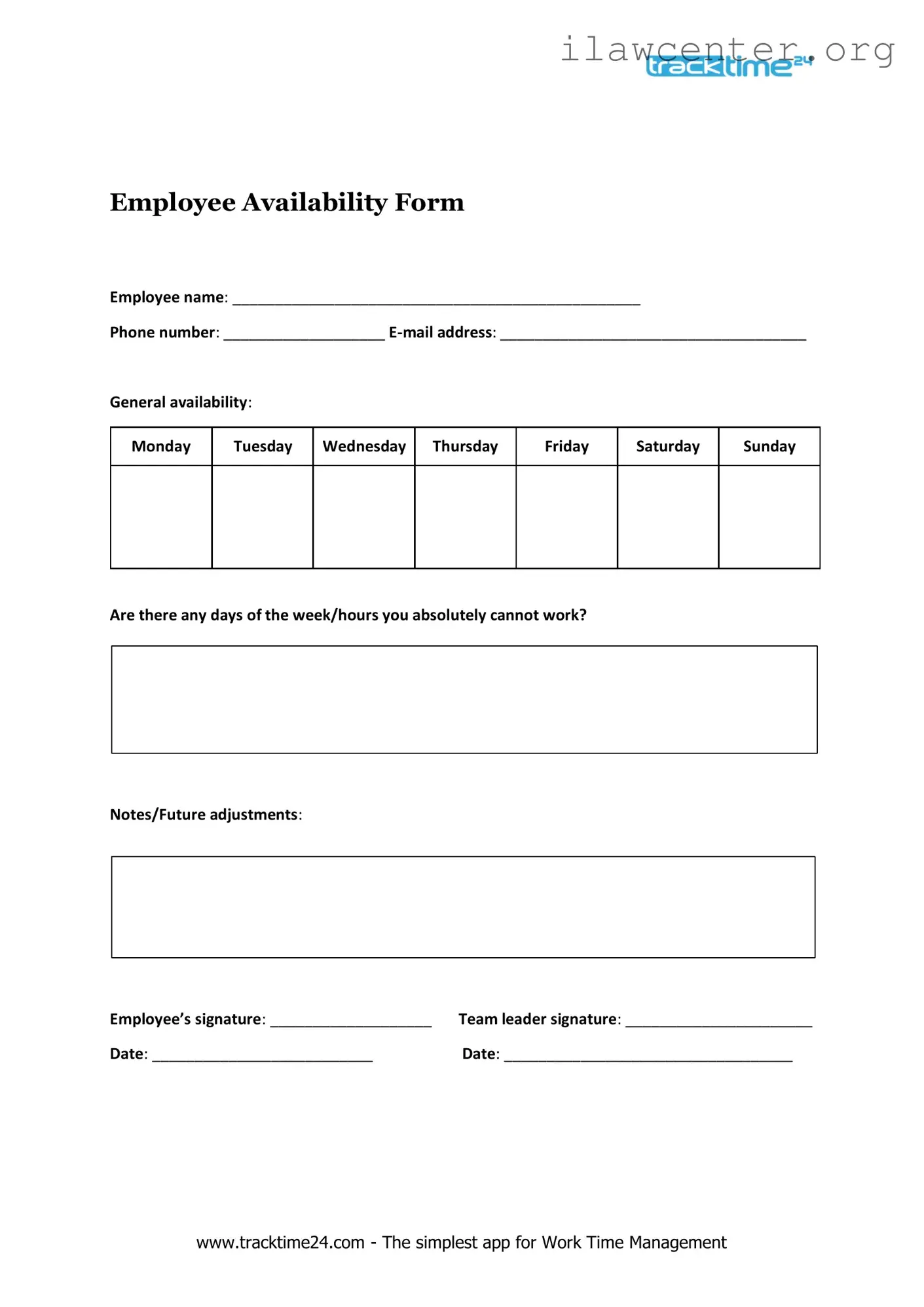
Employee Availability Preview

www.tracktime24.com - The simplest app for Work Time Management
Employee Availability Form
Employee name: ________________________________________________
Phone number: ___________________ E-mail address: ____________________________________
General availability:
Monday
Tuesday
Wednesday
Thursday
Friday
Saturday
Sunday
Are there any days of the week/hours you absolutely cannot work?
Notes/Future adjustments:
Employee’s signature: ___________________ Team leader signature: ______________________
Date: __________________________ Date: __________________________________

File Properties

Fact Name Description
Purpose The Employee Availability form is used to gather information about an employee's preferred working hours and days.
Importance Understanding employee availability helps employers create schedules that align with both business needs and employee preferences.
Flexibility Employees can indicate their availability for full-time, part-time, or flexible schedules on the form.
State-Specific Requirements Some states may have specific laws governing work hours and scheduling, which employers must consider when using the form.
Confidentiality Employers should handle the information provided in the form with care to protect employee privacy.
Updates Employees should be encouraged to update their availability as personal circumstances change.
Legal Compliance Employers must ensure that the use of the Employee Availability form complies with applicable labor laws, such as the Fair Labor Standards Act (FLSA).

Instructions on Utilizing Employee Availability

Once you have the Employee Availability form in hand, you will need to provide specific information regarding your availability for work. Completing this form accurately helps your employer understand when you are available to work, which is essential for scheduling purposes.

  1. Begin by entering your full name in the designated field.
  2. Next, fill in your employee ID number, if applicable.
  3. Indicate your preferred contact method, such as phone or email.
  4. List the days of the week you are available to work. Be clear and specific.
  5. For each available day, specify the times you can work. Use a 24-hour format if required.
  6. If there are any days you are not available, note those in the designated section.
  7. Review your entries for accuracy before submitting the form.
  8. Finally, sign and date the form at the bottom to confirm your availability.

Important Facts about Employee Availability

What is the Employee Availability form?

The Employee Availability form is a document used by employers to gather information about when employees are available to work. This helps in scheduling shifts and ensuring that the business has adequate coverage during peak times. By filling out this form, employees can communicate their preferred working hours, days off, and any other scheduling constraints.

Why is it important to fill out the Employee Availability form?

Completing the Employee Availability form is crucial for both employees and employers. For employees, it allows them to express their preferences and needs regarding their work schedule. For employers, it provides valuable insight into workforce availability, which aids in creating efficient schedules that meet both business needs and employee preferences.

How often should I update my availability?

It’s a good practice to update your availability whenever there are significant changes in your schedule, such as new classes, a second job, or personal commitments. Regular updates help ensure that your employer has the most accurate information, which can lead to a more satisfying work experience.

What should I do if my availability changes after submitting the form?

If your availability changes after you’ve submitted the form, inform your supervisor or HR department as soon as possible. Many employers appreciate open communication and will work with you to adjust your schedule accordingly. Some workplaces may also allow you to resubmit the form if necessary.

Can I request specific days off on the Employee Availability form?

Yes, you can typically request specific days off on the form. Most Employee Availability forms include a section where you can indicate any days or times you are unavailable to work. Be sure to clearly communicate any important dates, such as holidays or personal commitments, to help your employer accommodate your needs.

Is it possible to have flexible availability?

Many employers understand that flexibility is important for their employees. You can indicate flexible availability on the form by specifying that you are open to various shifts or by providing a range of times you are available. This can increase your chances of being scheduled for more hours or shifts that suit your lifestyle.

What happens if I don’t fill out the Employee Availability form?

If you choose not to fill out the Employee Availability form, your employer may not have a clear understanding of your scheduling needs. This can lead to conflicts in scheduling or may result in you being assigned shifts that do not align with your availability. It's in your best interest to complete the form to ensure a smoother scheduling process.

Who can I contact if I have questions about the form?

If you have questions about the Employee Availability form, reach out to your supervisor or the human resources department. They can provide guidance on how to fill out the form, clarify any policies related to scheduling, and address any specific concerns you may have.

Is there a deadline for submitting the Employee Availability form?

Deadlines for submitting the Employee Availability form can vary by employer. Some may require it to be submitted before a specific date each month or before a new schedule is created. Check with your supervisor or HR department to find out if there are any deadlines you need to be aware of.
Common mistakes

When filling out the Employee Availability form, many individuals inadvertently make mistakes that can lead to confusion and scheduling issues. One common error is failing to provide complete information. It’s crucial to include all relevant availability details, such as specific days and times when you can work. Omitting even a single day can result in unintentional scheduling conflicts.

Another frequent mistake is not updating the form when circumstances change. Life is dynamic, and availability can shift due to personal commitments or changes in employment status. If you’ve recently started a new course or taken on additional responsibilities, make sure to revise your availability to reflect these changes. Failing to do so may lead to misunderstandings about your commitment to the job.

Some individuals tend to be overly vague in their responses. Instead of simply stating “available evenings,” it’s beneficial to specify exact times, such as “available from 5 PM to 10 PM on weekdays.” Clear communication helps managers understand your preferences and allows for more efficient scheduling.

In addition, many people overlook the importance of considering peak business hours. If you know your workplace is busiest during certain times, it’s wise to indicate your availability during those hours, if possible. This not only shows your willingness to contribute but also enhances your value as an employee.

Another common oversight is not discussing availability with family or other commitments before submitting the form. It’s essential to ensure that your stated availability aligns with your personal life. By having these conversations upfront, you can avoid last-minute changes that could disrupt your work schedule.

Lastly, some employees neglect to review the form for accuracy before submission. Simple typos or incorrect information can lead to significant issues down the line. Taking a moment to double-check your entries can save time and prevent misunderstandings with management.

Documents used along the form

The Employee Availability form is an important document that helps employers understand when their employees are available to work. Alongside this form, several other documents may be utilized to streamline scheduling and ensure effective communication between management and staff. Below is a list of commonly used forms and documents that often accompany the Employee Availability form.

  • Employee Schedule: This document outlines the specific shifts and hours assigned to each employee, providing a clear overview of who is working at any given time.
  • Time Off Request Form: Employees use this form to formally request time away from work, detailing the dates and reasons for their absence.
  • Employee Handbook: This comprehensive guide includes company policies, procedures, and expectations, serving as a reference for employees regarding their rights and responsibilities.
  • Performance Review Form: This document is used to evaluate employee performance over a specified period, often including feedback and areas for improvement.
  • Payroll Information Form: Employees complete this form to provide necessary information for payroll processing, such as tax withholding and direct deposit details.
  • Incident Report Form: In the event of workplace incidents or accidents, this form is filled out to document the details and ensure proper follow-up actions are taken.
  • Training Acknowledgment Form: Employees sign this form to confirm they have received training on specific policies, procedures, or safety protocols.
  • Exit Interview Form: This document is used when an employee leaves the company, allowing them to provide feedback about their experience and the reasons for their departure.

These documents collectively support the management of employee schedules, compliance with company policies, and overall workplace efficiency. Utilizing them effectively can lead to improved communication and a better working environment for all parties involved.

Similar forms

  • Time-Off Request Form: Both documents allow employees to communicate their availability or unavailability for work. They serve as formal requests for time away from work, ensuring that management is informed of employee schedules.
  • Work Schedule Agreement: Similar to the Employee Availability form, this document outlines the agreed-upon working hours and days for an employee. It helps clarify expectations regarding work commitments.
  • Leave of Absence Form: This form is used to request extended time away from work, similar to the Employee Availability form. Both documents require employees to specify the duration of their absence and the reason for it.
  • Shift Swap Request: Employees use this document to request a change in their scheduled shifts. Like the Employee Availability form, it involves communication about work schedules and availability.
  • Overtime Approval Form: This document is used to request permission for working beyond regular hours. It shares similarities with the Employee Availability form in that it involves managing and communicating work hours.
  • Employee Schedule Change Request: Employees submit this form to request changes to their existing work schedules. It parallels the Employee Availability form by addressing availability concerns.
  • Remote Work Agreement: This document outlines the terms under which an employee can work from a different location. Both forms deal with the logistics of an employee's availability for work.
  • Job Sharing Agreement: This agreement is similar in that it details how two employees will share responsibilities for a single position. It requires clear communication about each employee's availability and work hours.

Dos and Don'ts

When filling out the Employee Availability form, it's important to follow certain guidelines to ensure accuracy and clarity. Here’s a list of things to do and avoid:

  • Do provide your full name and contact information.
  • Do specify your preferred working hours clearly.
  • Do indicate any days you are unavailable.
  • Do communicate any special circumstances that may affect your availability.
  • Don't leave any sections blank unless instructed to do so.
  • Don't forget to double-check your entries for accuracy.

Following these guidelines will help ensure that your availability is understood and considered appropriately.

Misconceptions

Understanding the Employee Availability form is crucial for effective workforce management. However, several misconceptions can lead to confusion among employees and managers alike. Here are four common misconceptions:

  1. Misconception 1: The form is only for part-time employees.

    This is not true. The Employee Availability form is designed for all employees, regardless of their employment status. Full-time employees may also have specific availability needs that should be communicated.

  2. Misconception 2: Submitting the form guarantees preferred shifts.

    While the form helps management understand employee availability, it does not guarantee that employees will receive their preferred shifts. Scheduling decisions depend on various factors, including business needs and staffing requirements.

  3. Misconception 3: The form needs to be filled out only once.

    Employee availability can change due to personal circumstances or business needs. Therefore, it’s important to update the form regularly to reflect current availability.

  4. Misconception 4: The information provided is not confidential.

    On the contrary, the details submitted through the Employee Availability form are treated with confidentiality. Management uses this information solely for scheduling purposes and does not share it publicly.

By addressing these misconceptions, employees can better understand the purpose of the Employee Availability form and how to use it effectively.

Key takeaways

Understanding the Employee Availability form is essential for both employees and employers. This form serves as a crucial tool for managing work schedules effectively. Here are some key takeaways to consider:

  • The form allows employees to specify their preferred working hours and days off.
  • Completing the form accurately ensures that employees' availability is respected.
  • Employers can use the information to create schedules that align with employees’ needs.
  • It is important to update the form whenever there are changes in availability.
  • Submitting the form in a timely manner helps prevent scheduling conflicts.
  • Employers should communicate the importance of this form to all employees.
  • Employees should consider their personal commitments when filling out the form.
  • Clear communication about expectations can lead to a more harmonious workplace.
  • Using the form effectively can improve overall job satisfaction and productivity.

By keeping these points in mind, both employees and employers can foster a more organized and responsive work environment.