Employee Status Change PDF Template

Employee Status Change PDF Template

The Employee Status Change form is a document used by organizations to officially record changes in an employee's status, such as promotions, transfers, or terminations. This form ensures that all relevant information is updated in the company’s records, facilitating smooth transitions and compliance with company policies. To make your changes official, fill out the form by clicking the button below.

Article Guide

The Employee Status Change form is a critical document used by organizations to formally record changes in an employee's status. This form addresses various aspects of employment, including promotions, demotions, transfers, and terminations. It ensures that all relevant information is captured accurately, facilitating a smooth transition for the employee and the organization. By documenting these changes, the form helps maintain clear communication between management and staff, ensuring that everyone is informed about the employee's current status. Additionally, it serves as a vital tool for human resources, aiding in compliance with company policies and legal requirements. Proper completion of the form can prevent misunderstandings and ensure that payroll and benefits are adjusted accordingly.

Employee Status Change Preview

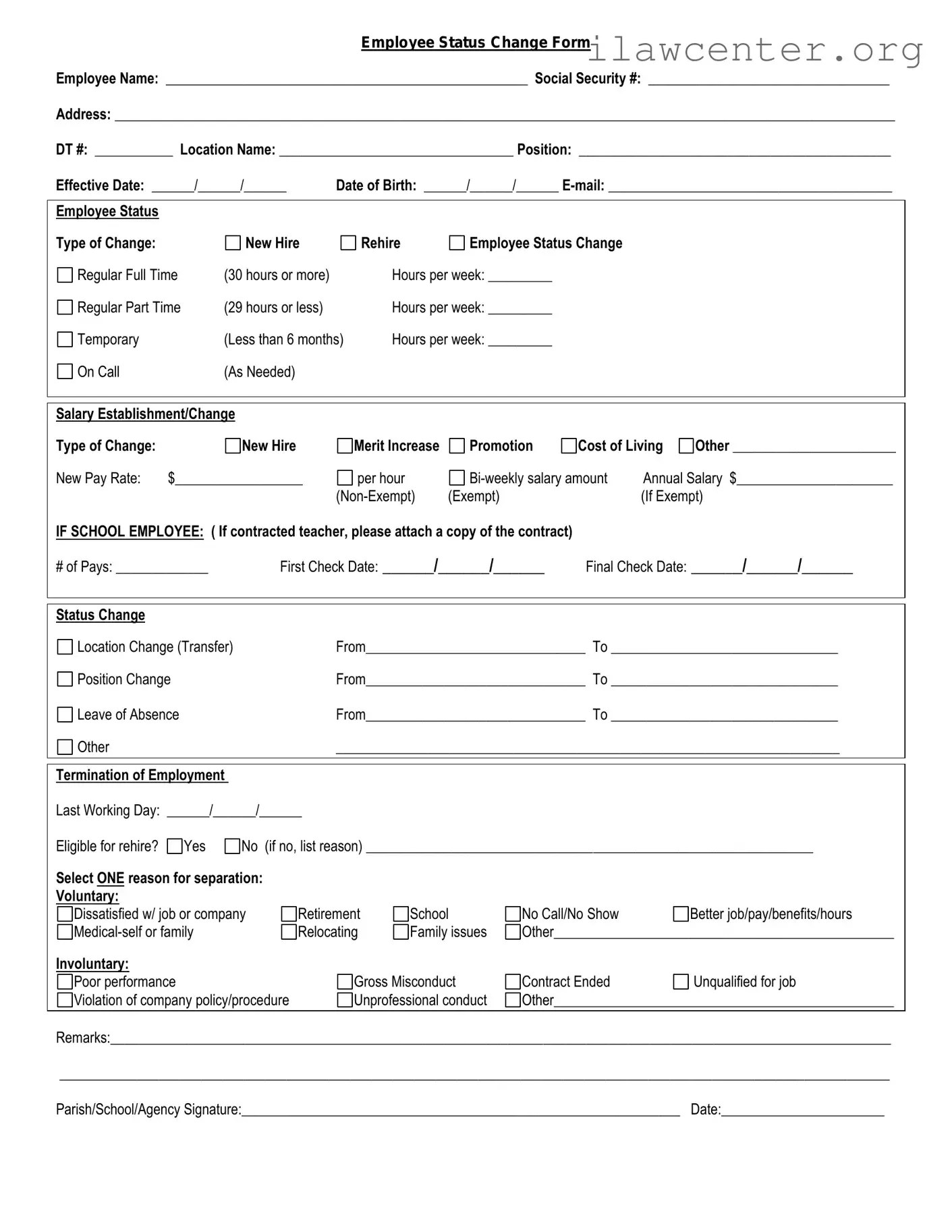
Employee Status Change Form
Employee Name: ___________________________________________________ Social Security #: __________________________________
Address: ______________________________________________________________________________________________________________
DT #: ___________ Location Name: _________________________________ Position: ____________________________________________
Effective Date: ______/______/______ Date of Birth: ______/______/______ E-mail: ________________________________________
Employee Status
Type of Change: New Hire Rehire Employee Status Change
Regular Full Time (30 hours or more) Hours per week: _________
Regular Part Time (29 hours or less) Hours per week: _________
Temporary (Less than 6 months) Hours per week: _________
On Call (As Needed)
Salary Establishment/Change
Type of Change: New Hire Merit Increase Promotion Cost of Living Other _______________________
New Pay Rate: $__________________ per hour Bi-weekly salary amount Annual Salary $______________________
(Non-Exempt) (Exempt) (If Exempt)
IF SCHOOL EMPLOYEE: ( If contracted teacher, please attach a copy of the contract)
# of Pays: _____________ First Check Date: ______/______/______ Final Check Date: ______/______/______
Status Change
Location Change (Transfer) From_______________________________ To ________________________________
Position Change From_______________________________ To ________________________________
Leave of Absence From_______________________________ To ________________________________
Other _______________________________________________________________________
Termination of Employment
Last Working Day: ______/______/______
Eligible for rehire? Yes No (if no, list reason) _______________________________________________________________
Select ONE reason for separation:
Voluntary:
Dissatisfied w/ job or company Retirement School No Call/No Show Better job/pay/benefits/hours
Medical-self or family Relocating Family issues Other________________________________________________
Involuntary:
Poor performance Gross Misconduct Contract Ended Unqualified for job
Violation of company policy/procedure Unprofessional conduct Other________________________________________________
Remarks:______________________________________________________________________________________________________________
_____________________________________________________________________________________________________________________
Parish/School/Agency Signature:______________________________________________________________ Date:_______________________
File Properties

Fact Name Description
Purpose The Employee Status Change form is used to document any changes in an employee's status, such as promotions, demotions, or terminations.
Required Information Typically, the form requires the employee's name, ID number, department, and details about the change being made.
Submission Process Employees or managers must submit the completed form to the HR department for processing.
State-Specific Forms Some states may have specific forms or requirements. For example, California governs employee status changes under the California Labor Code.
Record Keeping Employers should keep a copy of the form in the employee's personnel file for future reference.
Timeliness It is important to submit the form promptly to ensure accurate payroll and benefits processing.
Impact on Benefits Changes in employee status can affect benefits eligibility, so it's crucial to review these details during the process.

Instructions on Utilizing Employee Status Change

Once you have the Employee Status Change form, you will need to complete it accurately to ensure a smooth transition in your employment status. Follow these steps carefully to fill out the form correctly.

  1. Begin by entering your full name at the top of the form.
  2. Provide your employee identification number in the designated field.
  3. Indicate your current job title and the department you work in.
  4. Next, select the type of change you are reporting, such as promotion, transfer, or termination.
  5. Fill in the effective date of the change.
  6. Include any additional comments or details that may be relevant to your change.
  7. Finally, sign and date the form at the bottom to verify the information provided.

After completing the form, submit it to your supervisor or the HR department as instructed. They will review the information and process the changes accordingly.

Important Facts about Employee Status Change

What is the Employee Status Change form?

The Employee Status Change form is a document used by organizations to formally record changes in an employee's status. This could include promotions, demotions, transfers, or changes in employment status such as full-time to part-time. By using this form, employers ensure that all changes are documented consistently and that the necessary updates are made to payroll and benefits systems.

Who needs to fill out the Employee Status Change form?

What information is required on the Employee Status Change form?

How is the Employee Status Change form submitted?

What happens after the Employee Status Change form is submitted?

Common mistakes

Filling out the Employee Status Change form can be a straightforward process, but there are common mistakes that individuals often make. One of the most frequent errors is neglecting to provide complete information. When an employee's details are missing, it can delay the processing of the request and create confusion. Always ensure that all required fields are filled out accurately.

Another common mistake is using outdated information. Employees may forget to update their contact information or job title, which can lead to miscommunication. It’s essential to double-check that the details reflect the current status of the employee.

Inconsistent naming conventions can also cause issues. For example, using nicknames or abbreviations instead of an employee’s legal name can result in problems with record-keeping. Always use the full, legal name as it appears on official documents.

Additionally, some people overlook the importance of signatures. Not signing the form can render it invalid. Ensure that the appropriate parties have signed the document before submission to avoid unnecessary delays.

Another mistake is failing to specify the effective date of the change. Without this date, it can be unclear when the changes should take effect. Including a clear and accurate effective date helps maintain clarity for all parties involved.

Sometimes, individuals forget to notify their supervisor or HR department about the changes. This oversight can lead to misunderstandings or a lack of awareness about the employee's new status. Communication is key, so always inform relevant parties when submitting the form.

Moreover, not reviewing the form before submission is a common pitfall. Typos or incorrect information can easily go unnoticed, leading to complications later on. Taking a moment to review the form can save time and effort in the long run.

Finally, people may not keep a copy of the submitted form for their records. Having a copy can be helpful if any questions arise about the changes in the future. Always retain a copy for personal reference and follow-up purposes.

Documents used along the form

The Employee Status Change form is a vital document used by organizations to officially record changes in an employee's status, such as promotions, transfers, or terminations. Along with this form, several other documents are commonly utilized to ensure a smooth transition and proper record-keeping. Below is a list of some of these documents, each serving a specific purpose in the employee management process.

  • Job Description: This document outlines the specific responsibilities, duties, and expectations associated with a particular position. It helps clarify the role for both the employee and the employer, especially during promotions or transfers.
  • Performance Evaluation: A performance evaluation provides a formal assessment of an employee's work performance over a specific period. This document is often referenced during status changes to highlight achievements and areas for improvement.
  • New Hire Paperwork: For employees who are being onboarded or transferred to a new position, new hire paperwork may be necessary. This includes forms like tax withholding documents and benefits enrollment forms, ensuring compliance with legal and organizational requirements.
  • Termination Notice: If an employee is leaving the organization, a termination notice is required. This document formally communicates the end of employment and may outline the reasons for termination, as well as any final steps the employee needs to take.

Each of these documents plays a crucial role in managing employee transitions effectively. Properly completing and maintaining these records helps ensure compliance with company policies and legal requirements, ultimately contributing to a well-organized workplace.

Similar forms

  • Job Offer Letter: This document outlines the terms of employment, including position, salary, and start date. It formally communicates the acceptance of a job offer, similar to how the Employee Status Change form communicates changes in employment status.
  • Termination Letter: A termination letter provides formal notification of an employee's end of employment. Like the Employee Status Change form, it serves as an official record of a significant change in employment status.
  • Promotion Letter: This document details an employee’s promotion, including new responsibilities and compensation. It parallels the Employee Status Change form by documenting a change in status within the organization.
  • Transfer Request Form: This form is used when an employee seeks to change their job location or department. It is similar in purpose to the Employee Status Change form, as both address changes in employment circumstances.
  • Leave of Absence Request Form: This document requests time away from work for various reasons. It shares similarities with the Employee Status Change form by officially recording a temporary change in employment status.
  • Performance Review Document: This document assesses an employee's performance and may lead to changes in status, such as promotions or raises. It is akin to the Employee Status Change form in that it can impact an employee's role within the company.
  • Employee Handbook Acknowledgment: Employees sign this document to confirm they have received and understood company policies. It relates to the Employee Status Change form as both serve to clarify and formalize aspects of employment status and responsibilities.

Dos and Don'ts

When filling out the Employee Status Change form, it is important to follow specific guidelines to ensure accuracy and compliance. Here are five things you should and shouldn't do:

  • Do double-check all personal information for accuracy.
  • Do provide clear and concise reasons for the status change.
  • Do submit the form promptly to avoid delays.
  • Don't leave any required fields blank.
  • Don't use jargon or abbreviations that may confuse the reader.

Misconceptions

Understanding the Employee Status Change form is crucial for both employees and employers. However, several misconceptions can lead to confusion. Here are five common misunderstandings about this important document:

  1. It’s only for terminations.

    Many people think the form is solely for reporting when an employee leaves the company. In reality, it’s used for various changes, including promotions, transfers, and role modifications.

  2. Only HR can submit the form.

    While HR plays a key role in processing the form, employees can initiate the change. It’s important for employees to communicate their status changes to ensure proper documentation.

  3. It doesn’t affect benefits.

    This is a misconception. Changes in employment status can impact benefits eligibility, pay rates, and other important aspects. Always check how your change might affect your benefits.

  4. It’s a one-time process.

    Some believe that once the form is submitted, no further action is needed. However, ongoing communication with HR is essential to ensure all changes are accurately reflected in the company’s records.

  5. It’s a lengthy process.

    While it may seem daunting, the form is generally straightforward. With clear information and prompt submission, the process can be completed quickly.

Addressing these misconceptions can help streamline the process and ensure that all employee status changes are handled efficiently and accurately.

Key takeaways

Filling out and using the Employee Status Change form is an important process for both employees and employers. Here are some key takeaways to keep in mind:

  • The form must be completed accurately to reflect any changes in an employee's status, such as promotions, transfers, or terminations.
  • Timeliness is crucial. Submit the form as soon as a change occurs to ensure proper record-keeping and compliance with company policies.
  • Ensure that all required fields are filled out completely. Incomplete forms can delay processing and lead to misunderstandings.
  • Both the employee and their supervisor should review the form before submission to confirm that all information is correct.
  • Keep a copy of the submitted form for personal records. This can be useful for future reference or in case of discrepancies.
  • Understand the implications of the status change. For instance, a promotion may affect salary, benefits, and job responsibilities.
  • Consult with the human resources department if there are any questions or uncertainties regarding the form or the status change process.