Fee Worksheet PDF Template

Fee Worksheet PDF Template

The Fee Worksheet form is a detailed document used to outline the estimated charges associated with the settlement of a loan. It includes various fees related to the loan process, such as title charges, government recording fees, and additional settlement costs. Completing this form accurately is essential for understanding the financial obligations involved in a real estate transaction; click the button below to fill out the form.

Article Guide

The Fee Worksheet form serves as a crucial tool for both service providers and investors involved in real estate transactions. It provides a detailed breakdown of estimated charges that borrowers can expect to incur at the closing of a loan. This form is not just a simple list; it organizes various costs into categories such as title charges, government recording fees, and additional settlement charges. Each section helps clarify the financial responsibilities associated with the transaction. For instance, title charges may include fees for title insurance and settlement services, while government recording fees cover the costs related to recording the loan with local authorities. The worksheet also outlines estimated reserve and prepaid costs, which are essential for understanding upfront payments required by lenders. By summarizing these expenses, the Fee Worksheet helps borrowers anticipate their total closing costs and monthly payments, ensuring they are well-informed before finalizing their loan agreement.

Fee Worksheet Preview

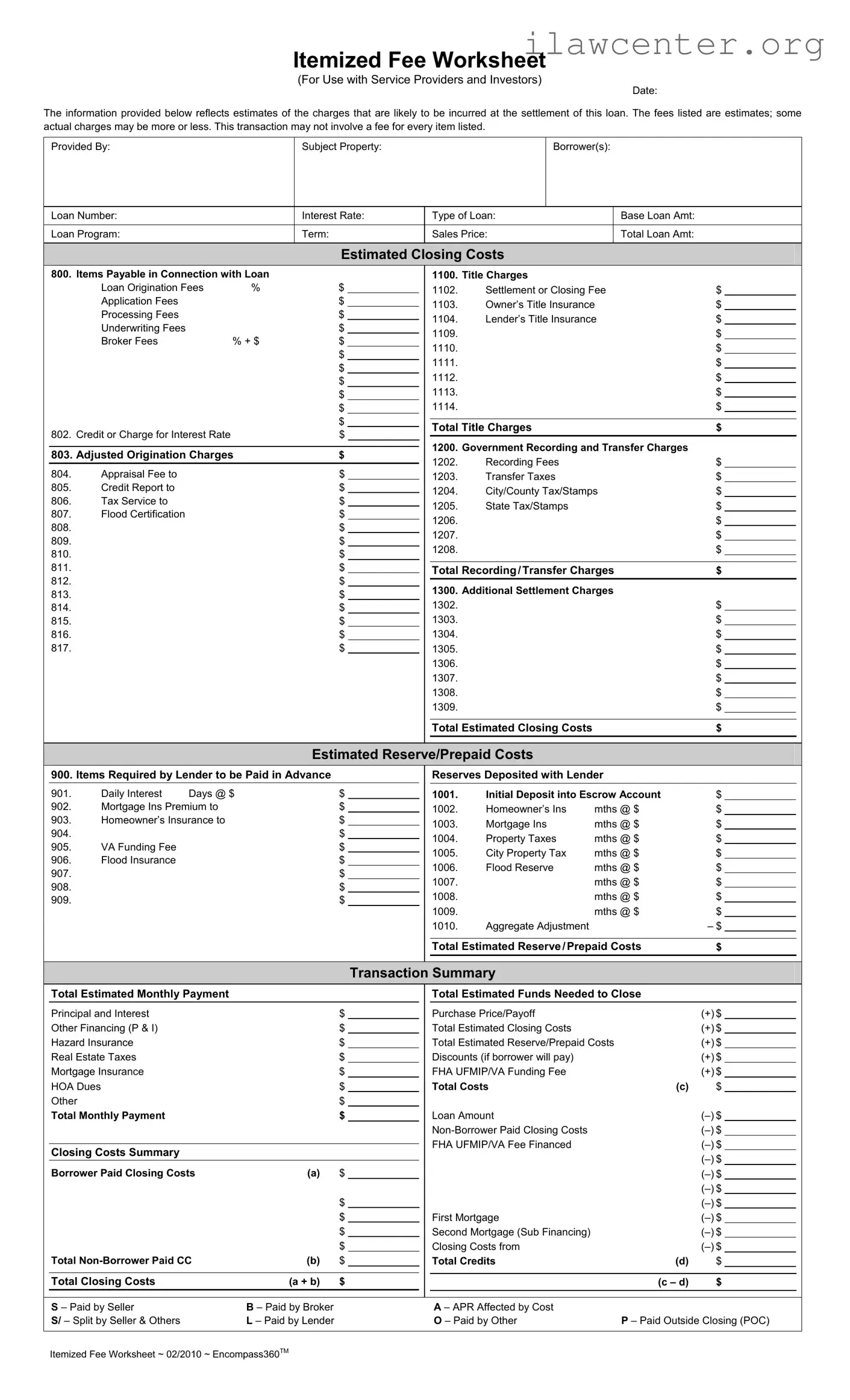
Itemized Fee Worksheet ~ 02/2010 ~ Encompass360
TM
Itemized Fee Worksheet
(For Use with Service Providers and Investors)
Date:
The information provided below reflects estimates of the charges that are likely to be incurred at the settlement of this loan. The fees listed are estimates; some
actual charges may be more or less. This transaction may not involve a fee for every item listed.
Provided By: Subject Property: Borrower(s):
Loan Number: Interest Rate: Type of Loan: Base Loan Amt:
Loan Program: Term: Sales Price: Total Loan Amt:
Estimated Closing Costs
800. Items Payable in Connection with Loan
Loan Origination Fees % $
Application Fees $
Processing Fees $
Underwriting Fees $
Broker Fees % + $ $
$
$
$
$
$
$
802. Credit or Charge for Interest Rate $
803. Adjusted Origination Charges
$
804. Appraisal Fee to $
805. Credit Report to $
806. Tax Service to $
807. Flood Certification $
808. $
809. $
810. $
811. $
812. $
813. $
814. $
815. $
816. $
817. $
1100. Title Charges
1102. Settlement or Closing Fee $
1103. Owner’s Title Insurance $
1104. Lender’s Title Insurance $
1109. $
1110. $
1111. $
1112. $
1113. $
1114. $
Total Title Charges
$
1200. Government Recording and Transfer Charges
1202. Recording Fees $
1203. Transfer Taxes $
1204. City/County Tax/Stamps $
1205. State Tax/Stamps $
1206. $
1207. $
1208. $
Total Recording / Transfer Charges
$
1300. Additional Settlement Charges
1302. $
1303. $
1304. $
1305. $
1306. $
1307. $
1308. $
1309. $
Total Estimated Closing Costs
$
Estimated Reserve/Prepaid Costs
900. Items Required by Lender to be Paid in Advance
901. Daily Interest Days @ $ $
902. Mortgage Ins Premium to $
903. Homeowner’s Insurance to $
904. $
905. VA Funding Fee $
906. Flood Insurance $
907. $
908. $
909. $
Reserves Deposited with Lender
1001. Initial Deposit into Escrow Account $
1002. Homeowner’s Ins mths @ $ $
1003. Mortgage Ins mths @ $ $
1004. Property Taxes mths @ $ $
1005. City Property Tax mths @ $ $
1006. Flood Reserve mths @ $ $
1007. mths @ $ $
1008. mths @ $ $
1009. mths @ $ $
1010. Aggregate Adjustment $
Total Estimated Reserve / Prepaid Costs
$
Transaction Summary
Total Estimated Monthly Payment
Principal and Interest $
Other Financing (P & I) $
Hazard Insurance $
Real Estate Taxes $
Mortgage Insurance $
HOA Dues $
Other $
Total Monthly Payment $
Closing Costs Summary
Borrower Paid Closing Costs (a) $
$
$
$
$
Total Non-Borrower Paid CC (b) $
Total Closing Costs
(a + b) $
Total Estimated Funds Needed to Close
Purchase Price/Payoff (+) $
Total Estimated Closing Costs (+) $
Total Estimated Reserve/Prepaid Costs (+) $
Discounts (if borrower will pay) (+) $
FHA UFMIP/VA Funding Fee (+) $
Total Costs (c) $
Loan Amount (–) $
Non-Borrower Paid Closing Costs (–) $
FHA UFMIP/VA Fee Financed (–) $
(–) $
(–) $
(–) $
(–) $
First Mortgage (–) $
Second Mortgage (Sub Financing) (–) $
Closing Costs from (–) $
Total Credits (d) $
(c – d) $
S – Paid by Seller
S/ – Split by Seller & Others
B – Paid by Broker
L – Paid by Lender
A – APR Affected by Cost
O – Paid by Other
P – Paid Outside Closing (POC)

File Properties

Fact Name Description
Purpose The Fee Worksheet is designed to provide an itemized list of estimated charges associated with the settlement of a loan.
Estimates All fees listed are estimates; actual charges may vary. Not every item listed may incur a fee.
Borrower Information Key borrower details, such as name and loan number, must be included to ensure accurate processing.
Governing Law This form adheres to applicable state laws regarding loan transactions and closing costs.

Instructions on Utilizing Fee Worksheet

Filling out the Fee Worksheet form accurately is essential for understanding the costs associated with your loan. This guide provides clear steps to help you complete the form efficiently.

  1. Enter the Date: Write the date when you are completing the form at the top.
  2. Fill in Provided By: Include the name of the person or organization providing the worksheet.
  3. Subject Property: Write the address of the property involved in the loan.
  4. Borrower(s): List the names of all borrowers on the loan.
  5. Loan Number: Enter the specific loan number assigned to this transaction.
  6. Interest Rate: Fill in the interest rate for the loan.
  7. Type of Loan: Specify the type of loan you are applying for.
  8. Base Loan Amount: Enter the total amount of the loan before any fees.
  9. Loan Program: Indicate the loan program you are using.
  10. Term: Write the term length of the loan (e.g., 15 years, 30 years).
  11. Sales Price: Enter the sales price of the property.
  12. Total Loan Amount: Calculate and write the total loan amount.
  13. Estimated Closing Costs: Fill in the estimated closing costs based on the provided categories.
  14. Items Payable in Connection with Loan: List all applicable fees, including loan origination fees, title charges, and any other costs.
  15. Estimated Reserve/Prepaid Costs: Include any costs required by the lender to be paid in advance.
  16. Transaction Summary: Summarize the total estimated monthly payment and funds needed to close.

After completing the Fee Worksheet, review all entries for accuracy. This will ensure a smooth process moving forward. Make sure to keep a copy for your records and submit it as required.

Important Facts about Fee Worksheet

What is the purpose of the Fee Worksheet form?

The Fee Worksheet form is designed to provide an itemized estimate of the charges that may be incurred during the settlement of a loan. It helps borrowers understand the various fees associated with their loan, including title charges, government recording fees, and additional settlement charges. This transparency aids in financial planning and ensures that borrowers are aware of potential costs before closing.

Who should complete the Fee Worksheet form?

The Fee Worksheet should be completed by the lender or mortgage broker working with the borrower. It is essential for anyone involved in the loan process to provide accurate estimates to ensure that all parties are informed about the financial implications of the transaction.

Are the fees listed on the Fee Worksheet form final?

No, the fees listed on the Fee Worksheet are estimates and may change. Some actual charges could be higher or lower than those estimated. It is important for borrowers to understand that this form reflects potential costs, and they should expect some variability in the final amounts due at closing.

What types of fees are included in the Fee Worksheet?

The Fee Worksheet includes various types of fees, such as loan origination fees, title insurance charges, appraisal fees, and government recording fees. It also outlines estimated closing costs, reserves, and prepaid costs required by the lender. Each category provides a breakdown of potential charges to give borrowers a comprehensive view of their financial obligations.

How can I use the Fee Worksheet to prepare for closing?

Borrowers can use the Fee Worksheet to anticipate the total costs associated with their loan. By reviewing the estimated closing costs and reserves, borrowers can plan their finances accordingly. It is advisable to discuss any questions or concerns regarding the fees with the lender or mortgage broker to ensure clarity and preparedness for the closing process.

What should I do if I notice discrepancies in the fees listed?

If discrepancies arise between the estimated fees on the Fee Worksheet and the actual charges presented at closing, it is crucial to address them immediately. Borrowers should contact their lender or mortgage broker to seek clarification and resolve any issues before finalizing the transaction.

Can the Fee Worksheet be modified?

Yes, the Fee Worksheet can be modified as needed. If there are changes in the loan terms or additional fees that need to be included, the lender or mortgage broker should update the worksheet accordingly. Keeping the document current ensures that borrowers have the most accurate information available throughout the loan process.

Is there a deadline for submitting the Fee Worksheet?

While there is no strict deadline for submitting the Fee Worksheet, it is advisable to complete it as early as possible in the loan process. This allows sufficient time for borrowers to review the estimates, ask questions, and make informed decisions regarding their loan before closing.

Common mistakes

When filling out the Fee Worksheet form, many individuals make common mistakes that can lead to confusion or delays in the loan process. Recognizing these pitfalls can help ensure that the form is completed accurately and efficiently.

One frequent error is overlooking the date. This date is crucial as it indicates when the information was gathered. Without it, the form can become outdated quickly, leading to potential discrepancies in the estimated charges at settlement.

Another mistake is failing to provide complete information about the borrower(s). It’s essential to include all names and details accurately. Incomplete information can result in miscommunication and may delay the loan approval process.

Many people also forget to specify the type of loan and the loan program. This information helps lenders understand the specific requirements and fees associated with different loan types. Without this clarity, the worksheet may not reflect the correct fees.

Another common oversight is miscalculating the total loan amount. This figure should accurately reflect the loan being requested. Errors in this area can lead to significant issues down the line, especially regarding interest rates and monthly payments.

Individuals often neglect to list all estimated closing costs. Each fee associated with the loan should be included to provide a complete picture of what to expect at settlement. Missing fees can lead to unexpected costs that catch borrowers off guard.

Inaccuracies in the itemized fee breakdown, such as the title charges and government recording fees, are also common. These fees can vary significantly, and ensuring they are listed correctly is vital for an accurate estimate of total costs.

Another mistake is not considering prepaid costs or reserves. These costs, which include items like homeowner’s insurance and property taxes, should be factored in to avoid underestimating the total funds needed at closing.

People sometimes forget to include additional settlement charges. These can include various miscellaneous fees that may apply to the transaction. Omitting these can lead to confusion and miscalculations in the final totals.

Lastly, many individuals fail to double-check their calculations. Simple math errors can lead to incorrect totals, which can complicate the loan process. Taking the time to review the worksheet can prevent these mistakes and ensure a smoother experience.

By being aware of these common mistakes, borrowers can fill out the Fee Worksheet more accurately, leading to a more efficient loan process and fewer surprises at closing.

Documents used along the form

The Fee Worksheet form is a crucial document in the loan settlement process, providing a detailed breakdown of estimated charges. However, several other forms and documents complement this worksheet, ensuring a smooth transaction. Below is a list of commonly used documents that you may encounter alongside the Fee Worksheet.

  • Loan Estimate: This document provides a summary of the loan terms, projected payments, and estimated closing costs. It is essential for borrowers to understand the financial implications of their loan.
  • Closing Disclosure: This form outlines the final terms of the loan, including the actual closing costs. It must be provided to the borrower at least three days before closing, allowing for a review period.
  • Title Insurance Policy: This document protects the lender and borrower against any potential claims on the property’s title. It ensures that the title is clear and free of liens or disputes.
  • Appraisal Report: An appraisal is conducted to determine the fair market value of the property. This report is vital for both the lender and borrower to ensure the loan amount aligns with the property's value.
  • Credit Report: Lenders review the borrower’s credit history to assess their creditworthiness. This report plays a significant role in determining loan eligibility and interest rates.
  • Escrow Agreement: This document outlines the terms under which an escrow agent will hold funds and documents until the transaction is completed. It ensures that all parties meet their obligations before the closing.
  • Borrower’s Affidavit: This is a sworn statement by the borrower confirming their identity and the accuracy of the information provided during the loan application process. It helps prevent fraud and ensures compliance with lending laws.

Understanding these documents is essential for a successful loan transaction. Each form serves a specific purpose and plays a vital role in protecting the interests of all parties involved. Be sure to familiarize yourself with them to navigate the closing process confidently.

Similar forms

The Fee Worksheet form serves as a crucial tool in the home loan process, helping borrowers understand the estimated costs associated with their loan. There are several other documents that share similarities with the Fee Worksheet, each designed to provide clarity and transparency regarding fees and costs. Here’s a look at six of those documents:

  • Loan Estimate: This document provides a detailed breakdown of the estimated closing costs, interest rate, and monthly payments. Like the Fee Worksheet, it aims to give borrowers a clear understanding of what to expect financially when closing on a loan.
  • Closing Disclosure: Issued shortly before closing, this document outlines the final terms of the loan, including all closing costs. It mirrors the Fee Worksheet in its itemization of fees, allowing borrowers to compare initial estimates with final figures.
  • Good Faith Estimate (GFE): Although it has been largely replaced by the Loan Estimate, the GFE was used to provide borrowers with an estimate of the costs associated with their loan. It shares the same purpose of transparency and helps borrowers budget for closing costs.
  • Settlement Statement (HUD-1): This document summarizes all the financial transactions that occur at closing. Similar to the Fee Worksheet, it itemizes fees and costs, ensuring that borrowers have a complete understanding of their financial obligations.
  • Borrower’s Closing Costs: This document lists all costs that the borrower is responsible for at closing. Like the Fee Worksheet, it provides a detailed account of fees, making it easier for borrowers to grasp their total financial commitment.
  • Escrow Analysis Statement: This statement provides a breakdown of the escrow account, detailing how much money is held for property taxes and insurance. It relates to the Fee Worksheet by offering insights into ongoing costs that may affect the borrower’s monthly payments.

Understanding these documents can empower borrowers, helping them navigate the often complex world of home financing with confidence.

Dos and Don'ts

When filling out the Fee Worksheet form, it is essential to follow specific guidelines to ensure accuracy and completeness. Here are six important do's and don'ts to keep in mind:

  • Do: Review all sections carefully before submitting.
  • Do: Provide accurate estimates for each fee listed.
  • Do: Include all relevant information about the loan and property.
  • Do: Double-check calculations to avoid errors.
  • Don't: Leave any sections blank; all fields must be filled out.
  • Don't: Use vague terms; be specific about fees and charges.

Following these guidelines will help ensure that your Fee Worksheet form is completed correctly, minimizing potential issues during the loan process. If any questions arise, seek clarification before finalizing the document.

Misconceptions

  • Misconception 1: The Fee Worksheet form provides exact costs.
  • Many people believe that the amounts listed on the Fee Worksheet are final and binding. In reality, these figures are estimates. Actual charges may vary, sometimes significantly, from what is displayed on the worksheet.

  • Misconception 2: All fees listed must be paid.
  • Some individuals assume that every fee mentioned on the Fee Worksheet must be incurred. However, not every item listed will necessarily apply to every transaction. It's important to review the specific circumstances of each loan.

  • Misconception 3: The Fee Worksheet is only for borrowers.
  • Another common misunderstanding is that this form is exclusively for borrowers. In fact, it is designed for both service providers and investors. Its purpose is to provide a clear overview of potential fees for all parties involved in the transaction.

  • Misconception 4: The worksheet includes all possible charges.
  • Some people think that the Fee Worksheet covers every conceivable charge associated with a loan. This is not the case. While it includes many common fees, there may be additional costs that are not listed, depending on the specifics of the transaction.

  • Misconception 5: Completing the Fee Worksheet guarantees loan approval.
  • Lastly, many believe that filling out the Fee Worksheet is a step toward securing loan approval. However, the worksheet is merely a tool for estimating costs and does not influence the approval process itself.

Key takeaways

Filling out the Fee Worksheet form accurately is essential for understanding the costs associated with your loan. Here are some key takeaways to keep in mind:

  • Understand the Estimates: The fees listed on the worksheet are estimates. Actual charges may vary, so be prepared for possible differences.
  • Identify Required Information: You will need to provide details like the subject property, borrower information, loan number, and type of loan.
  • Itemize Your Costs: Break down all charges into categories such as title charges, government recording fees, and additional settlement charges.
  • Check for Missing Items: Not every item listed may apply to your transaction. Review the worksheet to ensure you include only relevant fees.
  • Calculate Total Costs: Be sure to sum up all the estimated closing costs and prepaid costs to get a complete picture of what you'll need to pay.
  • Review Payment Responsibilities: Understand who is responsible for each cost. Some fees may be paid by the seller, broker, or lender.
  • Keep Copies: After filling out the worksheet, keep a copy for your records. This will help you track your expenses and provide clarity in discussions with your lender.

By following these guidelines, you can navigate the Fee Worksheet form with confidence. Clear understanding leads to better decision-making.