
Fitness For Duty PDF Template

Fitness For Duty PDF Template

The Fitness for Duty Certification Form is a document that must be completed by a healthcare provider for employees returning from medical leave under the Family and Medical Leave Act (FMLA). This form is essential for ensuring that employees can safely resume their work duties after an illness or injury. If you are an employee preparing to return to work, please fill out the form by clicking the button below.

Article Guide

The Fitness For Duty form plays a crucial role in the workplace, particularly for employees returning from medical leave under the Family and Medical Leave Act (FMLA). This form, completed by a healthcare provider, ensures that employees are ready to resume their duties safely and effectively. It addresses various return-to-work options, including full release, modified duty, and not released status, each tailored to the individual's health condition. A full release indicates that the employee can perform all job functions without restrictions, while modified duty may involve specific limitations that need to be documented. In cases where an employee is not cleared to work, the form specifies the next evaluation date, allowing for a structured path back to employment. Additionally, the form is designed to comply with the Genetic Information Nondiscrimination Act (GINA), which protects individuals from genetic discrimination. By prohibiting the inclusion of genetic information, the form respects employee privacy while ensuring that necessary medical information is conveyed. Submission of the completed form is confidential and directed to the appropriate Human Resources department, ensuring that sensitive health information is handled with care. Understanding the components and requirements of the Fitness For Duty form is essential for both employees and employers, fostering a supportive environment for recovery and reintegration into the workplace.

Fitness For Duty Preview

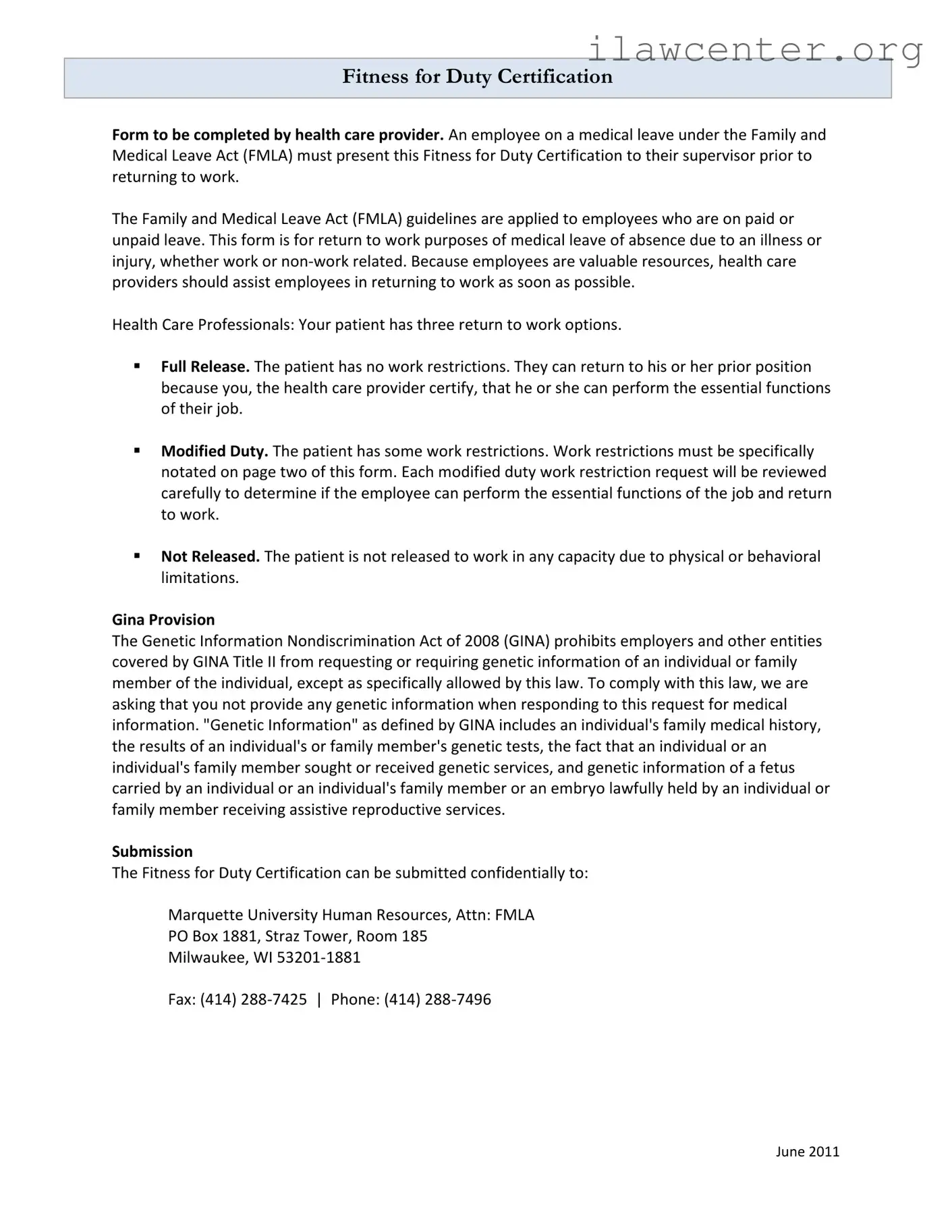
Fitness for Duty Certification
Form to be completed by health care provider. An employee on a medical leave under the Family and
Medical Leave Act (FMLA) must present this Fitness for Duty Certification to their supervisor prior to
returning to work.
The Family and Medical Leave Act (FMLA) guidelines are applied to employees who are on paid or
unpaid leave. This form is for return to work purposes of medical leave of absence due to an illness or
injury, whether work or non-work related. Because employees are valuable resources, health care
providers should assist employees in returning to work as soon as possible.
Health Care Professionals: Your patient has three return to work options.
Full Release. The patient has no work restrictions. They can return to his or her prior position
because you, the health care provider certify, that he or she can perform the essential functions
of their job.
Modified Duty. The patient has some work restrictions. Work restrictions must be specifically
notated on page two of this form. Each modified duty work restriction request will be reviewed
carefully to determine if the employee can perform the essential functions of the job and return
to work.
Not Released. The patient is not released to work in any capacity due to physical or behavioral
limitations.
Gina Provision
The Genetic Information Nondiscrimination Act of 2008 (GINA) prohibits employers and other entities
covered by GINA Title II from requesting or requiring genetic information of an individual or family
member of the individual, except as specifically allowed by this law. To comply with this law, we are
asking that you not provide any genetic information when responding to this request for medical
information. "Genetic Information" as defined by GINA includes an individual's family medical history,
the results of an individual's or family member's genetic tests, the fact that an individual or an
individual's family member sought or received genetic services, and genetic information of a fetus
carried by an individual or an individual's family member or an embryo lawfully held by an individual or
family member receiving assistive reproductive services.
Submission
The Fitness for Duty Certification can be submitted confidentially to:
Marquette University Human Resources, Attn: FMLA
PO Box 1881, Straz Tower, Room 185
Milwaukee, WI 53201-1881
Fax: (414) 288-7425 | Phone: (414) 288-7496
June 2011
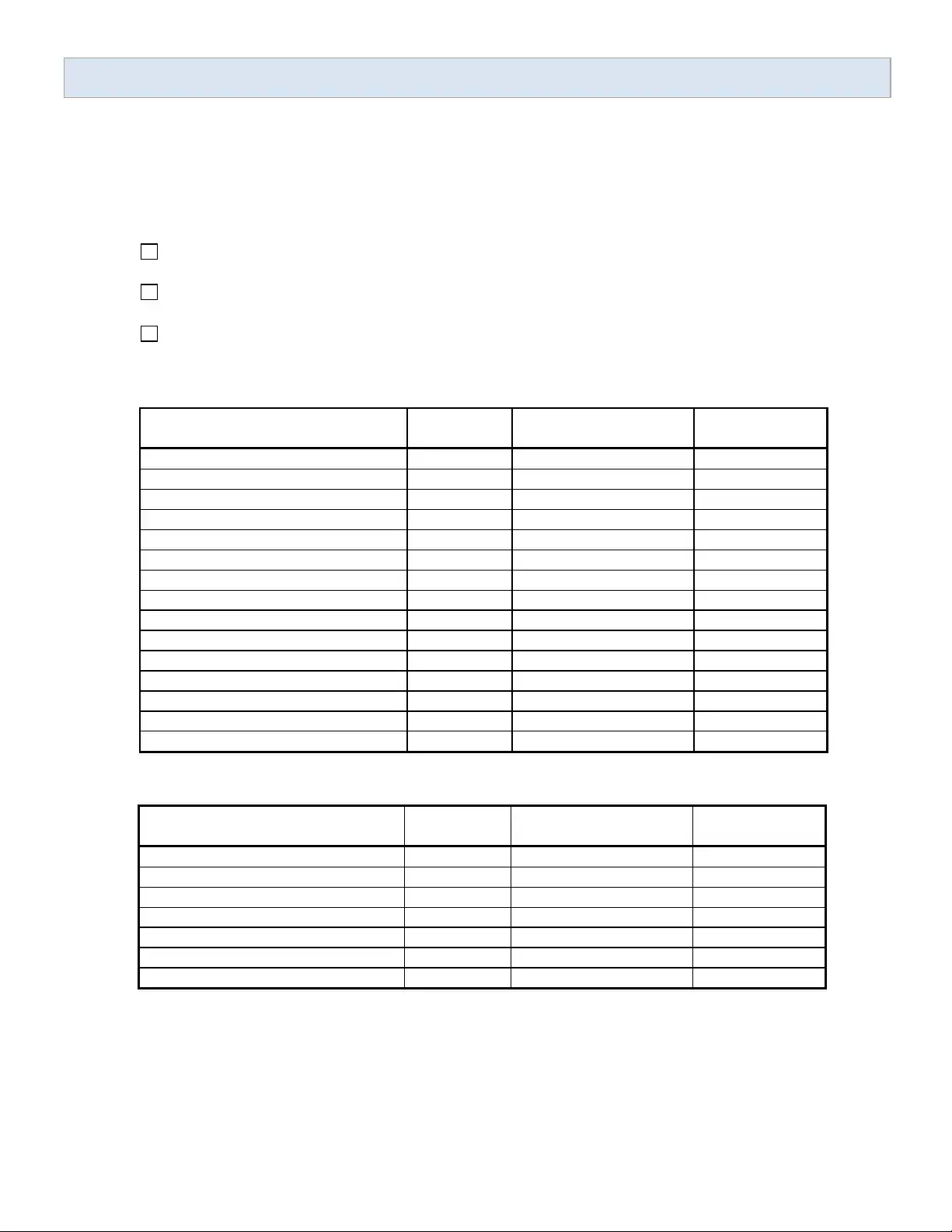
Fitness for Duty Certification
1. Employee / Patient _____________________________________
2. Date of Medical Examination _____________________________________
3. Please check the status of the employee’s release for duty
Full, unrestricted duty effective __________________________
Modified duty effective ________________ and next evaluation date ________________
Not released for any type of duty. Next evaluation date will be ________________
4. Physical Evaluation
5. Behavioral Evaluation
6. Other Restrictions, Considerations, or Notes
_____________________________________________________________________________________
_____________________________________________________________________________________
I hereby certify that the facts in this document are true and correct.
________________________________ ________________ ____________________
Printed Name of Health Care Provider Date Phone Number
Full
Restrictions
Partial Restrictions
(please specify)
No Restrictions
Sedentary-Lifting 0 to 10 pounds
Light-Lifting 10 to 20 pounds
Moderate-Lifting 20 to 50 pounds
Heavy-Lifting 50 to 100 pounds
Pulling/Pushing, Carrying
Reaching or working above shoulder
Walking
Standing
Stooping
Kneeling
Repeated Bending
Climbing
Operating a motor vehicle
Finger Manipulation (typing)
Pain (frequency, degree, signs)
Able to
perform
Other Considerations
(please specify)
Not Able to
perform
Understanding
Remembering
Sustained concentration
Follow-through on instructions
Decision making
Receiving supervision
Relating to co-workers and students
June 2011

File Properties

Fact Name Details
Purpose of the Form The Fitness for Duty Certification Form is designed for employees returning to work after medical leave. It ensures that they are fit to perform their job duties safely and effectively.
FMLA Requirement Under the Family and Medical Leave Act (FMLA), employees on medical leave must present this certification to their supervisor before resuming work.
Return to Work Options Health care providers indicate one of three statuses: Full Release, Modified Duty with specific restrictions, or Not Released for any duty.
GINA Compliance The Genetic Information Nondiscrimination Act (GINA) prohibits the request for genetic information. Health care providers must avoid including such information in their responses.
Submission Guidelines The completed form should be submitted confidentially to Marquette University Human Resources via mail or fax, ensuring privacy is maintained throughout the process.

Instructions on Utilizing Fitness For Duty

Completing the Fitness For Duty form is essential for employees returning to work after a medical leave. This form requires careful attention to detail, as it must be filled out by a health care provider. Follow the steps below to ensure that the form is completed accurately.

  1. Begin by entering the employee's name in the designated space.
  2. Record the date of the medical examination in the appropriate section.
  3. Check the status of the employee’s release for duty by selecting one of the options: Full, Modified, or Not Released. If applicable, fill in the effective date for the chosen status.
  4. For the Physical Evaluation section, indicate the level of physical capability by selecting one of the options: Full, Partial Restrictions, or No Restrictions. If there are restrictions, specify the details, including lifting capacities and other physical tasks.
  5. In the Behavioral Evaluation section, indicate whether the employee is able or not able to perform certain cognitive and social tasks. Provide details as necessary.
  6. Use the space provided to note any other restrictions, considerations, or important notes relevant to the employee's return to work.
  7. Finally, the health care provider must sign the form, print their name, and include the date and phone number for verification.

After completing the form, it should be submitted confidentially to the designated Human Resources department. Ensure that all information is accurate and complete to facilitate a smooth return to work process.

Important Facts about Fitness For Duty

What is the Fitness For Duty form?

The Fitness For Duty form is a certification document that must be completed by a healthcare provider. It is required for employees returning to work after a medical leave under the Family and Medical Leave Act (FMLA). The form verifies whether the employee is fit to resume their job duties following an illness or injury.

Who needs to complete the Fitness For Duty form?

Healthcare providers must complete the Fitness For Duty form for employees who have taken medical leave. This includes both paid and unpaid leave under the FMLA. The form serves to confirm the employee's ability to return to work safely.

What are the different return-to-work options on the form?

The form provides three options regarding an employee's return to work: 1. **Full Release**: The employee has no work restrictions and can perform all essential job functions. 2. **Modified Duty**: The employee has specific work restrictions noted on the form. These restrictions will be reviewed to determine if the employee can perform their job. 3. **Not Released**: The employee is not cleared to work due to physical or behavioral limitations.

What should healthcare providers avoid including in the form?

Healthcare providers must not include any genetic information when completing the Fitness For Duty form. This is in compliance with the Genetic Information Nondiscrimination Act of 2008 (GINA), which prohibits the disclosure of genetic information unless specifically allowed by law.

How does an employee submit the Fitness For Duty form?

The completed Fitness For Duty Certification should be submitted confidentially to Marquette University Human Resources. Employees can send it via mail to the designated address or fax it to the provided number. Contact information is included on the form for any inquiries.

What happens if an employee is not released for duty?

If an employee is not released for any type of duty, the healthcare provider will indicate this on the form. The provider will also specify the next evaluation date, which will determine when the employee may be reassessed for their ability to return to work.

Can an employee return to work with modified duties?

Yes, an employee can return to work with modified duties if their healthcare provider specifies certain work restrictions. These restrictions must be clearly noted on the form, and the employer will review them to ensure that the employee can still perform essential job functions safely.

What should an employee do if they have questions about the form?

If an employee has questions regarding the Fitness For Duty form, they should contact their supervisor or the Human Resources department. It is essential to clarify any uncertainties before submitting the form to ensure compliance with company policies.

What is the purpose of the Fitness For Duty form?

The primary purpose of the Fitness For Duty form is to ensure that employees are medically cleared to return to work after a leave of absence. This process helps protect both the employee's health and the safety of the workplace.

Common mistakes

Filling out the Fitness For Duty form is an important step for employees returning to work after a medical leave. However, several common mistakes can lead to complications or delays. Understanding these pitfalls can help ensure a smoother process.

One frequent error is failing to provide complete information about the employee. It’s essential to fill in all sections, including the employee's name and the date of the medical examination. Omitting this basic information can cause the form to be rejected or delayed, which can hinder the employee's return to work.

Another mistake involves misunderstanding the release status. The form requires a clear indication of whether the employee is fully released, on modified duty, or not released at all. If a health care provider marks “modified duty” but does not specify the restrictions on the second page, this can create confusion. Clear communication is vital.

Some individuals overlook the importance of the physical and behavioral evaluations. These sections must be completed thoroughly, noting any specific restrictions or considerations. Failing to do so may result in the employer being unaware of the employee's limitations, which could lead to unsafe working conditions.

In addition, not adhering to the guidelines set by the Genetic Information Nondiscrimination Act (GINA) is another common mistake. Health care providers should avoid including any genetic information in their responses. This includes family medical history or results from genetic tests. Ignoring this requirement can lead to legal complications for both the employer and the health care provider.

Another oversight is neglecting to sign and date the form. The certification must be completed by a qualified health care provider, and their signature is crucial for validating the information provided. Without this, the form may not be accepted, causing further delays in the employee’s return.

Some individuals also fail to submit the form to the correct address. It’s important to send the completed Fitness For Duty Certification to the designated Human Resources department. Sending it elsewhere can result in miscommunication and unnecessary delays.

Moreover, not keeping a copy of the completed form can be a significant oversight. Employees should always retain a copy for their records. This can serve as a reference in case any questions arise regarding their return to work.

Lastly, individuals sometimes underestimate the time it takes for processing. Employees should be aware that it may take some time for the Human Resources department to review the form and respond. Planning ahead and submitting the form early can help avoid last-minute complications.

Documents used along the form

The Fitness for Duty form is a crucial document for employees returning to work after a medical leave. Along with this form, several other documents may be required to ensure a smooth transition back to the workplace. Below is a list of commonly used forms and documents that often accompany the Fitness for Duty Certification.

  • Medical Leave Request Form: This form is submitted by an employee to formally request leave due to medical reasons. It typically requires details about the nature of the medical condition and the expected duration of the leave.
  • Return to Work Agreement: This document outlines the terms and conditions of the employee's return to work, including any accommodations or modifications necessary for the employee to perform their job safely.
  • Job Description: A detailed description of the employee's job responsibilities and essential functions. This document helps health care providers assess whether the employee can return to their role without restrictions.
  • Employee Medical History Form: This form collects relevant medical history from the employee, which may assist in determining their fitness for duty. It should be handled with confidentiality due to sensitive information.
  • Accommodations Request Form: If an employee requires modifications to their work environment or duties due to a medical condition, this form is used to formally request those accommodations.
  • Health Care Provider's Report: This report, completed by the employee's health care provider, provides additional medical information and recommendations regarding the employee's ability to return to work.
  • Family and Medical Leave Act (FMLA) Documentation: Employees may need to provide documentation that verifies their eligibility for FMLA leave, including medical certifications and any required notices.
  • Employee Assistance Program (EAP) Referral: If an employee is facing personal or behavioral challenges, a referral to an EAP may be necessary. This document outlines the support services available to the employee.
  • Occupational Health Assessment: This assessment evaluates the employee's physical and mental health in relation to their job requirements. It may be conducted by an occupational health specialist.
  • Confidentiality Agreement: This document ensures that any medical information shared during the process remains confidential, protecting the employee's privacy rights.

Each of these documents plays a vital role in the process of returning to work after medical leave. They help ensure that both the employee's health and the workplace environment are taken into consideration, promoting a safe and effective return to duty.

Similar forms

  • Return to Work Authorization Form: Similar to the Fitness For Duty form, this document is also completed by a healthcare provider. It certifies that an employee is fit to return to work after a medical leave, ensuring they can perform their job duties safely.
  • Medical Leave Certification: This form is used to verify an employee's need for medical leave under the Family and Medical Leave Act (FMLA). It requires a healthcare provider to confirm the employee's condition and the necessity for leave, paralleling the requirement for medical validation found in the Fitness For Duty form.
  • Job Accommodation Request: Employees may submit this document when they need modifications to their work environment due to medical reasons. Like the Fitness For Duty form, it involves healthcare provider input to ensure the employee can perform essential job functions with appropriate accommodations.
  • Disability Verification Form: This document is often required for employees seeking benefits or accommodations due to a disability. It shares similarities with the Fitness For Duty form in that it requires a healthcare provider's assessment of the employee's capabilities and limitations.
  • Workplace Injury Report: This report is filled out after an employee sustains an injury at work. It details the nature of the injury and any restrictions on the employee's ability to perform their job, akin to the evaluations found in the Fitness For Duty form.
  • Occupational Health Assessment: Conducted by a healthcare professional, this assessment evaluates an employee's health in relation to their job duties. It provides recommendations that can influence return-to-work decisions, similar to the guidance offered in the Fitness For Duty form.
  • Return to Work Plan: This document outlines a structured approach for an employee returning to work after a medical leave. It may include phased returns or modified duties, much like the options presented in the Fitness For Duty form.
  • Health Status Update: Employees may provide this update to their employer regarding their health status during or after a medical leave. It serves a similar purpose as the Fitness For Duty form by keeping the employer informed about the employee's ability to work.
  • Behavioral Health Assessment: This assessment evaluates an employee's mental health and ability to perform job functions. Like the Fitness For Duty form, it can indicate whether an employee is ready to return to work or if they require further support.

Dos and Don'ts

When filling out the Fitness For Duty form, consider the following guidelines:

  • Do ensure all sections of the form are completed accurately.
  • Do specify any work restrictions clearly on the designated page.
  • Do provide a realistic evaluation of the employee’s ability to perform their job.
  • Do submit the form confidentially to the designated Human Resources department.
  • Don't include any genetic information as prohibited by GINA.
  • Don't leave any required fields blank, as this may delay processing.
  • Don't provide vague or ambiguous statements regarding the employee's condition.

Misconceptions

  • Misconception 1: The Fitness For Duty form is only for work-related injuries.
  • This form applies to any medical leave, whether the cause is work-related or not. It is designed for employees returning from any illness or injury.

  • Misconception 2: Only employees on paid leave need to submit this form.
  • All employees on medical leave, regardless of whether it is paid or unpaid, must present the Fitness For Duty Certification before returning to work.

  • Misconception 3: Health care providers can disclose genetic information on the form.
  • The Genetic Information Nondiscrimination Act (GINA) prohibits the inclusion of genetic information. Providers should not provide such details when filling out the form.

  • Misconception 4: The form guarantees immediate return to work.
  • Submission of the form does not guarantee that an employee will return to work immediately. Each case is evaluated based on the provided information.

  • Misconception 5: Employees can return to work without any restrictions.
  • Employees may be released with full duty, modified duty, or not released at all. The health care provider determines the appropriate status.

  • Misconception 6: The form only requires a signature from the employee.
  • The form must be completed and signed by a health care provider. Their professional assessment is crucial for the return-to-work process.

  • Misconception 7: There is no deadline for submitting the form.
  • Employees should submit the form before returning to work. Delays in submission can affect the return process.

  • Misconception 8: All modified duty requests are automatically approved.
  • Each request for modified duty will be reviewed carefully. Approval depends on whether the employee can perform essential job functions.

  • Misconception 9: The form is not confidential.
  • The Fitness For Duty Certification can be submitted confidentially to the designated human resources department. Privacy is maintained throughout the process.

  • Misconception 10: The form is only applicable to full-time employees.
  • Any employee, regardless of their employment status, must complete this form if they are returning from medical leave.

Key takeaways

Filling out and using the Fitness For Duty form is an important step for employees returning to work after a medical leave. Here are some key takeaways to keep in mind:

  • Purpose of the Form: This form is designed for employees who have taken medical leave under the Family and Medical Leave Act (FMLA) to confirm their readiness to return to work.
  • Completion Requirement: A health care provider must complete the Fitness For Duty Certification before the employee can return to their job.
  • Return to Work Options: The form outlines three options for returning to work: Full Release, Modified Duty, and Not Released.
  • Full Release: If the employee is fully released, it means they can perform all essential job functions without restrictions.
  • Modified Duty: If there are work restrictions, they must be clearly noted on the second page of the form. Each request will be evaluated carefully.
  • Not Released: If an employee is not released to work, it indicates they cannot perform any job functions due to health limitations.
  • GINA Compliance: The Genetic Information Nondiscrimination Act (GINA) prohibits the request for genetic information. Health care providers should avoid including such information when filling out the form.
  • Submission Process: The completed form should be submitted confidentially to the designated Human Resources department at Marquette University.
  • Contact Information: For any inquiries, the HR department can be reached by phone or fax as provided on the form.
  • Accuracy is Key: It's crucial that all information provided in the form is accurate and truthful, as it plays a significant role in the employee's return to work.

Understanding these key points can help ensure a smooth transition back to work for employees who have taken medical leave. Proper completion and submission of the Fitness For Duty form are essential for both the employee's well-being and the employer's compliance with regulations.