Florida Vehicle POA form 82053 PDF Template

Florida Vehicle POA form 82053 PDF Template

The Florida Vehicle POA Form 82053 is a legal document that allows an individual to authorize another person to act on their behalf regarding vehicle-related matters. This form is essential for anyone needing to transfer ownership, register a vehicle, or handle other transactions without being present. To simplify the process, consider filling out the form by clicking the button below.

Article Guide

In Florida, managing vehicle ownership and transactions often requires a clear and straightforward approach, especially when individuals need to delegate authority. The Florida Vehicle Power of Attorney (POA) Form 82053 serves as a crucial tool for vehicle owners who wish to appoint another person to act on their behalf regarding vehicle-related matters. This form is particularly useful in situations where the vehicle owner cannot be present for the signing of documents, such as during the sale or transfer of a vehicle. By completing this form, the principal grants specific powers to the agent, allowing them to handle tasks like signing titles, registering vehicles, and even conducting transactions with the Department of Highway Safety and Motor Vehicles. It is essential for both parties to understand the responsibilities and limitations outlined in the form, ensuring that the agent acts in the best interest of the vehicle owner. With the right information and proper execution, the Florida Vehicle POA Form 82053 simplifies the process of managing vehicle affairs, providing peace of mind to those who may need assistance in navigating these responsibilities.

Florida Vehicle POA form 82053 Preview

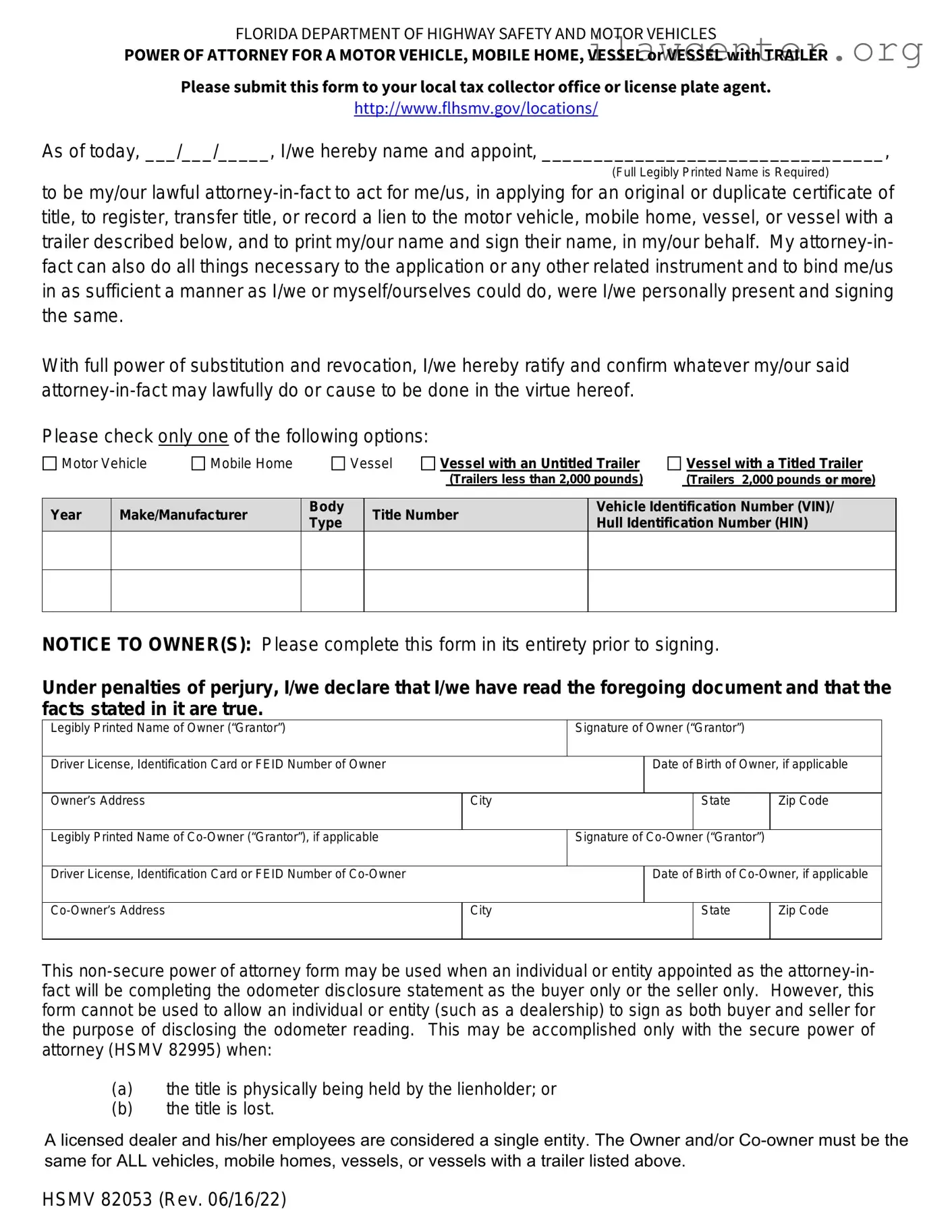
FLORIDA DEPARTMENT OF HIGHWAY SAFETY AND MOTOR VEHICLES
POWER OF ATTORNEY FOR A MOTOR VEHICLE, MOBILE HOME, VESSEL or VESSEL with TRAILER
HSMV 82053 (Rev. 06/16/22)
Please submit this form to your local tax collector office or license plate agent.
http://www.flhsmv.gov/locations/
As of today, ___/___/_____, I/we hereby name and appoint, _________________________________,
(Full Legibly Printed Name is Required)
to be my/our lawful attorney-in-fact to act for me/us, in applying for an original or duplicate certificate of
title, to register, transfer title, or record a lien to the motor vehicle, mobile home, vessel, or vessel with a
trailer described below, and to print my/our name and sign their name, in my/our behalf. My attorney-in-
fact can also do all things necessary to the application or any other related instrument and to bind me/us
in as sufficient a manner as I/we or myself/ourselves could do, were I/we personally present and signing
the same.
With full power of substitution and revocation, I/we hereby ratify and confirm whatever my/our said
attorney-in-fact may lawfully do or cause to be done in the virtue hereof.
Please check only one of the following options:
Motor Vehicle
Mobile Home
Vessel
Vessel with an Untitled Trailer
(Trailers less than 2,000 pounds)
Vessel with a Titled Trailer
(Trailers 2,000 pounds or more)
Year Make/Manufacturer
Body
Type
Title Number
Vehicle Identification Number (VIN)/
Hull Identification Number (HIN)
NOTICE TO OWNER(S): Please complete this form in its entirety prior to signing.
Under penalties of perjury, I/we declare that I/we have read the foregoing document and that the
facts stated in it are true.
Legibly Printed Name of Owner (“Grantor”)
Signature of Owner (“Grantor”)
Date of Birth of Owner, if applicable
Owner’s Address
City
State
Zip Code
Legibly Printed Name of Co-Owner (“Grantor”), if applicable
Signature of Co-Owner (“Grantor”)
Date of Birth of Co-Owner, if applicable
Co-Owner’s Address
City
State
Zip Code
This non-secure power of attorney form may be used when an individual or entity appointed as the attorney-in-
fact will be completing the odometer disclosure statement as the buyer only or the seller only. However, this
form cannot be used to allow an individual or entity (such as a dealership) to sign as both buyer and seller for
the purpose of disclosing the odometer reading. This may be accomplished only with the secure power of
attorney (HSMV 82995) when:
(
a)
t
he title is physically being held by the lienholder; or
(b) the title is lost.
A licensed dealer and his/her employees are cons
idered a single entity. The Owner and/or Co-owner must be the
same for ALL vehicles, mobile homes, vessels, or vessels with a trailer listed above.

File Properties

Fact Name Description
Form Title Florida Vehicle Power of Attorney Form 82053
Purpose This form allows an individual to designate another person to act on their behalf regarding vehicle transactions.
Governing Law The form is governed by Florida Statutes, specifically Chapter 709, which covers powers of attorney.
Signatories Both the principal (the person granting authority) and the agent (the person receiving authority) must sign the form.
Notarization The form requires notarization to be valid, ensuring that the signatures are authentic and voluntary.
Vehicle Information Specific details about the vehicle, such as the VIN (Vehicle Identification Number), must be included in the form.
Duration of Authority The authority granted can be limited to a specific transaction or can be ongoing, depending on the principal's wishes.
Revocation The principal has the right to revoke the power of attorney at any time, provided that the revocation is documented.

Instructions on Utilizing Florida Vehicle POA form 82053

Once you have gathered all necessary information, it’s time to fill out the Florida Vehicle POA form 82053. Completing this form accurately is crucial to ensure that the designated person can act on your behalf regarding vehicle-related matters. Follow the steps below to navigate the process smoothly.

  1. Begin by downloading the Florida Vehicle POA form 82053 from the official Florida Department of Highway Safety and Motor Vehicles website or obtain a physical copy from a local office.
  2. In the top section, enter your full name as the principal. This is the person granting the power of attorney.
  3. Next, provide your address, including the city, state, and zip code.
  4. Identify the person you are granting power of attorney to by filling in their full name in the designated area.
  5. Include the address of the agent, ensuring it’s complete with city, state, and zip code.
  6. Clearly specify the vehicle details by entering the Vehicle Identification Number (VIN), make, model, and year of the vehicle.
  7. Indicate the specific powers you are granting to the agent. This may include the ability to sell, transfer, or register the vehicle.
  8. Sign and date the form at the bottom. Make sure to sign as the principal.
  9. Have the signature notarized. This step is essential for the form to be legally valid.
  10. Keep a copy of the completed form for your records.

After filling out the form, it’s important to submit it to the appropriate authorities or keep it accessible for your agent to use when necessary. Ensure that your agent understands their responsibilities and has all required documents to act on your behalf.

Important Facts about Florida Vehicle POA form 82053

What is the Florida Vehicle POA Form 82053?

The Florida Vehicle Power of Attorney (POA) Form 82053 allows an individual to authorize another person to act on their behalf regarding vehicle-related matters. This can include signing documents for vehicle registration, title transfers, and other transactions related to the vehicle. It is a useful tool for those who may be unable to handle these tasks themselves due to various reasons, such as being out of state or having health issues.

Who can be designated as an agent in the POA form?

The agent can be any person you trust to handle your vehicle affairs. This could be a family member, friend, or a professional, such as an attorney. It is important to choose someone responsible and reliable, as they will have the authority to make decisions and sign documents on your behalf regarding your vehicle.

How do I complete the Florida Vehicle POA Form 82053?

To complete the form, you will need to provide your information, including your name and address, as well as the details of the vehicle involved, such as the make, model, and VIN. You must also include the name and address of the person you are appointing as your agent. After filling out the form, both you and the agent must sign it. It is advisable to have the signatures notarized to ensure its validity, although notarization is not always required.

Where do I submit the completed POA form?

Once the Florida Vehicle POA Form 82053 is completed and signed, it should be submitted to the appropriate agency handling vehicle registrations or titles. This is typically the Florida Department of Highway Safety and Motor Vehicles or a local tax collector's office. Make sure to keep a copy for your records, and confirm any additional requirements that may apply in your specific county.

Common mistakes

Filling out the Florida Vehicle Power of Attorney (POA) form 82053 can be a straightforward process, but many individuals make common mistakes that can lead to delays or complications. One frequent error is failing to provide complete information. Each section of the form requires specific details about the vehicle and the person granting the power of attorney. Omitting even a small piece of information can render the form invalid.

Another common mistake is not signing the form correctly. The signature must match the name as it appears on the vehicle title. If there are discrepancies, the form may be rejected. Additionally, some people forget to date their signature, which is essential for the form's validity. Without a date, it can create confusion regarding when the authority was granted.

Inaccurate vehicle information is also a significant issue. The Vehicle Identification Number (VIN) and the make and model of the car must be correct. Errors here can lead to complications when trying to transfer ownership or conduct other transactions related to the vehicle. Double-checking this information can save time and prevent headaches down the road.

Many individuals overlook the need for a witness or notary. Depending on the situation, the Florida Vehicle POA may require a witness signature or notarization to be legally binding. Failing to include this step can invalidate the entire document. It’s crucial to ensure that all necessary signatures are obtained before submitting the form.

People often neglect to check the expiration date of the power of attorney. The POA may have a limited duration, and if it expires before it’s used, it will not be effective. Understanding the time frame is essential to ensure that the authority granted remains valid for the intended purpose.

Another mistake is not keeping copies of the completed form. Once the POA is filled out and signed, it’s wise to make copies for personal records. This practice can be beneficial if there are any disputes or if the original form gets lost. Having a backup can provide peace of mind.

Some individuals also fail to read the instructions carefully. Each section of the form has specific requirements, and overlooking these can lead to mistakes. Taking the time to read and understand the instructions can prevent many common errors.

People might also make the mistake of assuming that the POA is only necessary for selling a vehicle. In reality, it can be used for various purposes, including registration and title transfers. Understanding the full scope of the POA can help individuals utilize it effectively.

Finally, not consulting with a legal professional can be a significant oversight. While the form may seem simple, there can be nuances that vary based on individual circumstances. Seeking guidance can help ensure that everything is filled out correctly and that all legal requirements are met.

Documents used along the form

The Florida Vehicle Power of Attorney (POA) form 82053 is a crucial document for those who need to delegate authority for vehicle-related matters. However, it is often used in conjunction with other forms and documents that facilitate various transactions and legal processes related to vehicle ownership and registration. Below is a list of commonly associated documents that may be required alongside the Florida Vehicle POA form.

  • Florida Vehicle Registration Application (Form HSMV 82040): This form is used to apply for the registration of a vehicle in Florida. It includes details about the vehicle, the owner, and any applicable fees.
  • Title Application (Form HSMV 82101): When transferring ownership of a vehicle, this form is necessary. It documents the details of the vehicle title transfer and ensures that the new owner is officially recognized.
  • Bill of Sale: A bill of sale serves as a legal document that records the sale of a vehicle. It includes information about the buyer, seller, vehicle details, and the sale price, providing proof of ownership transfer.
  • Notice of Sale (Form HSMV 82050): This form notifies the Florida Department of Highway Safety and Motor Vehicles of a vehicle sale. It protects the seller from liability for the vehicle after the sale is completed.
  • Application for Duplicate Title (Form HSMV 82101): If a vehicle title is lost or damaged, this form is used to apply for a duplicate title. It ensures that the owner can obtain a new title without having to go through the entire title transfer process.
  • Odometer Disclosure Statement: This document is often required during the sale of a vehicle. It verifies the mileage on the vehicle at the time of sale, helping to prevent fraud related to odometer tampering.

Utilizing the Florida Vehicle POA form 82053 alongside these documents can streamline the process of vehicle ownership transfer and registration. Being prepared with the necessary paperwork ensures that transactions are conducted smoothly and legally, providing peace of mind for all parties involved.

Similar forms

The Florida Vehicle POA form 82053 allows an individual to designate another person to handle specific vehicle-related tasks on their behalf. Several other documents serve similar purposes in granting authority or managing responsibilities. Here are seven documents that share similarities with the Florida Vehicle POA form:

  • General Power of Attorney: This document allows one person to act on behalf of another in various legal matters, including financial and property transactions.
  • Limited Power of Attorney: Similar to the general version, this document restricts the authority granted to specific tasks or timeframes, such as managing a single property or financial account.
  • Medical Power of Attorney: This form designates someone to make healthcare decisions for another person if they become unable to do so themselves.
  • Durable Power of Attorney: This document remains effective even if the person granting it becomes incapacitated, allowing the agent to continue managing their affairs.
  • Vehicle Title Transfer Form: This form is used to transfer ownership of a vehicle from one party to another, often requiring the signature of the seller.
  • Release of Liability Form: This document can protect a seller from future claims related to a vehicle after it has been sold or transferred.
  • Bill of Sale: This document serves as proof of the sale of a vehicle, detailing the transaction and the parties involved.

Dos and Don'ts

When filling out the Florida Vehicle Power of Attorney (POA) form 82053, it’s essential to approach the task with care. This document allows someone to act on your behalf regarding vehicle matters. Here’s a list of things you should and shouldn’t do to ensure the process goes smoothly.

  • Do read the instructions carefully before starting.
  • Do provide accurate information about the vehicle and the parties involved.
  • Do sign the form in the presence of a notary public.
  • Do keep a copy of the completed form for your records.
  • Do ensure the person you are granting power to is trustworthy.
  • Don’t leave any sections blank; all fields must be filled out.
  • Don’t use white-out or erase any mistakes; instead, cross out errors and initial them.
  • Don’t forget to date the form when signing.
  • Don’t assume the notary will fill in any missing information for you.
  • Don’t give the form to someone who may misuse the authority granted.

Misconceptions

The Florida Vehicle Power of Attorney (POA) form 82053 is a useful document for vehicle owners who wish to delegate authority to another individual. However, several misconceptions about this form can lead to confusion. Below are six common misconceptions, along with clarifications to help better understand the form.

  • Misconception 1: The POA form is only for selling vehicles.
  • Many people believe that the POA form can only be used for selling a vehicle. In reality, it can authorize someone to perform various tasks, such as registering a vehicle, obtaining a title, or handling other related transactions.

  • Misconception 2: The form must be notarized to be valid.
  • While notarization can add an extra layer of authenticity, the Florida Vehicle POA form does not require notarization to be legally binding. However, some institutions may request it for their own policies.

  • Misconception 3: Anyone can be designated as an agent.
  • It is a common belief that any person can be designated as an agent. However, the individual must be competent and capable of handling the responsibilities outlined in the POA. This often means they should be an adult and trustworthy.

  • Misconception 4: The POA form is permanent.
  • Some individuals assume that once the POA is signed, it remains in effect indefinitely. In fact, the principal can revoke the POA at any time, provided they are of sound mind and able to do so.

  • Misconception 5: The form can be used for multiple vehicles without modification.
  • It is a misconception that a single POA form can cover multiple vehicles. Each vehicle typically requires its own POA form to ensure clarity and proper authorization.

  • Misconception 6: The POA agent can make decisions unrelated to the vehicle.
  • Some may think that the agent has broad authority beyond the scope of vehicle-related matters. In truth, the authority granted is limited to the specific tasks outlined in the POA form, which should be clearly defined.

Key takeaways

When dealing with the Florida Vehicle Power of Attorney (POA) form 82053, it is important to understand its purpose and how to fill it out correctly. Here are some key takeaways to keep in mind:

  • Purpose of the Form: The Florida Vehicle POA form allows an individual (the principal) to designate another person (the agent) to handle vehicle-related transactions on their behalf.
  • Eligibility: Anyone who owns a vehicle in Florida can use this form. It is particularly useful for those who may be unable to attend to vehicle matters due to distance, health issues, or other reasons.
  • Information Required: To complete the form, you will need to provide specific details, including the vehicle's make, model, year, and VIN (Vehicle Identification Number), as well as the names and signatures of both the principal and the agent.
  • Notarization: The form must be signed in the presence of a notary public to be legally binding. This step is crucial for ensuring that the document is valid and can be accepted by authorities.
  • Duration of Authority: The POA can be set for a specific duration or remain in effect until revoked. It is important to clearly state the intended timeframe to avoid any confusion later.
  • Revocation: If you decide to revoke the POA, you must do so in writing. Notify the agent and any relevant institutions to ensure that your wishes are respected.

By following these guidelines, you can effectively utilize the Florida Vehicle POA form 82053 to manage vehicle-related tasks smoothly and efficiently.