
IRS 940 PDF Template

IRS 940 PDF Template

The IRS Form 940 is an annual tax form used by employers to report their Federal Unemployment Tax Act (FUTA) liability. This form helps the IRS track the unemployment taxes that businesses pay to fund unemployment benefits. Understanding how to properly fill out and submit this form is essential for compliance, so take the next step and get started by clicking the button below.

Article Guide

The IRS 940 form plays a crucial role in the annual reporting of federal unemployment taxes for employers across the United States. This form is used to report and calculate the Federal Unemployment Tax Act (FUTA) tax, which helps fund unemployment compensation programs. Employers must file the 940 form if they paid $1,500 or more in wages in any calendar quarter or had at least one employee for some part of a day in any 20 or more weeks during the year. Understanding the nuances of this form is essential for compliance, as it outlines the tax obligations and provides details on any credits that may apply, such as the credit for state unemployment taxes paid. Furthermore, the 940 form must be submitted annually, typically by January 31 of the following year, ensuring that employers remain accountable for their contributions to the unemployment system. By accurately completing and filing the form, businesses can avoid penalties and ensure they are fulfilling their responsibilities to both employees and the federal government.

IRS 940 Preview

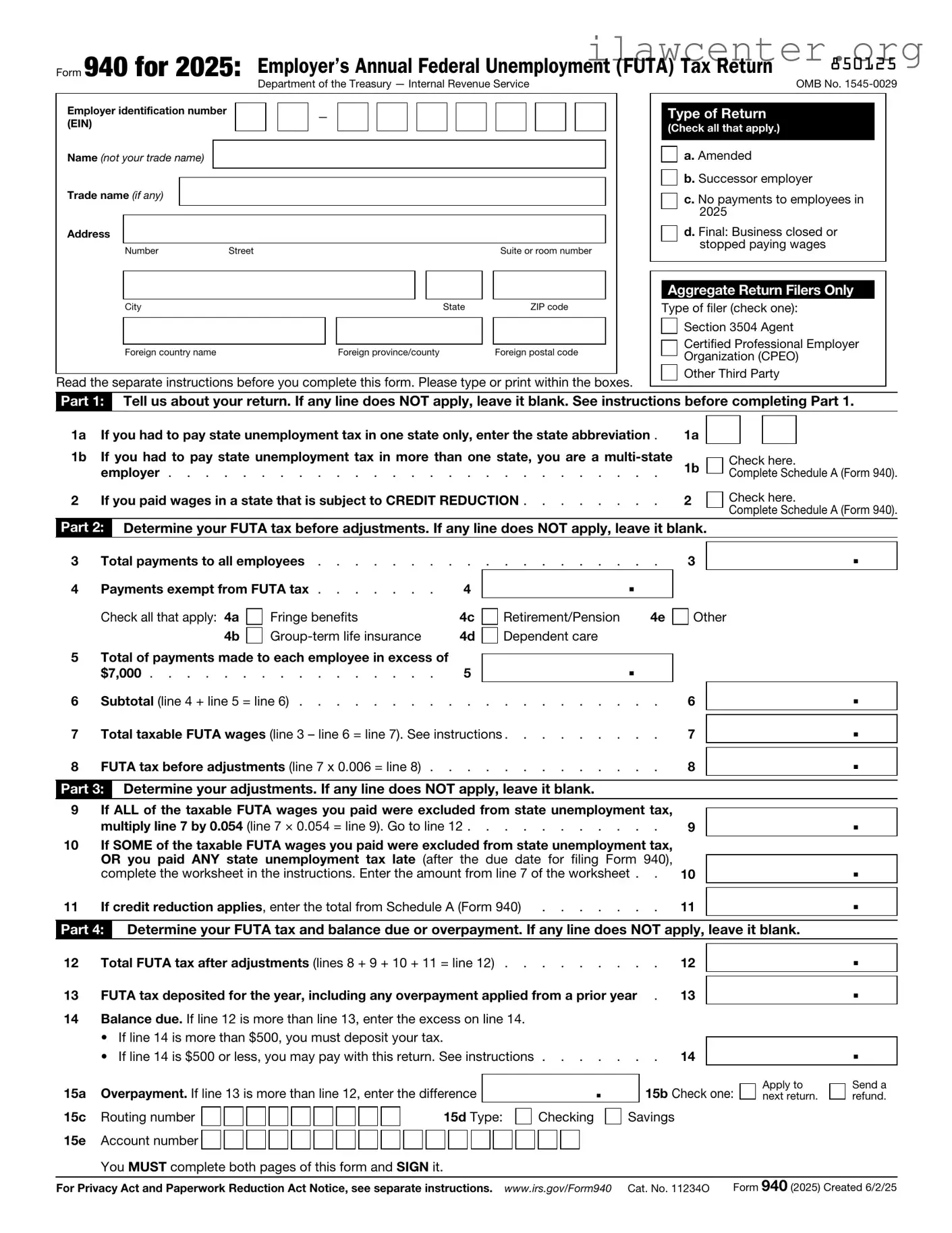
Form 940 for 2025: Employer’s Annual Federal Unemployment (FUTA) Tax Return

850125


Department of the Treasury — Internal Revenue Service

OMB No. 1545-0029

Employer identification number


(EIN)


Name (not your trade name)


Trade name (if any)


Address


Number

Street


Suite or room number


City


State


ZIP code


Foreign country name


Foreign province/county


Foreign postal code

Read the separate instructions before you complete this form. Please type or print within the boxes.

Type of Return (Check all that apply.)

a. Amended

b. Successor employer

c. No payments to employees in 2025

d. Final: Business closed or stopped paying wages

Aggregate Return Filers Only

Type of filer (check one): Section 3504 Agent

Certified Professional Employer Organization (CPEO)

Other Third Party

Part 1: Tell us about your return. If any line does NOT apply, leave it blank. See instructions before completing Part 1.

1a

If you had to pay state unemployment tax in one state only, enter the state abbreviation .

1b

If you had to pay state unemployment tax in more than one state, you are a multi-state


employer

2

If you paid wages in a state that is subject to CREDIT REDUCTION

1a

1b

2

Check here.

Complete Schedule A (Form 940).

Check here.

Complete Schedule A (Form 940).

Part 2: Determine your FUTA tax before adjustments. If any line does NOT apply, leave it blank.

3

Total payments to all employees

4

Payments exempt from FUTA tax

4


Check all that apply: 4a

Fringe benefits

4c


4b

Group-term life insurance

4d

5 Total of payments made to each employee in excess of

$7,000 . . . . . . . . . . . . . . . . 5

6 Subtotal (line 4 + line 5 = line 6) . . . . . . . . . .

. . . . . . . . .. .

Retirement/Pension 4e Dependent care

.

. . . . . . . . . .

3

Other

6

.

.

7 Total taxable FUTA wages (line 3 – line 6 = line 7). See instructions . . . . . . . . .

8 FUTA tax before adjustments (line 7 x 0.006 = line 8) . . . . . . . . . . . . .

7

8

.

.

Part 3: Determine your adjustments. If any line does NOT apply, leave it blank.

9

If ALL of the taxable FUTA wages you paid were excluded from state unemployment tax,


.


multiply line 7 by 0.054 (line 7 × 0.054 = line 9). Go to line 12

9

10

If SOME of the taxable FUTA wages you paid were excluded from state unemployment tax,


OR you paid ANY state unemployment tax late (after the due date for filing Form 940),


.


complete the worksheet in the instructions. Enter the amount from line 7 of the worksheet . .

10


11

If credit reduction applies, enter the total from Schedule A (Form 940)

11

.


Part 4: Determine your FUTA tax and balance due or overpayment. If any line does NOT apply, leave it blank.

12

Total FUTA tax after adjustments (lines 8 + 9 + 10 + 11 = line 12)

12

.


13

FUTA tax deposited for the year, including any overpayment applied from a prior year .

13

.

14Balance due. If line 12 is more than line 13, enter the excess on line 14.


• If line 14 is more than $500, you must deposit your tax.


14


.


• If line 14 is $500 or less, you may pay with this return. See instructions . . . .

. . .


15a

Overpayment. If line 13 is more than line 12, enter the difference


.


15b

Check one:

Apply to

Send a


next return.

refund.

15c

Routing number


15d Type:


Checking

Savings


15e


Account number


You MUST complete both pages of this form and SIGN it.


For Privacy Act and Paperwork Reduction Act Notice, see separate instructions. www.irs.gov/Form940 Cat. No. 11234O

Form 940 (2025) Created 6/2/25

850212

Name (not your trade name)

Employer identification number (EIN)


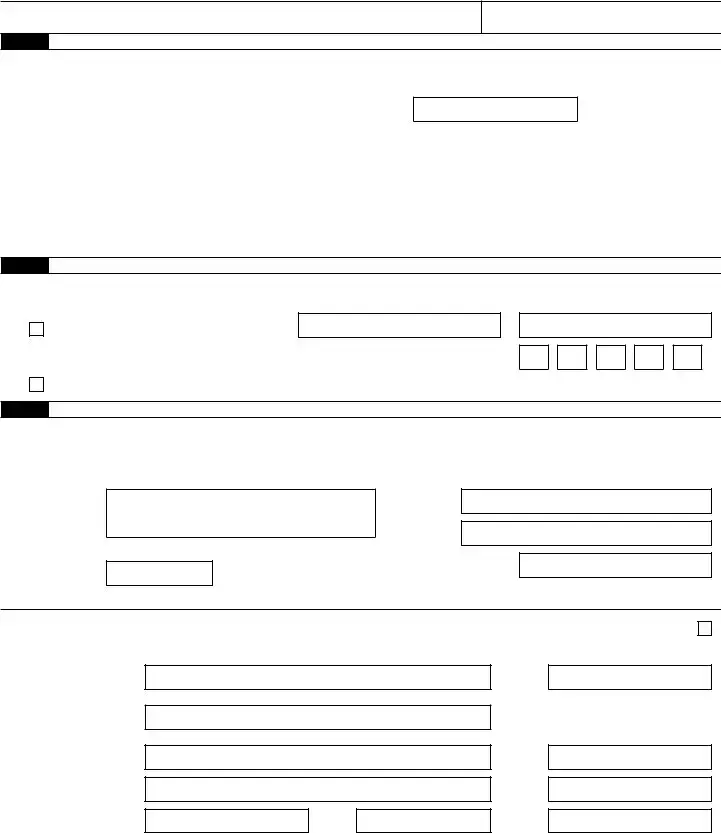
Part 5: Report your FUTA tax liability by quarter only if line 12 is more than $500. If not, go to Part 6.

16Report the amount of your FUTA tax liability for each quarter; do NOT enter the amount you deposited. If you had no liability for

a quarter, leave the line blank.

16a 1st quarter (January 1 – March 31) . . . . . . . . . 16a.


16b

2nd quarter (April 1 – June 30)

16b

.


16c

3rd quarter (July 1 – September 30)

16c

.


16d

4th quarter (October 1 – December 31)

16d

.


17 Total tax liability for the year (lines 16a + 16b + 16c + 16d = line 17)

17

.

Total must equal line 12.

Part 6: May we speak with your third-party designee?

Do you want to allow an employee, a paid tax preparer, or another person to discuss this return with the IRS? See the instructions for details.

Yes. Designee’s name and phone number

Select a 5-digit personal identification number (PIN) to use when talking to the IRS.

No.

Part 7: Sign here. You MUST complete both pages of this form and SIGN it.

Under penalties of perjury, I declare that I have examined this return, including accompanying schedules and statements, and to the best of my knowledge and belief, it is true, correct, and complete, and that no part of any payment made to a state unemployment fund claimed as a credit was, or is to be, deducted from the payments made to employees. Declaration of preparer (other than taxpayer) is based on all information of which preparer has any knowledge.

Sign your name here

Date

/ /

Print your name here

Print your title here

Best daytime phone

Paid Preparer Use Only

Preparer’s name

Preparer’s signature

Firm’s name (or yours if self-employed)

Address

City

State

Check if you are self-employed

PTIN

Date

/

/

EIN

Phone

ZIP code

Page 2

Form 940 (2025)

Form 940-V, Payment Voucher

Purpose of Form

Complete Form 940-V if you’re paying your balance due on Form 940 by check or money order. We will use the completed voucher to credit your payment more promptly and accurately, and to improve our service to you.

Making Payments With Form 940

To avoid a penalty, make your payment with your 2025 Form 940 only if your FUTA tax for the fourth quarter (plus any undeposited amounts from earlier quarters) is $500 or less. If your total FUTA tax after adjustments (Form 940, line 12) is more than $500, you must make deposits by electronic funds transfer (EFT). An EFT can be made using the Electronic Federal Tax Payment System (EFTPS), IRS Direct Pay, or your IRS business tax account. Don’t use Form 940-V to make federal tax deposits. You can also pay your balance due by EFT instead of sending Form 940-V. If you pay your balance due by EFT, file your return using the Without a payment address under Where Do You File? in the Instructions for Form 940; don’t file Form 940-V. For more information about EFTPS or to enroll in EFTPS, go to www.eftps.gov. For more information about IRS Direct Pay, go to www.irs.gov/DirectPay. For more information about making an EFT through your IRS business tax account, go to www.irs.gov/BusinessAccount. See When Must You Deposit Your FUTA Tax? in the Instructions for Form 940. Also see sections 11 and 14 of Pub. 15 for more information about deposits.

Use Form 940-V if you’re paying your balance ! due on Form 940 by check or money order. CAUTION However, if you pay an amount with Form 940

that should’ve been deposited, you may be subject to a penalty. See Deposit Penalties in section 11 of Pub. 15.

Specific Instructions

Box 1—Employer identification number (EIN). If you don’t have an EIN, you may apply for one online by going to www.irs.gov/EIN. You may also apply for an EIN by faxing or mailing Form SS-4 to the IRS. If you haven’t received your EIN by the due date of Form 940, write “Applied For” and the date you applied in this

entry space.

Box 2—Amount paid. Enter the amount paid with Form 940.

Box 3—Name and address. Enter your name and address as shown on Form 940.

Enclose your check or money order made payable to “United States Treasury.” Be sure to enter your EIN, “Form 940,” and “2025” on your check or money order. Don’t send cash. Don’t staple Form 940-V or your payment to Form 940 (or to each other).

Detach Form 940-V and send it with your payment and Form 940 to the address provided in the Instructions for Form 940.

Note: You must also complete the entity information above Part 1 on Form 940.

Detach Here and Mail With Your Payment and Form 940.

Form 940-V

Department of the Treasury

Internal Revenue Service

1Enter your employer identification number (EIN).

Payment Voucher

Don’t staple or attach this voucher to your payment.

2Enter the amount of your payment.

Make your check or money order payable to “United States Treasury.”

OMB No. 1545-0029

2025

Dollars

Cents


3Enter your business name (individual name if sole proprietor). Enter your address.

Enter your city, state, and ZIP code; or your city, foreign country name, foreign province/county, and foreign postal code.

File Properties

Fact Name Description
Purpose The IRS Form 940 is used to report annual Federal Unemployment Tax Act (FUTA) taxes.
Filing Frequency This form is filed annually, typically due by January 31 of the following year.
Employer Eligibility Employers who pay wages of $1,500 or more in any calendar quarter must file this form.
Tax Rate The standard FUTA tax rate is 6.0% on the first $7,000 of each employee's wages.
State Credits Employers may receive a credit of up to 5.4% for state unemployment taxes paid.
Form Variants While Form 940 is federal, some states have their own unemployment tax forms that may need to be filed.
Record Keeping Employers must keep records of all employee wages and taxes paid for at least four years.
Penalties Failure to file Form 940 on time may result in penalties and interest on unpaid taxes.
State-Specific Forms States like California and New York have their own unemployment tax forms governed by state labor laws.
Electronic Filing Form 940 can be filed electronically through the IRS e-file system, simplifying the process.

Instructions on Utilizing IRS 940

Completing the IRS 940 form is a crucial step for employers who need to report their annual Federal Unemployment Tax Act (FUTA) tax. By accurately filling out this form, you ensure compliance with federal tax regulations. Follow these steps to fill out the form correctly.

  1. Gather necessary information. Collect your business details, including your Employer Identification Number (EIN), business name, and address.
  2. Download the IRS 940 form from the IRS website or obtain a physical copy.
  3. Begin with Part 1 of the form. Enter your business name and address as it appears on your tax records.
  4. Fill in your EIN in the designated box. This number is essential for identifying your business with the IRS.
  5. In Part 1, indicate whether you are a seasonal employer by checking the appropriate box.
  6. Move to Part 2. Report the total payments made to employees during the year. This includes wages and any other compensation subject to FUTA tax.
  7. Calculate the FUTA tax owed. Use the applicable tax rate on the total payments reported in Part 2.
  8. Complete Part 3 if you had any adjustments or credits to report. This could include state unemployment tax credits.
  9. Review the form for accuracy. Ensure that all numbers are correct and that you have signed and dated the form.
  10. Submit the completed form. You can file it electronically or mail it to the appropriate IRS address based on your location.

After submitting the form, keep a copy for your records. This documentation will be important for future reference and potential audits. Ensure you stay informed about any updates to tax laws that may affect your filing requirements in the future.

Important Facts about IRS 940

What is the IRS 940 form?

The IRS 940 form is an annual report used by employers to report their Federal Unemployment Tax Act (FUTA) tax liability. This tax helps fund unemployment benefits for workers who lose their jobs. Employers must file this form if they meet certain criteria regarding employee wages and the number of employees.

Who needs to file the IRS 940 form?

Employers who paid $1,500 or more in wages in any calendar quarter during the year must file the IRS 940 form. Additionally, if you had one or more employees for any part of a day in 20 or more weeks during the year, you are required to file.

When is the IRS 940 form due?

The IRS 940 form is due on January 31 of the following year. If you deposited all your FUTA tax on time, you may have until February 10 to file the form. Always check for any updates or changes to deadlines each tax year.

How do I complete the IRS 940 form?

To complete the IRS 940 form, gather your payroll records for the year. You will need to calculate your total FUTA tax based on the wages you paid. Follow the instructions provided with the form to fill out each section accurately. Make sure to double-check your calculations.

Can I e-file the IRS 940 form?

Yes, you can e-file the IRS 940 form. The IRS encourages electronic filing for faster processing and fewer errors. You can use approved software or a tax professional to submit your form electronically.

What happens if I don’t file the IRS 940 form?

If you fail to file the IRS 940 form, you may face penalties and interest on any unpaid FUTA tax. The IRS can impose fines for late filing, which can accumulate over time. It’s essential to file on time to avoid these consequences.

Can I amend my IRS 940 form?

Yes, if you discover an error after filing your IRS 940 form, you can amend it. To do this, complete a new form with the correct information and mark it as an amended return. Submit it to the IRS as soon as you identify the mistake.

Where do I send my completed IRS 940 form?

The mailing address for your completed IRS 940 form depends on your location and whether you are including a payment. Check the IRS website for the correct address based on your specific circumstances.

What if I have questions about the IRS 940 form?

If you have questions about the IRS 940 form, you can contact the IRS directly or consult a tax professional. The IRS also provides resources and guidance on their website to help you understand the filing process.

Is there a state unemployment tax I need to be aware of?

Yes, in addition to the federal unemployment tax reported on the IRS 940 form, many states also impose their own unemployment taxes. Check with your state’s tax agency for specific requirements and filing deadlines.

Common mistakes

Filling out the IRS 940 form can be a daunting task, and many people make common mistakes that can lead to delays or issues with their tax filings. One frequent error is incorrect reporting of wages. Employers must accurately report the total wages paid to employees during the year. If the reported amount is too high or too low, it can trigger an audit or result in penalties.

Another common mistake involves neglecting to check for state unemployment taxes. The IRS 940 form is specifically for federal unemployment tax, but employers must also consider their state obligations. Failing to account for these can lead to discrepancies and potential fines from state agencies.

Many individuals also overlook the importance of double-checking the EIN, or Employer Identification Number. An incorrect EIN can cause significant issues, including delays in processing the form and potential penalties. Ensuring that the EIN matches what the IRS has on file is crucial for a smooth filing process.

Additionally, missing deadlines is a frequent pitfall. The IRS has strict timelines for submitting the 940 form, and failing to meet these deadlines can result in penalties. Employers should be aware of the due dates and plan accordingly to avoid last-minute complications.

Lastly, some individuals fail to keep adequate records of their payroll and tax payments. Good record-keeping is essential for accurately completing the IRS 940 form. Without proper documentation, it becomes challenging to verify the amounts reported, which can lead to errors and potential audits.

Documents used along the form

The IRS Form 940 is used by employers to report annual Federal Unemployment Tax Act (FUTA) taxes. It is essential for businesses to ensure compliance with federal regulations regarding unemployment taxes. Along with Form 940, several other forms and documents may be required to provide a complete picture of an employer's tax obligations. Below is a list of these forms and a brief description of each.

  • IRS Form 941: This form is used to report income taxes, Social Security tax, and Medicare tax withheld from employee wages. Employers file this quarterly to ensure they are meeting their payroll tax obligations.
  • IRS Form 944: Smaller employers may use this form to report annual payroll taxes instead of filing quarterly. It simplifies the process for those with lower payroll tax liabilities.
  • IRS Form W-2: Employers must provide this form to their employees at the end of the year. It summarizes the employee's earnings and the taxes withheld during the year.
  • IRS Form W-3: This is a summary form that accompanies Form W-2 when it is submitted to the IRS. It provides a total of all W-2 forms issued by the employer for the year.
  • IRS Form 1099: Used to report various types of income other than wages, salaries, and tips. It is especially important for independent contractors and freelancers.
  • State Unemployment Tax Forms: Each state has its own forms for reporting unemployment taxes. Employers must be aware of their state's requirements to ensure compliance.
  • Payroll Records: While not a formal IRS document, maintaining accurate payroll records is crucial. These records support all tax filings and can be audited by the IRS.
  • Form 940 Schedule A: This schedule is used by employers who have employees in multiple states. It helps calculate the state unemployment tax credit.
  • Form 720: This form is used for reporting and paying federal excise taxes, which may be relevant for certain employers depending on their business activities.

Understanding these forms and documents is vital for employers to stay compliant with tax regulations. Proper filing and record-keeping can help avoid penalties and ensure that employees receive the benefits they are entitled to. Each form serves a unique purpose, contributing to the overall management of payroll and tax responsibilities.

Similar forms

The IRS Form 940 is used for reporting annual Federal Unemployment Tax Act (FUTA) taxes. Several other forms serve similar purposes in terms of tax reporting and compliance. Below is a list of nine documents that share similarities with the IRS Form 940:

  • IRS Form 941: This form is filed quarterly to report income taxes, Social Security tax, and Medicare tax withheld from employee wages. Like Form 940, it is essential for compliance with federal tax regulations.
  • IRS Form 944: Designed for smaller employers, this annual form allows them to report and pay payroll taxes. It simplifies the process for those who owe less than $1,000 in payroll taxes annually.
  • IRS Form 945: This form is used to report withheld federal income tax from nonpayroll payments, such as pensions and annuities. It serves a similar purpose in tracking tax liabilities.
  • IRS Form W-2: Employers use this form to report wages paid to employees and taxes withheld. It is crucial for employees' tax filing and bears similarities in reporting obligations.
  • IRS Form W-3: This is a transmittal form that accompanies Form W-2 when filed with the Social Security Administration. It summarizes the total earnings and taxes withheld for all employees.
  • IRS Form 1099-MISC: Used to report various types of income other than wages, salaries, and tips. This form is similar in its purpose of informing the IRS about income paid to non-employees.
  • IRS Form 1096: This form serves as a summary of information returns, such as Forms 1099 and W-2, submitted to the IRS. It facilitates the reporting process for various types of income.
  • IRS Form 720: This form is used to report and pay federal excise taxes. While it covers different tax types, it shares the requirement for annual reporting.
  • IRS Form 8862: This form is for taxpayers who have previously claimed the Earned Income Tax Credit (EITC) but were denied. It is similar in that it requires documentation and compliance with tax regulations.

Dos and Don'ts

When filling out the IRS 940 form, it is important to follow specific guidelines to ensure accuracy and compliance. Here are five things to consider:

  • Do double-check all information for accuracy before submission.
  • Don't forget to sign and date the form, as an unsigned form is considered invalid.
  • Do use the correct tax year for which you are filing.
  • Don't leave any required fields blank; provide all necessary information.
  • Do keep a copy of the completed form for your records.

Following these guidelines can help prevent delays and issues with your filing.

Misconceptions

The IRS Form 940 is an important document for employers, specifically related to federal unemployment tax. However, several misconceptions surround this form that can lead to confusion. Below is a list of common misunderstandings about the IRS 940 form, along with explanations to clarify each point.

  • Form 940 is only for large businesses. Many believe that only large employers need to file Form 940. In reality, any business that pays wages to employees and is subject to federal unemployment tax must file this form, regardless of size.
  • Form 940 is the same as Form 941. While both forms are related to employment taxes, they serve different purposes. Form 941 is used to report income taxes withheld from employee paychecks, while Form 940 focuses on the federal unemployment tax.
  • Filing Form 940 is optional. Some employers think that filing Form 940 is optional if they do not owe any unemployment tax. This is incorrect; filing is mandatory for all eligible employers, even if no tax is due.
  • Only employers with employees in multiple states need to file Form 940. This is a misconception. Employers with any employees, regardless of location, must file Form 940 if they meet the criteria for federal unemployment tax.
  • Form 940 can be filed at any time during the year. Employers may assume they can file Form 940 whenever it is convenient. However, the form must be filed annually by January 31 for the previous calendar year.
  • Form 940 is only for new businesses. Many think that only newly established businesses need to file this form. In truth, any business that meets the criteria must file, regardless of how long it has been operating.
  • There are no penalties for late filing of Form 940. Some employers believe that there are no consequences for filing late. In fact, the IRS imposes penalties for late filings, which can increase the amount owed.
  • Form 940 does not require any supporting documentation. Employers may think that submitting the form alone is sufficient. However, maintaining accurate records of employee wages and taxes is essential, as the IRS may request documentation to support the information provided.
  • Filing Form 940 guarantees that no unemployment tax will be owed. Lastly, some believe that submitting the form means they will not owe any taxes. The form is simply a reporting tool; whether taxes are owed depends on the employer's specific circumstances.

Understanding these misconceptions about the IRS Form 940 can help employers navigate their tax responsibilities more effectively. Clarity on these points can prevent unnecessary confusion and ensure compliance with federal regulations.

Key takeaways

The IRS 940 form is crucial for employers as it relates to federal unemployment tax (FUTA). Understanding how to fill it out correctly can prevent costly mistakes. Here are key takeaways to keep in mind:

  • Understand the Purpose: The form is used to report and pay federal unemployment taxes, which fund unemployment benefits for workers who lose their jobs.
  • Eligibility: Not all employers are required to file this form. Generally, if you paid $1,500 or more in wages in any calendar quarter, you must file.
  • Filing Deadline: The form is due annually by January 31 for the previous calendar year. If you deposited all FUTA tax owed on time, you have until February 10 to file.
  • Accurate Reporting: Ensure that you accurately report the total wages subject to FUTA tax. This includes most employee wages, but certain payments may be excluded.
  • Tax Rate: The standard FUTA tax rate is 6.0% on the first $7,000 of each employee's wages. However, most employers receive a credit of up to 5.4%, effectively lowering the rate.
  • State Unemployment Taxes: Be aware that payments made to state unemployment funds can affect your FUTA tax liability. These payments may qualify you for a credit.
  • Record Keeping: Maintain accurate records of employee wages and taxes paid. This documentation is essential for both filing and potential audits.
  • Amendments: If you discover an error after filing, you can amend your IRS 940 form using Form 940-X to correct the information.

By keeping these points in mind, employers can navigate the complexities of the IRS 940 form more effectively. Timely and accurate filing is essential to ensure compliance and avoid penalties.