Instructions on Utilizing IRS Schedule C 1040
Completing the IRS Schedule C (Form 1040) is an essential task for self-employed individuals, sole proprietors, and freelancers. This form allows you to report income and expenses related to your business activities. Following the steps outlined below will help ensure that you accurately fill out the form and prepare for the next steps in your tax filing process.
- Gather your business records, including income statements, receipts, and any relevant documentation of expenses.
- Obtain a copy of the IRS Schedule C form, which can be downloaded from the IRS website or obtained through tax software.
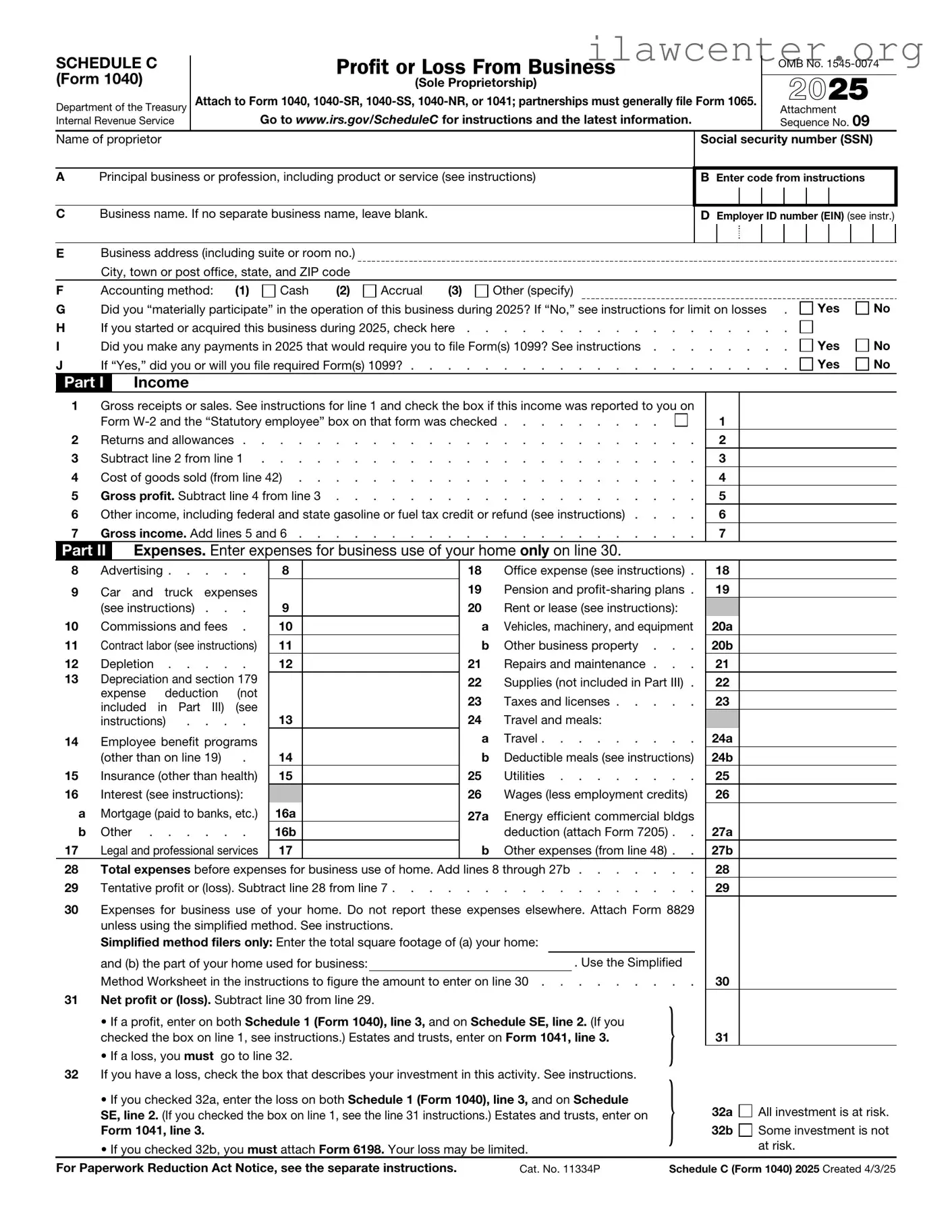
- At the top of the form, provide your name, Social Security number, and the name of your business if applicable.
- In Part I, report your gross income. This includes all revenue generated from your business activities. List the total amount on Line 1.
- Proceed to Part II to detail your business expenses. You will categorize these expenses based on the type of costs incurred, such as advertising, car and truck expenses, and rent or lease payments.
- Fill out each applicable line in Part II with the corresponding amounts for each category. Be thorough and ensure that your figures are accurate.
- After listing your expenses, calculate your total expenses and enter that amount on Line 28.
- Subtract your total expenses from your gross income to determine your net profit or loss. Enter this amount on Line 31.
- Complete any additional sections as required, such as information about your business vehicle or if you have a home office deduction.
- Review the entire form for accuracy, ensuring all information is correct and complete.
- Sign and date the form before submitting it with your federal tax return.