
IRS Schedule E 1040 PDF Template

IRS Schedule E 1040 PDF Template

The IRS Schedule E 1040 form is a tax document used by individuals to report income or loss from rental real estate, royalties, partnerships, S corporations, estates, trusts, and residual interests in REMICs. This form is essential for accurately calculating taxable income from various sources beyond traditional employment. To ensure compliance and maximize deductions, consider filling out the form by clicking the button below.

Article Guide

The IRS Schedule E (Form 1040) plays a crucial role for taxpayers who earn income from rental properties, partnerships, S corporations, estates, trusts, and certain royalties. This form allows individuals to report supplemental income and losses, providing a clear picture of their financial situation. By detailing income sources such as rental payments and distributions from partnerships, Schedule E ensures that all relevant earnings are accounted for during tax season. Additionally, it offers the opportunity to deduct expenses related to these income sources, including repairs, management fees, and depreciation. Understanding how to accurately complete this form is essential for maximizing deductions and minimizing tax liability. Whether you are a seasoned investor or a first-time landlord, navigating the intricacies of Schedule E can help you make informed financial decisions and maintain compliance with IRS regulations.

IRS Schedule E 1040 Preview

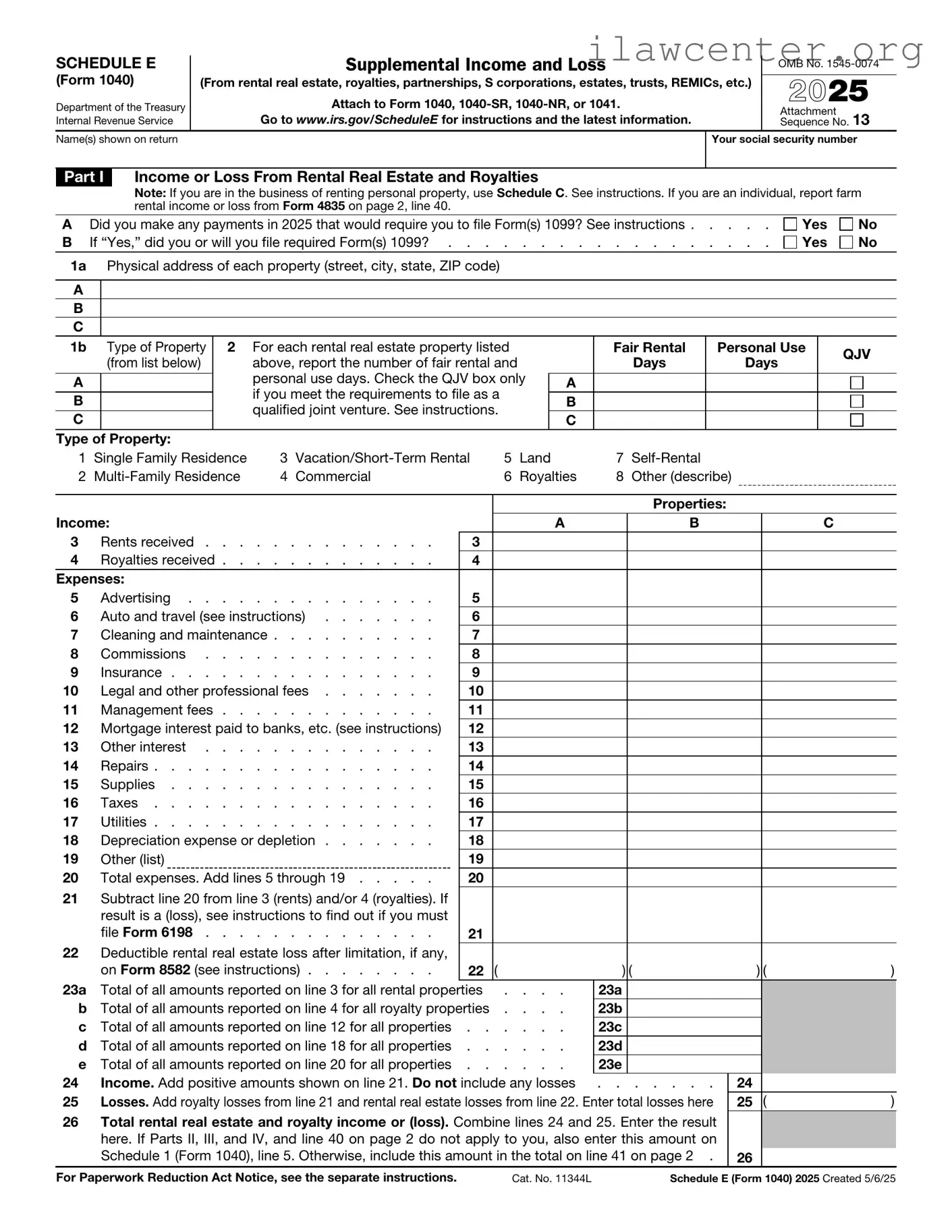
SCHEDULE E


Supplemental Income and Loss


OMB No. 1545-0074


(Form 1040)


(From rental real estate, royalties, partnerships, S corporations, estates, trusts, REMICs, etc.)


2025

Department of the Treasury


Attach to Form 1040, 1040-SR, 1040-NR, or 1041.


Internal Revenue Service


Go to www.irs.gov/ScheduleE for instructions and the latest information.


Attachment


13


Sequence No.

Name(s) shown on return


Your social security number


Part I


Income or Loss From Rental Real Estate and Royalties


Note: If you are in the business of renting personal property, use Schedule C. See instructions. If you are an individual, report farm


rental income or loss from Form 4835 on page 2, line 40.


A

Did you make any payments in 2025 that would require you to file Form(s) 1099? See instructions .

. . . .

Yes


No

B

If “Yes,” did you or will you file required Form(s) 1099? .

. . . . . . . . . . . . .

. . . .

Yes


No

1a Physical address of each property (street, city, state, ZIP code)


A


B


C


1b


Type of Property

2

For each rental real estate property listed


Fair Rental

Personal Use


QJV


(from list below)


above, report the number of fair rental and


Days

Days


personal use days. Check the QJV box only


A


A


if you meet the requirements to file as a


B


B


qualified joint venture. See instructions.


C


C


Type of Property:


1

Single Family Residence

3

Vacation/Short-Term Rental

5

Land


7

Self-Rental


2

Multi-Family Residence

4

Commercial


6

Royalties

8

Other (describe)


Properties:


Income:


A


B


C


3


Rents received

3


4


Royalties received

4


Expenses:


5


Advertising

5


6


Auto and travel (see instructions)

6


7


Cleaning and maintenance

7


8


Commissions

8


9


Insurance

9


10


Legal and other professional fees

10


11


Management fees

11


12


Mortgage interest paid to banks, etc. (see instructions)

12


13


Other interest

13


14


Repairs

14


15


Supplies

15


16


Taxes

16


17


Utilities

17


18


Depreciation expense or depletion

18


19


Other (list)


19


20


Total expenses. Add lines 5 through 19

20


21Subtract line 20 from line 3 (rents) and/or 4 (royalties). If result is a (loss), see instructions to find out if you must

file Form 6198

21

22Deductible rental real estate loss after limitation, if any,


on Form 8582 (see instructions)

22 (

) (


) (

)

23a

Total of all amounts reported on line 3 for all rental properties . . . .

23a


b

Total of all amounts reported on line 4 for all royalty properties . . . .

23b


c

Total of all amounts reported on line 12 for all properties

23c


d

Total of all amounts reported on line 18 for all properties

23d


e

Total of all amounts reported on line 20 for all properties

23e


24

Income. Add positive amounts shown on line 21. Do not include any losses

. . . . . . .

24


25

Losses. Add royalty losses from line 21 and rental real estate losses from line 22. Enter total losses here

25

(

)

26Total rental real estate and royalty income or (loss). Combine lines 24 and 25. Enter the result here. If Parts II, III, and IV, and line 40 on page 2 do not apply to you, also enter this amount on

Schedule 1 (Form 1040), line 5. Otherwise, include this amount in the total on line 41 on page 2 .

26

For Paperwork Reduction Act Notice, see the separate instructions.

Cat. No. 11344L

Schedule E (Form 1040) 2025 Created 5/6/25

Schedule E (Form 1040) 2025

Attachment Sequence No. 13

Page 2

Name(s) shown on return. Do not enter name and social security number if shown on other side.

Your social security number

Caution: The IRS compares amounts reported on your tax return with amounts shown on Schedule(s) K-1.

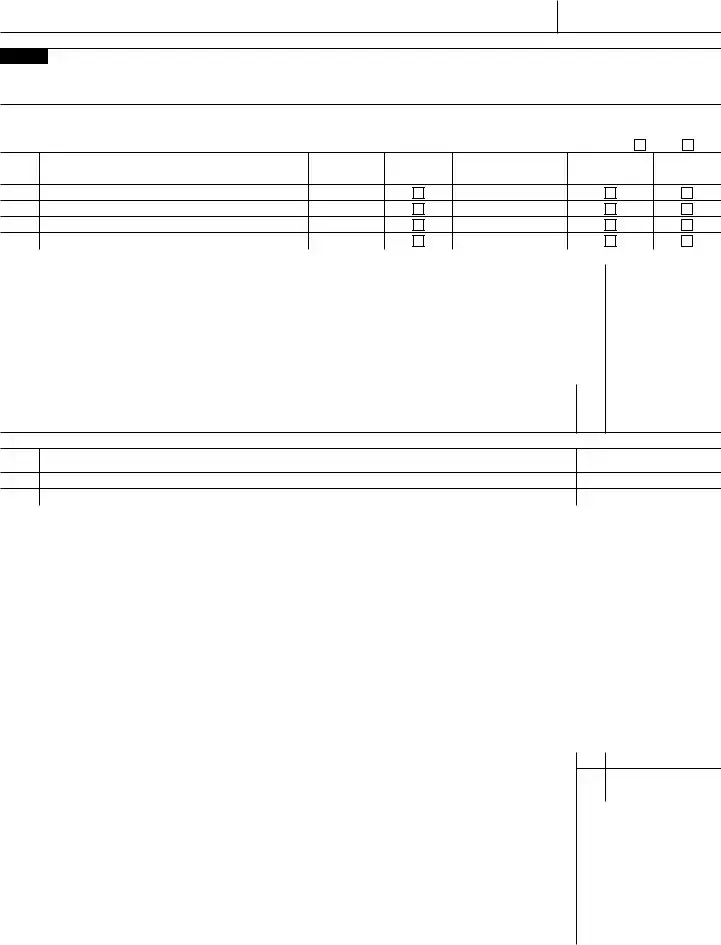
Part II Income or Loss From Partnerships and S Corporations

Note: If you report a loss, receive a distribution, dispose of stock, or receive a loan repayment from an S corporation, you must check the box in column (e) on line 28 and attach the required basis computation. If you report a loss from an at-risk activity for which any amount is not at risk, you must check the box in column (f) on line 28 and attach Form 6198. See instructions.

27Are you reporting any loss not allowed in a prior year due to the at-risk or basis limitations, a prior year unallowed loss from a

passive activity (if that loss was not reported on Form 8582), or unreimbursed partnership expenses? If you answered “Yes,”

see instructions before completing this section

Yes

No

28

A

B

C

D

(a)Name

(b)Enter P for partnership; S

for S corporation

(c)Check if foreign

partnership

(d)Employer

identification number

(e)Check if

basis computation

is required

(f)Check if any amount is

not at risk


Passive Income and Loss

Nonpassive Income and Loss


(g) Passive loss allowed

(h) Passive income

(i) Nonpassive loss allowed


(j) Section 179 expense

(k) Nonpassive income


(attach Form 8582 if required)

from Schedule K-1

(see Schedule K-1)


deduction from Form 4562

from Schedule K-1

A


B


C


D


29a

Totals


b

Totals


30

Add columns (h) and (k) of line 29a

. . . . . . . . .


. . . . . .

30


31

Add columns (g), (i), and (j) of line 29b

. . . . . . . . .


. . . . . .

31 (

)

32

Total partnership and S corporation income or (loss). Combine lines 30 and 31

. . . . .

32


Part III Income or Loss From Estates and Trusts

33

A

B

(a)Name

(b)Employer

identification number


Passive Income and Loss


Nonpassive Income and Loss


(c) Passive deduction or loss allowed


(d) Passive income


(e) Deduction or loss


(f) Other income from


(attach Form 8582 if required)


from Schedule K-1


from Schedule K-1


Schedule K-1


A


B


34a

Totals


b

Totals


35

Add columns (d) and (f) of line 34a

. . . . . . . . . . . .

35


36

Add columns (c) and (e) of line 34b

. . . . . . . . . . . .

36

(

)

37

Total estate and trust income or (loss). Combine lines 35 and 36

37


Part IV

Income or Loss From Real Estate Mortgage Investment Conduits (REMICs)—Residual

Holder


38


(a) Name


(b) Employer

(c) Excess inclusion from

(d) Taxable income

(e) Income from


identification number

Schedules Q, line 2c

(net loss) from


Schedules Q, line 3b


(see instructions)

Schedules Q, line 1b


39

Combine columns (d) and (e) only. Enter

the result here and include in the total on line 41 below .

39


Part V

Summary


40

Net farm rental income or (loss) from Form 4835. Also, complete line 42 below

40


41Total income or (loss). Combine lines 26, 32, 37, 39, and 40. Enter the result here and on Schedule

1 (Form 1040), line 5

. . . . . . . . .

41

42 Reconciliation of farming and fishing income. Enter your gross


farming and fishing income reported on Form 4835, line 7; Schedule K-1


(Form 1065), box 14, code B; Schedule K-1 (Form 1120-S), box 17, code


AN; and Schedule K-1 (Form 1041), box 14, code F. See instructions .

42


43 Reconciliation for real estate professionals. If you were a real estate


professional (see instructions), enter the net income or (loss) you


reported anywhere on Form 1040, Form 1040-SR, or Form 1040-NR


from all rental real estate activities in which you materially participated


under the passive activity loss rules

43


Schedule E (Form 1040) 2025

File Properties

Fact Name Description
Purpose The IRS Schedule E (Form 1040) is used to report income or loss from rental real estate, royalties, partnerships, S corporations, estates, trusts, and residual interests in REMICs.
Filing Requirement Taxpayers must file Schedule E if they have income or loss from the sources mentioned, regardless of whether they are actively involved in the management.
Income Reporting Income from rental properties must be reported on Schedule E, including any expenses related to the property that can be deducted.
State-Specific Forms Some states require additional forms to report rental income. For example, California requires Form 540 and follows the California Revenue and Taxation Code.
Passive Activity Loss Rules Losses from rental activities may be subject to passive activity loss rules, which limit the ability to deduct losses against other types of income.
Filing Deadline Schedule E must be filed by the tax return deadline, which is typically April 15, unless an extension has been granted.

Instructions on Utilizing IRS Schedule E 1040

Filling out the IRS Schedule E (Form 1040) can seem daunting at first, but breaking it down into manageable steps makes the process easier. This form is used to report income or loss from rental real estate, royalties, partnerships, S corporations, estates, trusts, and more. Let’s dive into the steps needed to complete this form.

  1. Gather your documents. Collect all relevant information, including income statements, expenses, and any other necessary financial records.
  2. Obtain the Schedule E form. You can download it from the IRS website or get a physical copy from a local IRS office.
  3. Fill out your personal information. At the top of the form, enter your name, Social Security number, and address.
  4. Complete Part I for rental real estate. List each property separately. Include the address, the type of property, and the income received.
  5. Report your expenses. In the same section, detail the expenses associated with each property, such as repairs, maintenance, and management fees.
  6. Calculate the net income or loss. Subtract your total expenses from your total income for each property.
  7. Move to Part II if you have partnerships or S corporations. Report your share of income or loss from these entities.
  8. Fill out Part III for royalties, if applicable. Provide information about any royalties you earned during the tax year.
  9. Review your entries for accuracy. Double-check all numbers and ensure that all required information is included.
  10. Sign and date the form. Make sure to sign it before submitting it to the IRS.

Once you have completed the form, keep a copy for your records. Then, submit it along with your Form 1040 when you file your taxes. Remember, accuracy is key to avoid any issues with the IRS.

Important Facts about IRS Schedule E 1040

What is IRS Schedule E (Form 1040)?

IRS Schedule E is a tax form used by individuals to report income or loss from rental real estate, royalties, partnerships, S corporations, estates, trusts, and residual interests in REMICs. It is an attachment to Form 1040 and helps taxpayers provide detailed information about their supplemental income sources.

Who needs to file Schedule E?

Individuals who have income from rental properties, partnerships, S corporations, or other sources of supplemental income must file Schedule E. If you own rental property or are involved in a partnership or S corporation, this form is essential for accurately reporting your income and expenses.

What types of income are reported on Schedule E?

Schedule E is used to report various types of income, including rental income from real estate, royalties from intellectual property, and income from partnerships and S corporations. Each source of income has its own section on the form to ensure clarity and organization.

Can I deduct expenses related to rental properties on Schedule E?

Yes, you can deduct certain expenses related to rental properties on Schedule E. Common deductions include mortgage interest, property taxes, repairs, maintenance, and depreciation. These deductions help reduce your taxable income from the rental property.

How do I report losses on Schedule E?

If your expenses exceed your rental income, you may report a loss on Schedule E. This loss can be used to offset other income, subject to certain limitations. Be sure to keep detailed records of all income and expenses to support your claims.

What is the difference between passive and non-passive income on Schedule E?

Passive income typically comes from rental activities or businesses in which the taxpayer does not materially participate. Non-passive income, on the other hand, is derived from active participation in a business. The classification affects how losses can be used to offset other income.

Are there any special considerations for real estate professionals filing Schedule E?

Real estate professionals may qualify for different tax treatment regarding rental activities. If you meet specific criteria, you may be able to deduct losses from rental properties against other income without the passive loss limitations. It is important to understand these rules if you qualify.

How do I handle multiple rental properties on Schedule E?

If you own multiple rental properties, you can report each property on a separate line within the rental income section of Schedule E. Be sure to provide detailed information for each property, including income and expenses, to ensure accurate reporting.

What should I do if I receive a Form 1099 for rental income?

If you receive a Form 1099 for rental income, you must report this income on Schedule E. The amount shown on the 1099 should be included in the rental income section of the form. Keep the 1099 for your records as it serves as documentation of the income received.

Where can I find IRS Schedule E and instructions for filling it out?

You can find IRS Schedule E and its instructions on the official IRS website. The forms are available for download, and the instructions provide guidance on how to complete the form accurately. Make sure to use the most current version for your tax filing.

Common mistakes

Completing the IRS Schedule E (Form 1040) can be a challenging task for many individuals. One common mistake is failing to report all rental income. It’s essential to include every source of rental income, whether it comes from long-term leases, short-term rentals, or even renting out a room in your home. Omitting any income can lead to discrepancies and potential penalties from the IRS.

Another frequent error involves misclassifying expenses. Taxpayers often confuse personal expenses with deductible business expenses. For example, if a property owner incurs costs related to personal use of a rental property, those expenses should not be claimed on Schedule E. Accurate categorization is crucial to ensure compliance with tax regulations.

Many individuals also overlook the importance of keeping detailed records. Without proper documentation, it becomes challenging to substantiate claimed expenses or income. Receipts, invoices, and contracts should be organized and maintained for at least three years. This practice not only aids in filling out the form accurately but also protects against potential audits.

Some taxpayers fail to take advantage of all available deductions. For instance, depreciation can significantly reduce taxable income, yet it is often underutilized. Understanding the various deductions available for rental properties, such as repairs, property management fees, and utilities, can lead to substantial tax savings.

Lastly, errors can occur when individuals do not double-check their calculations. Simple arithmetic mistakes can lead to incorrect tax liability. It is advisable to review all figures carefully before submitting the form. In some cases, using tax software or consulting with a tax professional can help ensure accuracy and compliance with IRS requirements.

Documents used along the form

When filing taxes, particularly for income derived from rental properties or partnerships, several forms and documents may accompany the IRS Schedule E (Form 1040). Each of these documents serves a specific purpose and provides important information to ensure accurate reporting of income and expenses. Below are some commonly used forms that may be relevant.

  • Form 4562: This form is used to claim depreciation and amortization. If you own rental property or have business assets, you may need to report the depreciation of these assets on your Schedule E. Form 4562 helps calculate the allowable deduction for the year.
  • Form 1040: This is the main individual income tax return form. Schedule E is an attachment to Form 1040, where you report income or loss from rental real estate, royalties, partnerships, S corporations, estates, trusts, and more. It consolidates your overall tax information.
  • Form 8825: This form is specifically for reporting income and expenses from rental real estate activities conducted through partnerships or S corporations. If you are involved in such entities, Form 8825 will help detail the income and expenses associated with your rental properties.
  • Schedule A: If you itemize deductions, Schedule A allows you to report various deductible expenses, such as mortgage interest and property taxes, which may be relevant if you own rental property. These deductions can potentially reduce your overall taxable income.

Understanding these forms can facilitate a smoother tax filing process. Each document contributes to a comprehensive view of your financial situation, ensuring compliance with tax regulations while maximizing potential deductions.

Similar forms

The IRS Schedule E (Form 1040) is primarily used to report income or loss from rental real estate, partnerships, S corporations, estates, trusts, and residual interests in real estate mortgage investment conduits. Here are five other documents that share similarities with Schedule E:

  • Schedule C (Form 1040): This form is used by sole proprietors to report income and expenses from a business. Like Schedule E, it requires detailed reporting of income and allows for deductions related to the business.
  • Schedule F (Form 1040): Farmers use this form to report income and expenses from farming. Similar to Schedule E, it focuses on specific income sources and allows for deductions related to the operation.
  • Form 1065: Partnerships file this form to report their income, deductions, and other tax-related information. Both Schedule E and Form 1065 involve reporting income from partnerships, but Schedule E is used by individual partners to report their share of income.
  • Form 1120S: This is the tax return for S corporations. Shareholders report their income from S corporations on Schedule E. Both documents deal with pass-through entities, where income is taxed at the individual level.
  • Form 1041: This form is used by estates and trusts to report income. Beneficiaries report their share of the income on Schedule E. Both forms involve similar reporting of income derived from entities that are not taxed at the entity level.

Dos and Don'ts

When filling out the IRS Schedule E (Form 1040), it’s important to approach the process with care. Here’s a list of ten things you should and shouldn’t do to ensure accuracy and compliance.

  • Do gather all relevant documentation before starting.
  • Don’t rush through the form; take your time to review each section.
  • Do accurately report all rental income received.
  • Don’t forget to include any expenses related to the property.
  • Do use the correct method for reporting depreciation.
  • Don’t leave any sections blank; fill out every applicable line.
  • Do double-check your math for accuracy.
  • Don’t ignore the importance of maintaining records for your entries.
  • Do consult IRS guidelines if you have questions.
  • Don’t submit the form without reviewing it one last time.

By following these tips, you can navigate the Schedule E form with greater confidence and clarity.

Misconceptions

When it comes to taxes, misinformation can lead to confusion and costly mistakes. The IRS Schedule E (Form 1040) is no exception. Here are eight common misconceptions about this important tax form:

  • Schedule E is only for landlords. While many people associate Schedule E with rental income, it also covers income from partnerships, S corporations, estates, trusts, and royalties. Anyone receiving income from these sources may need to use this form.
  • You can only report rental properties on Schedule E. This is not true. Schedule E allows taxpayers to report various types of income, including royalties from intellectual property and income from partnerships or S corporations.
  • All rental income is taxable. Not necessarily. While most rental income is taxable, there are exceptions. For example, if you rent out your home for fewer than 15 days a year, that income is not taxable.
  • Expenses related to rental properties cannot be deducted. In fact, many expenses can be deducted. This includes mortgage interest, property taxes, repairs, and depreciation. Keeping track of these expenses can significantly reduce your taxable income.
  • Only full-time landlords need to file Schedule E. Anyone who receives rental income, even if it’s part-time or occasional, must report it. If you rent out a room in your home or have a vacation property, you still need to file.
  • You can't claim losses from rental properties. This is a misconception. If your rental expenses exceed your rental income, you may be able to deduct those losses, subject to certain limitations.
  • Schedule E is the same as Schedule C. These forms serve different purposes. Schedule C is for self-employed individuals and reports business income and expenses, while Schedule E focuses on passive income sources like rental properties.
  • Filing Schedule E guarantees a tax audit. While any tax return can be audited, simply filing Schedule E does not increase your chances. As long as your information is accurate and well-documented, there’s no reason to fear an audit.

Understanding these misconceptions can help you navigate your tax responsibilities more effectively. Always consider consulting a tax professional for personalized advice.

Key takeaways

When filling out and using the IRS Schedule E 1040 form, it is important to keep several key points in mind:

  • The form is used to report income or loss from rental real estate, royalties, partnerships, S corporations, estates, trusts, and more.
  • Each type of income or loss should be reported in the appropriate section of the form.
  • Keep accurate records of all income and expenses related to each property or business activity.
  • Expenses that can be deducted include mortgage interest, property taxes, repairs, and depreciation.
  • Make sure to include the correct taxpayer identification number for each partnership or S corporation.
  • Filing Schedule E does not require a separate payment; it is submitted with your Form 1040.
  • Understand how passive activity rules may affect your ability to deduct losses.
  • Review the instructions for Schedule E carefully to ensure compliance with IRS requirements.