Lab Requisition PDF Template

Lab Requisition PDF Template

A Lab Requisition form is a document used by healthcare providers to request laboratory tests for patients. This form ensures that all necessary information is collected, allowing laboratories to perform the requested tests accurately and efficiently. To get started, fill out the form by clicking the button below.

Article Guide

The Lab Requisition form serves as a vital tool in the healthcare system, facilitating communication between healthcare providers and laboratories. This essential document captures crucial information about the patient, including their name, date of birth, and gender, ensuring that tests are accurately linked to the correct individual. Additionally, it requires the provider's details, such as their name, contact information, and identification numbers, which help streamline the testing process. The form also includes sections for ICD-9 diagnosis codes, which are necessary for insurance billing and determining coverage for specific tests. Patients may be designated as non-fasting or fasting, and the urgency of the tests can be indicated as routine, STAT, or ASAP. A wide array of tests can be ordered, ranging from urinalysis and hematology to specialized chemistry panels, allowing providers to tailor the requisition to meet each patient's unique needs. Lastly, the form mandates the provider's signature and date, confirming that the requested tests have been approved, thus ensuring accountability in patient care. Understanding the components of the Lab Requisition form can empower patients and providers alike, enhancing the efficiency and accuracy of laboratory testing.

Lab Requisition Preview

For questions regarding tube types or other specimen collection issues, call the Laboratory Client Services Dept. at 303-404-4050 M-F 8am-6pm
Reorder form # 00254730 Kaiser Permanente form updated on 6/07
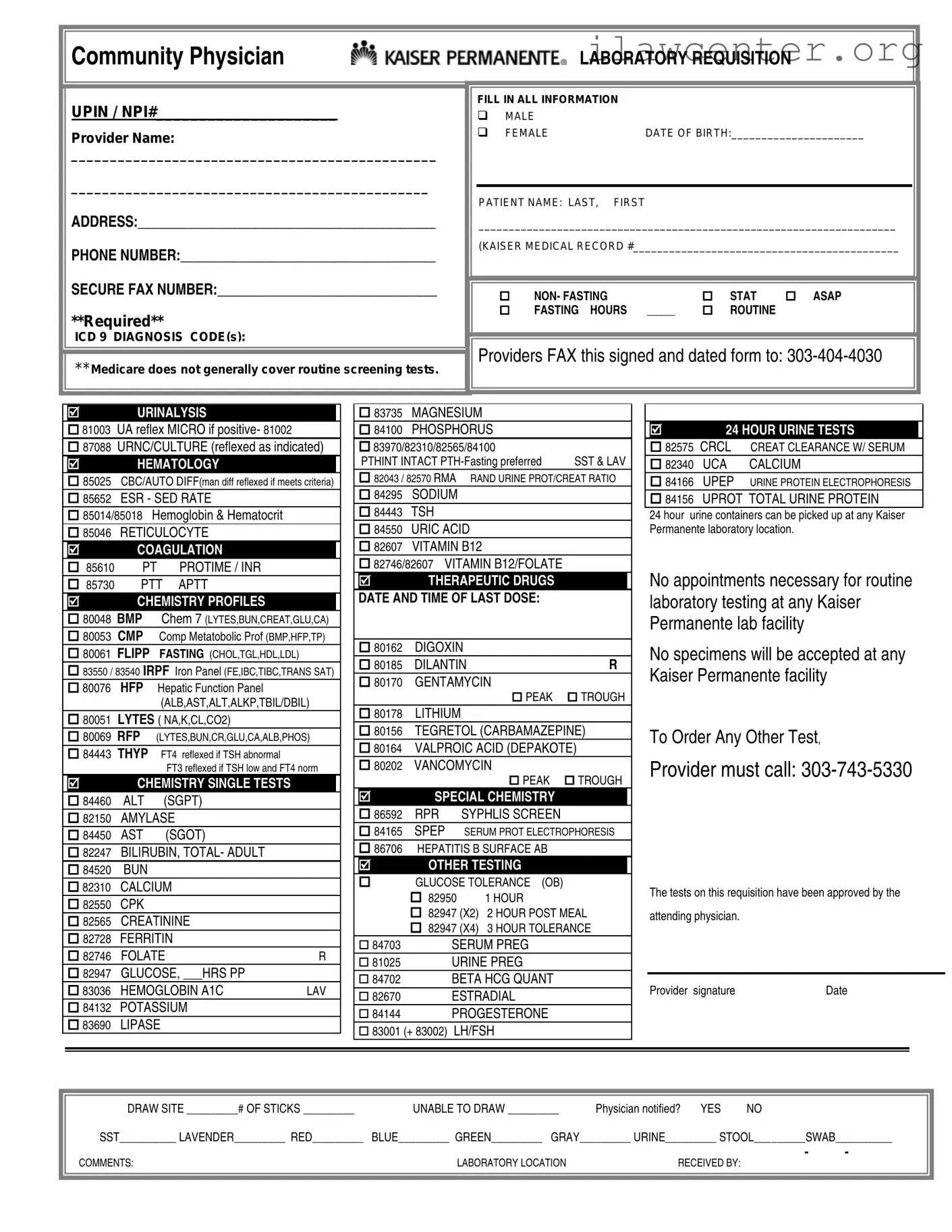
Community Physician LABORATORY REQUISITION
UPIN / NPI#_____________________
Provider Name:
_______________________________________________
______________________________________________
ADDRESS:__________________________________________
PHONE NUMBER:____________________________________
SECURE FAX NUMBER:_______________________________
**Required**
ICD 9 DIAGNOSIS CODE
(s):
FILL IN ALL INFORMATION
MALE
FEMALE DATE OF BIRTH:______________________
PATIENT NAME: LAST, FIRST
_____________________________________________________________________
(KAISER MEDICAL RECORD #____________________________________________
NON- FASTING STAT ASAP
FASTING HOURS _____ ROUTINE
**Medicare does not generally cover routine screening tests.
Providers FAX this signed and dated form to: 303-404-4030
URINALYSIS
81003 UA reflex MICRO if positive- 81002
87088 URNC/CULTURE (reflexed as indicated)
HEMATOLOGY
85025 CBC/AUTO DIFF(man diff reflexed if meets criteria)
85652 ESR - SED RATE
85014/85018 Hemoglobin & Hematocrit
85046 RETICULOCYTE
COAGULATION LB/SP1 L
85610 PT PROTIME / INR
85730 PTT APTT
CHEMISTRY PROFILES
80048 BMP Chem 7 (LYTES,BUN,CREAT,GLU,CA)
80053 CMP Comp Metatobolic Prof (BMP,HFP,TP)
80061 FLIPP FASTING (CHOL,TGL,HDL,LDL)
83550 / 83540 IRPF Iron Panel (FE,IBC,TIBC,TRANS SAT)
80076 HFP Hepatic Function Panel
(ALB,AST,ALT,ALKP,TBIL/DBIL)
80051 LYTES ( NA,K,CL,CO2)
80069 RFP (LYTES,BUN,CR,GLU,CA,ALB,PHOS)
84443 THYP FT4 reflexed if TSH abnormal
FT3 reflexed if TSH low and FT4 norm
CHEMISTRY SINGLE TESTS
84460 ALT (SGPT)
82150 AMYLASE
84450 AST (SGOT)
82247 BILIRUBIN, TOTAL- ADULT
84520 BUN
82310 CALCIUM
82550 CPK
82565 CREATININE
82728 FERRITIN
82746 FOLATE R
82947 GLUCOSE, ___HRS PP
83036 HEMOGLOBIN A1C LAV
84132 POTASSIUM
83690 LIPASE
83735 MAGNESIUM
84100 PHOSPHORUS
83970/82310/82565/84100
PTHINT INTACT PTH-Fasting preferred SST & LAV
82043 / 82570 RMA RAND URINE PROT/CREAT RATIO
84295 SODIUM
84443 TSH
84550 URIC ACID
82607 VITAMIN B12
82746/82607 VITAMIN B12/FOLATE
THERAPEUTIC DRUGS
DATE AND TIME OF LAST DOSE:
80162 DIGOXIN
80185 DILANTIN R
80170 GENTAMYCIN
PEAK TROUGH
80178 LITHIUM
80156 TEGRETOL (CARBAMAZEPINE)
80164 VALPROIC ACID (DEPAKOTE)
80202 VANCOMYCIN
PEAK TROUGH
SPECIAL CHEMISTRY
86592 RPR SYPHLIS SCREEN
84165 SPEP SERUM PROT ELECTROPHORESIS
86706 HEPATITIS B SURFACE AB
OTHER TESTING
GLUCOSE TOLERANCE (OB)
82950 1 HOUR
82947 (X2) 2 HOUR POST MEAL
82947 (X4) 3 HOUR TOLERANCE
84703
SERUM PREG
81025 URINE PREG
84702 BETA HCG QUANT
82670 ESTRADIAL
84144 PROGESTERONE
83001 (+ 83002) LH/FSH
24 HOUR URINE TESTS
82575 CRCL CREAT CLEARANCE W/ SERUM
82340 UCA CALCIUM
84166 UPEP URINE PROTEIN ELECTROPHORESIS
84156 UPROT TOTAL URINE PROTEIN
24 hour urine containers can be picked up at any Kaiser
Permanente laboratory location.
No appointments necessary for routine
laboratory testing at any Kaiser
Permanente lab facility
No specimens will be accepted at any
Kaiser Permanente facility
To Order Any Other Test,
Provider must call: 303-743-5330
The tests on this requisition have been approved by the
attending physician.
Provider signature Date
DRAW SITE _________# OF STICKS ________
_
UNABLE TO DRAW _________ Physician notified? YES NO
SST__________ LAVENDER_________ RED_________ BLUE_________ GREEN_________ GRAY_________ URINE_________ STOOL_________SWAB__________
COMMENTS: LABORATORY LOCATION RECEIVED BY:

File Properties

Fact Name Description
Provider Identification The form requires the provider's UPIN or NPI number, along with their name and contact information, ensuring proper identification of the healthcare professional responsible for the requisition.
Patient Information Essential details about the patient must be filled out, including their name, date of birth, and gender. This information helps in accurately processing the tests.
ICD Diagnosis Code The form mandates the inclusion of ICD-9 diagnosis codes. This is crucial for insurance purposes, particularly as Medicare does not typically cover routine screening tests.
Test Selection Providers can select various tests from multiple categories, including hematology, chemistry, and therapeutic drugs. This flexibility allows for tailored testing based on patient needs.
Submission Guidelines The completed form must be faxed to a specific number, ensuring that the laboratory receives the requisition in a timely manner for processing.
State-Specific Regulations In Colorado, the governing laws include the Colorado Revised Statutes Title 25, which outlines regulations regarding laboratory testing and requisition forms.

Instructions on Utilizing Lab Requisition

Filling out a Lab Requisition form is a straightforward process that ensures the necessary information is provided for lab tests. Completing this form accurately helps facilitate timely and effective patient care. Below are the steps to guide you through filling out the Lab Requisition form.

  1. Provider Information: Enter the UPIN/NPI number, provider name, address, phone number, and secure fax number at the top of the form.
  2. ICD Diagnosis Codes: Fill in the required ICD 9 diagnosis code(s) as applicable.
  3. Patient Information: Indicate the patient's gender by checking either the "MALE" or "FEMALE" box. Then, provide the patient's date of birth.
  4. Patient Name: Write the patient's full name in the format "LAST, FIRST." If applicable, include the Kaiser medical record number.
  5. Test Information: Check the appropriate boxes for test urgency, such as "NON-FASTING," "STAT," "ASAP," or "FASTING HOURS." Also, indicate if the tests are "ROUTINE."
  6. Select Tests: Choose the specific tests required by checking the corresponding boxes in the sections for Urinalysis, Hematology, Coagulation, Chemistry Profiles, Chemistry Single Tests, Therapeutic Drugs, Special Chemistry, Other Testing, and 24 Hour Urine Tests.
  7. Draw Site: Specify the draw site and the number of sticks if applicable. Indicate if unable to draw and whether the physician has been notified.
  8. Tube Type: Mark the types of tubes needed for the tests, such as SST, Lavender, Red, Blue, Green, Gray, Urine, Stool, or Swab.
  9. Comments: Add any relevant comments in the comments section, if necessary.
  10. Signature: The provider must sign and date the form to validate the requisition.

Once you have completed the form, it should be faxed to the designated number provided on the form. This will ensure that the laboratory receives the necessary information to process the tests efficiently.

Important Facts about Lab Requisition

What is a Lab Requisition Form?

A Lab Requisition Form is a document that healthcare providers use to order laboratory tests for their patients. It includes essential information such as the patient's details, the tests to be performed, and the provider's contact information. This form ensures that the laboratory has all the necessary information to conduct the tests accurately and efficiently.

Why is the Lab Requisition Form important?

The Lab Requisition Form is crucial for several reasons. First, it helps maintain clear communication between healthcare providers and laboratories. Second, it ensures that the correct tests are ordered based on the patient's medical needs. Finally, it helps streamline the testing process, reducing the chances of errors and delays in patient care.

What information do I need to provide on the Lab Requisition Form?

When filling out the Lab Requisition Form, you will need to provide information such as the patient's name, date of birth, gender, and diagnosis codes. Additionally, you must specify the tests you want to be performed and any special instructions, such as fasting requirements or urgency (e.g., STAT or ASAP).

How do I submit the Lab Requisition Form?

The completed Lab Requisition Form should be faxed to the designated laboratory number, which is 303-404-4030 in this case. Ensure that the form is signed and dated by the provider before submission. This step is essential to confirm that the tests have been approved by the attending physician.

What happens if I forget to include information on the Lab Requisition Form?

If critical information is missing from the Lab Requisition Form, it can lead to delays in testing or even incorrect tests being performed. It is vital to double-check all entries before submission. If you realize you've made an error after sending the form, contact the laboratory as soon as possible to rectify the situation.

Can I order any lab test using the Lab Requisition Form?

While many common tests can be ordered using the Lab Requisition Form, some specialized tests may require a phone call to the laboratory at 303-743-5330. Always check with the laboratory or your healthcare provider if you are unsure about the availability of a specific test.

What if I need a 24-hour urine test?

For a 24-hour urine test, you can pick up the necessary collection containers at any Kaiser Permanente laboratory location. No appointment is required for routine laboratory testing, making it convenient to obtain the containers and instructions for the test.

What should I do if I have questions about specimen collection?

If you have questions about specimen collection or tube types, you can reach out to the Laboratory Client Services Department at 303-404-4050. They are available Monday through Friday from 8 AM to 6 PM to assist you with any inquiries.

What if I need to reorder a Lab Requisition Form?

If you need to reorder a Lab Requisition Form, make sure to reference the reorder form number provided, which is 00254730. This will help the laboratory process your request more efficiently.

How do I know if my Lab Requisition Form was received?

After submitting your Lab Requisition Form, you can follow up with the laboratory to confirm receipt. It's a good practice to keep a record of your submission, including the date and time, to ensure that your patient's tests are processed without unnecessary delays.

Common mistakes

Filling out a Lab Requisition form can seem straightforward, but there are common mistakes that can lead to delays or issues with testing. Understanding these pitfalls can help ensure a smoother experience for both patients and healthcare providers.

One frequent error is neglecting to provide the ICD-9 diagnosis code(s). This code is essential for insurance purposes, particularly with Medicare, which often does not cover routine screening tests. Without this information, the laboratory may reject the requisition or the insurance claim may be denied.

Another common mistake is failing to fill in the patient’s date of birth. This detail is crucial for accurately identifying the patient and ensuring that test results are matched correctly. Missing this information can lead to confusion and delays in processing.

Some individuals forget to indicate the patient's gender. The options provided—male or female—are important for certain tests and can affect the interpretation of results. Omitting this detail may lead to miscommunication or errors in the testing process.

Additionally, marking the test urgency is often overlooked. Indicating whether the tests are STAT, ASAP, or routine helps the laboratory prioritize their workload. Without this indication, tests that require immediate attention may not be processed in a timely manner.

People sometimes skip providing the provider’s name and contact information. This information is vital for the laboratory to reach out if there are questions or issues regarding the requisition. Missing provider details can lead to unnecessary delays in patient care.

Another common oversight is not specifying the draw site or the number of sticks required. This information helps the phlebotomist prepare adequately for the blood draw. If these details are missing, it may result in complications during the procedure.

Some patients also fail to indicate whether the sample is fasting or non-fasting. This distinction is important for accurate test results, especially for tests measuring glucose or cholesterol levels. Not clarifying this can lead to inaccurate results and potential re-testing.

It's also important to remember that all sections of the form should be filled out completely. Leaving any section blank can cause confusion or delays in processing. Each piece of information plays a role in ensuring that the laboratory can provide the best possible care.

Lastly, patients sometimes forget to sign and date the form. A signature indicates that the provider has approved the tests and acknowledges responsibility for the requisition. Without this, the laboratory may not proceed with the tests.

By being mindful of these common mistakes, patients and providers can work together to ensure that the Lab Requisition form is completed accurately. This attention to detail can lead to faster results and a more efficient healthcare experience.

Documents used along the form

When healthcare providers order laboratory tests, they often use several forms and documents in conjunction with the Lab Requisition form. Each of these documents serves a specific purpose in ensuring that the testing process runs smoothly and that patient information is accurately recorded. Below is a list of commonly used forms.

  • Patient Consent Form: This document is used to obtain a patient's permission before conducting tests or procedures. It outlines the risks, benefits, and alternatives to the proposed tests, ensuring that patients are informed and can make educated decisions about their healthcare.
  • Insurance Authorization Form: This form is necessary for obtaining approval from a patient's insurance provider before performing certain tests. It helps to ensure that the tests will be covered under the patient’s insurance plan, minimizing unexpected out-of-pocket costs.
  • Specimen Collection Protocol: This document provides detailed instructions on how to properly collect and handle specimens for testing. It is crucial for ensuring that samples are collected in a manner that preserves their integrity and provides accurate results.
  • Test Result Report: After tests are completed, this report summarizes the findings and is sent to the ordering physician. It includes information on the results and any relevant interpretations, aiding in the diagnosis and treatment of the patient.
  • Referral Form: In some cases, a provider may need to refer a patient to a specialist for further evaluation or testing. This form includes essential information about the patient and the reason for the referral, facilitating communication between healthcare providers.
  • Follow-Up Appointment Form: This document is used to schedule follow-up appointments for patients after test results are received. It helps ensure that patients receive timely care based on their test outcomes.
  • Laboratory Safety Data Sheet (SDS): This sheet provides information about the safe handling and potential hazards of laboratory materials and chemicals. It is essential for maintaining a safe working environment in the laboratory.
  • Quality Control Log: This log tracks the performance of laboratory tests and equipment over time. It helps ensure that testing procedures meet established standards and that any issues can be addressed promptly.

Each of these documents plays a vital role in the laboratory testing process. Together, they help ensure that patient care is efficient, accurate, and compliant with healthcare regulations.

Similar forms

  • Prescription Pad: Like a Lab Requisition form, a prescription pad is used by healthcare providers to order specific tests or medications for patients. Both documents require the provider's information and patient details to ensure accurate processing.
  • Referral Form: A referral form is similar in that it facilitates communication between healthcare providers. It allows one provider to refer a patient to another for specialized care, much like how a Lab Requisition directs lab testing.
  • Patient Intake Form: This document collects essential information about a patient, including demographics and medical history. Both forms aim to gather necessary data to provide appropriate care and services.
  • Insurance Authorization Form: Just as the Lab Requisition may require insurance details for testing coverage, an insurance authorization form is used to obtain approval for specific medical services from insurance providers.
  • Medical History Form: This form captures a patient’s past medical issues and treatments. Similar to the Lab Requisition, it helps healthcare providers understand a patient's health background to make informed decisions.
  • Discharge Summary: After a patient receives care, a discharge summary outlines the treatment received and any follow-up instructions. Like the Lab Requisition, it serves as an important communication tool between healthcare providers regarding patient care.

Dos and Don'ts

When filling out a Lab Requisition form, there are several important dos and don’ts to keep in mind. Following these guidelines can help ensure that the process goes smoothly and that the necessary information is provided accurately.

  • Do fill in all required information completely. This includes patient name, date of birth, and diagnosis codes.
  • Do specify the type of test or tests needed. Be clear about any special instructions, such as fasting requirements.
  • Do provide accurate contact information for the provider. This includes phone numbers and secure fax numbers.
  • Do double-check for any errors before submitting the form. Mistakes can lead to delays in testing.
  • Don't leave any sections blank. Missing information can cause confusion and may delay processing.
  • Don't forget to sign and date the form. An unsigned form may not be accepted.
  • Don't use outdated diagnosis codes. Always ensure you are using the most current codes.
  • Don't submit the form without confirming the required tests with the attending physician.

By adhering to these guidelines, you can help facilitate a more efficient and effective lab testing process. Accurate and complete forms lead to quicker results and better patient care.

Misconceptions

  • Misconception 1: The lab requisition form is only for blood tests.

    In reality, this form is used for a variety of tests, including urinalysis, cultures, and special chemistry tests. It serves as a comprehensive tool for ordering multiple types of laboratory analyses.

  • Misconception 2: All tests on the requisition are covered by insurance.

    This is not always the case. For example, Medicare does not generally cover routine screening tests. It’s important to verify coverage with your insurance provider beforehand.

  • Misconception 3: Fasting is required for all tests.

    While some tests require fasting, others do not. The requisition form clearly indicates whether fasting is necessary for specific tests, so it’s crucial to read the instructions carefully.

  • Misconception 4: The form does not need to be filled out completely.

    Completing all required fields is essential. Missing information can lead to delays or issues with processing the tests. Always ensure that every section is filled out accurately.

  • Misconception 5: You can drop off specimens at any location.

    This is incorrect. Specimens must be submitted to designated Kaiser Permanente facilities. It’s important to be aware of where to take your samples to ensure they are accepted.

  • Misconception 6: The lab requisition form is only for established patients.

    New patients can also use this form for testing. However, it’s advisable to consult with the healthcare provider to ensure all necessary information is included.

  • Misconception 7: You can order any test without prior approval.

    Not all tests can be ordered freely. Some tests require prior authorization from a physician. Always check with the healthcare provider to confirm that the requested tests are approved.

Key takeaways

When filling out and using the Lab Requisition form, keep these key points in mind:

  • Complete all required fields. Ensure that all necessary information, including provider details and patient demographics, is filled out accurately.
  • Use correct diagnosis codes. Include the appropriate ICD 9 diagnosis code(s) as Medicare does not generally cover routine screening tests.
  • Indicate patient gender. Clearly mark whether the patient is male or female.
  • Specify fasting requirements. Note if the test requires fasting, is non-fasting, or needs to be done stat or ASAP.
  • Fax the completed form. Send the signed and dated requisition to the designated fax number: 303-404-4030.
  • Choose the correct tests. Select the appropriate tests based on the patient's needs and the physician's orders.
  • Document the draw site. Indicate where the blood draw will occur and the number of sticks attempted.
  • Check for specimen acceptance. Remember that no specimens will be accepted at any Kaiser Permanente facility without prior approval.
  • Contact for assistance. If you have questions about tube types or specimen collection, reach out to Laboratory Client Services at 303-404-4050.

Following these guidelines will help ensure a smooth process for laboratory testing.