Nj Sales Tax St 50 PDF Template

Nj Sales Tax St 50 PDF Template

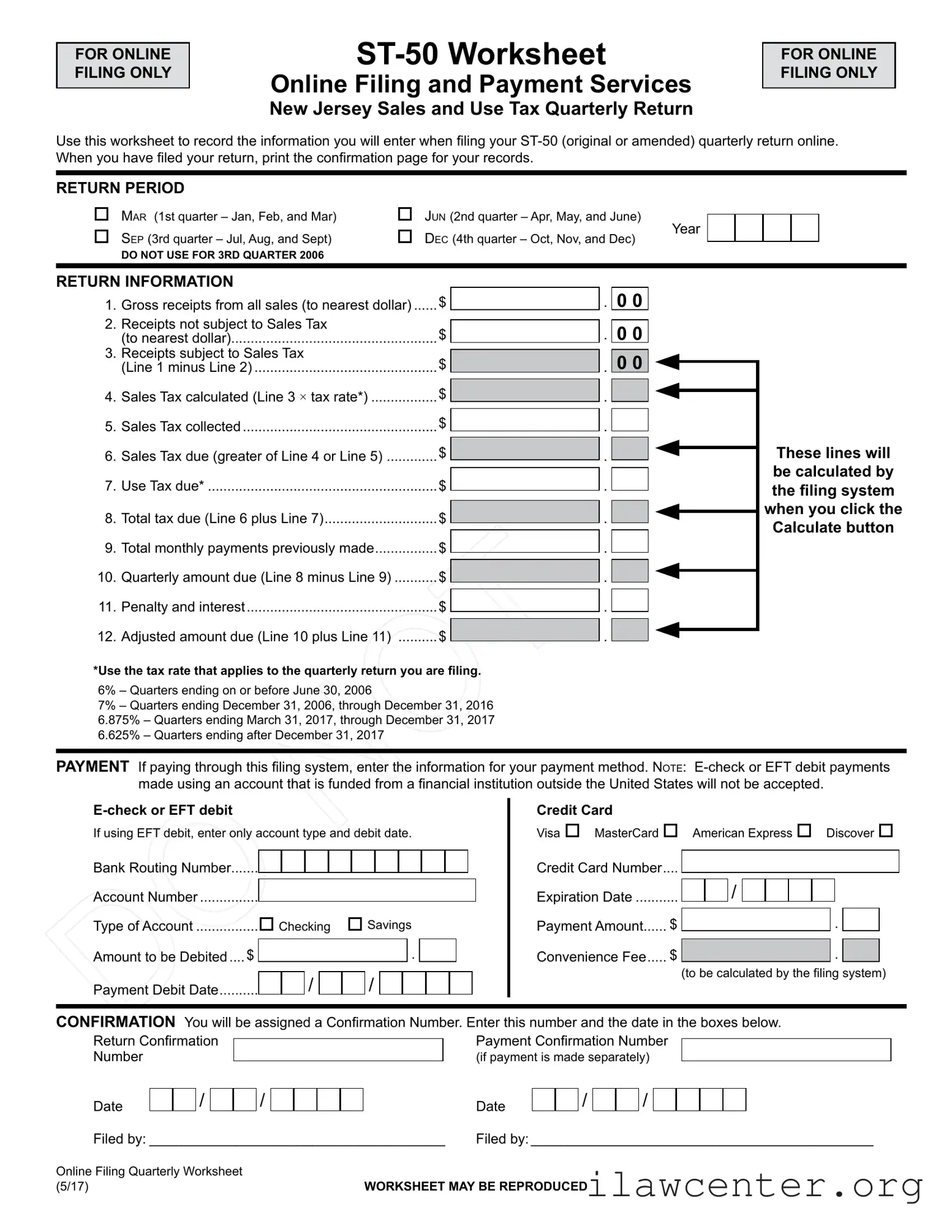
The NJ Sales Tax ST-50 form is a worksheet designed for online filing of the New Jersey Sales and Use Tax quarterly return. This form helps businesses accurately record their gross receipts, sales tax collected, and any payments made, ensuring compliance with state tax regulations. For a smooth filing experience, click the button below to fill out the ST-50 form.

Article Guide

The New Jersey Sales Tax ST-50 form serves as a crucial tool for businesses to report their sales and use tax obligations on a quarterly basis. Designed for online filing, this form allows taxpayers to efficiently record their gross receipts, distinguish between taxable and non-taxable sales, and calculate the appropriate sales tax due. Each quarter, businesses must select the relevant return period, which corresponds to the months of operation being reported. The form requires the user to input various financial figures, including total sales, sales tax collected, and any applicable use tax. Additionally, it provides a straightforward method for determining the total tax due by comparing the calculated sales tax with the amount collected. The ST-50 also includes sections for payment information, allowing for electronic funds transfers or credit card payments, ensuring a seamless transaction process. After submission, a confirmation number is generated, which serves as proof of filing. Understanding the nuances of this form is essential for compliance and accurate tax reporting in New Jersey.

Nj Sales Tax St 50 Preview

ST-50 Worksheet
Online Filing and Payment Services
New Jersey Sales and Use Tax Quarterly Return
Use this worksheet to record the information you will enter when ling your ST-50 (original or amended) quarterly return online.
When you have led your return, print the conrmation page for your records.
RETURN PERIOD

M
ar
(1st quarter – Jan, Feb, and Mar)

J
un
(2nd quarter – Apr, May, and June)

S
ep
(3rd quarter – Jul, Aug, and Sept)

D
ec
(4th quarter – Oct, Nov, and Dec)
Year
DO NOT USE FOR 3RD QUARTER 2006
RETURN INFORMATION
1. Gross receipts from all sales (to nearest dollar) ......
$
.
0 0
2. Receipts not subject to Sales Tax
(to nearest dollar).....................................................
$
.
0 0
3. Receipts subject to Sales Tax
(Line 1 minus Line 2) ...............................................
$
.
0 0
4. Sales Tax calculated (Line 3 × tax rate*) .................
$
.
5. Sales Tax collected ..................................................
$
.
6. Sales Tax due (greater of Line 4 or Line 5) .............
$
.
7. Use Tax due* ...........................................................$ .
8. Total tax due (Line 6 plus Line 7) .............................$ .
9. Total monthly payments previously made ................$ .
10. Quarterly amount due (Line 8 minus Line 9) ........... $ .
11. Penalty and interest .................................................$ .
12. Adjusted amount due (Line 10 plus Line 11) ..........$ .
*Use the tax rate that applies to the quarterly return you are ling.
6% – Quarters ending on or before June 30, 2006
7% – Quarters ending December 31, 2006, through December 31, 2016
6.875% – Quarters ending March 31, 2017, through December 31, 2017
6.625% – Quarters ending after December 31, 2017
PAYMENT
If paying through this ling system, enter the information for your payment method. n
ote
: E-check or EFT debit payments
made using an account that is funded from a nancial institution outside the United States will not be accepted.
E-check or EFT debit Credit Card
If using EFT debit, enter only account type and debit date.
Visa
MasterCard
American Express
Discover
Bank Routing Number.......
Credit Card Number ....
Account Number ...............
Expiration Date ...........
/
Type of Account ................
Checking
Savings
Payment Amount ......
$
.
A
mount to be Debited ....
$
.
Convenience Fee .....
$
.
Payment Debit Date ..........
/
/
(to be calculated by the ling system)
CONFIRMATION
You will be assigned a Conrmation Number. Enter this number and the date in the boxes below.
Return Conrmation Payment Conrmation Number
Number
(if payment is made separately)
Date
/
/
Date
/
/
Filed by: ______________________________________ Filed by: ____________________________________________
Online Filing Quarterly Worksheet
(5/17)
WORKSHEET MAY
BE REPRODUCED
FOR ONLINE
FILING ONLY
FOR ONLINE
FILING ONLY
These lines will
be calculated by
the ling system
when you click the
Calculate button

File Properties

Fact Name Details
Purpose The ST-50 form is used for filing the New Jersey Sales and Use Tax quarterly return online.
Filing Method This form is designated for online filing only, ensuring a streamlined process for taxpayers.
Return Periods The form accommodates four return periods: January-March, April-June, July-September, and October-December.
Tax Rates Applicable tax rates vary by quarter: 6% for periods before June 30, 2006; 7% for certain periods in 2006-2016; 6.875% for 2017; and 6.625% for periods after December 31, 2017.
Payment Options Payments can be made via e-check, EFT debit, or credit card, with specific rules for international accounts.
Confirmation A Confirmation Number is provided upon filing, which should be recorded for future reference.
Governing Law The ST-50 form is governed by the New Jersey Division of Taxation regulations regarding sales and use tax.

Instructions on Utilizing Nj Sales Tax St 50

Filling out the NJ Sales Tax ST-50 form is a straightforward process. It involves gathering information about your sales and calculating the taxes owed. After completing the form, you will file it online. Make sure to keep a copy of the confirmation page for your records.

  1. Start by selecting the return period. Choose from the options: March, June, September, or December.
  2. Enter your gross receipts from all sales in Line 1. Round to the nearest dollar.
  3. For Line 2, input the receipts that are not subject to sales tax, again rounding to the nearest dollar.
  4. Calculate Line 3 by subtracting Line 2 from Line 1. This gives you the receipts subject to sales tax.
  5. For Line 4, multiply the amount in Line 3 by the applicable tax rate to find the sales tax calculated.
  6. Input the sales tax collected in Line 5.
  7. Determine Line 6 by taking the greater amount between Line 4 and Line 5. This is the sales tax due.
  8. Enter any use tax due in Line 7.
  9. Calculate Line 8 by adding Line 6 and Line 7 to find the total tax due.
  10. For Line 9, enter the total monthly payments you have previously made.
  11. Subtract Line 9 from Line 8 to find the quarterly amount due in Line 10.
  12. Input any penalties and interest in Line 11.
  13. Add Line 10 and Line 11 to get the adjusted amount due in Line 12.
  14. If paying online, provide your payment method details, including bank routing and account numbers for e-checks or credit card information.
  15. After submitting, record the confirmation number and date for both the return and payment, if applicable.

Important Facts about Nj Sales Tax St 50

What is the NJ Sales Tax ST-50 form?

The NJ Sales Tax ST-50 form is a quarterly return used by businesses in New Jersey to report and pay sales and use tax. This form is specifically for online filing and allows businesses to record their gross receipts, calculate the sales tax owed, and submit payment electronically. It is essential for maintaining compliance with state tax regulations.

How do I determine which quarter to file for?

The ST-50 form is designated for quarterly reporting. You will need to choose the appropriate quarter based on your sales activities. The quarters are divided as follows: January through March for the first quarter, April through June for the second quarter, July through September for the third quarter, and October through December for the fourth quarter. Make sure to select the correct quarter to ensure accurate reporting.

What information do I need to complete the ST-50 form?

To fill out the ST-50 form, you will need to gather information about your gross receipts from all sales, the receipts not subject to sales tax, and the receipts that are subject to sales tax. You will also need to calculate the sales tax due based on the applicable tax rate for the quarter you are filing. Additionally, you will need to provide details about any payments previously made and any penalties or interest that may apply.

How is the sales tax calculated on the ST-50 form?

The sales tax is calculated by taking the total receipts subject to sales tax and multiplying that amount by the appropriate tax rate. The rates vary depending on the quarter you are filing for. For example, the rate was 6% for quarters ending on or before June 30, 2006, and has changed over the years. Be sure to use the correct rate for the period you are reporting to ensure accurate calculations.

What payment methods are accepted for the ST-50 form?

You can pay your sales tax due through the online filing system using either an e-check or a credit card. If you choose to pay via e-check, ensure that your account is with a financial institution within the United States, as international accounts are not accepted. For credit card payments, you will need to provide your card information and will incur a convenience fee, which will be calculated by the system.

What should I do after filing the ST-50 form?

After you have successfully filed the ST-50 form online, it is crucial to print the confirmation page for your records. This confirmation will provide proof of your filing and payment. Additionally, keep track of your confirmation numbers and the dates of your submission, as these details may be needed for future reference or in case of any discrepancies.

Common mistakes

Filling out the New Jersey Sales Tax ST-50 form can be straightforward, but there are common mistakes that people often make. One frequent error is not accurately calculating the gross receipts. It’s essential to ensure that the total sales amount is recorded correctly. Missing or miscalculating this figure can lead to significant discrepancies in the tax owed, potentially resulting in penalties or interest.

Another common mistake is failing to differentiate between receipts that are subject to sales tax and those that are not. Line 2 requires you to enter receipts not subject to sales tax, while Line 3 calculates the amount that is taxable. If you overlook this distinction, it can skew your tax calculations and lead to an incorrect total tax due. Always double-check your entries to ensure clarity and accuracy.

Many individuals also neglect to apply the correct tax rate for their reporting period. The ST-50 form specifies different rates based on the quarter you are filing for. Using an outdated or incorrect rate can result in underpayment or overpayment of taxes. It’s crucial to verify the applicable rate for the specific quarter you are addressing to avoid complications.

Finally, people often forget to keep a record of their confirmation numbers after filing. Once the form is submitted, a confirmation number is generated, which is vital for tracking your submission. Without this number, it may be challenging to address any issues that arise later. Always print or save the confirmation page for your records to ensure you have proof of your filing.

Documents used along the form

The New Jersey Sales Tax ST-50 form is a crucial document for businesses to report their sales tax obligations. However, several other forms and documents often accompany this filing to ensure compliance and proper record-keeping. Below is a list of related forms that may be necessary for businesses in New Jersey.

  • ST-51: This form is used for claiming a refund of sales tax paid on purchases that are later returned. It helps businesses recover funds when goods are returned to vendors or suppliers.
  • ST-3: This is the Sales Tax Exempt Certificate. Businesses use it to purchase goods tax-free when those goods are for resale or for use in manufacturing. Proper completion of this form is essential to avoid tax liabilities.
  • ST-4: This form allows for the exemption of certain purchases made by nonprofit organizations. Nonprofits must present this form to suppliers to avoid paying sales tax on eligible purchases.
  • ST-5: The Vendor's Certificate of Exempt Use is used by purchasers to certify that they are buying goods for a specific exempt purpose. This form is vital for vendors to ensure they do not charge sales tax on exempt transactions.
  • ST-50 Worksheet: This worksheet assists in calculating the sales tax due before filing the ST-50. It helps businesses organize their sales data and ensure accurate reporting of gross receipts and tax obligations.

Understanding these related forms can streamline the sales tax filing process and ensure compliance with New Jersey tax regulations. Proper use of these documents can prevent errors and potential penalties, making it essential for businesses to familiarize themselves with each form's purpose and requirements.

Similar forms

The New Jersey Sales Tax ST-50 form serves a specific purpose in the realm of tax reporting, particularly for businesses. Several other documents share similarities with the ST-50, primarily in their function of reporting financial information to tax authorities. Here are four documents that resemble the ST-50 in various aspects:

  • IRS Form 941: This form is used by employers to report income taxes, Social Security tax, and Medicare tax withheld from employee paychecks. Like the ST-50, it requires businesses to provide gross income figures and calculate taxes owed, reflecting a similar structure of reporting financial data.
  • New Jersey Corporate Business Tax Return (CBT-100): This document is filed by corporations doing business in New Jersey. It includes details about gross receipts and tax calculations, akin to the ST-50, which also focuses on gross sales and tax liabilities.
  • Sales Tax Return (varies by state): Many states have their own versions of sales tax returns that require businesses to report sales figures and tax collected. These documents typically follow a similar format to the ST-50, emphasizing gross sales, taxable sales, and the calculation of taxes owed.
  • Form 1065 (U.S. Return of Partnership Income): Partnerships use this form to report their income, deductions, gains, and losses. While it serves a different type of entity, it shares the ST-50's requirement for detailed financial reporting and tax calculations, thus providing a parallel in terms of documentation and compliance.

Dos and Don'ts

When filling out the New Jersey Sales Tax ST-50 form, attention to detail is crucial. Here are ten guidelines to follow to ensure a smooth filing process.

  • Do double-check your gross receipts to ensure accuracy.
  • Don't forget to include all sales, both taxable and non-taxable.
  • Do use the correct tax rate based on the period you are filing for.
  • Don't mix up the payment methods; ensure your chosen method is accepted.
  • Do keep a copy of the confirmation page after filing for your records.
  • Don't leave any required fields blank; incomplete forms can lead to delays.
  • Do calculate your total tax due carefully, considering both sales tax and use tax.
  • Don't ignore penalties or interest; they can accumulate if not addressed.
  • Do file your return on time to avoid unnecessary fees.
  • Don't forget to enter your confirmation number and date after filing.

By following these dos and don'ts, you can navigate the ST-50 form with greater ease and confidence.

Misconceptions

Understanding the New Jersey Sales Tax ST-50 form can be challenging. There are several misconceptions surrounding this form that can lead to confusion. Here’s a list of common misunderstandings:

  • Only large businesses need to file the ST-50 form. Many believe that only large businesses are required to file, but this form is necessary for any business that makes taxable sales in New Jersey, regardless of size.
  • The ST-50 form is only for online filing. While the form is designed for online filing, it can also be printed and submitted by mail. However, online filing is encouraged for convenience.
  • All sales are subject to sales tax. Not every sale is taxable. Certain items, like food and clothing, may be exempt from sales tax, and businesses should be aware of these exemptions.
  • You can calculate sales tax at any rate. It's crucial to use the correct tax rate that applies to the specific quarter you are filing for. Rates change over time, and using the wrong rate can lead to errors.
  • Filing late is not a big deal. Many think that filing late will not have consequences. However, late filings can incur penalties and interest, increasing the amount owed.
  • Once filed, you cannot make changes. If you realize a mistake after submitting the form, you can file an amended return to correct any errors.
  • The confirmation number is not important. Some may overlook the confirmation number, but it serves as proof of filing. Keeping this number is essential for your records.
  • Payments can be made from any bank account. It's a common misconception that any bank account can be used for payments. Payments from accounts outside the U.S. are not accepted.
  • Using a credit card will avoid convenience fees. Many believe that credit card payments do not incur fees. However, a convenience fee is often applied, so it’s important to factor this into your total payment.

Understanding these misconceptions can help ensure that you file your ST-50 form correctly and on time, avoiding unnecessary complications. If you have further questions, consider reaching out to a tax professional for personalized guidance.

Key takeaways

Filling out the New Jersey Sales Tax ST-50 form can be a straightforward process if you keep a few key points in mind. Here are some important takeaways to help you navigate this task effectively:

  • Use the Worksheet: The ST-50 worksheet is designed for online filing. Utilize it to record all necessary information before submitting your return.
  • Understand the Return Period: Be aware of the specific quarters for which you are filing. The options include March, June, September, and December.
  • Calculate Your Sales Tax: Determine your gross receipts and separate the amounts that are subject to sales tax from those that are not. This will help you accurately calculate your total tax due.
  • Know the Tax Rates: Familiarize yourself with the applicable tax rates for the quarter you are filing. Rates have changed over the years, so ensure you are using the correct one.
  • Payment Options: If you choose to pay through the online system, ensure you have your bank account or credit card information ready. Note that certain payment methods may not be accepted.
  • Confirmation is Key: After filing, print the confirmation page. This serves as proof of your submission and is important for your records.
  • Review for Accuracy: Before finalizing your submission, double-check all entries. Errors can lead to penalties or interest charges.
  • Seek Help if Needed: If you find the process overwhelming, consider consulting with a tax professional or legal consultant who can provide guidance tailored to your situation.

By keeping these points in mind, you can approach the ST-50 form with confidence, ensuring that your sales tax filing is accurate and timely.