Attorney-Verified  Employee Handbook Document for North Carolina

Attorney-Verified Employee Handbook Document for North Carolina

The North Carolina Employee Handbook form serves as a vital resource for employers and employees alike, outlining workplace policies, expectations, and employee rights. This comprehensive guide helps ensure that everyone is on the same page, fostering a positive work environment. Ready to get started? Fill out the form by clicking the button below.

Article Guide

The North Carolina Employee Handbook form serves as a crucial document for both employers and employees, outlining essential policies and procedures that govern the workplace. This form typically includes information about workplace expectations, employee rights, and responsibilities, as well as guidelines on issues such as attendance, dress code, and workplace conduct. Additionally, it often addresses important topics like anti-discrimination policies, harassment prevention, and conflict resolution processes. By providing clarity on these matters, the handbook not only helps to foster a positive work environment but also protects the organization from potential legal disputes. Employers are encouraged to customize the handbook to reflect their specific culture and operational needs, ensuring that it aligns with state and federal laws. In doing so, they create a transparent framework that can enhance communication and understanding within the workplace, ultimately contributing to a more cohesive and productive team.

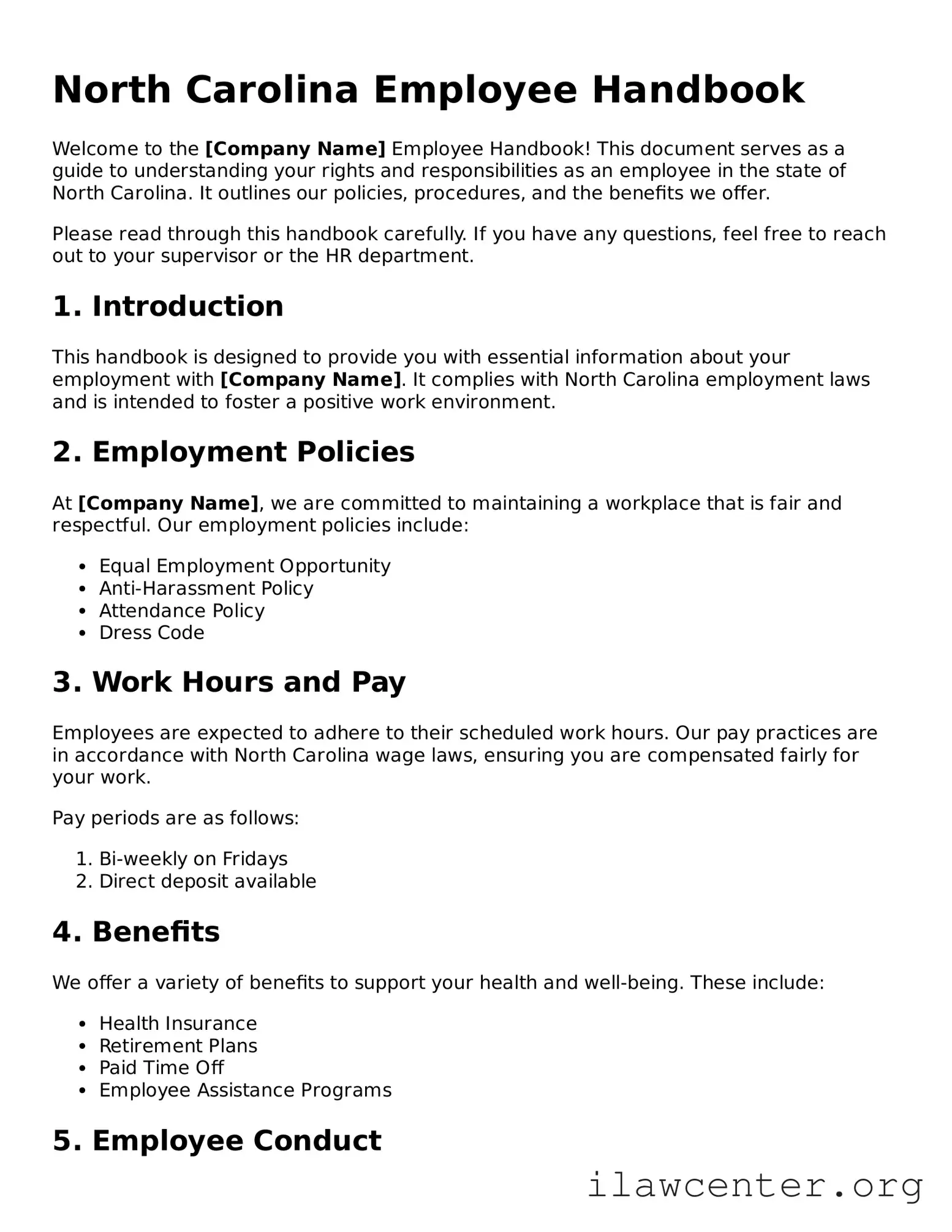
North Carolina Employee Handbook Preview

North Carolina Employee Handbook

Welcome to the [Company Name] Employee Handbook! This document serves as a guide to understanding your rights and responsibilities as an employee in the state of North Carolina. It outlines our policies, procedures, and the benefits we offer.

Please read through this handbook carefully. If you have any questions, feel free to reach out to your supervisor or the HR department.

1. Introduction

This handbook is designed to provide you with essential information about your employment with [Company Name]. It complies with North Carolina employment laws and is intended to foster a positive work environment.

2. Employment Policies

At [Company Name], we are committed to maintaining a workplace that is fair and respectful. Our employment policies include:

  • Equal Employment Opportunity
  • Anti-Harassment Policy
  • Attendance Policy
  • Dress Code

3. Work Hours and Pay

Employees are expected to adhere to their scheduled work hours. Our pay practices are in accordance with North Carolina wage laws, ensuring you are compensated fairly for your work.

Pay periods are as follows:

  1. Bi-weekly on Fridays
  2. Direct deposit available

4. Benefits

We offer a variety of benefits to support your health and well-being. These include:

  • Health Insurance
  • Retirement Plans
  • Paid Time Off
  • Employee Assistance Programs

5. Employee Conduct

Maintaining a professional and respectful workplace is essential. All employees are expected to:

  • Follow company policies
  • Communicate respectfully
  • Report any misconduct

6. Safety and Health

Your safety is our priority. We comply with North Carolina occupational safety regulations. Employees are encouraged to:

  • Report unsafe conditions
  • Participate in safety training

7. Acknowledgment of Receipt

By signing below, you acknowledge that you have received and read the [Company Name] Employee Handbook.

Employee Name: [Employee Name]

Signature: [Employee Signature]

Date: [Date]

PDF Form Characteristics

Fact Name Details
Purpose The North Carolina Employee Handbook serves as a guide for employees, outlining company policies, procedures, and expectations.
Legal Requirement While not legally required, having an employee handbook is highly recommended to clarify workplace policies.
Governing Laws The handbook should comply with North Carolina labor laws, including the North Carolina Wage and Hour Act.
Content Areas Common sections include employment policies, benefits information, and disciplinary procedures.
Employee Acknowledgment Employees often sign an acknowledgment form to confirm they have received and understood the handbook.
Updates Regular updates are essential to reflect changes in laws or company policies.
Non-Discrimination Policies Handbooks should include non-discrimination and harassment policies in compliance with federal and state laws.
At-Will Employment Most North Carolina handbooks clarify that employment is at-will, meaning either party can terminate the relationship at any time.
Legal Protection A well-drafted handbook can provide legal protection for the employer by clearly outlining policies and expectations.

Instructions on Utilizing North Carolina Employee Handbook

Filling out the North Carolina Employee Handbook form is a straightforward process. By following these steps, you will ensure that all necessary information is accurately provided. This will help in maintaining compliance and clarity in your employment documentation.

  1. Begin by downloading the North Carolina Employee Handbook form from the official website or your employer's portal.
  2. Open the form using a PDF reader or word processing software that supports form filling.
  3. Enter your full name in the designated field at the top of the form.
  4. Provide your employee identification number, if applicable, in the next section.
  5. Fill in your job title and department to specify your role within the organization.
  6. Complete the contact information section, including your phone number and email address.
  7. Review the sections that require you to acknowledge receipt and understanding of the handbook.
  8. Sign and date the form at the bottom to confirm your agreement.
  9. Save the completed form on your device or print it out for submission.
  10. Submit the form to your HR department or designated supervisor as instructed.

Important Facts about North Carolina Employee Handbook

What is the North Carolina Employee Handbook form?

The North Carolina Employee Handbook form is a document that outlines the policies, procedures, and expectations for employees within a company. It serves as a guide for both employers and employees, ensuring that everyone understands their rights and responsibilities. This handbook can cover topics such as workplace conduct, benefits, and disciplinary procedures.

Why is an Employee Handbook important?

An Employee Handbook is important because it helps establish a clear understanding of the workplace environment. It can prevent misunderstandings and disputes by providing a reference point for policies and procedures. Additionally, having a well-documented handbook can protect the employer from potential legal issues by demonstrating that they have communicated their policies effectively.

Who should create the Employee Handbook?

How often should the Employee Handbook be updated?

The Employee Handbook should be reviewed and updated regularly, at least once a year. Changes in laws, company policies, or industry standards may necessitate updates. Employers should also consider updating the handbook whenever significant changes occur within the organization, such as a merger or a change in management.

What should be included in the Employee Handbook?

The Employee Handbook should include essential information such as the company’s mission and values, employee rights and responsibilities, workplace policies, benefits, and procedures for addressing grievances. It may also cover topics like attendance, dress code, and safety protocols. Tailoring the content to the specific needs of the organization is crucial for its effectiveness.

Common mistakes

Filling out the North Carolina Employee Handbook form can seem straightforward, but many individuals make common mistakes that can lead to confusion later on. One frequent error is neglecting to read the entire document before signing. It’s essential to understand the policies and procedures outlined in the handbook. Skipping this step might result in unexpected surprises regarding workplace rules or benefits.

Another common mistake is failing to update personal information. When employees change their address, phone number, or emergency contact, they often forget to reflect these changes in the handbook. Keeping this information current is vital for effective communication and can prevent potential issues in case of emergencies.

Some individuals overlook the importance of asking questions. If something in the handbook is unclear, it’s crucial to seek clarification from a supervisor or HR representative. Ignoring this step can lead to misunderstandings about workplace expectations or benefits, which can affect job performance and satisfaction.

Additionally, people sometimes assume that the handbook is a one-time read. In reality, policies may change, and new procedures may be introduced. Regularly reviewing the handbook ensures that employees stay informed about their rights and responsibilities, helping to foster a positive workplace culture.

Lastly, a significant mistake occurs when employees fail to sign and date the form properly. This signature confirms that they have received and understood the handbook. Without it, there may be disputes later about whether an employee was aware of specific policies. Taking the time to complete this step accurately is essential for both the employee and the employer.

Documents used along the form

The North Carolina Employee Handbook is an essential document that outlines company policies and procedures. Alongside this handbook, several other forms and documents are commonly utilized to ensure compliance and clarity in the workplace. Here’s a list of related documents that may be required:

  • Employment Application: This form collects personal and professional information from job applicants. It helps employers assess qualifications and suitability for the role.
  • Job Description: A detailed description of the responsibilities, duties, and qualifications required for a specific position. It provides clarity for both employees and management.
  • Offer Letter: This document formally extends an offer of employment to a candidate. It outlines the terms of employment, including salary, benefits, and start date.
  • W-4 Form: Employees fill out this form to determine the amount of federal income tax withholding from their paychecks. It is essential for payroll processing.
  • Direct Deposit Authorization Form: This form allows employees to authorize their employer to deposit their pay directly into their bank account, ensuring timely payment.
  • Employee Evaluation Form: Used for performance reviews, this form assesses an employee's work performance, strengths, and areas for improvement.
  • Leave of Absence Request Form: Employees submit this form to formally request time off for various reasons, such as medical or personal matters.
  • Confidentiality Agreement: This document protects sensitive company information. Employees sign it to acknowledge their responsibility to keep proprietary information confidential.
  • Termination Notice: This form is used to document the end of an employee's tenure with the company, outlining the reasons for termination and any final steps required.

Each of these documents plays a critical role in the employment process and helps maintain a structured and compliant workplace environment. Ensuring that all necessary forms are completed and properly maintained is vital for both employees and employers.

Similar forms

  • Policy Manual: Similar to the Employee Handbook, a policy manual outlines the organization's rules and procedures. Both documents serve to guide employee behavior and ensure compliance with company standards.
  • Onboarding Guide: An onboarding guide provides new employees with essential information about their roles and the company culture. Like the Employee Handbook, it helps to set expectations and integrate new hires into the workplace.
  • Training Manual: A training manual offers detailed instructions on job-specific tasks and responsibilities. Both documents aim to equip employees with the knowledge they need to succeed in their positions.
  • Code of Conduct: The code of conduct establishes ethical guidelines for employee behavior. Similar to the Employee Handbook, it emphasizes the importance of professionalism and integrity within the workplace.
  • Safety Manual: A safety manual outlines procedures and protocols to ensure a safe working environment. Like the Employee Handbook, it addresses employee responsibilities and company policies regarding safety practices.
  • Employee Agreement: An employee agreement details the terms of employment, including job responsibilities and benefits. Both documents serve to clarify expectations and protect the rights of both the employer and employee.
  • Performance Review Guide: A performance review guide explains the evaluation process and criteria for employee assessments. Similar to the Employee Handbook, it helps employees understand how their performance will be measured and the potential for growth.
  • Benefits Overview: A benefits overview outlines the various perks and compensation offered to employees. Like the Employee Handbook, it informs employees about their entitlements and how to access them.

Dos and Don'ts

When filling out the North Carolina Employee Handbook form, it is essential to approach the task with care and attention. Here are ten important things to consider:

  • Do read the entire form thoroughly before starting to fill it out.
  • Do provide accurate and up-to-date information about your personal details.
  • Do ask for clarification if any section of the form is unclear.
  • Do ensure that you sign and date the form where required.
  • Do keep a copy of the completed form for your records.
  • Don't rush through the form; take your time to avoid mistakes.
  • Don't leave any sections blank unless instructed to do so.
  • Don't use abbreviations or shorthand that may confuse the reader.
  • Don't provide false information, as this can lead to serious consequences.
  • Don't forget to review the form one last time before submitting it.

By following these guidelines, individuals can ensure a smooth process when completing the Employee Handbook form in North Carolina.

Misconceptions

There are several misconceptions about the North Carolina Employee Handbook form that can lead to confusion for both employers and employees. Here’s a look at seven common myths:

  1. Employee handbooks are optional.

    Many believe that having an employee handbook is not necessary. In reality, while not legally required, a handbook can provide clear guidelines and protect both the employer and employees.

  2. All handbooks must be the same.

    Some think that there is a one-size-fits-all handbook. However, each handbook should reflect the specific policies, culture, and needs of the organization.

  3. Once created, a handbook never needs updates.

    It’s a common belief that handbooks are set in stone. In truth, they should be reviewed and updated regularly to reflect changes in laws and company policies.

  4. Handbooks only benefit employees.

    Many assume that handbooks are solely for employees' benefit. However, they also protect employers by clearly outlining expectations and procedures.

  5. Every policy needs to be included in the handbook.

    Some people think that every possible policy must be covered. In reality, it’s more effective to focus on key policies that are essential for the workplace.

  6. Handbooks can’t be enforced.

    There’s a misconception that handbooks are not enforceable. While they are not contracts, they can still provide a basis for disciplinary actions if policies are violated.

  7. Employees read the handbook thoroughly.

    It’s often assumed that all employees will read the handbook in detail. In practice, many may skim it or overlook important sections, making it essential for employers to highlight key points during onboarding.

Key takeaways

Filling out and utilizing the North Carolina Employee Handbook form is an important step for both employers and employees. Here are some key takeaways to keep in mind:

  1. Understand the Purpose: The Employee Handbook serves as a guide for employees, outlining company policies, procedures, and expectations.
  2. Customize the Content: Tailor the handbook to reflect your company's specific culture, values, and operational practices.
  3. Legal Compliance: Ensure that all policies comply with state and federal laws to protect both the employer and the employee.
  4. Clear Language: Use straightforward language. Avoid jargon to ensure that all employees can easily understand the handbook.
  5. Review and Update Regularly: Periodically review the handbook to incorporate changes in laws, company policies, or organizational structure.
  6. Distribute Effectively: Provide the handbook to all employees, ensuring they receive a copy and understand its contents.
  7. Obtain Acknowledgment: Have employees sign an acknowledgment form to confirm they have received and understood the handbook.

By following these guidelines, you can create a comprehensive and effective Employee Handbook that serves your organization well.