
Offer Report PDF Template

Offer Report PDF Template

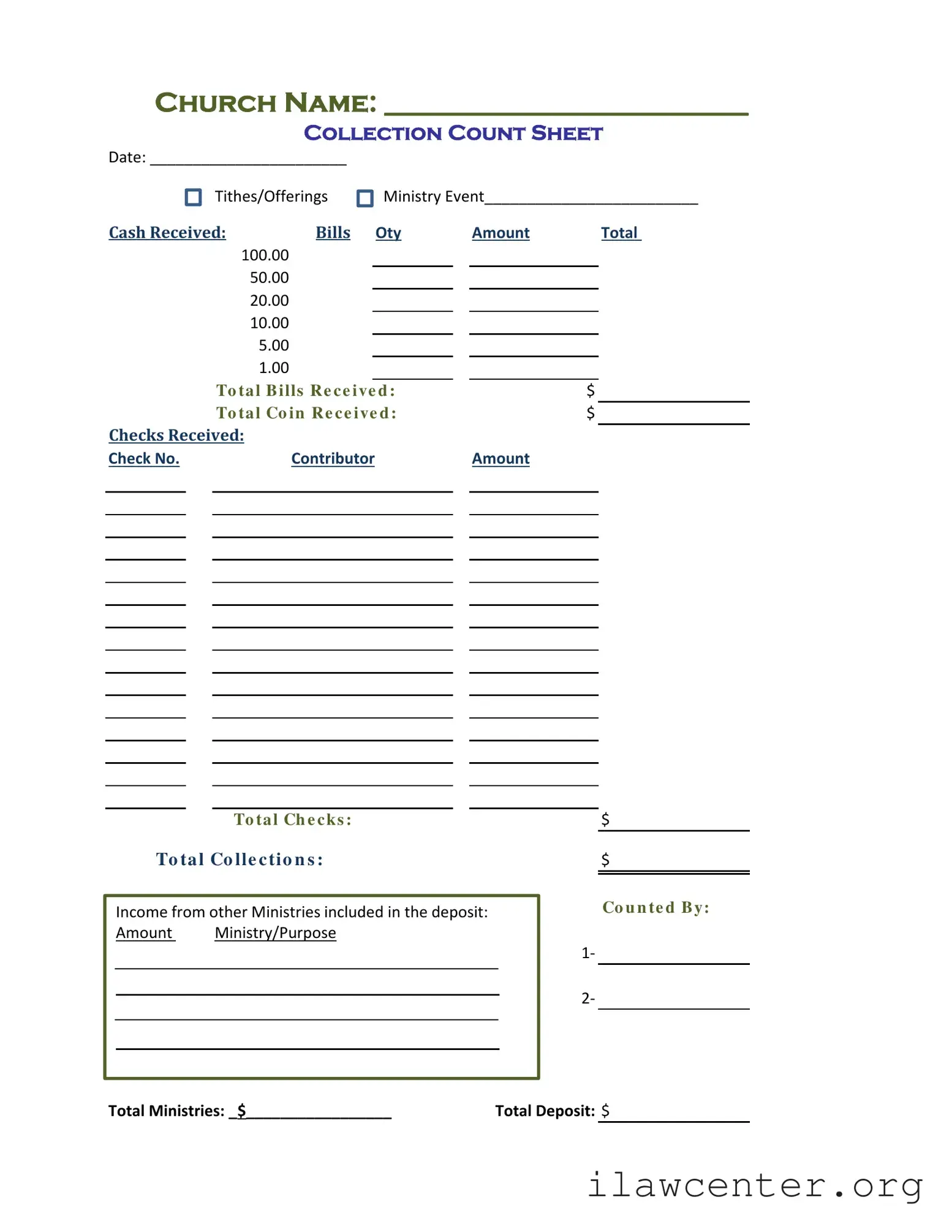
The Offer Report form is a crucial document used by churches to track and report financial contributions, including cash and checks received during services or events. This form helps ensure transparency and accuracy in financial reporting, which is essential for maintaining trust within the congregation. If you need to document your church's offerings, fill out the form by clicking the button below.

Article Guide

The Offer Report form is a vital tool for churches to track and manage their financial contributions. It includes essential sections that capture various types of donations, such as cash and checks. The form begins with the church name and date, ensuring that each report is properly identified. Contributors can record cash received, detailing the quantity and denominations of bills and coins, which helps in maintaining accurate financial records. Additionally, the form allows for the documentation of checks received, including check numbers and contributor amounts. There is also a section for noting any income from other ministries, providing a comprehensive view of the total collections. The form concludes with spaces for the names of those who counted the donations and the total deposit amount, ensuring transparency and accountability in financial reporting.

Offer Report Preview

Date:_______________________
Tithes/Offerings MinistryEvent_________________________
CashReceived: Bills Oty Amount Total
100.00
50.00
20.00
10.00
5.00
1.00
To tal Bills Re ce ive d: $
To tal Co in Re ce ive d : $
ChecksReceived:
CheckNo. Amount
$
$
1
2
TotalMinistries:_$
_
________________
TotalDeposit: $
Church Name: __________________________
Collection Count Sheet
To ta l Co lle ctio n s :
Co u n te d By:
To tal Ch e cks :
Contributor
IncomefromotherMinistries includedinthedeposit:
Amount Ministry/Purpose

File Properties

Fact Name Details
Form Purpose The Offer Report form is used to document the collection of tithes and offerings during church events.
Collection Date The form requires the date of collection to ensure accurate record-keeping.
Cash Breakdown It includes a section for detailing cash received, categorized by bill denominations.
Check Details The form has a section for recording checks received, including check numbers and contributor names.
Total Amounts It calculates total cash and check collections to provide a comprehensive financial overview.
Ministry Contributions The form allows for the inclusion of income from other ministries, ensuring transparency in collections.
Counted By A designated person must sign off on the form to verify the accuracy of the reported amounts.
Governing Law State-specific forms must comply with local laws regarding financial reporting for non-profit organizations.

Instructions on Utilizing Offer Report

Completing the Offer Report form is an essential step in documenting financial contributions for your church. This process ensures that all donations are accurately recorded and accounted for. Follow these steps carefully to fill out the form correctly.

  1. Start by entering the Church Name at the top of the form.
  2. Write the Date of the collection next to the designated space.
  3. In the section labeled Tithes/Offerings Ministry Event, specify the event related to the collection.
  4. For the CASH RECEIVED section, list the quantity of each type of bill in the corresponding boxes:
    • 100.00
    • 50.00
    • 20.00
    • 10.00
    • 5.00
    • 1.00
  5. Calculate and write the total amount of cash bills received in the Total Bills Received field.
  6. Calculate and write the total amount of coins received in the Total Coin Received field.
  7. In the CHECKS RECEIVED section, fill in the check number, contributor name, and amount for each check received.
  8. Calculate and write the Total Checks amount.
  9. Next, calculate the Total Collections by adding the total cash and total checks received.
  10. If there is income from other ministries included in the deposit, list the amounts and their respective ministries in the designated area.
  11. Write the name of the person who Counted By in the provided lines.
  12. Finally, fill in the Total Ministries amount and the Total Deposit at the bottom of the form.

Once the form is filled out, ensure that all calculations are correct and that it is signed by the appropriate individuals. This report will then be ready for submission and further processing.

Important Facts about Offer Report

What is the purpose of the Offer Report form?

The Offer Report form is designed to track and document the collection of tithes and offerings during church services or events. It helps ensure transparency and accountability in financial reporting, allowing churches to maintain accurate records of their income from donations.

What information do I need to fill out on the Offer Report form?

You will need to provide the church name, date of the collection, and the specific ministry event associated with the funds. Additionally, you must record the amounts received in cash and checks, including a breakdown of the cash denominations and check numbers from contributors.

How should I record cash received?

When recording cash, list the quantity of each bill denomination in the designated section. For example, if you received five $20 bills, you would write "5" in the quantity column next to the $20 denomination. Then, calculate the total for each denomination and sum these amounts to get the total cash received.

What if I receive contributions from other ministries?

If you receive income from other ministries, you should document this in the section labeled "Income from other Ministries included in the deposit." List the amount received along with the specific ministry or purpose for which the funds were designated. This ensures that all contributions are accounted for accurately.

Who is responsible for counting the collections?

The Offer Report form includes a section for the names of individuals who counted the collections. It is important to have at least two people involved in this process to promote transparency and minimize the risk of errors or discrepancies.

How do I calculate the total deposit?

The total deposit is the sum of all cash and checks received, including any contributions from other ministries. To find this total, add the total cash received and the total checks received together. Ensure that all amounts are accurately recorded to reflect the total deposit correctly.

What should I do with the completed Offer Report form?

Once the Offer Report form is completed, it should be submitted to the church's financial office or designated personnel responsible for financial records. Keeping a copy for your records is also advisable to ensure you have a reference for future audits or inquiries.

Can the Offer Report form be modified for different events?

Yes, while the Offer Report form has a standard format, it can be modified to suit specific events or needs. However, any changes should maintain the core purpose of documenting the collection accurately and transparently. Ensure that all essential information remains included to facilitate proper record-keeping.

Common mistakes

Filling out the Offer Report form can seem straightforward, but many people encounter common pitfalls that can lead to errors. One frequent mistake is forgetting to include the church name at the top of the form. This information is crucial for proper record-keeping and ensures that the report is attributed to the right congregation.

Another common error is neglecting to date the form. Without a date, it becomes difficult to track when the collections occurred, which can complicate financial reporting and accountability. Always take a moment to write down the date clearly.

Many individuals also overlook the collection count sheet section. This part requires detailed information about the cash received, including the denominations of bills and coins. Failing to fill this out accurately can lead to discrepancies in the total amounts reported.

When recording cash received, some people forget to calculate the total bills and total coins separately. It’s essential to sum these amounts correctly to ensure the total cash received reflects the actual contributions. Double-checking these figures can save time and confusion later on.

Another mistake involves the section for checks received. People often forget to list the check numbers or contributors. This information is vital for tracking donations and maintaining transparency. Each check should be accounted for to avoid any potential issues down the line.

In the section that asks for income from other ministries, individuals sometimes leave this blank or miscalculate the amounts. This can lead to an incomplete picture of the church's financial health. Always ensure that every source of income is recorded accurately.

It’s also important to note the person who counted the collections. Some individuals skip the counted by section entirely. This information is essential for accountability and helps identify who was responsible for verifying the amounts.

Lastly, failing to check the final totals can result in significant errors. After completing the form, take a moment to review all entries. Confirm that the total collections match the sum of cash and checks received. A careful review can prevent misunderstandings and ensure accurate reporting.

Documents used along the form

The Offer Report form is a crucial document for tracking the financial contributions of a church. It provides a structured way to record cash and check donations, as well as contributions from various ministries. Several other forms and documents complement the Offer Report to ensure comprehensive financial management. Below is a list of these related documents, each serving a specific purpose.

  • Donation Receipt: This document serves as proof of a donor's contribution. It typically includes the donor's name, the amount donated, and the date of the donation. Receipts are essential for tax purposes and help maintain transparency in financial dealings.
  • Bank Deposit Slip: This form is used when depositing collected funds into the church's bank account. It details the total amount being deposited, including cash and checks, and serves as a record of the transaction for both the church and the bank.
  • Financial Statement: A financial statement provides a summary of the church's financial activities over a specific period. It includes income, expenses, and overall financial position. This document is vital for budgeting and financial planning.
  • Budget Report: This report outlines the planned income and expenditures for a given period, usually a fiscal year. It helps guide financial decisions and ensures that resources are allocated effectively to various ministries and programs.
  • Ministry Contribution Tracking Form: This form tracks contributions made by specific ministries within the church. It records the amount contributed, the purpose of the funds, and the date of the contribution, ensuring accountability and transparency within the church’s financial practices.

These documents, when used alongside the Offer Report form, contribute to a robust financial management system within a church. They enhance accountability, ensure compliance with financial regulations, and foster trust among the congregation and stakeholders.

Similar forms

The Offer Report form serves as a vital tool for tracking donations within a church setting. Its structure and purpose share similarities with several other important documents. Here are seven documents that closely resemble the Offer Report form:

  • Donation Receipt: Like the Offer Report, a donation receipt provides a summary of contributions made by individuals. Both documents record the amount given and the date, ensuring transparency for both the donor and the organization.
  • Contribution Statement: This statement outlines all donations made by an individual over a specific period. Similar to the Offer Report, it helps in tracking total contributions for tax purposes and provides a clear record for the donor.
  • Cash Receipt Form: A cash receipt form captures cash transactions, just like the Offer Report does for tithes and offerings. Both documents confirm the receipt of funds and detail the amounts involved.
  • Fundraising Report: This report summarizes the proceeds from specific fundraising events. It shares the Offer Report's goal of tracking income but focuses more on event-specific contributions rather than regular donations.
  • Bank Deposit Slip: A bank deposit slip records the total amount being deposited into the church's account. While the Offer Report details individual contributions, both documents culminate in a total deposit amount.
  • Event Collection Sheet: This sheet is used during specific events to track donations made at that time. Similar to the Offer Report, it categorizes contributions and provides a total for the event.
  • Financial Statement: A financial statement provides an overview of the church's financial health, including income from various sources. While broader in scope, it shares the Offer Report's focus on documenting income.

Understanding these documents helps clarify the processes involved in tracking and managing donations effectively. Each serves a unique purpose while contributing to the overall financial transparency of the organization.

Dos and Don'ts

When filling out the Offer Report form, it is important to follow certain guidelines to ensure accuracy and clarity. Below are some dos and don'ts to consider.

  • Do write clearly and legibly in the designated spaces.
  • Do double-check all amounts before submitting the form.
  • Don't leave any sections blank unless they are not applicable.
  • Don't forget to include the date and your name for accountability.

Misconceptions

Misconceptions about the Offer Report form can lead to confusion and errors in financial reporting. Here are eight common misunderstandings:

  • The form is only for cash donations. Many believe that the Offer Report form is solely for cash received. However, it also includes checks and income from other ministries.
  • Only the church treasurer needs to fill it out. While the treasurer often manages the form, anyone involved in counting or collecting donations should understand how to complete it accurately.
  • It is optional to report all contributions. Some may think that reporting is optional. In reality, all contributions should be documented for transparency and accountability.
  • All cash and checks must be counted on the same day. There is a misconception that cash and checks must be counted together. They can be reported separately as long as they are accurately documented.
  • The form does not need to be signed. Some individuals believe that a signature is unnecessary. However, having a signature can provide verification and accountability for the reported amounts.
  • Only large donations need to be recorded. There is a belief that small donations do not need to be included. In truth, every contribution, regardless of size, should be reported to maintain complete records.
  • It is only for tithes and offerings. Some think that the form is limited to tithes and offerings. It can also include funds from ministry events and other income sources.
  • The total deposit must match the total collected. Many believe that the total deposit must always equal the total collected. However, discrepancies can occur due to various reasons, such as errors in counting or recording.

Understanding these misconceptions can help ensure accurate reporting and maintain financial integrity within the church.

Key takeaways

When it comes to filling out and using the Offer Report form, there are several important points to keep in mind. Here are some key takeaways that can help ensure accuracy and clarity:

  • Complete Church Information: Always start by filling in the church name and the date at the top of the form. This helps identify the report easily.
  • Collection Count Sheet: Make sure to indicate the specific ministry event associated with the tithes and offerings. This adds context to the report.
  • Cash Received Section: Accurately list the number of bills of each denomination received. This is crucial for tracking cash flow.
  • Calculating Totals: After listing the bills, calculate the total amount received in cash. Ensure that the totals for bills and coins are clearly indicated.
  • Checks Received: Record each check by its number, contributor, and amount. This information is essential for proper record-keeping.
  • Total Collections: Sum up the total cash and checks received to provide a complete picture of the collection.
  • Income from Other Ministries: If there are contributions from other ministries, document these amounts and their purposes. This transparency is important for financial accountability.
  • Counting Responsibility: Include the names of the individuals who counted the collection. This adds an extra layer of verification.
  • Total Deposit: Finally, ensure that the total deposit amount is clearly stated. This final figure should match the total collections for accuracy.

By following these takeaways, you can streamline the process of filling out the Offer Report form and maintain clear financial records for your church.