



Ohio Sales Tax Ust 1 PDF Template

Ohio Sales Tax Ust 1 PDF Template

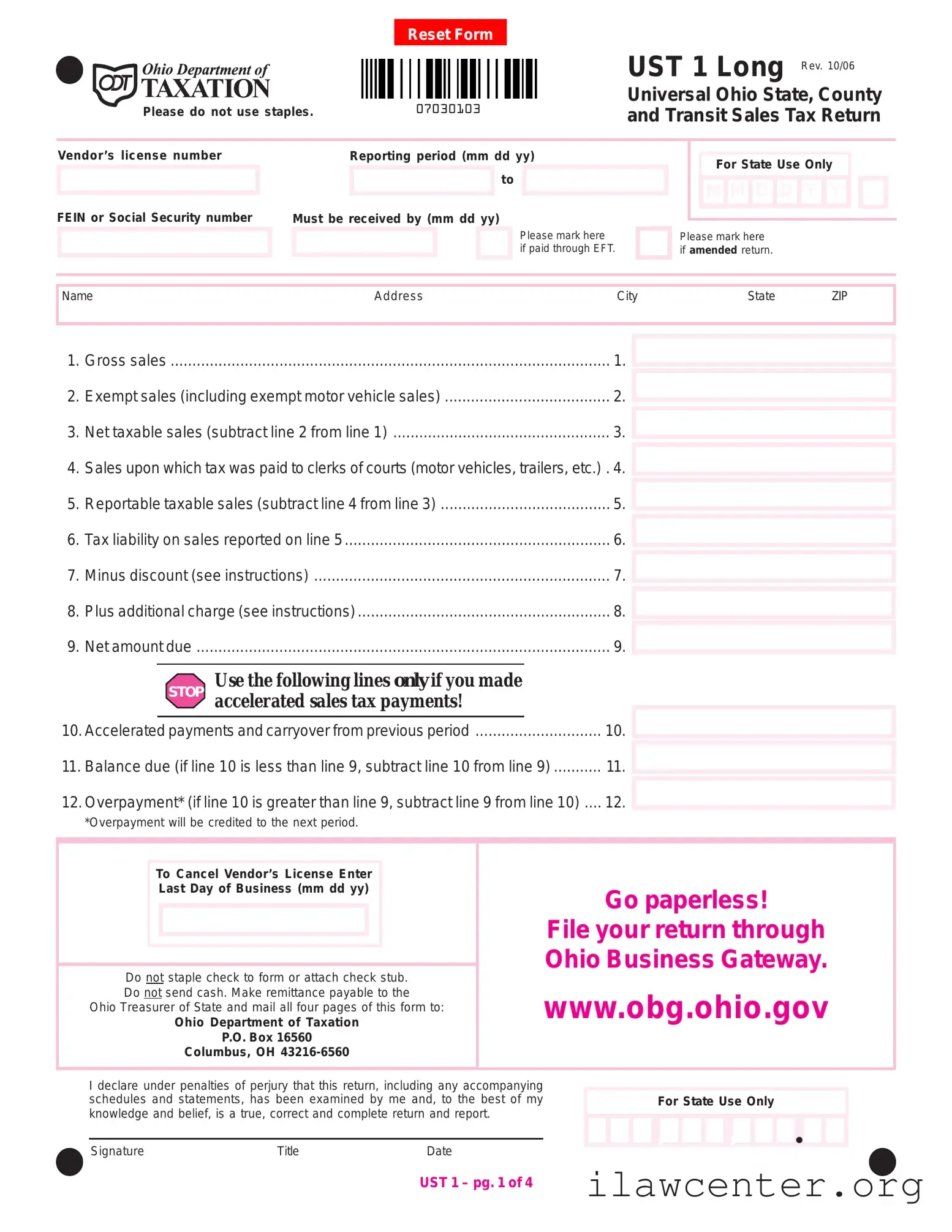
The Ohio Sales Tax UST 1 form is a document used by businesses to report sales tax collected on sales made in Ohio. This form helps ensure compliance with state tax regulations and allows businesses to calculate their tax liability accurately. To get started, fill out the form by clicking the button below.

Article Guide

The Ohio Sales Tax UST 1 form is a critical document for businesses operating in Ohio, ensuring compliance with state sales tax regulations. This form collects essential information regarding gross sales, exempt sales, and net taxable sales, allowing businesses to accurately report their tax liability. It includes sections for vendors to input their license number, reporting period, and payment details, including options for electronic funds transfer (EFT). Additionally, the form requires businesses to break down taxable sales by county, providing a clear picture of tax obligations across different jurisdictions. Important calculations, such as discounts and additional charges, are also featured, guiding users through the process of determining the net amount due. For those who need to amend a return or cancel their vendor's license, the form offers clear instructions. Completing and submitting the UST 1 form on time is vital, as it helps avoid penalties and ensures that businesses remain in good standing with the Ohio Department of Taxation.

Ohio Sales Tax Ust 1 Preview

1. Gross sales .....................................................................................................1.
2. Exempt sales (including exempt motor vehicle sales) ......................................2.
3. Net taxable sales (subtract line 2 from line 1) .................................................. 3.
4. Sales upon which tax was paid to clerks of courts (motor vehicles, trailers, etc.) . 4.
5. Reportable taxable sales (subtract line 4 from line 3) .......................................5.
6. Tax liability on sales reported on line 5.............................................................6.
7. Minus discount (see instructions) .................................................................... 7.
8. Plus additional charge (see instructions)..........................................................8.
9. Net amount due ............................................................................................... 9.
10.Accelerated payments and carryover from previous period ............................. 10.
11.Balance due (if line 10 is less than line 9, subtract line 10 from line 9)........... 11.
12.Overpayment* (if line 10 is greater than line 9, subtract line 9 from line 10) .... 12.
*Overpayment will be credited to the next period.
Do not staple check to form or attach check stub.
Do not send cash. Make remittance payable to the
Ohio Treasurer of State and mail all four pages of this form to:
Ohio Department of Taxation
P.O. Box 16560
Columbus, OH 43216-6560
Go paperless!
File your return through
Ohio Business Gateway.
www.obg.ohio.gov
UST 1 – pg. 1 of 4
Name Address City State ZIP
FEIN or Social Security number
Must be received by (mm dd yy)
Please mark here
if paid through EFT.
Please mark here
if amended return.
Signature Title Date
I declare under penalties of perjury that this return, including any accompanying
schedules and statements, has been examined by me and, to the best of my
knowledge and belief, is a true, correct and complete return and report.
Use the following lines only if you made
accelerated sales tax payments!
STOP
Vendor’s license number
Reporting period (mm dd yy)
to
For State Use Only
MDDYMY
Please do not use staples.
UST 1 Long
Universal Ohio State, County
and Transit Sales Tax Return
Rev. 10/06
To Cancel Vendor’s License Enter
Last Day of Business (mm dd yy)
For State Use Only
,,
Q
07030103
Reset Form
UST 1 – pg. 2 of 4
Vendor’s license number
Reporting period (mm dd yy)
to
Supporting schedule must be completed showing
taxable sales and the combined state, county and
transit authority taxes on a county-by-county basis.
Please do not use staples.
UST 1 Long
Universal Ohio State, County
and Transit Sales Tax Return
Rev. 10/06
Adams 01
Allen 02
Ashland 03
Ashtabula 04
Athens 05
Auglaize 06
Belmont 07
Brown 08
Butler 09
Carroll 10
Champaign 11
Clark 12
Clermont 13
Clinton 14
Columbiana 15
Coshocton 16
Crawford 17
Cuyahoga 18
Darke 19
Defiance 20
Delaware 21
Delaware (COTA) 96
Erie 22
Fairfield 23
Fairfield (COTA) 93
Fayette 24
Franklin 25
Fulton 26
Gallia 27
Geauga 28
Greene 29
Guernsey 30
Hamilton 31
County Name
*If this amount is a negative, please mark an “X” in the box provided.
Tax Liability*Taxable Sales*
County Number
Page 2 subtotal
07030203
Reset Form
UST 1 – pg. 3 of 4
Vendor’s license number
Reporting period (mm dd yy)
to
Please do not use staples.
UST 1 Long
Universal Ohio State, County
and Transit Sales Tax Return
Rev. 10/06
County Name
*If this amount is a negative, please mark an “X” in the box provided.
Tax Liability*Taxable Sales*
County Number
Hancock 32
Hardin 33
Harrison 34
Henry 35
Highland 36
Hocking 37
Holmes 38
Huron 39
Jackson 40
Jefferson 41
Knox 42
Lake 43
Lawrence 44
Licking 45
Licking (COTA) 94
Logan 46
Lorain 47
Lucas 48
Madison 49
Mahoning 50
Marion 51
Medina 52
Meigs 53
Mercer 54
Miami 55
Monroe 56
Montgomery 57
Morgan 58
Morrow 59
Muskingum 60
Noble 61
Ottawa 62
Paulding 63
Page 3 subtotal
Supporting schedule must be completed showing
taxable sales and the combined state, county and
transit authority taxes on a county-by-county basis.
07030303
Reset Form
UST 1 – pg. 4 of 4
Vendor’s license number
Reporting period (mm dd yy)
to
Please do not use staples.
UST 1 Long
Universal Ohio State, County
and Transit Sales Tax Return
Rev. 10/06
County Name
*If this amount is a negative, please mark an “X” in the box provided.
Tax Liability*Taxable Sales*
County Number
Perry 64
Pickaway 65
Pike 66
Portage 67
Preble 68
Putnam 69
Richland 70
Ross 71
Sandusky 72
Scioto 73
Seneca 74
Shelby 75
Stark 76
Summit 77
Trumbull 78
Tuscarawas 79
Union 80
Van Wert 81
Vinton 82
Warren 83
Washington 84
Wayne 85
Williams 86
Wood 87
Wyandot 88
Supporting schedule must be completed showing
taxable sales and the combined state, county and
transit authority taxes on a county-by-county basis.
Subtotal this page
Page 2 subtotal
Page 3 subtotal
Grand total*
*Enter totals on lines 5 and 6 on the front page of this return.
07030403
Reset Form

File Properties

Fact Name Description
Form Title Ohio Sales Tax UST 1 form is used for reporting state, county, and transit sales taxes.
Governing Law This form is governed by the Ohio Revised Code, specifically sections related to sales tax regulations.
Vendor Information Vendors must provide their license number and either FEIN or Social Security number on the form.
Reporting Period The form requires the reporting period to be specified in the format mm/dd/yy.
Filing Deadline Completed forms must be received by the Ohio Department of Taxation by the specified deadline.
EFT Payment Option There is an option to mark if the payment was made through Electronic Funds Transfer (EFT).
Amended Returns If the return is amended, the vendor must indicate this on the form.
Net Amount Due The form calculates the net amount due after accounting for discounts and additional charges.
Overpayment Credit Any overpayment will be credited to the vendor's next reporting period.
Filing Method Vendors can file the return electronically through the Ohio Business Gateway.

Instructions on Utilizing Ohio Sales Tax Ust 1

Completing the Ohio Sales Tax UST 1 form requires careful attention to detail. Follow these steps to ensure you fill it out correctly. Once you have completed the form, you will need to submit it along with any payment to the Ohio Department of Taxation.

  1. Start by resetting the form if necessary.
  2. Enter your vendor’s license number at the top of the form.
  3. Provide your FEIN or Social Security number.
  4. Fill in the reporting period (from mm/dd/yy to mm/dd/yy).
  5. Note the due date for submission of the form.
  6. If applicable, mark the box indicating payment through EFT.
  7. If this is an amended return, mark the appropriate box.
  8. Enter your name, address, city, state, and ZIP code.
  9. Fill in the gross sales on line 1.
  10. Enter the exempt sales (including exempt motor vehicle sales) on line 2.
  11. Calculate the net taxable sales by subtracting line 2 from line 1, and enter this amount on line 3.
  12. On line 4, report any sales on which tax was paid to clerks of courts (motor vehicles, trailers, etc.).
  13. Determine the reportable taxable sales by subtracting line 4 from line 3, and enter the result on line 5.
  14. Calculate the tax liability on the sales reported on line 5 and enter it on line 6.
  15. If applicable, enter any discount on line 7.
  16. If applicable, enter any additional charge on line 8.
  17. Calculate the net amount due by adjusting line 6 with lines 7 and 8, and enter this amount on line 9.
  18. If you made accelerated sales tax payments, complete lines 10 through 12 as instructed.
  19. If you are canceling your vendor’s license, enter the last day of business.
  20. Do not staple any checks to the form or attach check stubs. Do not send cash.
  21. Make your remittance payable to the Ohio Treasurer of State.
  22. Mail all pages of the completed form to the Ohio Department of Taxation at the specified address.

Important Facts about Ohio Sales Tax Ust 1

What is the Ohio Sales Tax UST 1 form?

The Ohio Sales Tax UST 1 form is a tax return used by businesses to report sales and calculate the sales tax owed to the state of Ohio. This form includes sections for gross sales, exempt sales, net taxable sales, and tax liability, among other details. It is essential for compliance with Ohio tax laws.

Who needs to file the UST 1 form?

Any business that has a vendor’s license in Ohio and makes taxable sales must file the UST 1 form. This includes retailers, wholesalers, and service providers. If your business collects sales tax from customers, you are required to report and remit that tax using this form.

When is the UST 1 form due?

The UST 1 form is typically due on the 23rd day of the month following the end of the reporting period. For example, if your reporting period ends on December 31, the form must be submitted by January 23. Timely filing is important to avoid penalties and interest.

What information is required to complete the UST 1 form?

To complete the UST 1 form, you will need your vendor’s license number, federal employer identification number (FEIN) or Social Security number, and details about your sales. This includes gross sales, exempt sales, and any sales tax paid to clerks of courts. You will also need to calculate your net taxable sales and tax liability.

Can I file the UST 1 form electronically?

Yes, you can file the UST 1 form electronically through the Ohio Business Gateway. This online platform allows for a more streamlined filing process and can help ensure that your return is submitted on time. You can access the gateway at www.obg.ohio.gov.

What should I do if I made an error on my UST 1 form?

If you realize that you made an error on your UST 1 form after submitting it, you can file an amended return. There is a box on the form to indicate that it is an amended return. Be sure to provide the correct information and any necessary explanations for the changes.

What happens if I do not file the UST 1 form?

Failing to file the UST 1 form can lead to penalties and interest on any unpaid tax. The Ohio Department of Taxation may also take enforcement actions to collect the owed amounts. It's crucial to file on time to avoid these consequences.

How do I cancel my vendor’s license using the UST 1 form?

If you need to cancel your vendor’s license, you can do so by entering the last day of business on the UST 1 form. Make sure to complete and submit the form as required, along with any outstanding tax obligations, to ensure proper cancellation.

Where do I send my completed UST 1 form?

After completing the UST 1 form, send it to the Ohio Department of Taxation at P.O. Box 16560, Columbus, OH 43216-6560. Do not staple the form or attach a check stub, and ensure that your payment is made out to the Ohio Treasurer of State.

Common mistakes

Filling out the Ohio Sales Tax UST 1 form can be a straightforward process, but mistakes can lead to delays or issues with your tax return. One common error occurs when individuals forget to include their vendor's license number. This number is crucial for identifying your business and ensuring that your sales tax is properly credited. Without it, your return may be considered incomplete.

Another frequent mistake is failing to accurately report the reporting period. This section requires you to specify the start and end dates for the sales being reported. If these dates are incorrect, it can cause confusion and may lead to penalties. Always double-check that you have entered the correct dates in the required format.

Many people also overlook the importance of calculating net taxable sales correctly. This figure is obtained by subtracting exempt sales from gross sales. Errors in this calculation can result in reporting incorrect tax liabilities, which may lead to overpayment or underpayment of taxes. It’s essential to take your time and ensure that all figures are accurate.

Another common error involves the tax liability calculation. After determining your reportable taxable sales, it’s important to accurately calculate the tax owed based on those figures. Missing this step or miscalculating can lead to significant issues with the Ohio Department of Taxation.

Many filers also forget to account for any discounts or additional charges that may apply to their tax liability. These adjustments can affect the total amount due. Always refer to the instructions provided with the form to ensure you’re applying these correctly.

When it comes to making payments, individuals sometimes neglect to check the box indicating that they paid through EFT (Electronic Funds Transfer). This can create confusion regarding the payment method and may delay processing. Always mark this box if applicable to avoid any potential issues.

Another mistake is not signing the form before submission. A signature is required to validate the information provided. Failing to sign can result in the form being returned or rejected, causing unnecessary delays.

Lastly, many people forget to send the correct payment along with their form. Ensure that your payment is made out to the Ohio Treasurer of State and that it is not stapled to the form. This simple oversight can lead to complications with your submission.

By being mindful of these common mistakes, you can help ensure that your Ohio Sales Tax UST 1 form is completed accurately and submitted without issues. Taking the time to review your entries can save you from future headaches.

Documents used along the form

The Ohio Sales Tax UST 1 form is an essential document for businesses operating in Ohio, allowing them to report their sales tax obligations. However, it is often accompanied by several other forms and documents that help ensure compliance with state tax regulations. Below is a list of these forms, each serving a specific purpose in the sales tax reporting process.

  • Ohio Vendor's License Application (Form ST-1): This form is necessary for businesses to obtain a vendor's license, which permits them to collect sales tax from customers. It includes details about the business and its owners.
  • Ohio Sales Tax Exemption Certificate (Form STEC): This certificate is used by purchasers to claim exemption from sales tax on certain purchases. It is vital for businesses to keep these certificates on file to support tax-exempt sales.
  • Ohio Sales Tax Return (Form ST-AX): This form is often used by businesses that have a more complex sales tax situation. It allows for reporting sales tax collected, deductions, and any adjustments needed for previous periods.
  • Ohio Business Gateway (OBG) Account Setup Form: To file sales tax returns electronically, businesses must set up an account through the OBG. This form captures necessary information for online access.
  • Ohio Taxpayer Identification Number (Form IT-1): This form is used to apply for a Taxpayer Identification Number, which is essential for businesses to report and pay taxes accurately.
  • Sales Tax Audit Documentation: Businesses should maintain records that support their sales tax filings. This may include invoices, receipts, and other financial documents to verify reported sales and tax collected.
  • Amended Sales Tax Return (Form UST 1-A): If a business needs to correct errors on a previously filed UST 1 form, this amended return is used to report the changes and ensure accurate tax liability.

Understanding these forms and their purposes can help businesses navigate the complexities of sales tax compliance in Ohio. By maintaining accurate records and submitting the necessary documentation, businesses can fulfill their tax obligations while minimizing the risk of penalties or audits.

Similar forms

The Ohio Sales Tax UST 1 form shares similarities with several other documents used for tax reporting and compliance. Each of these documents serves a specific purpose in ensuring accurate tax reporting and management. Here’s a list of eight documents that are comparable to the UST 1 form:

  • IRS Form 1040: This is the standard individual income tax return form. Like the UST 1, it requires detailed reporting of income and deductions to determine tax liability.
  • IRS Form 941: This form is used to report income taxes, Social Security tax, and Medicare tax withheld from employee paychecks. It shares the need for accurate reporting of financial data similar to the UST 1.
  • Ohio Corporate Franchise Tax Return (Form FT): This document is used by corporations to report their franchise tax. It requires detailed financial information, akin to the requirements of the UST 1.
  • Sales Tax Return (varies by state): Many states have their own sales tax return forms that require businesses to report sales and calculate tax owed, similar to the Ohio UST 1.
  • Form W-2: This form reports wages paid to employees and the taxes withheld. Like the UST 1, it is crucial for accurate tax reporting and compliance.
  • Form 1099-MISC: Used to report various types of income other than wages, salaries, and tips. It requires careful documentation, much like the UST 1.
  • Ohio Employer Withholding Tax Return (Form IT-501): This form is used to report withholding tax from employee wages. It is similar to the UST 1 in its focus on tax liabilities.
  • Ohio Commercial Activity Tax (CAT) Return: This return is filed by businesses to report gross receipts. It requires similar financial reporting as the UST 1.

Each of these documents plays a vital role in tax compliance and reporting, ensuring that individuals and businesses meet their obligations accurately and on time.

Dos and Don'ts

When filling out the Ohio Sales Tax UST 1 form, it is essential to follow specific guidelines to ensure accuracy and compliance. Below is a list of dos and don’ts to help streamline the process.

  • Do ensure that all required fields are completed, including your vendor’s license number and reporting period.
  • Do double-check your calculations, particularly when determining net taxable sales and tax liability.
  • Do mark the appropriate boxes if you are submitting an amended return or if you have paid through electronic funds transfer (EFT).
  • Do use the correct mailing address: Ohio Department of Taxation, P.O. Box 16560, Columbus, OH 43216-6560.
  • Do file your return electronically through the Ohio Business Gateway for a quicker processing time.
  • Don’t staple any documents or forms together, as this can cause processing delays.
  • Don’t send cash with your form; make sure to include a check made payable to the Ohio Treasurer of State.

By adhering to these guidelines, you can help ensure that your submission is processed smoothly and efficiently.

Misconceptions

There are several misconceptions about the Ohio Sales Tax UST 1 form. Understanding these can help ensure accurate filing and compliance. Here are eight common misconceptions:

  • 1. The UST 1 form is only for businesses with a physical location in Ohio. Many believe that only businesses operating in Ohio need to file this form. However, any business making sales to Ohio customers, regardless of location, may need to file.
  • 2. All sales are taxable. Some people think that every sale requires sales tax. In reality, certain sales may be exempt, including specific goods and services.
  • 3. The form must be submitted in paper format only. While some may think that paper filing is the only option, businesses can file electronically through the Ohio Business Gateway, making the process more efficient.
  • 4. Only large businesses need to file the UST 1 form. This form is required for any business making taxable sales, regardless of size. Small businesses must also comply with sales tax regulations.
  • 5. The deadline for filing is the same every year. Some may assume the filing deadline is fixed. However, the deadline can vary based on the reporting period, so it's important to check each time.
  • 6. You can staple documents to the form. Many people think it's acceptable to staple their payment or other documents. In fact, the instructions specifically state not to use staples.
  • 7. Amended returns are not allowed. Some believe that once a return is filed, it cannot be changed. However, there is an option to file an amended return if errors are discovered.
  • 8. Discounts are not considered in tax calculations. Many think that discounts do not affect tax liability. In reality, discounts can reduce the taxable amount and should be accounted for when calculating sales tax owed.

Key takeaways

Filling out the Ohio Sales Tax UST 1 form is an important task for businesses. Here are key takeaways to help you navigate the process:

  • Vendor's License Number: Always include your vendor's license number on the form. This is essential for identification.
  • Reporting Period: Clearly indicate the reporting period in the format (mm dd yy) to (mm dd yy). This helps ensure accurate processing.
  • Exempt Sales: Report any exempt sales, including exempt motor vehicle sales, in the appropriate section.
  • Net Taxable Sales: Calculate net taxable sales by subtracting exempt sales from gross sales. This figure is crucial for determining tax liability.
  • Tax Liability: The tax liability is based on reportable taxable sales. Ensure you calculate this accurately to avoid penalties.
  • Discounts and Additional Charges: Include any discounts or additional charges as instructed. These can affect the net amount due.
  • Payment Methods: If paying through EFT, mark the appropriate box. This can simplify your payment process.
  • Amended Returns: If you are submitting an amended return, be sure to check the corresponding box. This alerts the tax authorities to your changes.
  • Mailing Instructions: Do not staple the check to the form. Make the check payable to the Ohio Treasurer of State and mail it to the specified address.
  • Online Filing: Consider filing your return online through the Ohio Business Gateway. This can save time and reduce paperwork.

By following these takeaways, you can ensure that your Ohio Sales Tax UST 1 form is filled out correctly and submitted on time. This helps maintain compliance with state tax regulations.