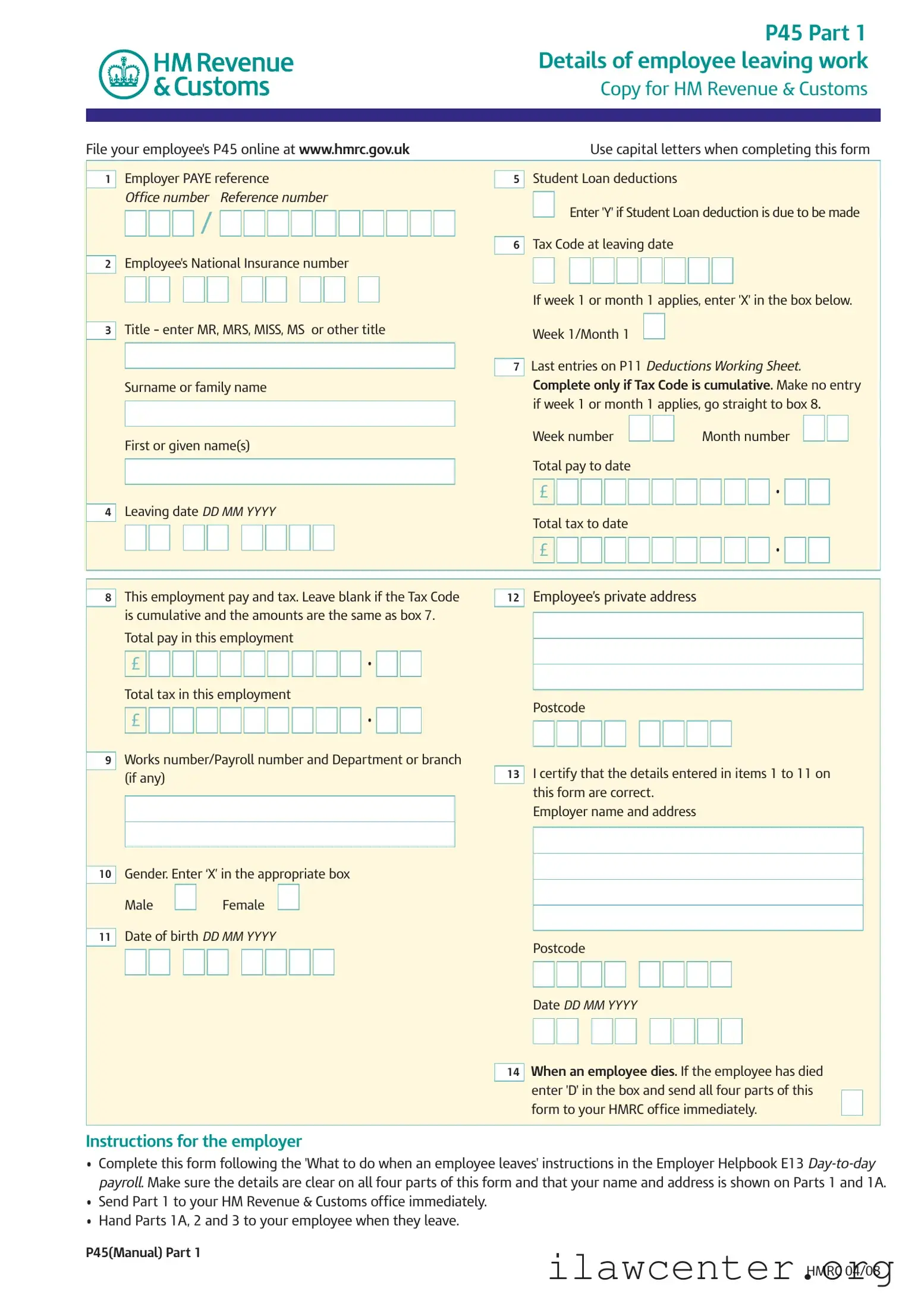
P 45 It PDF Template

P 45 It PDF Template

The P45 IT form is a crucial document that records the details of an employee leaving their job. It is divided into multiple parts, with specific sections for the employer, employee, and new employer, ensuring that tax information is accurately communicated to HM Revenue & Customs. To fill out the form correctly, click the button below.

Article Guide

The P45 form is a crucial document for both employees and employers in the United Kingdom, particularly when an employee leaves a job. It consists of three parts, each serving a specific purpose in the transition process. Part 1 provides essential details about the employee's departure, including their National Insurance number, tax code, and total pay and tax to date. Employers must complete this section accurately and send it to HM Revenue & Customs (HMRC) promptly. Part 1A is a copy for the employee, who should keep it safe for future reference, especially when filing a tax return or applying for benefits. Lastly, Part 2 is designed for the new employer, ensuring they have the necessary information to handle tax deductions correctly. The form also includes important instructions regarding student loan deductions and what to do if the employee is going abroad or becoming self-employed. By understanding the P45 form's structure and requirements, both employees and employers can navigate the complexities of employment transitions with greater ease.

P 45 It Preview

P45 Part 1
Details of employee leaving work
Copy for HM Revenue & Customs
P45(Manual) Part 1
HMRC 04/08
Employer PAYE reference
Office number Reference number
Employee's National Insurance number
Title – enter MR, MRS, MISS, MS or other title
Surname or family name
First or given name(s)
Leaving date
DD MM YYYY
4
3
2
/
1
Student Loan deductions
Enter 'Y' if Student Loan deduction is due to be made
Tax Code at leaving date
If week 1 or month 1 applies, enter 'X' in the box below.
Week 1/Month 1
Last entries on P11 Deductions Working Sheet.
Complete only if Tax Code is cumulative. Make no entry
if week 1 or month 1 applies, go straight to box 8.
Week number Month number
Total pay to date
Total tax to date
£
£
7
6
5
This employment pay and tax. Leave blank if the Tax Code
is cumulative and the amounts are the same as box 7.
Total pay in this employment
Total tax in this employment
Works number/Payroll number and Department or branch
(if any)
Gender. Enter ‘X’ in the appropriate box
Male Female
Date of birth DD MM YYYY
11
10
9
£
£
8
Employees private address
Postcode
I certify that the details entered in items 1 to 11 on
this form are correct.
Employer name and address
Postcode
Date DD MM YYYY
When an employee dies. If the employee has died
enter 'D' in the box and send all four parts of this
form to your HMRC office immediately.
14
13
12
File your employee's P45 online at www.hmrc.gov.uk Use capital letters when completing this form
Instructions for the employer
Complete this form following the 'What to do when an employee leaves' instructions in the Employer Helpbook E13 Day-to-day
payroll. Make sure the details are clear on all four parts of this form and that your name and address is shown on Parts 1 and 1A.
Send Part 1 to your HM Revenue & Customs office immediately.
Hand Parts 1A, 2 and 3 to your employee when they leave.
P45 Part 1A
Details of employee leaving work
Copy for employee
P45(Manual) Part 1A HMRC 04/08
To the employee
The P45 is in three parts. Please keep this part (Part 1A) safe.
Copies are not available. You might need the information in
Part 1A to fill in a Tax Return if you are sent one.
Please read the notes in Part 2 that accompany Part 1A.
The notes give some important information about what you
should do next and what you should do with Parts 2 and 3 of
this form.
Tax credits
Tax credits are flexible. They adapt to changes in your life, such
as leaving a job. If you need to let us know about a change in
your income, phone 0845 300 3900.
To the new employer
If your new employee gives you this Part 1A, please return
it to them. Deal with Parts 2 and 3 as normal.
Employer PAYE reference
Office number Reference number
Employee's National Insurance number
Title – enter MR, MRS, MISS, MS or other title
Surname or family name
First or given name(s)
Leaving date
DD MM YYYY
4
3
2
/
1
Student Loan deductions
Student Loan deductions to continue
Tax Code at leaving date
If week 1 or month 1 applies, enter 'X' in the box below.
Week 1/Month 1
Last entries on P11 Deductions Working Sheet.
Complete only if Tax Code is cumulative. If there is an ‘X’
at box 6 there will be no entries here.
Week number Month number
Total pay to date
Total tax to date
£
£
7
6
5
This employment pay and tax. If no entry here, the amounts
are those shown at box 7.
Total pay in this employment
Total tax in this employment
Works number/Payroll number and Department or branch
(if any)
Gender. Enter ‘X’ in the appropriate box
Male Female
Date of birth DD MM YYYY
11
10
9
£
£
8
Employees private address
Postcode
I certify that the details entered in items 1 to 11 on
this form are correct.
Employer name and address
Postcode
Date DD MM YYYY
13
12
P45 Part 2
Details of employee leaving work
Copy for new employer
P45(Manual) Part 2 HMRC 04/08
To the employee
This form is important to you. Take good care of it and
keep it safe. Copies are not available. Please keep
Parts 2 and 3 of the form together and do not alter them
in any way.
Going to a new job
Give Parts 2 and 3 of this form to your new employer,
or you will have tax deducted using the emergency
code and may pay too much tax. If you do not want
your new employer to know the details on this form,
send it to your HM Revenue & Customs (HMRC) office
immediately with a letter saying so and giving the
name and address of your new employer. HMRC can
make special arrangements, but you may pay too
much tax for a while as a result of this.
Going abroad
If you are going abroad or returning to a country
outside the UK ask for form P85 Leaving the United Kingdom
from any HMRC office or Enquiry Centre.
Becoming self-employed
You must register with HMRC within three months of
becoming self-employed or you could incur a penalty.
To register as newly self-employed see The Phone Book
under HM Revenue & Customs or go to www.hmrc.gov.uk
to get a copy of the booklet SE1 Are you thinking of working
for yourself?
Claiming Jobseeker's Allowance or
Employment and Support Allowance (ESA)
Take this form to your Jobcentre Plus office. They will pay you
any tax refund you may be entitled to when your claim ends,
or at 5 April if this is earlier.
Not working and not claiming Jobseeker's Allowance or
Employment and Support Allowance (ESA)
If you have paid tax and wish to claim a refund ask for
form P50 Claiming Tax back when you have stopped
working from any HMRC office or Enquiry Centre.
Help
If you need further help you can contact any HMRC office
or Enquiry Centre. You can find us in The Phone Book under
HM Revenue & Customs or go to www.hmrc.gov.uk
To the new employer
Check this form and complete boxes 8 to 18 in Part 3
and prepare a form P11 Deductions Working Sheet.
Follow the instructions in the Employer Helpbook E13
Day-to-day payroll, for how to prepare a P11 Deductions
Working Sheet. Send Part 3 of this form to your HMRC office
immediately. Keep Part 2.
Employer PAYE reference
Office number Reference number
Employee's National Insurance number
Title - enter MR, MRS, MISS, MS or other title
Surname or family name
First or given name(s)
Leaving date
DD MM YYYY
4
3
2
/
1
Student Loan deductions
Student Loan deductions to continue
Tax Code at leaving date
If week 1 or month 1 applies, enter 'X' in the box below.
Week 1/Month 1
Last entries on P11 Deductions Working Sheet.
Complete only if Tax Code is cumulative. If there is an ‘X’
at box 6, there will be no entries here.
Week number Month number
Total pay to date
Total tax to date
£
£
7
6
5
P45 Part 3
New employee details
For completion by new employer
P45(Manual) Part 3 HMRC 04/08
New employer PAYE reference
Office number Reference number
Date new employment started DD MM YYYY
Works number/Payroll number and Department or branch
(if any)
Enter 'P' here if employee will not be paid by you
between the date employment began and the
next 5 April.
Enter Tax Code in use if different to the Tax Code at box 6
If week 1 or month 1 applies, enter 'X' in the box below.
Week 1/Month 1
If the tax figure you are entering on P11 Deductions
Working Sheet differs from box 7 (see the E13 Employer
Helpbook Day-to-day payroll) please enter the
figure here.
New employee's job title or job description
14
£
13
12
11
10
9
/
8
Employee's private address
Postcode
Gender. Enter ‘X’ in the appropriate box
Male Female
Date of birth DD MM YYYY
Declaration
I have prepared a P11 Deductions Working Sheet
in accordance with the details above.
Employer name and address
Postcode
Date DD MM YYYY
18
17
16
15
To the new employer Complete boxes 8 to 18 and send P45 Part 3 only to your HMRC office immediately.
Employer PAYE reference
Office number Reference number
Employee's National Insurance number
Title – enter MR, MRS, MISS, MS or other title
Surname or family name
First or given name(s)
Leaving date
DD MM YYYY
4
3
2
/
1
Student Loan deductions
Student Loan deductions to continue
Tax Code at leaving date
If week 1 or month 1 applies, enter 'X' in the box below.
Week 1/Month 1
Last entries on P11 Deductions Working Sheet.
Complete only if Tax Code is cumulative. If there is an ‘X’
at box 6, there will be no entries here.
Week number Month number
Total pay to date
Total tax to date
£
£
7
6
5
File your employee's P45 online at www.hmrc.gov.uk Use capital letters when completing this form

File Properties

Fact Name Fact Description
Purpose The P45 form records details when an employee leaves a job.
Parts The form consists of three parts: Part 1 for HMRC, Part 1A for the employee, and Part 2 for the new employer.
Employer's Responsibility The employer must complete and send Part 1 to HMRC immediately after the employee leaves.
Employee's Role Employees should keep Part 1A safe for future tax purposes, such as filling out a Tax Return.
Tax Code The form includes the employee's tax code at the time of leaving, which affects tax calculations.
Student Loans Employers must indicate if student loan deductions are applicable on the form.
Leaving Date The form requires the exact date the employee leaves, formatted as DD MM YYYY.
National Insurance Number Employees must provide their National Insurance number on the form for identification purposes.
Governing Law The P45 form is governed by UK tax law as administered by HM Revenue & Customs (HMRC).

Instructions on Utilizing P 45 It

Completing the P45 form is an important step when an employee leaves a job. The information you provide will help ensure that tax records are accurate and that the employee has the necessary documents for their next steps. Follow these steps to fill out the P45 form correctly.

  1. Begin by filling in the employer's PAYE reference in the designated box.
  2. Enter the office number and reference number.
  3. Input the employee's National Insurance number.
  4. In the title section, write MR, MRS, MISS, MS, or other title as appropriate.
  5. Fill in the employee's surname or family name.
  6. Next, provide the employee's first or given name(s).
  7. Enter the leaving date in the format DD MM YYYY.
  8. Indicate if Student Loan deductions are applicable by marking 'Y' or leaving it blank.
  9. If applicable, enter the Tax Code at the leaving date.
  10. If the employee is on a week 1 or month 1 basis, mark 'X' in the box provided.
  11. Complete the week number and month number if necessary.
  12. Record the total pay to date and total tax to date in the respective boxes.
  13. Provide the employee's private address and postcode.
  14. Include the works number or payroll number and the department or branch if applicable.
  15. Indicate the employee's gender by marking 'X' in the appropriate box.
  16. Fill in the employee's date of birth in the format DD MM YYYY.
  17. Sign and date the form to certify that the details are correct.

After completing the form, ensure that all details are clear. Send Part 1 to HM Revenue & Customs (HMRC) immediately. Hand Parts 1A, 2, and 3 to the employee as they leave. This will help them in their future employment or claims.

Important Facts about P 45 It

What is the P45 form?

The P45 form is a document that an employer provides to an employee when they leave a job. It shows the employee's pay and tax details for that employment. The form has four parts, with different sections for the employer, employee, and new employer.

Why do I need a P45?

You need a P45 to ensure your tax is calculated correctly when you start a new job or claim benefits. It contains important information about your earnings and tax deductions, which helps your new employer set up your tax code correctly.

What should I do with my P45?

What if I lose my P45?

If you lose your P45, contact your previous employer to request a replacement. If that’s not possible, you can provide your new employer with your last payslip and tax details, but this may lead to incorrect tax deductions.

What information is included in the P45?

The P45 includes details such as your name, National Insurance number, leaving date, total pay, and total tax paid during your employment. It also contains your tax code and any student loan deductions if applicable.

What happens if I die while employed?

If an employee passes away, the employer should mark the P45 with a 'D' and send all parts of the form to HM Revenue & Customs immediately. This ensures that the tax records are updated correctly.

Can I use the P45 to claim tax refunds?

Yes, if you have overpaid tax during your employment, you can use your P45 to claim a refund. If you are not working and wish to claim a refund, you may need to fill out a P50 form.

What should I do if I start a new job without a P45?

If you start a new job without a P45, inform your new employer. They may need to apply an emergency tax code until they receive your P45 or can verify your tax details with HMRC.

How do I file my P45 with HMRC?

Your employer is responsible for filing the P45 with HMRC. They should send Part 1 to HMRC immediately after you leave. You do not need to file it yourself.

What if I am going abroad?

If you are leaving the UK and need to manage your tax, ask for form P85 from HMRC. This form will help you with tax matters while you are abroad, including any potential refunds.

Common mistakes

Filling out the P45 IT form can be straightforward, but mistakes are common. One frequent error is not using capital letters as instructed. The form specifically requests that capital letters be used when completing details. This requirement ensures clarity and prevents misinterpretation of the information provided.

Another mistake is failing to include the correct PAYE reference and office number. These details are essential for accurate processing by HM Revenue & Customs. Omitting or miswriting these numbers can lead to delays and complications in tax records.

Many individuals also overlook the importance of entering the correct National Insurance number. This number is crucial for tracking contributions and ensuring that the employee's tax records are accurate. Missing or incorrect entries can cause significant issues down the line.

People often forget to mark the week 1 or month 1 box when applicable. If this applies, entering an 'X' in the designated box is necessary. Failure to do so can result in the wrong tax code being applied, leading to potential overpayment or underpayment of taxes.

Another common error involves the completion of the total pay and tax amounts. These figures should reflect the employee’s earnings and tax deductions accurately. Leaving these sections blank or entering incorrect amounts can lead to confusion and may affect the employee’s tax return.

Lastly, individuals sometimes neglect to certify the details entered on the form. The certification statement at the bottom of the form is critical. By signing this section, the employer confirms that all information is correct, which is vital for compliance with tax regulations.

Documents used along the form

The P45 form is essential for employees transitioning between jobs. However, several other documents may accompany it to ensure a smooth process. Below is a list of forms and documents that are commonly used alongside the P45.

  • P60 - This document summarizes an employee's total pay and deductions for the tax year. It is issued at the end of the tax year and is crucial for tax return purposes.
  • P50 - This form is used to claim a tax refund when an employee has stopped working and is not claiming Jobseeker's Allowance or Employment and Support Allowance.
  • P85 - For individuals leaving the UK to work abroad, this form notifies HMRC and helps in managing tax responsibilities while overseas.
  • P11D - This form details benefits and expenses provided to employees, which are not included in their salary. Employers must submit this form for each employee receiving such benefits.
  • Tax Return - Employees may need to complete a tax return to report their income and claim any refunds or credits, especially if their tax situation changes significantly.
  • Student Loan Repayment Plan - This document outlines the employee's student loan repayment obligations, especially if they had deductions taken from their pay.
  • Jobseeker's Allowance Claim Form - If an employee is applying for Jobseeker's Allowance, this form will be necessary to initiate their claim.
  • Employment Contract - This document outlines the terms of employment, including job responsibilities, salary, and benefits, which may be relevant when starting a new position.
  • Reference Letter - A letter from a previous employer can provide a new employer with insights into the employee's work history and character.
  • National Insurance Number Confirmation - This document verifies the employee's National Insurance number, which is essential for tax and social security purposes.

These documents collectively support the transition process for employees leaving one job and starting another. Keeping them organized will ensure that all necessary information is readily available for tax and employment purposes.

Similar forms

The P45 form is an essential document for employees leaving a job, detailing their earnings and tax contributions. Several other forms serve similar purposes in different contexts. Here are six documents that share similarities with the P45 form:

  • P60: This document summarizes an employee's total pay and deductions for the entire tax year. Like the P45, it is crucial for tax purposes, especially when filing annual tax returns.
  • P11D: This form reports benefits and expenses provided to employees, which are not included in their salary. It is similar to the P45 in that it helps the employee and HMRC understand tax obligations.
  • P50: Used to claim a tax refund when an individual stops working, the P50 is akin to the P45 in that it provides necessary information for calculating tax refunds based on prior earnings.
  • P85: This form is for individuals leaving the UK to work abroad. It informs HMRC about the individual's departure and is similar to the P45 as it also addresses tax status and contributions.
  • Form W-2: In the United States, this form reports an employee's annual wages and the taxes withheld. It serves a similar function to the P45 by providing a summary of earnings for tax filing purposes.
  • Form 1099: This document is used for independent contractors and freelancers to report income. While not identical, it parallels the P45 in that it outlines income earned outside of traditional employment, impacting tax responsibilities.

Understanding these documents is vital for both employees and employers to ensure compliance with tax regulations and to facilitate smooth transitions during employment changes.

Dos and Don'ts

Things to Do:

  • Use capital letters when filling out the form to ensure clarity.
  • Enter the correct Tax Code at the time of leaving to avoid tax issues.
  • Provide accurate National Insurance number to facilitate proper tax processing.
  • Double-check all entries for accuracy before submitting the form.

Things Not to Do:

  • Do not leave any fields blank unless instructed to do so.
  • Avoid using abbreviations or informal language in the form.
  • Do not forget to sign and date the form, as this is crucial for validation.
  • Do not submit the form late; send it to HMRC immediately after completion.

Misconceptions

Misconceptions about the P45 form can lead to confusion for both employers and employees. Here are four common misunderstandings:

  • The P45 is only for employees who resign. Many believe that the P45 form is only issued when an employee voluntarily leaves their job. However, this form is also necessary when an employee is terminated, laid off, or even in cases of death. It serves as a record of an employee's tax and pay details, regardless of the reason for leaving.
  • The P45 is not important for tax purposes. Some people think that the P45 form is just a formality and does not affect their tax situation. In reality, the P45 is crucial for ensuring that the correct amount of tax is deducted in future employment or when claiming benefits. It helps prevent overpayment or underpayment of taxes.
  • You can get a replacement P45 easily. Many individuals assume that if they lose their P45, they can quickly obtain a replacement. Unfortunately, copies of the P45 are not available. If an employee loses their P45, they must request a statement of earnings from their previous employer to help with tax matters.
  • The P45 is only necessary for full-time employees. Another misconception is that only full-time employees receive a P45. In fact, any employee who has left a job, whether part-time or full-time, is entitled to receive a P45. This form is essential for all workers, as it documents their earnings and tax contributions.

Key takeaways

  • The P45 form is essential when an employee leaves a job. It provides important details about their employment and tax status.

  • It consists of three parts: Part 1 is for HM Revenue & Customs (HMRC), Part 1A is for the employee, and Parts 2 and 3 are for the new employer.

  • Employers must complete the form accurately and promptly. This ensures that the employee's tax records are correct and up-to-date.

  • Employees should keep Part 1A safe, as it may be needed for tax returns or future employment.

  • When filling out the form, use capital letters and ensure all information is clear, including the PAYE reference and National Insurance number.

  • If an employee has a Student Loan, make sure to indicate whether deductions will continue or not.

  • For employees moving to a new job, it’s crucial to provide Parts 2 and 3 to the new employer to avoid unnecessary tax deductions.