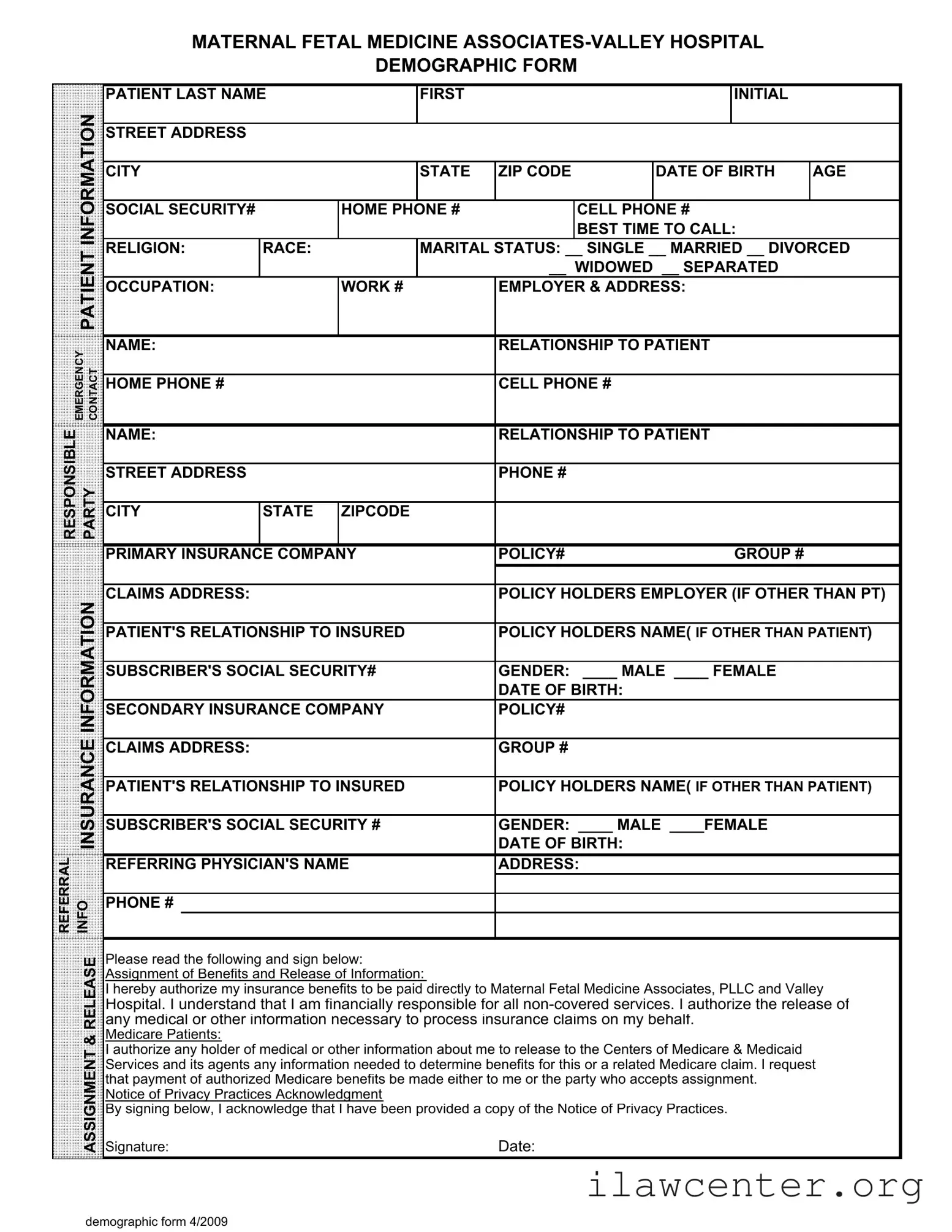

Patient Demographics PDF Template

Patient Demographics PDF Template

The Patient Demographics form is a crucial document that collects essential information about patients to ensure accurate medical care and billing. This form captures details such as your name, contact information, insurance coverage, and emergency contacts. Completing this form helps healthcare providers understand your needs and facilitates a smoother experience during your visit, so please fill it out by clicking the button below.

Article Guide

The Patient Demographics form is a crucial document that captures essential information about patients seeking care at Maternal Fetal Medicine Associates and Valley Hospital. This form collects personal details such as the patient's name, address, and contact information, ensuring that healthcare providers can reach out effectively. It also includes vital statistics like date of birth, age, and social security number, which are necessary for identification and billing purposes. The form addresses the patient's insurance details, requiring information about primary and secondary insurance providers, policy numbers, and the relationship of the patient to the insured. Additionally, it gathers emergency contact information, ensuring that loved ones can be notified in case of an urgent situation. The form also covers important demographic aspects such as race, religion, and marital status, which can be relevant for providing personalized care. Finally, it includes sections for authorization of benefits and release of information, ensuring compliance with privacy regulations and facilitating the claims process. Overall, the Patient Demographics form plays a significant role in streamlining patient intake and ensuring that healthcare providers have the necessary information to deliver quality care.

Patient Demographics Preview

MATERNAL FETAL MEDICINE ASSOCIATES-VALLEY HOSPITAL
DEMOGRAPHIC FORM
PATIENT LAST NAM
E
FIRST INITIAL
STREET ADDRESS
CITY STATE ZIP CODE DATE OF BIRTH
AGE
SOCIAL SECURITY
#
HOME PHONE # CELL PHONE #
BEST TIME TO CALL:
RELIGION: RACE: MARITAL STATUS: __ SINGLE __ MARRIED __ DIVORCED
__ WIDOWED __ SEPARATE
D
OCCUPATION: WORK # EMPLOYER & ADDRESS:
NAME: RELATIONSHIP TO PATIENT
HOME PHONE # CELL PHONE #
NAME: RELATIONSHIP TO PATIENT
STREET ADDRESS PHONE #
CITY STATE ZIPCODE
PRIMARY INSURANCE COMPAN
Y
POLICY# GROUP #
CLAIMS ADDRESS: POLICY HOLDERS EMPLOYER (IF OTHER THAN PT)
PATIENT'S RELATIONSHIP TO INSURED
POLICY HOLDERS NAME(
IF OTHER THAN PATIENT)
SUBSCRIBER'S SOCIAL SECURITY
#
GENDER: ____ MALE ____ FEMALE
DATE OF BIRTH:
SECONDARY INSURANCE COMPAN
Y
POLICY#
CLAIMS ADDRESS: GROUP #
PATIENT'S RELATIONSHIP TO INSURED
POLICY HOLDERS NAME(
IF OTHER THAN PATIENT)
SUBSCRIBER'S SOCIAL SECURITY
#
GENDER: ____ MALE ____FEMALE
DATE OF BIRTH:
REFERRING PHYSICIAN'S NAM
E
ADDRESS:
PHONE #
ease rea
e
o
ow
ng an
s
gn
e
ow:
A
ss
i
gnmen
t
o
f
B
ene
fit
s an
d
R
e
l
ease o
f
I
n
f
orma
ti
on:
I
h
ere
b
y au
th
or
i
ze my
i
nsurance
b
ene
fit
s
t
o
b
e pa
id
di
rec
tl
y
t
o
M
a
t
erna
l
F
e
t
a
l
M
e
di
c
i
ne
A
ssoc
i
a
t
es,
PLLC
an
d
V
a
ll
ey
H
osp
it
a
l
.
I
un
d
ers
t
an
d
th
a
t
I
am
fi
nanc
i
a
ll
y respons
ibl
e
f
or a
ll
non-covere
d
serv
i
ces.
I
au
th
or
i
ze
th
e re
l
ease o
f
any me
di
ca
l
or o
th
er
i
n
f
orma
ti
on necessary
t
o process
i
nsurance c
l
a
i
ms on my
b
e
h
a
lf
.
M
e
di
care
P
a
ti
en
t
s:
I
au
th
or
i
ze any
h
o
ld
er o
f
me
di
ca
l
or o
th
er
i
n
f
orma
ti
on a
b
ou
t
me
t
o re
l
ease
t
o
th
e
C
en
t
ers o
f
M
e
di
care
&
M
e
di
ca
id
S
erv
i
ces an
d
it
s agen
t
s any
i
n
f
orma
ti
on nee
d
e
d
t
o
d
e
t
erm
i
ne
b
ene
fit
s
f
or
thi
s or a re
l
a
t
e
d
M
e
di
care c
l
a
i
m.
I
reques
t
th
a
t
paymen
t
o
f
au
th
or
i
ze
d
M
e
di
care
b
ene
fit
s
b
e ma
d
e e
ith
er
t
o me or
th
e par
t
y w
h
o accep
t
s ass
i
gnmen
t
.
N
o
ti
ce o
f
P
r
i
vacy
P
rac
ti
ces
A
c
k
now
l
e
d
gmen
t
B
y s
i
gn
i
ng
b
e
l
ow,
I
ac
k
now
l
e
d
ge
th
a
t
I
h
ave
b
een prov
id
e
d
a copy o
f
th
e
N
o
ti
ce o
f
P
r
i
vacy
P
rac
ti
ces.
Signature: Date:
PATIENT INFORMATION
REFERRAL
INFO
ASSIGNMENT & RELEASE
EMERGENCY
CONTACT
RESPONSIBLE
PARTY
INSURANCE INFORMATION
demographic form 4/2009

File Properties

Fact Name Description
Purpose The Patient Demographics form collects essential information for patient identification and healthcare services.
Required Information Patients must provide personal details such as name, address, date of birth, and contact numbers.
Emergency Contact Patients are asked to list an emergency contact, including their relationship and phone numbers.
Insurance Details The form requires information about primary and secondary insurance providers, policy numbers, and the insured's relationship to the patient.
Governing Laws In states like California, the form complies with the California Confidentiality of Medical Information Act.
Privacy Practices Patients acknowledge receipt of the Notice of Privacy Practices by signing the form, ensuring their rights are protected.
Signature Requirement A signature is required to authorize the release of information and assignment of benefits to the healthcare provider.

Instructions on Utilizing Patient Demographics

Completing the Patient Demographics form is an important step in ensuring that your medical information is accurately recorded. This information will be used to facilitate your care and communicate with your insurance providers. Follow the steps below to fill out the form correctly.

  1. Begin with your last name and first initial in the designated fields.
  2. Provide your street address, city, state, and ZIP code.
  3. Enter your date of birth and age.
  4. Fill in your social security number.
  5. List your home phone number and cell phone number.
  6. Indicate the best time to call you.
  7. Provide your religion and race.
  8. Select your marital status by checking the appropriate box: Single, Married, Divorced, Widowed, or Separated.
  9. State your occupation and provide your work number and employer's address.
  10. Fill in the emergency contact name, their relationship to you, and their home and cell phone numbers.
  11. Provide the responsible party's name and their relationship to you, along with their street address and phone number.
  12. List your primary insurance company, policy number, and group number.
  13. Fill in the claims address for your primary insurance.
  14. Provide the policy holder's employer if it is different from yours.
  15. Indicate your relationship to the insured if the policy holder is not you.
  16. Fill in the policy holder's name if it is not you and their social security number.
  17. Indicate your gender by checking the appropriate box: Male or Female.
  18. Provide the date of birth for the policy holder.
  19. Complete the information for your secondary insurance company, including policy number, claims address, and group number.
  20. Repeat the steps for the secondary insurance regarding policy holder's name and social security number.
  21. Fill in the referring physician's name, address, and phone number.
  22. Read the release section and sign your name along with the date.
  23. Acknowledge receipt of the Notice of Privacy Practices by signing below the acknowledgment section.

Important Facts about Patient Demographics

What is the purpose of the Patient Demographics form?

The Patient Demographics form collects essential information about patients. This information helps healthcare providers understand patient needs, manage appointments, and process insurance claims efficiently. It ensures that the healthcare team has accurate details for providing the best care possible.

What information is required on the form?

The form requires personal details such as your name, address, date of birth, and contact numbers. It also asks for your social security number, marital status, occupation, and emergency contact information. Additionally, insurance details, including policy numbers and the relationship to the insured, are necessary for billing purposes.

Why do I need to provide my social security number?

Your social security number helps verify your identity and is often required by insurance companies for processing claims. It ensures that the services you receive are accurately billed to the correct insurance provider. However, you should always check how your information will be protected.

What if I do not have insurance?

If you do not have insurance, you can still complete the form. Indicate that you are uninsured. This information helps the healthcare provider understand your situation and discuss payment options or financial assistance that may be available to you.

How is my personal information protected?

Your privacy is a priority. The information you provide on the form is kept confidential and is used only for medical and billing purposes. By signing the release section, you authorize the healthcare provider to share necessary information with your insurance company while adhering to privacy laws.

What should I do if my information changes?

If any of your information changes, such as your address, phone number, or insurance details, notify the healthcare provider as soon as possible. Keeping your information up to date helps avoid issues with appointments and insurance claims.

Can I fill out the form online?

Many healthcare providers offer online options for filling out the Patient Demographics form. Check with your provider to see if this option is available. If not, you may need to fill out a paper form during your visit.

What is the significance of the assignment of benefits section?

The assignment of benefits section allows your insurance company to pay the healthcare provider directly for services rendered. This simplifies the billing process for you. By signing this section, you agree to let the provider handle the insurance claims on your behalf.

Do I need to sign the Notice of Privacy Practices acknowledgment?

Yes, signing the Notice of Privacy Practices acknowledgment confirms that you have received and understood the provider's privacy practices. This is an important step in ensuring that you are aware of how your personal health information will be used and protected.

What if I have questions about the form?

If you have questions about any part of the Patient Demographics form, don’t hesitate to ask the healthcare provider's staff for assistance. They can help clarify any sections and ensure you understand what information is needed.

Common mistakes

Completing the Patient Demographics form accurately is crucial for ensuring that medical care is delivered efficiently and that insurance claims are processed without delay. However, many individuals make common mistakes that can lead to complications. One significant error is failing to provide complete contact information. Omitting details like a cell phone number or the best time to call can hinder communication between the healthcare provider and the patient. This lack of information may result in missed appointments or delays in receiving critical health updates.

Another frequent mistake involves inaccurate or incomplete insurance information. Patients often neglect to double-check their policy numbers or the claims address. If the insurance details are incorrect, it can lead to claim denials, leaving patients responsible for costs they believed would be covered. It is essential to ensure that all fields related to insurance are filled out carefully and accurately.

Many people also overlook the importance of specifying their relationship to the insured party. This detail is vital, especially when the patient is not the primary policyholder. Without this information, insurance companies may struggle to process claims effectively. Moreover, patients should ensure that they provide the correct name of the policyholder, as discrepancies can lead to unnecessary complications.

Another common oversight is the selection of marital status. Patients sometimes leave this section blank or select multiple options. This can create confusion in the medical records and affect the way that certain services are billed. It is best to choose one option that accurately reflects the patient’s current status to avoid any potential issues.

Lastly, many individuals forget to sign the release section of the form. This signature is not just a formality; it authorizes the healthcare provider to access necessary medical information and process insurance claims. Without this signature, the provider may be unable to obtain vital information needed for treatment or billing, leading to delays in care.

Documents used along the form

The Patient Demographics form is a crucial document that collects essential information about a patient. It serves as the foundation for medical records and insurance processing. Along with this form, there are several other documents that are commonly utilized to ensure comprehensive patient care and accurate billing.

  • Medical History Form: This document gathers detailed information about a patient’s past medical conditions, surgeries, allergies, and medications. It helps healthcare providers understand the patient's health background and make informed decisions regarding treatment.
  • Insurance Verification Form: This form is used to confirm a patient’s insurance coverage and benefits. It helps the medical office determine the extent of coverage and any out-of-pocket costs the patient may incur.
  • Consent for Treatment Form: Patients sign this document to give healthcare providers permission to perform necessary medical procedures or treatments. It ensures that patients are informed about the procedures and agree to them voluntarily.
  • Release of Information Form: This form allows healthcare providers to share a patient’s medical information with other entities, such as specialists or insurance companies. It is essential for coordinating care and processing claims efficiently.
  • Financial Responsibility Agreement: This document outlines the patient’s financial obligations regarding their healthcare services. It clarifies payment expectations and helps prevent misunderstandings about billing.

Understanding these documents can enhance a patient’s experience and streamline the administrative processes in a healthcare setting. Each form plays a vital role in ensuring that patients receive the best care possible while also facilitating efficient communication with insurance providers.

Similar forms

The Patient Demographics form is an essential document in healthcare settings, collecting key information about patients. Here are nine other documents that share similarities with the Patient Demographics form:

  • Medical History Form: Like the Patient Demographics form, this document gathers personal information and medical background to provide a comprehensive view of the patient's health.
  • Insurance Information Form: This form collects details about the patient's insurance coverage, similar to how the Patient Demographics form includes insurance company information and policy numbers.
  • Consent for Treatment Form: Both documents require the patient's acknowledgment and consent, ensuring that they understand and agree to the services provided.
  • Emergency Contact Form: This document also collects information about individuals to contact in case of emergencies, paralleling the emergency contact section in the Patient Demographics form.
  • Referral Form: Similar to the referral information section, this form is used to document the physician's name and contact details when referring a patient to a specialist.
  • Patient Registration Form: This document serves a similar purpose by collecting basic personal information, including name, address, and contact details.
  • Authorization for Release of Information Form: Both forms involve the patient's consent to share their medical information with relevant parties, ensuring compliance with privacy regulations.
  • Payment Agreement Form: This document outlines the financial responsibilities of the patient, akin to the financial responsibilities mentioned in the Patient Demographics form.
  • Patient Satisfaction Survey: While primarily focused on feedback, this survey often collects demographic information to analyze patient experiences, similar to the data collected in the Patient Demographics form.

Dos and Don'ts

When filling out the Patient Demographics form, it is important to be thorough and accurate. Here are five guidelines to follow:

  • Do provide complete and accurate information for each section.
  • Do double-check your entries for any spelling errors or omissions.
  • Do ensure that the emergency contact information is current and reliable.
  • Don't leave any required fields blank; this could delay processing.
  • Don't provide false information, as this can lead to complications with insurance claims.

By adhering to these guidelines, you can help ensure that your information is processed smoothly and efficiently.

Misconceptions

Here are nine misconceptions about the Patient Demographics form:

  1. It's only for insurance purposes. Many people think the form is solely for insurance. In reality, it collects essential information for patient care and communication.
  2. All fields are mandatory. While most fields are important, not every section is required. Patients can leave some fields blank if they feel uncomfortable providing certain information.
  3. Only new patients need to fill it out. Existing patients may need to update their information periodically. Changes in address, insurance, or emergency contacts should be reported.
  4. My information is not secure. Healthcare providers are required by law to keep patient information confidential. The form is handled with strict privacy measures in place.
  5. I have to provide my Social Security number. While it can help with identification, patients can often provide an alternative form of identification if they prefer not to disclose their Social Security number.
  6. The form is only for adults. Children and minors also require a Patient Demographics form. Parents or guardians typically fill it out on their behalf.
  7. My insurance will cover everything. The form helps determine coverage, but patients are still responsible for understanding their benefits and any potential out-of-pocket costs.
  8. Completing the form is a waste of time. Accurate and complete information is vital for effective healthcare. It ensures that providers can deliver the best possible care.
  9. Once I fill it out, I never have to do it again. Changes in personal circumstances may require updates to the form. Regular reviews help maintain accurate patient records.

Key takeaways

Filling out the Patient Demographics form is an essential step in ensuring accurate medical care and billing. Here are some key takeaways to keep in mind:

  • Provide Complete Information: Fill in all fields accurately, including your full name, address, and contact details.
  • Emergency Contact: Include a reliable emergency contact person who can be reached if necessary.
  • Insurance Details: Ensure you provide comprehensive information about your primary and secondary insurance, including policy numbers and claims addresses.
  • Relationship to Insured: Clearly indicate your relationship to the policyholder if you are not the insured party.
  • Marital Status: Select your current marital status, as this information may be relevant for your medical care and billing.
  • Signature Required: Sign the form to authorize the release of your medical information and assignment of benefits to the healthcare provider.
  • Notice of Privacy Practices: Acknowledge that you have received information about your privacy rights by signing the acknowledgment section.
  • Keep a Copy: After submitting the form, retain a copy for your records to ensure you have all pertinent information at hand.
  • Update as Necessary: If your information changes, such as a new address or insurance provider, fill out a new form promptly.

By following these guidelines, you can help ensure that your healthcare experience is smooth and efficient.