Pnc Bank Statement PDF Template

Pnc Bank Statement PDF Template

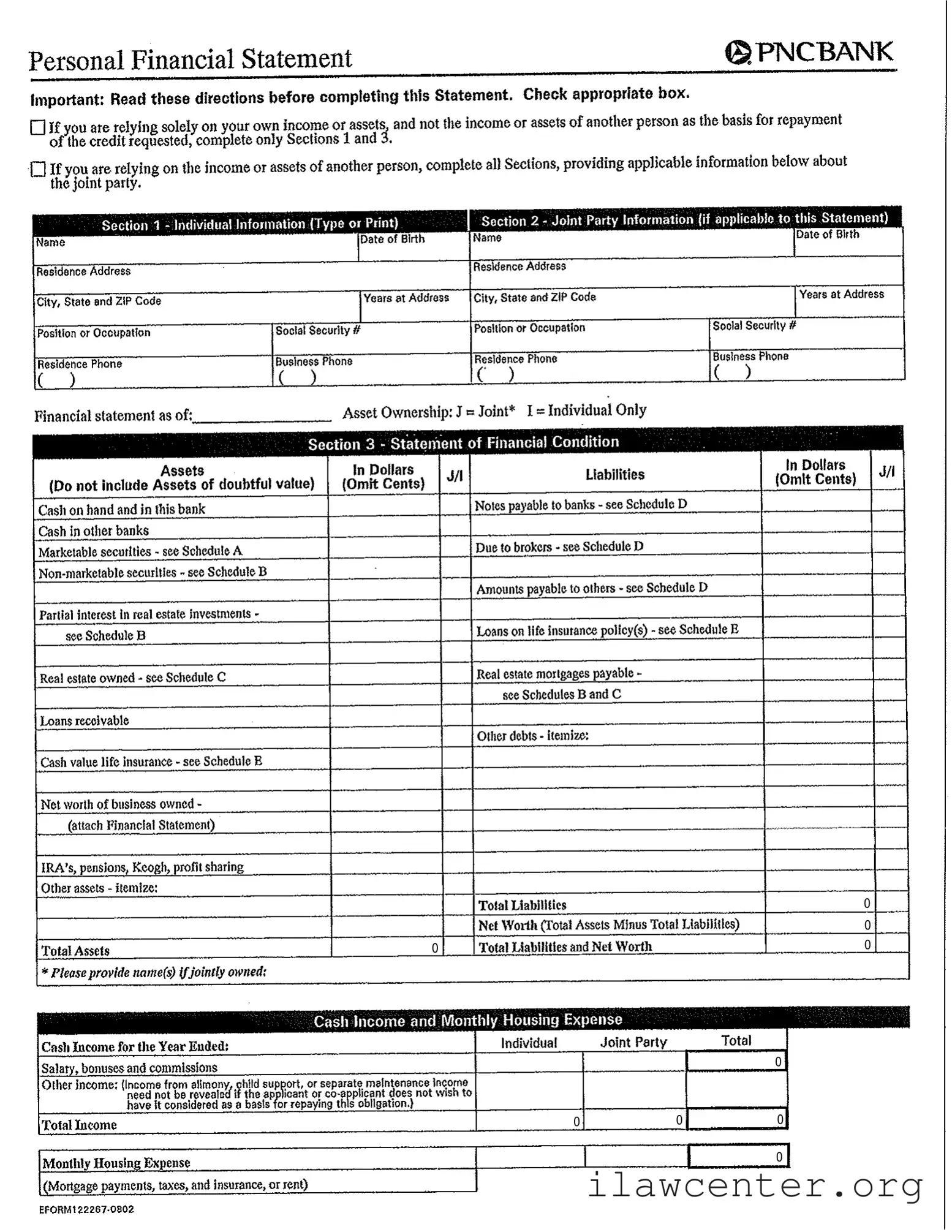
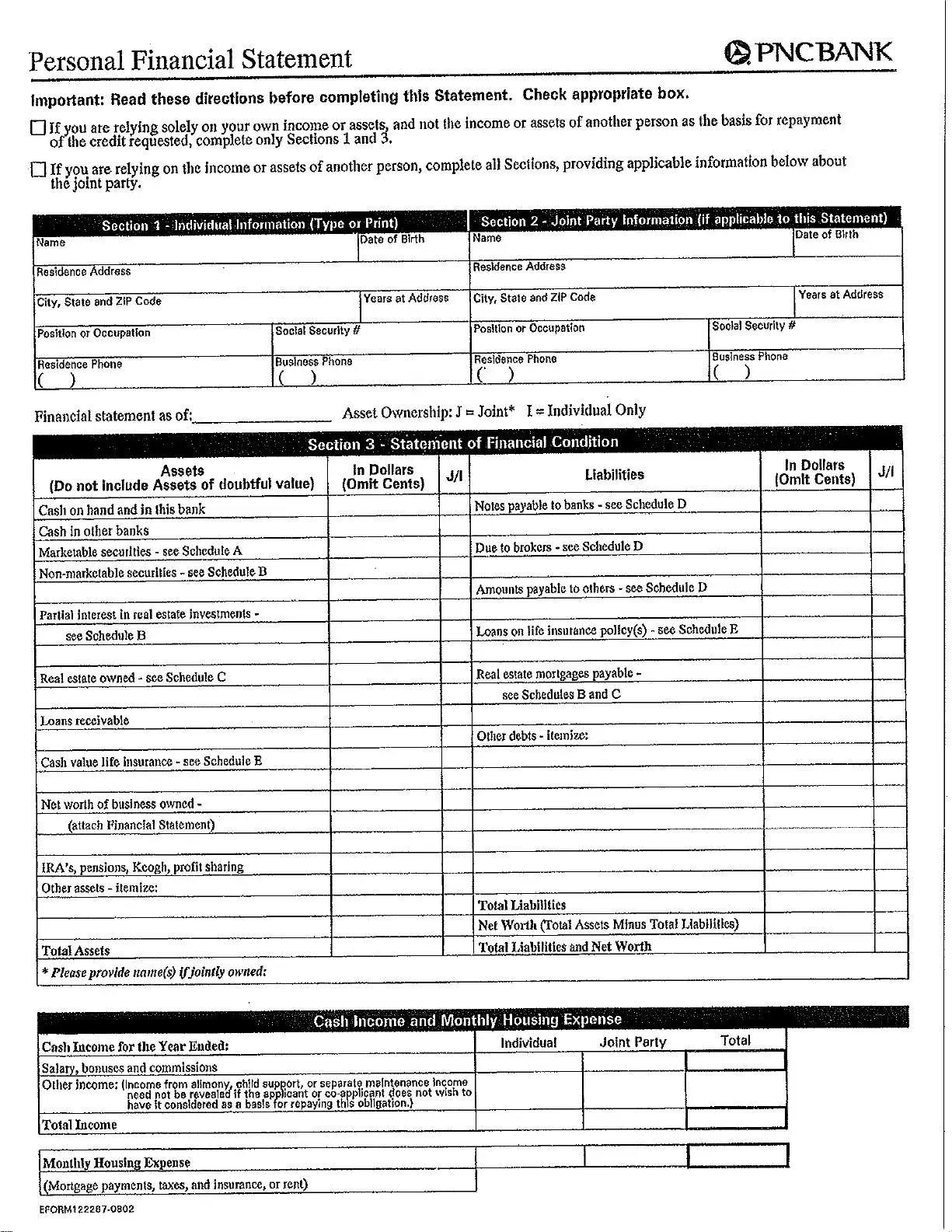
The PNC Bank Statement form is a crucial document used to outline an individual's financial condition, providing a comprehensive overview of assets, liabilities, and income. This form is essential for anyone seeking credit, whether relying solely on personal finances or the finances of a joint party. Timely completion of this form can significantly impact your credit application process, so be sure to fill it out accurately by clicking the button below.

Article Guide

The PNC Bank Statement form is a crucial document for individuals seeking credit or loans. It captures essential financial information that helps the bank assess an applicant's creditworthiness. The form consists of several sections, beginning with individual information, which includes personal details such as name, address, and contact information. If applicable, there is a section for joint party information, allowing for the inclusion of another individual's financial details. The heart of the form lies in the Statement of Financial Condition, where applicants list their assets and liabilities. This section provides a comprehensive overview of one's financial standing, including cash, real estate, and other investments. Applicants must also report their income sources, which can include salary, bonuses, and other earnings. The form concludes with important representations and warranties, where individuals affirm the accuracy of the information provided. Completing this form accurately is vital for a smooth credit application process, ensuring that all relevant financial details are disclosed to the bank.

Pnc Bank Statement Preview

0
0
0
0
0
0
0
0
0

File Properties

Fact Name Description
Purpose The PNC Bank Statement form is used to assess an individual's financial condition for credit applications.
Sections The form consists of multiple sections, including individual information, joint party information, and financial condition statements.
Asset Ownership Assets can be listed as either jointly owned or individually owned, affecting the assessment of creditworthiness.
Income Reporting Applicants must report their income, including salary and other sources, which may include alimony or child support.
Liabilities Disclosure All liabilities must be disclosed, excluding assets of doubtful value, to provide a clear picture of financial obligations.
Governing Laws State-specific laws govern the use of this form, including consumer protection laws and credit reporting regulations.
Signature Requirement Both the individual and any joint party must sign the form, confirming the accuracy of the provided information.
Confidentiality Information submitted is confidential and used solely for evaluating creditworthiness and extending credit.
Verification Rights The bank has the right to verify the information provided, ensuring its accuracy before processing the credit application.

Instructions on Utilizing Pnc Bank Statement

After completing the PNC Bank Statement form, it is important to review all the information provided for accuracy. Ensure that all necessary sections have been filled out based on whether you are applying solely on your own income or if you are including the income of another person. Once completed, submit the form as instructed.

  1. Obtain the PNC Bank Statement form.
  2. Read the directions carefully before starting.
  3. Check the appropriate box based on your financial situation:
    • If relying solely on your own income, complete only Sections 1 and 3.
    • If relying on another person's income, complete all sections.
  4. Fill out Section 1 with your individual information, including:
    • Name
    • Residence Address
    • City, State, and ZIP Code
    • Position or Occupation
    • Residence Phone
    • Date of Birth
    • Social Security Number
    • Business Phone
  5. If applicable, complete Section 2 with the joint party's information in the same manner.
  6. In Section 3, list your assets and liabilities in dollars. Ensure to omit cents.
  7. Calculate your total assets and total liabilities.
  8. Determine your net worth by subtracting total liabilities from total assets.
  9. Provide your cash income for the year and any monthly housing expenses.
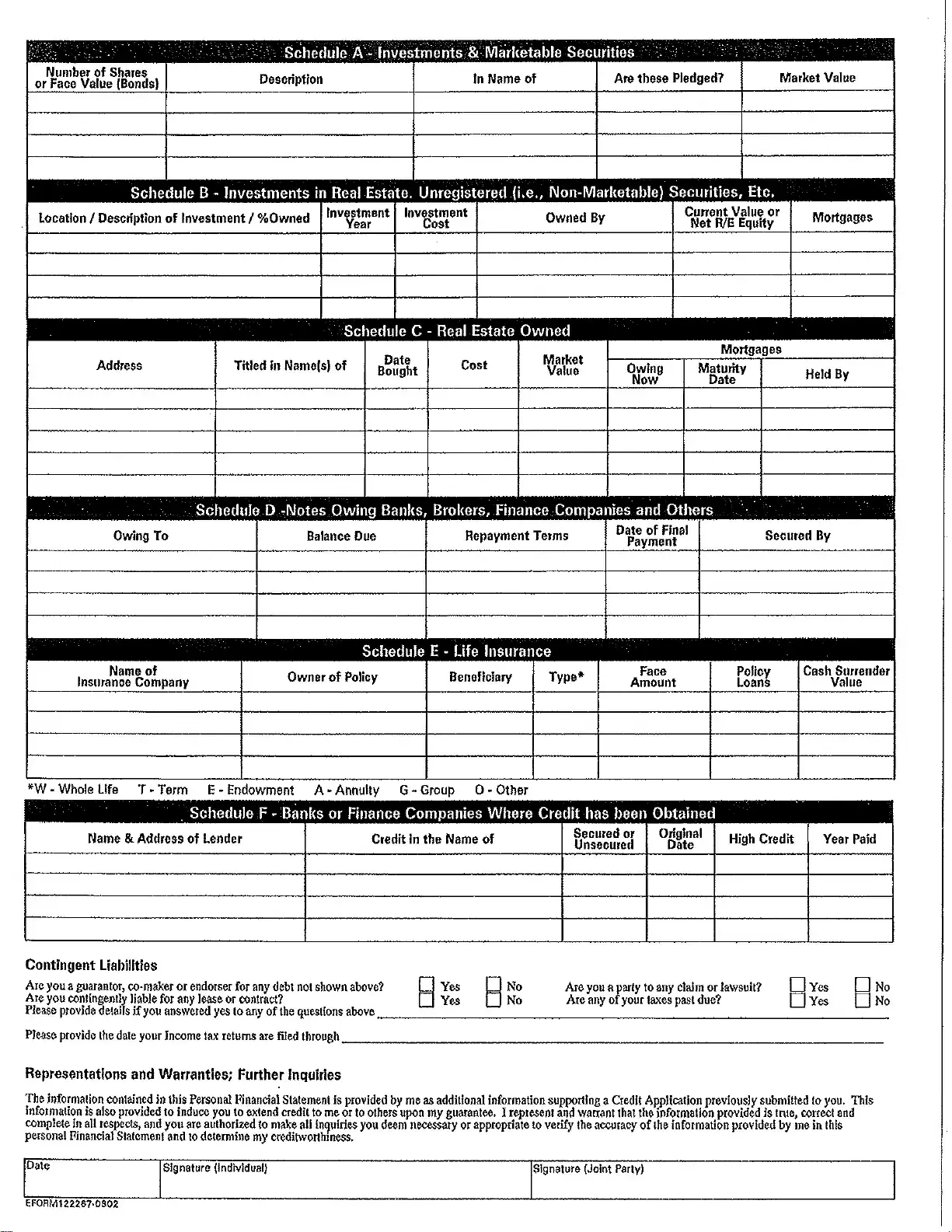
  10. Complete any additional schedules that apply to your financial situation:
    • Schedule A for investments and marketable securities
    • Schedule B for investments in real estate
    • Schedule C for real estate owned
    • Schedule D for notes owing
    • Schedule E for life insurance details
  11. Answer any questions regarding guarantor status, claims, or past due taxes.
  12. Sign and date the form in the designated areas for both individual and joint party, if applicable.

Important Facts about Pnc Bank Statement

What is the purpose of the PNC Bank Statement form?

The PNC Bank Statement form is designed to collect detailed financial information from individuals applying for credit. It helps the bank assess the applicant's financial condition, including assets, liabilities, income, and expenses. This information is crucial for determining creditworthiness and making informed lending decisions.

Who should complete the form?

What information is required in Section 1?

Section 1 requires personal information from the individual applying for credit. This includes your name, residence address, occupation, and contact details. Additionally, you will need to provide your date of birth and Social Security number. Accurate information is essential, as it forms the basis of your financial profile.

What details are needed for joint party information?

If you are relying on a joint party's income or assets, Section 2 must be filled out. This section asks for similar information about the joint party, including their name, address, occupation, and financial details. It’s important to provide complete and accurate information about the joint party, as it impacts the overall assessment of your credit application.

How should I report my assets and liabilities?

In Section 3, you will list your assets and liabilities in dollars. This includes cash, real estate, investments, and any debts you owe. Be sure to omit cents and only include amounts that reflect your current financial situation. The total assets will be compared against total liabilities to calculate your net worth, which is a critical factor in the credit evaluation process.

What if I have contingent liabilities or ongoing legal issues?

If you have contingent liabilities, such as being a guarantor for a loan not listed on the form, or if you are involved in any legal claims, you must disclose this information. Transparency is vital, as these factors can influence your creditworthiness. If applicable, provide details in the designated section to ensure a complete assessment.

How does the bank verify the information provided?

The bank reserves the right to verify the accuracy of the information you provide. This may include contacting financial institutions, reviewing credit reports, or requesting additional documentation. By signing the form, you authorize the bank to conduct these inquiries, which helps ensure that all information is accurate and complete.

What happens after I submit the PNC Bank Statement form?

Once you submit the form, the bank will review your financial information as part of the credit application process. Depending on the assessment, you may be approved or denied credit. If approved, the bank will provide you with the terms of the credit offered. If additional information is needed, a bank representative may contact you for clarification.

Common mistakes

Filling out the PNC Bank Statement form can be a straightforward process, but many individuals make common mistakes that can lead to delays or complications. Here are ten mistakes to watch out for when completing the form.

One frequent error is not reading the directions carefully. The form provides essential instructions that clarify which sections need to be completed based on your financial situation. Failing to check the appropriate box can result in submitting an incomplete form.

Another common mistake is skipping sections that may seem irrelevant. For example, individuals relying solely on their own income might overlook the need to provide complete information in Section 3. Every section is designed to gather necessary details, so it’s crucial to fill them out as required.

Inaccurate personal information is also a prevalent issue. Many people mistakenly enter wrong names, addresses, or Social Security numbers. These errors can create significant problems during the verification process, leading to potential delays in credit approval.

People often forget to include all sources of income. When reporting income, it’s essential to account for salaries, bonuses, and any other earnings, such as alimony or child support, if applicable. Omitting any income can misrepresent financial stability.

Another mistake is neglecting to itemize debts accurately. Individuals may either forget to list certain liabilities or fail to provide complete details about repayment terms. This oversight can lead to an inaccurate picture of financial obligations.

Many applicants also make the mistake of not providing the correct market value for assets. Underestimating or overestimating the value of real estate or investments can mislead the lender about your financial condition.

Inconsistent information is a problem that arises when individuals fill out the form without cross-checking their entries. Discrepancies between reported income, assets, and liabilities can raise red flags and complicate the approval process.

Another oversight is failing to sign and date the form. This step may seem minor, but without a signature, the form is incomplete and cannot be processed. Always ensure that both the individual and any joint party sign the document.

People sometimes forget to attach necessary schedules or additional documentation. If the form requires supporting documents, such as tax returns or financial statements, failing to include them can delay the review process.

Lastly, individuals may not keep a copy of the completed form for their records. Having a copy can be helpful for future reference, especially if there are questions or issues that arise later on.

By being aware of these common mistakes, individuals can improve their chances of successfully completing the PNC Bank Statement form and expedite their credit application process.

Documents used along the form

When applying for credit or financial assistance, you may need to provide several forms and documents alongside the PNC Bank Statement form. Each of these documents serves a specific purpose, helping lenders assess your financial situation accurately. Below is a list of common documents that are often requested.

  • Personal Identification - This includes government-issued ID, such as a driver's license or passport, to verify your identity.
  • Proof of Income - Recent pay stubs or tax returns that show your earnings. This helps lenders understand your ability to repay the loan.
  • Credit Report - A detailed report of your credit history. Lenders use this to evaluate your creditworthiness.
  • Debt Schedule - A list of all current debts, including credit cards and loans, showing outstanding balances and payment terms.
  • Asset Documentation - Proof of ownership for assets like real estate, vehicles, or investments. This can include deeds, titles, or account statements.
  • Business Financial Statements - If you own a business, you may need to provide profit and loss statements and balance sheets to show its financial health.
  • Loan Application - A formal request for credit that includes details about the amount requested and the purpose of the loan.
  • Bank Statements - Recent statements from all your bank accounts, showing your financial activity and balances.
  • Insurance Policies - Documentation for any life or property insurance, which can indicate additional financial security.
  • Lease Agreements - If you are renting, providing a copy of your lease can help clarify your housing situation and expenses.

Gathering these documents can streamline the application process and improve your chances of securing credit. Always ensure that the information you provide is accurate and up to date, as this builds trust with potential lenders.

Similar forms

  • Loan Application Form: Similar to the PNC Bank Statement, a loan application form collects personal financial details to assess creditworthiness. It typically requires information on income, assets, and liabilities.
  • Credit Report: A credit report provides a comprehensive overview of an individual's credit history. Like the PNC Bank Statement, it includes details about debts, payment history, and overall financial behavior.
  • Mortgage Application: This document is used when applying for a mortgage. It requires information about income, assets, and liabilities, mirroring the structure of the PNC Bank Statement.
  • Personal Balance Sheet: A personal balance sheet outlines an individual's assets and liabilities. It serves a similar purpose to the PNC Bank Statement by providing a snapshot of financial health.
  • Investment Portfolio Statement: This document summarizes an individual's investments, similar to the asset section of the PNC Bank Statement. It details marketable and non-marketable securities.
  • Tax Return: A tax return contains financial information regarding income and expenses. Like the PNC Bank Statement, it reflects an individual’s financial situation over a specific period.
  • Financial Aid Application: This application is used for educational funding and requires detailed financial information. It shares similarities with the PNC Bank Statement in assessing financial need.
  • Debt Settlement Proposal: A debt settlement proposal outlines an individual's financial situation to negotiate with creditors. It resembles the PNC Bank Statement in providing a detailed account of assets and liabilities.
  • Business Financial Statement: This document is for business owners to present their financial status. It parallels the PNC Bank Statement by detailing assets, liabilities, and net worth.
  • Retirement Account Statement: This statement provides information about retirement savings and investments. It is similar to the PNC Bank Statement in that it details assets and their current values.

Dos and Don'ts

When filling out the PNC Bank Statement form, there are several important dos and don'ts to keep in mind. Following these guidelines will help ensure that your application is processed smoothly.

  • Do read the directions carefully before starting the form.
  • Do check the appropriate box to indicate whether you are relying on your own income or that of another person.
  • Do fill out all required sections completely and accurately.
  • Do provide your Social Security number and other necessary identification information.
  • Don't leave any sections blank unless instructed to do so.
  • Don't include assets of doubtful value in your financial statement.
  • Don't forget to sign and date the form before submitting it.
  • Don't provide false information, as this can lead to serious consequences.

Misconceptions

Here are six common misconceptions about the PNC Bank Statement form:

  • Only individuals can complete the form. Many believe that only individuals can fill out the PNC Bank Statement form. In reality, joint parties can also provide their information, making it suitable for couples or business partners.
  • All sections must be completed regardless of circumstances. Some think every section is mandatory. However, if you are relying solely on your own income or assets, you only need to complete Sections 1 and 3.
  • Income from alimony or child support must always be disclosed. There is a misconception that all sources of income must be reported. You can choose not to disclose alimony or child support if you don’t want it considered for credit evaluation.
  • The form is only for applying for loans. Many people assume this form is exclusively for loan applications. It can also be used to provide financial information for other types of credit assessments.
  • Financial statements must be perfect. Some believe that any errors or omissions will lead to automatic rejection. While accuracy is important, minor mistakes can often be corrected during the review process.
  • Only current assets and liabilities are relevant. There’s a notion that only current financial conditions matter. However, historical data, such as past income or previous debts, can also play a role in assessing overall financial health.

Key takeaways

When filling out the PNC Bank Statement form, it’s essential to approach the task with care and attention to detail. Here are some key takeaways to keep in mind:

  • Understand the Sections: The form is divided into distinct sections. If you are using only your income for credit, complete Sections 1 and 3. If another person’s income or assets are involved, fill out all sections, including Section 2 for joint party information.
  • Accurate Personal Information: Ensure that all personal details, such as names, addresses, and contact numbers, are filled out accurately. This information is crucial for the bank to process your application.
  • Detail Your Financial Condition: Clearly outline your assets and liabilities in the provided sections. Be sure to list all relevant items, including cash, securities, real estate, and any debts you owe. This helps in assessing your financial health.
  • Income Disclosure: Report all income sources, including salaries and any additional income like alimony or child support. Remember, you don’t have to disclose income you don’t want considered for repayment.
  • Review Before Submission: Before submitting the form, double-check all entries for accuracy. Ensure that you sign and date the document, as this validates the information provided and allows the bank to proceed with your application.

By following these guidelines, you can navigate the PNC Bank Statement form with confidence and clarity, paving the way for a smoother credit application process.