Rst Army PDF Template

Rst Army PDF Template

The Request for Authorization for Rescheduled Training (RST) form is a document used by military personnel to request approval for rescheduled training, equivalent training, or an excuse from regular scheduled unit training. It requires detailed information about the applicant, including their name, unit assignment, and reasons for absence. To ensure proper processing, complete the form accurately and submit it as instructed by your commanding officer. Fill out the form by clicking the button below.

Article Guide

The Request for Authorization for Rescheduled Training (RST) form is an essential document for military personnel seeking to address training absences. This form caters to various situations, including rescheduled training, equivalent training, or an excused absence from regular scheduled unit training, as outlined in AR 135-91 and AR 140-1. Applicants must fill out Part I, providing their name, unit details, rank, and the reason for their absence. They will also indicate whether they are requesting RST, Equivalent Training (ET), or an excused absence. Following this, Part II requires details about the rescheduled training, such as the training window, makeup date, and location. Additionally, the supervising officer and the duties to be performed must be specified. Finally, the Commander will complete Part III, approving or disapproving the request, with clear instructions on the next steps. This structured approach ensures that all necessary information is captured, facilitating a smooth process for both the applicant and the command. Understanding how to properly complete this form is crucial for maintaining training standards and accountability within military units.

Rst Army Preview

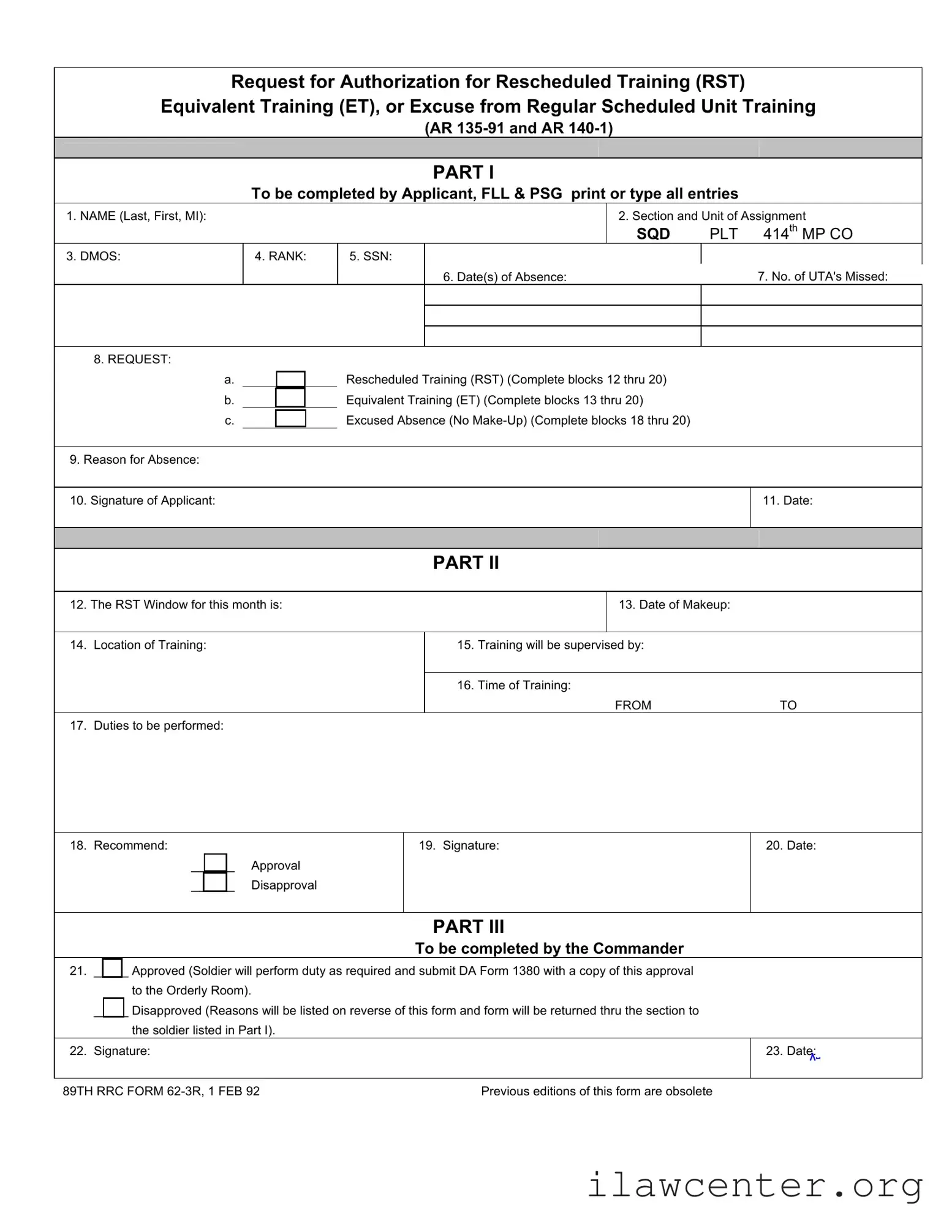
Request for Authorization for Rescheduled Training (RST)
Equivalent Training (ET), or Excuse from Regular Scheduled Unit Training
(AR 135-91 and AR 140-1)
PART I
To be completed by Applicant, FLL & PSG print or type all entries
1. NAME (Last, First, MI):
2. Section and Unit of Assignment
SQD
PLT 414
th
MP CO
3. DMOS: 4. RANK: 5. SSN:
6. Date(s) of Absence:
7. No. of UTA's Missed:
8. REQUEST:
a.
Rescheduled Training (RST) (Complete blocks 12 thru 20)
b.
Equivalent Training (ET) (Complete blocks 13 thru 20)
c.
Excused Absence (No Make-Up) (Complete blocks 18 thru 20)
9. Reason for Absence:
10. Signature of Applicant:
11. Date:
PART II
12. The RST Window for this month is:
13. Date of Makeup:
14. Location of Training:
15. Training will be supervised by:
16. Time of Training:
FROM
TO
17. Duties to be performed:
18. Recommend: 19. Signature: 20. Date:
_____
Approval
_____
Disapproval
PART III
To be completed by the Commander
21. _____ Approved (Soldier will perform duty as required and submit DA Form 1380 with a copy of this approval
to the Orderly Room).
_____ Disapproved (Reasons will be listed on reverse of this form and form will be returned thru the section to
the soldier listed in Part I).
22. Signature:
23. Date:
89TH RRC FORM 62-3R, 1 FEB 92 Previous editions of this form are obsolete

File Properties

Fact Name Details
Form Purpose This form is used to request authorization for rescheduled training, equivalent training, or an excuse from regular scheduled unit training.
Governing Laws The RST Army form is governed by AR 135-91 and AR 140-1.
Applicant Requirements Applicants must complete Part I, including personal information and the reason for absence.
Training Details Part II requires specific details about the rescheduled training, including the date, location, and supervising officer.
Commander’s Role The commander completes Part III, approving or disapproving the request and providing reasons if disapproved.
Obsolete Editions Previous editions of this form are considered obsolete as of February 1, 1992.

Instructions on Utilizing Rst Army

Filling out the RST Army form is a straightforward process. Make sure to gather all necessary information before you begin. This will help ensure that you complete the form accurately and efficiently. Follow the steps below to fill out the form correctly.

  1. PART I: Start by entering your name in the format of Last, First, and Middle Initial.
  2. Fill in your section and unit of assignment, including SQD and PLT information.
  3. Provide your DMOS (Duty Military Occupational Specialty).
  4. Enter your rank.
  5. Input your Social Security Number (SSN).
  6. Specify the date(s) of absence.
  7. Indicate the number of Unit Training Assemblies (UTA's) missed.
  8. Check the appropriate request box:
    • Rescheduled Training (RST) - complete blocks 12 through 20
    • Equivalent Training (ET) - complete blocks 13 through 20
    • Excused Absence (No Make-Up) - complete blocks 18 through 20
  9. Provide a reason for your absence.
  10. Sign and date the form as the applicant.
  1. PART II: In block 12, write the RST window for the current month.
  2. Enter the date of the makeup training.
  3. Specify the location of the training.
  4. Indicate who will supervise the training.
  5. Fill in the time of training, specifying both the start and end times.
  6. Describe the duties to be performed during the training.
  7. Mark your recommendation for approval or disapproval.
  8. Sign and date the form.
  1. PART III: The commander will indicate approval or disapproval of the request.
  2. The commander must provide their signature.
  3. Finally, the commander will date the form.

Important Facts about Rst Army

What is the purpose of the RST Army form?

The RST Army form is designed to request authorization for rescheduled training, equivalent training, or an excuse from regular scheduled unit training. This form is essential for service members who cannot attend their scheduled training due to various reasons. It helps maintain accurate records and ensures that soldiers can fulfill their training requirements in a timely manner.

Who needs to complete the RST Army form?

The form must be completed by the applicant, which typically includes the service member requesting the rescheduling or excusal. Additionally, the First Line Leader (FLL) and Platoon Sergeant (PSG) are also required to print or type their entries on the form. This collaborative approach ensures that all necessary parties are involved in the approval process.

What information is required on the RST Army form?

Applicants need to provide several key pieces of information on the form. This includes their name, section and unit of assignment, duty military occupational specialty (DMOS), rank, Social Security Number (SSN), dates of absence, and the number of Unit Training Assemblies (UTAs) missed. Additionally, the applicant must specify the reason for their absence and sign the form. The form also includes sections for training details and recommendations from the chain of command.

What happens after the RST Army form is submitted?

Once the form is completed and submitted, it goes through a review process. The chain of command will evaluate the request, providing recommendations for approval or disapproval. If approved, the soldier is expected to perform the necessary duties and submit a DA Form 1380 along with a copy of the approval to the Orderly Room. If disapproved, the reasons for denial will be documented on the reverse side of the form and returned to the soldier.

How does the RST Army form impact a soldier's training record?

Filling out the RST Army form accurately is crucial for maintaining a soldier's training record. It ensures that missed training is accounted for and that the soldier can complete their required training hours through rescheduled or equivalent training. This process helps prevent any negative impact on the soldier’s overall performance evaluations and readiness status.

Common mistakes

Filling out the RST Army form can be straightforward, but mistakes often occur that can delay the process. One common error is failing to provide complete information in the NAME section. Applicants sometimes forget to include their middle initial or provide their name in the wrong order. This can lead to confusion and may require resubmission of the form.

Another frequent mistake is in the REASON for Absence section. Applicants may provide vague or insufficient explanations. A clear and detailed reason is essential for the approval process. Without this, the reviewing officer may not fully understand the context of the absence, which can result in disapproval.

Many applicants also overlook the importance of signatures. In both Part I and Part II, failing to sign the form or missing the date can render the submission incomplete. This oversight can cause unnecessary delays. Always ensure that all required signatures are obtained before submitting the form.

Finally, applicants often misinterpret the requirements for the REQUEST section. It is crucial to complete the appropriate blocks based on the selected option, whether it is for Rescheduled Training, Equivalent Training, or Excused Absence. Incomplete or incorrect entries can lead to confusion and possible denial of the request. Take the time to review each section carefully before submission.

Documents used along the form

When submitting a Request for Authorization for Rescheduled Training (RST), several other forms and documents may also be required. These documents help streamline the process and ensure that all necessary information is provided. Below are some commonly used forms that accompany the RST Army form.

  • DA Form 1380: This form is used to document and report training or duty performed by a soldier. It provides a record of the makeup training completed and is submitted to the Orderly Room along with the approval of the RST request.
  • AR 135-91: This Army regulation outlines the policies and procedures for the Reserve Component. It includes guidelines on attendance, training requirements, and the process for requesting excused absences or rescheduled training.
  • AR 140-1: Similar to AR 135-91, this regulation governs the training and duty of Army National Guard and Army Reserve personnel. It details the responsibilities of soldiers and commanders in managing training schedules and attendance.
  • Unit Training Schedule: This document provides a comprehensive overview of the training activities planned for a specific period. It helps soldiers understand their training commitments and can be referenced when submitting an RST request.

Each of these documents plays a crucial role in the training and administrative processes of military personnel. By ensuring that all forms are completed accurately and submitted on time, soldiers can maintain their readiness and fulfill their duties effectively.

Similar forms

The RST Army form is similar to several other documents used in military training and personnel management. Each of these documents serves a unique purpose but shares common elements with the RST form. Here are six similar documents:

  • DA Form 1380: This form is used to document training events and absences. Like the RST form, it requires details about the soldier, the training, and the reason for absence.
  • DA Form 1059: This document is for documenting course completion and training evaluations. It includes sections for participant details and training specifics, similar to the RST form's structure.
  • AR 135-91: This regulation outlines policies for absences and training requirements. It provides guidance on how to request excused absences, much like the RST form does.
  • AR 140-1: This regulation addresses the administration of the Army Reserve. It includes provisions for training and attendance, paralleling the RST form’s focus on rescheduled training.
  • Unit Training Plan (UTP): This document outlines scheduled training events for units. It shares a similar goal of ensuring soldiers meet training requirements, akin to the RST form.
  • Leave Request Form: This form is used for requesting leave from duty. While focused on absence, it requires similar information about the soldier and the reason for the request, mirroring the RST form's format.

Dos and Don'ts

When filling out the Request for Authorization for Rescheduled Training (RST) form, attention to detail is crucial. Here are some guidelines to help ensure a smooth process:

  • Do print or type all entries clearly to avoid misunderstandings.
  • Do include your full name as it appears on official documents.
  • Do specify the exact dates of absence to provide clarity.
  • Do indicate the number of Unit Training Assemblies (UTAs) missed accurately.
  • Do select the appropriate request type (RST, ET, or Excused Absence) and complete the necessary blocks.
  • Don't leave any sections blank; incomplete forms can lead to delays.
  • Don't use abbreviations or shorthand that may confuse the reviewer.
  • Don't forget to sign and date the form; an unsigned form is invalid.
  • Don't provide vague reasons for your absence; be specific to strengthen your request.
  • Don't submit the form without reviewing it for errors or omissions.

By following these guidelines, you can help ensure that your request is processed efficiently and effectively. Clear communication and attention to detail are key in navigating military forms.

Misconceptions

Understanding the RST Army form can be challenging due to various misconceptions. Here are seven common misunderstandings about this important document:

  • 1. The RST form is only for missed training. Many believe that the RST form is exclusively for soldiers who miss training sessions. In reality, it can also be used for requesting rescheduled training or equivalent training, not just for absences.
  • 2. All absences require a detailed explanation. Some think that every absence must be justified with a lengthy explanation. While a reason for absence is required, it does not need to be overly detailed; a clear and concise statement is sufficient.
  • 3. Only high-ranking officials can approve RST requests. There is a misconception that only senior officers can approve these requests. In fact, the approval process can involve various levels of command, depending on the unit's structure.
  • 4. The form must be filled out in person. Many believe that the RST form must be completed in person. However, it can often be filled out electronically or submitted through digital means, depending on the unit’s policies.
  • 5. Submitting the form guarantees approval. Some individuals assume that submitting the RST form ensures their request will be approved. This is not the case; approval is contingent on various factors, including the reason for absence and unit needs.
  • 6. The RST form is only relevant for active-duty personnel. There is a common belief that only active-duty soldiers need to be concerned with the RST form. In truth, it applies to reserve components and other members who are subject to regular training schedules.
  • 7. Once submitted, the RST form cannot be modified. Many think that once the RST form is submitted, it cannot be changed. However, if circumstances change, soldiers may be able to update their request before it is processed.

By clarifying these misconceptions, soldiers can better navigate the process of requesting rescheduled training or equivalent training, ensuring they meet their obligations effectively.

Key takeaways

When filling out the RST Army form, clarity and accuracy are essential. Here are some key takeaways to ensure a smooth process:

  • Complete All Required Fields: Ensure that all sections, particularly your name, unit, and dates of absence, are filled out accurately.
  • Understand the Request Types: Familiarize yourself with the three options: Rescheduled Training (RST), Equivalent Training (ET), and Excused Absence.
  • Provide a Valid Reason: Clearly state the reason for your absence. This will support your request and facilitate the review process.
  • Sign and Date: Don’t forget to sign and date the form. This confirms your submission and intention.
  • Follow Up on Approval: After submission, keep track of the approval status. This ensures you’re aware of any required actions.
  • Review the RST Window: Be aware of the RST window for the month. This will help you plan your training accordingly.
  • Communicate with Your Supervisor: Discuss your training plans with your supervisor to ensure alignment with unit expectations.
  • Check for Disapproval Reasons: If your request is disapproved, review the reasons provided. This feedback can help you in future submissions.