
Sc Dmv 416 PDF Template

Sc Dmv 416 PDF Template

The South Carolina DMV 416 form is a crucial document known as the Notice of Vehicle Sold, which must be submitted to the South Carolina Department of Motor Vehicles when a vehicle changes ownership. This form serves to notify the DMV of the sale or trade of a registered vehicle, ensuring that the last registered owner remains protected until the transfer of ownership is officially completed. It is essential to fill out this form accurately and promptly; click the button below to get started.

Article Guide

The SC DMV 416 form, officially titled "Notice of Vehicle Sold," serves a critical role in the vehicle ownership transfer process in South Carolina. This form is essential for notifying the South Carolina Department of Motor Vehicles about the sale or trade of a registered vehicle. It requires specific details, including the vehicle's make, year, license number, and Vehicle Identification Number (VIN). Sellers must also provide information about the new owner, including their street address, city, state, and ZIP code. The date of the sale or trade must be recorded, along with the seller's signature. While the completion of this form is an important step, it is crucial to note that it does not legally transfer ownership; rather, it protects the last registered owner until the new owner completes the actual transfer. Additionally, the form emphasizes that a street address must accompany any P.O. Box listed, ensuring accurate communication with the DMV. Understanding the purpose and requirements of the SC DMV 416 form can help facilitate a smoother transition during the sale or trade of a vehicle.

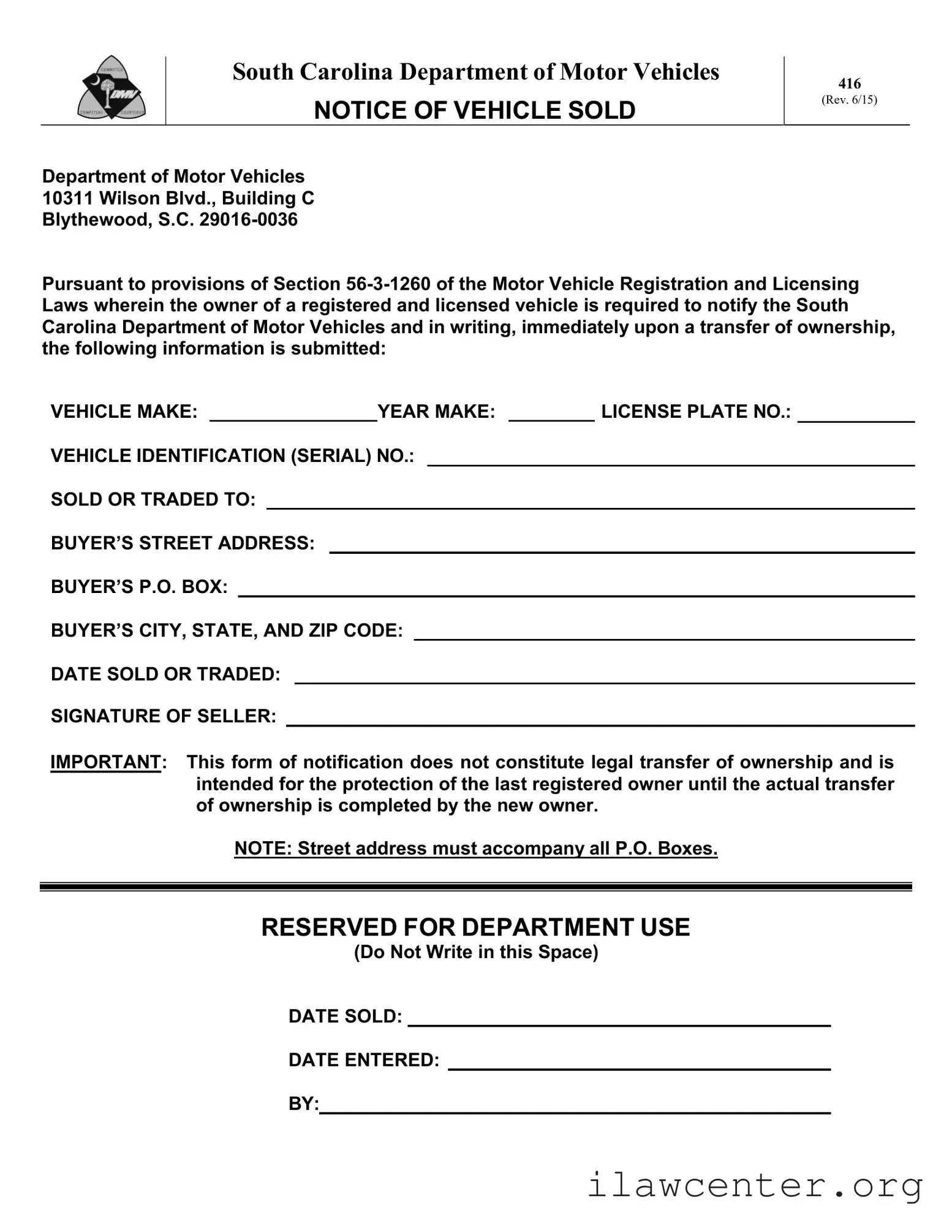
Sc Dmv 416 Preview

South Carolina Department of Motor Vehicles

416

NOTICE OF VEHICLE SOLD

(Rev. 6/15)


Department of Motor Vehicles

10311 Wilson Blvd., Building C

Blythewood, S.C. 29016-0036

Pursuant to provisions of Section 56-3-1260 of the Motor Vehicle Registration and Licensing Laws wherein the owner of a registered and licensed vehicle is required to notify the South Carolina Department of Motor Vehicles and in writing, immediately upon a transfer of ownership, the following information is submitted:

VEHICLE MAKE:


YEAR MAKE:


LICENSE PLATE NO.:

VEHICLE IDENTIFICATION (SERIAL) NO.:

SOLD OR TRADED TO:

BUYER’S STREET ADDRESS:

BUYER’S P.O. BOX:

BUYER’S CITY, STATE, AND ZIP CODE:

DATE SOLD OR TRADED:

SIGNATURE OF SELLER:

IMPORTANT: This form of notification does not constitute legal transfer of ownership and is intended for the protection of the last registered owner until the actual transfer of ownership is completed by the new owner.

NOTE: Street address must accompany all P.O. Boxes.

RESERVED FOR DEPARTMENT USE

(Do Not Write in this Space)

DATE SOLD:

DATE ENTERED:

BY:

File Properties

Fact Name Details
Form Title NOTICE OF VEHICLE SOLD 416 (REV. 3/05)
Governing Law Section 56-3-1260 of the Motor Vehicle Registration and Licensing Laws
Purpose This form notifies the South Carolina DMV of a vehicle ownership transfer.
Required Information Includes vehicle make, year, license number, and VIN.
Seller's Responsibility The seller must complete the form immediately upon transfer of ownership.
Legal Disclaimer This form does not legally transfer ownership; it protects the last registered owner.
Address Requirement A street address must accompany all P.O. Boxes on the form.

Instructions on Utilizing Sc Dmv 416

Completing the SC DMV 416 form is a straightforward process that ensures the South Carolina Department of Motor Vehicles is notified of a vehicle's sale or trade. This notification helps protect the seller until the new owner officially registers the vehicle. Follow these steps to fill out the form accurately.

  1. Begin by entering the vehicle make in the designated space. This refers to the brand or manufacturer of the vehicle.
  2. Next, provide the year of the vehicle. This is the model year, which is usually found on the vehicle's title or registration documents.
  3. In the following field, write down the license number. This is the current license plate number assigned to the vehicle.
  4. Then, locate the vehicle identification number (VIN) or serial number. This unique identifier is typically found on the dashboard or inside the driver's side door frame.
  5. Indicate to whom the vehicle was sold or traded by filling in their name in the appropriate space.
  6. Provide the street address and P.O. Box of the buyer. Ensure that you include both for proper identification.
  7. Next, enter the city, state, and ZIP code of the buyer's address.
  8. Record the date sold or traded. This should reflect the actual date of the transaction.
  9. Finally, sign the form in the signature of seller section. This confirms that the information provided is accurate and complete.

After completing the form, submit it to the South Carolina Department of Motor Vehicles. This ensures that the department updates its records accordingly. Keep a copy of the form for your records, as it serves as proof of the transaction until the new owner registers the vehicle.

Important Facts about Sc Dmv 416

What is the purpose of the SC DMV 416 form?

The SC DMV 416 form, also known as the Notice of Vehicle Sold, serves a crucial function in the vehicle ownership transfer process in South Carolina. When a registered vehicle is sold or traded, the last registered owner must notify the South Carolina Department of Motor Vehicles (DMV) immediately. This form helps protect the seller by ensuring that the DMV is aware of the change in ownership, which can prevent potential liability issues associated with the vehicle after the sale.

What information is required on the SC DMV 416 form?

Completing the SC DMV 416 form requires specific information to ensure accuracy and compliance. The form asks for details such as the vehicle make, year, license number, and vehicle identification number (VIN). Additionally, the seller must provide the name and address of the individual or entity to whom the vehicle was sold or traded, along with the date of the transaction. The seller's signature is also necessary to validate the notification.

Does submitting the SC DMV 416 form legally transfer ownership of the vehicle?

No, submitting the SC DMV 416 form does not legally transfer ownership of the vehicle. It is important to understand that this form is intended solely for notification purposes. The legal transfer of ownership is completed when the new owner registers the vehicle in their name with the DMV. Therefore, while the form serves as a protective measure for the seller, it does not replace the need for the new owner to follow through with the registration process.

What should I do if I sold my vehicle but did not submit the SC DMV 416 form?

If you sold your vehicle and did not submit the SC DMV 416 form, it is advisable to complete and submit it as soon as possible. This action helps to document the sale and protect you from any future liabilities related to the vehicle. Additionally, if you have the buyer's information, include it on the form. If you have concerns about potential issues arising from not submitting the form, consider contacting the DMV for guidance on how to proceed.

Common mistakes

When filling out the South Carolina DMV 416 form, individuals often make several common mistakes that can lead to complications. One frequent error is neglecting to provide complete information about the vehicle. It's essential to include the make, year, license number, and vehicle identification number. Omitting any of these details can delay the processing of the form and may create issues for both the seller and the buyer.

Another mistake involves the address information for the buyer. The form requires a full street address along with any P.O. Box information. Some people mistakenly believe that a P.O. Box alone is sufficient. This oversight can result in the form being returned or not processed, as the DMV needs a complete and accurate address for their records.

Additionally, the date of sale is a critical component that must be filled out correctly. Some individuals forget to include this date or write it incorrectly. This can lead to confusion regarding when the ownership transfer occurred, which may affect liability and registration issues. It is crucial to ensure that the date is clear and accurately reflects the transaction.

Finally, many people overlook the importance of the seller's signature. This form requires the seller to sign, confirming that the information provided is accurate. Without a signature, the DMV may not accept the form, which can prolong the process of officially recording the sale. Taking a moment to ensure that all sections are filled out correctly can save time and prevent potential legal complications.

Documents used along the form

The South Carolina DMV 416 form, also known as the Notice of Vehicle Sold, is an essential document for notifying the DMV about the sale or trade of a vehicle. Along with this form, several other documents are often required to ensure a smooth transfer of ownership and compliance with state regulations. Here’s a look at some of these important forms and documents.

  • Title Transfer Form: This document is crucial for officially transferring ownership of the vehicle from the seller to the buyer. It includes information about the vehicle, the seller, and the buyer, and must be signed by both parties.
  • Bill of Sale: A bill of sale serves as a receipt for the transaction. It outlines the details of the sale, including the sale price, date of sale, and vehicle information. This document can provide proof of ownership and is often required for registration.
  • Application for Title: The buyer must complete this application to obtain a new title in their name. It includes personal information about the new owner and details about the vehicle. This form is typically submitted along with the title transfer form.
  • Odometer Disclosure Statement: This statement is required by federal law for vehicles under 10 years old. It verifies the vehicle's mileage at the time of sale, helping to prevent fraud related to odometer tampering.
  • Proof of Insurance: Before registering the vehicle in the new owner's name, proof of insurance must be provided. This document demonstrates that the new owner has the necessary coverage to legally operate the vehicle.

Understanding these additional forms and documents can simplify the process of transferring vehicle ownership. Each document plays a vital role in ensuring that both the seller and buyer are protected and that all legal requirements are met. Always keep copies of these documents for your records, as they can be invaluable in case of future disputes or inquiries.

Similar forms

The SC DMV 416 form serves as a notification of vehicle sale or transfer. It is essential for maintaining accurate vehicle registration records. Several other documents share similarities with the SC DMV 416 form in terms of purpose, content, or function. Below is a list of nine such documents:

  • Bill of Sale: This document provides proof of the sale of a vehicle and includes details such as the vehicle's make, model, and sale price. Like the SC DMV 416, it confirms the transfer of ownership.
  • Title Transfer Application: This form is used to officially transfer the title of a vehicle from one owner to another. It includes similar information about the vehicle and the parties involved in the transaction.
  • Vehicle Registration Application: This document registers a vehicle under a new owner's name. It requires information about the vehicle and the new owner, similar to the SC DMV 416.
  • Notice of Transfer: Some states require a notice to be filed when a vehicle is sold or transferred. This document serves a similar purpose to the SC DMV 416 by notifying the DMV of the change in ownership.
  • Odometer Disclosure Statement: This form is often required during the sale of a vehicle to disclose the odometer reading at the time of sale. It is relevant in the context of ownership transfer.
  • Power of Attorney for Vehicle Transactions: This document allows one party to act on behalf of another in vehicle transactions, including sales. It shares the purpose of facilitating ownership transfer.
  • Application for Duplicate Title: If a vehicle title is lost or damaged, this application allows the owner to obtain a new title. It is related to ownership documentation like the SC DMV 416.
  • Vehicle Release Form: This form is used when a lien on a vehicle is released, indicating that the vehicle is free of any financial obligations. It is pertinent to ownership status.
  • Affidavit of Vehicle Ownership: This document can be used to assert ownership of a vehicle when the title is not available. It serves as a declaration of ownership, similar to the SC DMV 416.

Each of these documents plays a crucial role in the vehicle ownership process and ensures that all parties are protected during a sale or transfer.

Dos and Don'ts

When filling out the South Carolina DMV 416 form, it's important to follow specific guidelines to ensure accuracy and compliance. Here are some do's and don'ts to keep in mind:

  • Do provide complete and accurate information about the vehicle, including the make, year, license number, and vehicle identification number.
  • Do include the full street address along with any P.O. Box information when listing the buyer's address.
  • Do sign the form to confirm that you are the seller and that the information provided is correct.
  • Do keep a copy of the completed form for your records after submitting it to the DMV.
  • Don't forget to notify the DMV immediately upon the transfer of ownership.
  • Don't leave any fields blank; incomplete forms can lead to delays or issues with the transfer process.
  • Don't assume that submitting this form alone transfers ownership; this is just a notification.
  • Don't write in the reserved space for department use; this area is meant for DMV personnel only.

Misconceptions

Here are five common misconceptions about the South Carolina DMV 416 form, along with clarifications for each:

  • Filing the form transfers ownership of the vehicle. Many people believe that submitting the DMV 416 form automatically transfers ownership. However, this form merely notifies the DMV of the sale; it does not legally transfer ownership until the new owner registers the vehicle in their name.
  • Only the seller needs to fill out the form. Some think that only the seller is responsible for completing the form. In reality, both the seller and the buyer should be aware of the form's contents and implications, ensuring that all necessary information is accurately provided.
  • The form can be submitted at any time after the sale. There is a misconception that the form can be submitted at any point following the sale. The law requires that the seller notify the DMV immediately upon the transfer of ownership to protect their interests.
  • The DMV sends a confirmation after the form is processed. Many assume that the DMV will send a confirmation once the 416 form is processed. In fact, the DMV does not provide confirmation of receipt, so it is advisable for sellers to keep a copy of the submitted form for their records.
  • Using a P.O. Box is sufficient for the buyer's address. Some believe that providing only a P.O. Box is adequate for the buyer's address. However, the DMV requires a physical street address in addition to a P.O. Box to ensure accurate record-keeping and communication.

Key takeaways

When filling out the South Carolina DMV 416 form, there are several important points to keep in mind. Below are key takeaways to ensure the process goes smoothly:

  • Purpose of the Form: This form serves as a notification to the South Carolina Department of Motor Vehicles when a vehicle is sold or traded.
  • Owner Responsibility: As the seller, you are required to notify the DMV immediately upon transferring ownership of the vehicle.
  • Information Required: Be prepared to provide detailed information, including the vehicle make, year, license number, and vehicle identification number (VIN).
  • New Owner Details: It is essential to include the name and address of the person or entity to whom the vehicle is sold or traded.
  • Date of Transaction: Clearly indicate the date on which the sale or trade occurred.
  • Signature: The seller must sign the form to validate the notification.
  • Legal Transfer: Remember that submitting this form does not legally transfer ownership. The new owner must complete the necessary steps to finalize the transfer.
  • P.O. Box Requirement: If you use a P.O. Box, ensure that you also provide a street address for accuracy.
  • Department Use: Leave the section reserved for department use blank; it is not for the seller's information.

By following these guidelines, you can help ensure that the process of notifying the DMV is completed correctly and efficiently.