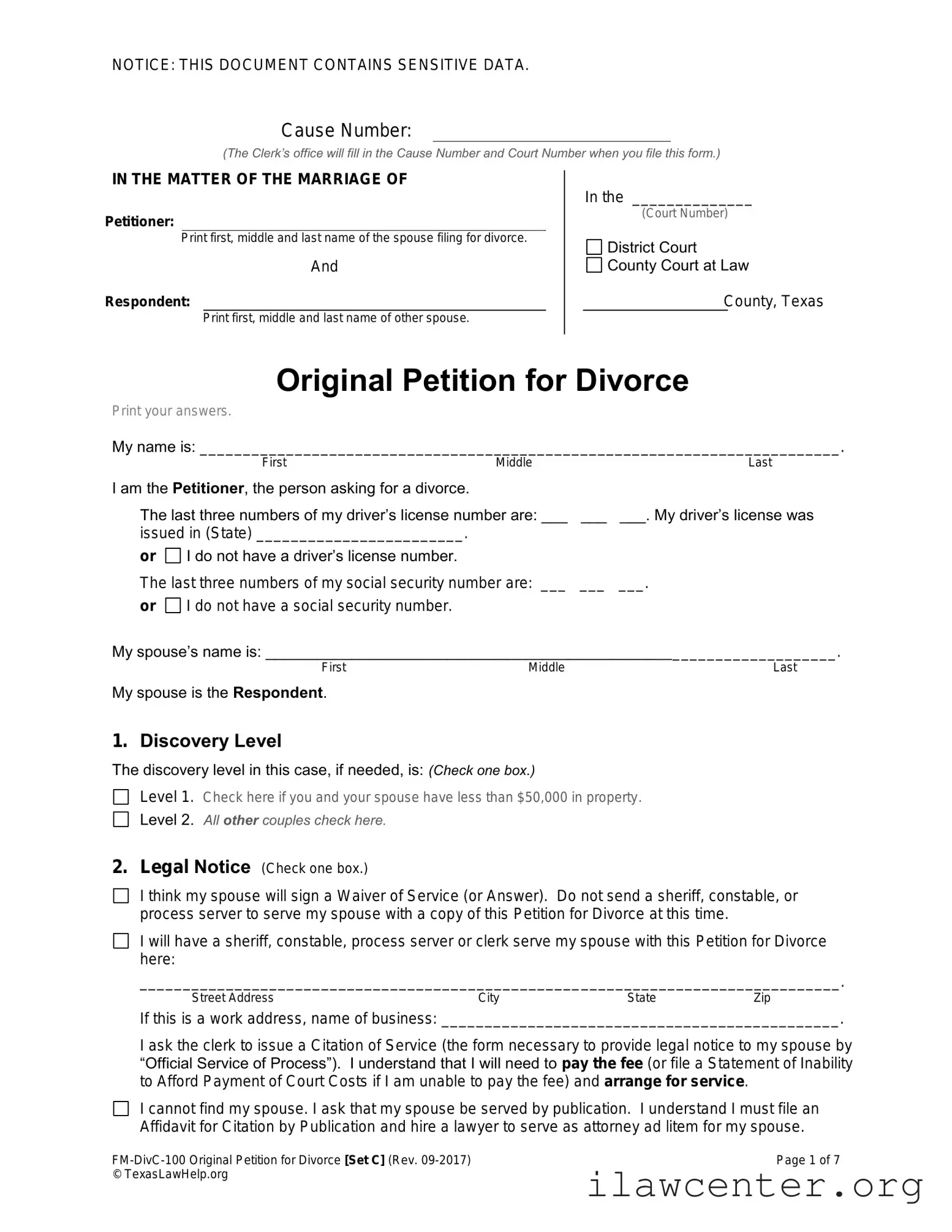







Texas Law Help FM-DivC-100 Original Petition for Divorce Set C PDF Template

Texas Law Help FM-DivC-100 Original Petition for Divorce Set C PDF Template

The Texas Law Help FM-DivC-100 Original Petition for Divorce Set C form is a legal document used to initiate a divorce in Texas. This form outlines the basic details of the divorce and helps establish the grounds for the legal separation. If you are ready to begin this important process, fill out the form by clicking the button below.

Article Guide

The Texas Law Help FM-DivC-100 Original Petition for Divorce Set C form serves as a crucial document for individuals seeking a divorce in Texas. This form is designed to initiate the divorce process by outlining essential information about the marriage, including the names of both spouses, the date of marriage, and the grounds for divorce. It also addresses matters such as child custody, property division, and any spousal support that may be applicable. By completing this form, individuals can formally request the court to dissolve their marriage while ensuring that their rights and interests are represented. The form is structured to guide users through the necessary steps, making it easier for them to articulate their needs and preferences regarding the divorce settlement. Moreover, it is vital to provide accurate and comprehensive information, as this can significantly influence the outcome of the proceedings. Understanding the nuances of this form can empower individuals to navigate the complexities of divorce with greater confidence and clarity.

Texas Law Help FM-DivC-100 Original Petition for Divorce Set C Preview

NOTICE: THIS DOCUMENT CONTAINS SENSITIVE DATA.
FM-DivC-100 Original Petition for Divorce [Set C] (Rev. 09-2017) Page 1 of 7
© TexasLawHelp.org
Original Petition for Divorce
Print your answers.
My name is: __________________________________________________________________________.
First Middle Last
I am the Petitioner, the person asking for a divorce.
The last three numbers of my driver’s license number are: ___ ___ ___. My driver’s license was
issued in (State) ________________________.
or I do not have a driver’s license number.
The last three numbers of my social security number are: ___ ___ ___.
or I do not have a social security number.
My spouse’s name is: __________________________________________________________________.
First Middle Last
My spouse is the Respondent.
1. Discovery Level
The discovery level in this case, if needed, is: (Check one box.)
Level 1. Check here if you and your spouse have less than $50,000 in property.
Level 2. All other couples check here.
2. Legal Notice (Check one box.)
I think my spouse will sign a Waiver of Service (or Answer). Do not send a sheriff, constable, or
process server to serve my spouse with a copy of this Petition for Divorce at this time.
I will have a sheriff, constable, process server or clerk serve my spouse with this Petition for Divorce
here:
_________________________________________________________________________________.
Street Address City State Zip
If this is a work address, name of business: ______________________________________________.
I ask the clerk to issue a Citation of Service (the form necessary to provide legal notice to my spouse by
“Official Service of Process”). I understand that I will need to pay the fee (or file a Statement of Inability
to Afford Payment of Court Costs if I am unable to pay the fee) and arrange for service.
I cannot find my spouse. I ask that my spouse be served by publication. I understand I must file an
Affidavit for Citation by Publication and hire a lawyer to serve as attorney ad litem for my spouse.
Cause Number:
(The Clerk’s office will fill in the Cause Number and Court Number when you file this form.)
IN THE MATTER OF THE MARRIAGE OF
Petitioner:
Print first, middle and last name of the spouse filing for divorce.
And
Respondent:
Print first, middle and last name of other spouse.
FM-DivC-100 Original Petition for Divorce [Set C] (Rev. 09-2017) Page 2 of 7
© TexasLawHelp.org
3. Jurisdiction
3A. County Residence Requirement
(Check all boxes that apply.)
I have lived in this county for the last 90 days.
My spouse has lived in this county for the last 90 days.
I am serving in the armed forces or other government service outside
of Texas, but this county has been the home county of either my
spouse or me for at least 90 days.
I have accompanied my spouse who is serving in
the armed forces or other government service outside of
Texas, but this county has been the home county of either
my spouse or me for at least 90 days.
3B. Texas Residence Requirement
(Check all boxes that apply.)
I have lived in Texas for the last six months.
My spouse has lived in Texas for the last six months.
I am serving in the armed forces or other government service outside of Texas, but Texas is the home
state of either my spouse or me and has been for at least 6 months.
I have accompanied my spouse who is serving in the armed forces or other government service outside
of Texas, but Texas is the home state of either my spouse or me and has been for at least 6 months.
3C. Personal Jurisdiction over Spouse
(Check one box.)
My spouse lives in Texas.
My spouse does not live in Texas.
(If your spouse does not live in Texas, check any boxes that apply below.)
My spouse agrees that a Texas court can make orders in this divorce, including orders dividing our
property and debts. My spouse will file a Waiver of Service (or Answer).
Texas is the last state where we lived together as a married couple. This Petition for Divorce is filed
less than two years after we separated.
4. Dates of Marriage and Separation
My spouse and I got married on or about: __________________________________________________.
Month Day Year
We stopped living together as spouses on or about: __________________________________________.
Month Day Year
5. Grounds for Divorce
I ask the Court to grant me a divorce. The marriage has become insupportable due to discord or conflict of
personalities that destroys the legitimate ends of the marital relationship and prevents any reasonable
expectation of reconciliation.
Note: You cannot file for
divorce in Texas until you
or your spouse has lived in
the county where you are
asking for a divorce for at
least the last 90 days and
in Texas for at least the
last six months.
There are special rules for
military families and others
who are absent from the
state due to government
service. Get more
information at
www.TexasLawHelp.org.
FM-DivC-100 Original Petition for Divorce [Set C] (Rev. 09-2017) Page 3 of 7
© TexasLawHelp.org
6. Children Together
My spouse and I do have children together who are under the age of 18 or still in high school. All of our
children who are under the age of 18 or still in high school are listed below. However, there is a final court
order for custody (conservatorship), visitation, child support and medical support of all the children listed
below and I am not asking to change that order at this time.
The order was made in ____________________________ County and ____________________ State.
The cause number for the order is __________________________________.
I understand I must attach a file-stamped copy of the order to my Final Decree of Divorce.
Child’s name
Age
Date of Birth
Sex
1.
2.
3.
4.
5.
6.
7. Is the Wife Pregnant?
(Check one box.)
The wife in this marriage is not pregnant.
The wife in this marriage is pregnant. I understand that I cannot finish the divorce until after the child is
born.
(If the wife is pregnant, also check one box below.)
The husband is the father of this child. I ask the court to include orders for custody, visitation, child
support and medical support for the child in the Final Decree of Divorce.
The husband is not the father of this child. I understand that paternity of the child must be
established before I can finish my divorce. (Get information about establishing paternity at
www.TexasLawHelp.org.)
Note: Do not use this form if you have a court order about your children but:
1) the order does not include all the children you and your spouse have together, or
2) the order is a temporary order, or
3) you are asking the court to make changes to the order.
If one of these situations applies, you must ask a lawyer to draft the appropriate form for your case.
FM-DivC-100 Original Petition for Divorce [Set C] (Rev. 09-2017) Page 4 of 7
© TexasLawHelp.org
8. Did the Wife have a Child with Another Man while Married to the Husband?
(Check one box. Fill in the requested information, if applicable.)
The wife did not have a child with another man while married to the husband.
The wife did have a child with another man while married to the husband. All of the children born
during the marriage that are not the husband’s adopted or biological children are named below:
Child’s name
Age
Date of Birth
Sex
1.
2.
3.
4.
5.
6.
(If the wife had a child or children with another man during the marriage, check one box below,)
Paternity of the child/ren named above has not been established. I understand that paternity of the
child/ren must be established before I can finish my divorce. (Get information about establishing
paternity at www.TexasLawHelp.org.)
Paternity of the child/ren named above has been established:
(Check one box.)
A court order has established that another man is the biological father and/or the Husband is
not the biological father of the child/ren listed above. I understand I must attach a file-stamped
copy of the court order to my Final Decree of Divorce.
An Acknowledgement of Paternity was signed by the biological father and a Denial of Paternity
was signed by the Husband for the child/ren listed above. I understand I must attach a copy of
these documents to my Final Decree of Divorce.
FM-DivC-100 Original Petition for Divorce [Set C] (Rev. 09-2017) Page 5 of 7
© TexasLawHelp.org
9. Protective Order Statement (Check the appropriate boxes below. Fill in the requested information.)
9A. No Protective Order
I do not have a protective order against my spouse and I have not asked for one.
My spouse does not have a protective order against me and has not asked for one.
9B. Pending Protective Order
I have filed paperwork at the courthouse asking for a protective order against my spouse, but a
judge has not decided if I should get it. I asked for a protective order on ____________________
Date Filed
in ______________ County, ___________. The cause number is _________________________.
County State Cause Number
If I get a protective order, I will file a copy of it before any hearings in this divorce.
My spouse has filed paperwork asking for a protective order against me, but a judge has not
decided if my spouse will get it. My spouse asked for a protective order on _________________
Date Filed
in _______________ County, ___________. The cause number is ________________________.
County State Cause Number
If my spouse gets a protective order, I will file a copy of it before any hearings in this divorce.
9C. Protective Order in Place
I do have a protective order against my spouse. I got the protective order in
____________________________ County, ______________________ on _________________.
County State Date Ordered
The cause number for the protective order is _________________________________________.
Cause Number
Either I have attached a copy of the protective order to this petition or I will file a copy of it with the
court before any hearings in this divorce.
My spouse does have a protective order against me. The protective order was made in
_____________________________ County, _____________________ on __________________.
County State Date Ordered
The cause number for the protective order is __________________________________________.
Cause Number
Either I have attached a copy of the protective order to this petition or I will file a copy of it with the
court before any hearings in this divorce.
10. Waiver of Waiting Period Based on Family Violence (Check only if applicable.)
I ask the Court to waive the 60-day waiting period for divorce because: (Check one box.)
My spouse has been convicted of or received deferred adjudication for a crime involving family
violence against me or a member of my household.
I have an active protective order or an active magistrate’s order for emergency protection against
my spouse because of family violence during our marriage. The order includes a finding that my
spouse committed family violence.
Note: You must provide information about any protective order or pending application for protective order
involving you and your spouse or a child of either you or your spouse. This includes information about any: (1)
family violence protective order, (2) sexual assault, sexual abuse, trafficking or stalking protective order and/or
(3) emergency protective order issued after an arrest.
You must also attach to this petition a copy of any protective order (even if it’s expired) in which one spouse or
child of either spouse was the applicant or victim and the other spouse was the respondent or defendant.
FM-DivC-100 Original Petition for Divorce [Set C] (Rev. 09-2017) Page 6 of 7
© TexasLawHelp.org
11. Property and Debt
Note: It is important to talk with lawyer if you or your spouse has a house, land, business, retirement funds, other
valuable property or debt. Getting advice from a lawyer now can save you time and money in the long run.
About community property: Texas is a community property state. This means that any new property that either
spouse gets from the minute they are married until the minute the judge grants the divorce is probably community
property, even if the property is only in one spouse’s name.
About separate property: Property owned by a spouse before the marriage is that spouse’s separate property.
In addition, if either spouse receives a gift, an inheritance, or a recovery for personal injuries that occurred during
the marriage (not including a recovery for lost wages or medical expenses); it is that spouse’s separate property.
There are exceptions to these general rules. If you have questions talk to a lawyer.
About retirement: Retirement funds (such as 401k, pension, profit sharing, stock option plans and IRAs) earned
by either spouse during the marriage are usually considered to be community property that can be divided by the
court. This is true even if you or your spouse has not yet retired. If you want the Court to divide retirement funds
(other than an IRA), you will need to have the Court sign an additional form, usually called a “Qualified Domestic
Relations Order” (QDRO), to make the division effective. You should have the QDRO prepared before you go to
court, so the judge can sign it when you finish your divorce. A QDRO form is not included with this divorce set.
You may be able to get a sample QDRO form from the employer or retirement fund administrator. If not, you
should hire a lawyer to draft the QDRO form. If you use the employer or retirement fund administrator’s QDRO
form, you should still have a lawyer review it to make sure you are not giving up important benefits. Note: If you
and your spouse plan to keep your own retirement funds or do not have retirement funds, you do not need a
QDRO.
About debt: A creditor’s right to collect a debt is not affected by a divorce decree. So, if the Court orders your
spouse to pay a debt (such as a mortgage) that is in both of your names but your spouse doesn’t pay it, the
creditor can still seek payment from you. Ask a lawyer how to protect yourself in this situation.
11A. Community Property and Debt
If my spouse and I can agree about how to divide the property and debts we got during our marriage, I ask
the Court to approve our agreement. If we cannot agree, I ask the Court to divide our community property
and debts according to Texas law.
11B. Separate Property
I own the following separate property. I owned this property before I was married or I received this property
as a gift or inheritance during my marriage or I received this property as recovery for personal injuries that
occurred during the marriage (not including any recovery for lost wages or medical expenses). I ask the
Court to confirm this property as my separate property.
(Fill in all lines. If you have no property to list in a particular category, write “none.”)
House or land located ___________________________________________________________________
Street Address City State Zip
Cars, trucks, motorcycles or other vehicles
Year
Make
Model
Vehicle Identification No. [VIN]-
Other money or personal property I owned before I was married, received as a gift or inheritance during my
marriage or property I purchased during my marriage with separate property funds:
Money I received as recovery for personal injuries that occurred during the marriage that was not for lost
wages or medical expenses:
FM-DivC-100 Original Petition for Divorce [Set C] (Rev. 09-2017) Page 7 of 7
© TexasLawHelp.org
12. Name Change
(Check one box.)
I am NOT asking the Court to change my name.
I ask the Court to change my name back to a name I used before my marriage. I am not asking the
court to change my name to avoid criminal prosecution or creditors. I ask that my name be changed to:
_________________________________________________________________________________.
First Middle Last
13. Request for Judgment
I ask the Court to grant my divorce. I also ask the Court to make the other orders I have asked for in this
Petition and any other orders to which I am entitled.
Petitioner’s Name
Date
Petitioner’s Signature
Phone
Mailing Address City State Zip
Email Address:
Fax #
(if any)
I understand that I must notify the Court and my spouse’s attorney (or my spouse if my spouse
does not have an attorney) in writing if my mailing address or email address changes during these
divorce proceedings. If I don’t, any notices about this case including the dates and times of
hearings will be sent to me at the mailing address or email address above.
Note: For a referral to a lawyer call your local lawyer referral service
or the State Bar of Texas Lawyer Referral Information Service at 1-800-252-9690.
For information about free and low-cost legal help in your county go to www.TexasLawHelp.org
or call the Legal Aid office serving your area:
Legal Aid of Northwest Texas 1-888-529-5277 (serves Dallas / Ft. Worth area & Northwest Texas)
Lone Star Legal Aid 1-800-733-8394 (serves Houston area & East Texas)
Texas Rio Grande Legal Aid 1-888-988-9996 (serves Austin / San Antonio area, El Paso area & South Texas)
If you have been the victim of family violence, or if at any time you feel unsafe, get help by calling the:
National Domestic Violence Hotline at 1-800-799-SAFE (7233) or
Texas Family Violence Legal Line at 1-800-374-HOPE (4673) or
Advocates for Victims of Crime (AVOICE): at 1-888-343-4414.
Note: You cannot use this form to change your name to anything other
than a name you used before you got married.

File Properties

Fact Name Details
Purpose The FM-DivC-100 form is used to initiate a divorce proceeding in Texas.
Governing Law This form is governed by Texas Family Code, Title 1, Chapter 6.
Eligibility At least one spouse must have lived in Texas for six months before filing.
Filing Location The form must be filed in the district court of the county where either spouse resides.
Required Information Basic information about both spouses, children, and property must be included.
Next Steps After filing, the petitioner must serve the other spouse with the divorce papers.

Instructions on Utilizing Texas Law Help FM-DivC-100 Original Petition for Divorce Set C

After obtaining the Texas Law Help FM-DivC-100 Original Petition for Divorce Set C form, you will need to complete it accurately to initiate the divorce process. The following steps will guide you through filling out the form properly.

  1. Obtain the Form: Download the FM-DivC-100 form from the Texas Law Help website or acquire a physical copy from a local courthouse.
  2. Read the Instructions: Familiarize yourself with any accompanying instructions provided with the form to understand the required information.
  3. Fill in Your Information: At the top of the form, enter your full name, address, and contact information. Ensure that this information is accurate.
  4. Provide Spouse’s Information: Enter your spouse’s full name and address in the designated section of the form.
  5. State the Grounds for Divorce: Specify the reason for seeking a divorce in the appropriate section. Texas allows for no-fault and fault-based grounds.
  6. Detail Children’s Information: If applicable, provide the names and birthdates of any children from the marriage. This section is essential for custody considerations.
  7. List Property and Debts: Include any community property and debts acquired during the marriage. This information is vital for the division of assets.
  8. Sign the Form: After completing all sections, sign and date the form at the bottom. Ensure that your signature is clear and legible.
  9. Make Copies: Create copies of the completed form for your records and for your spouse, if required.
  10. File the Form: Submit the original form and any required copies to the appropriate court in your jurisdiction. Pay any necessary filing fees at this time.

After completing these steps, you will have initiated the divorce process. The next steps may involve serving the petition to your spouse and attending court hearings as required.

Important Facts about Texas Law Help FM-DivC-100 Original Petition for Divorce Set C

What is the FM-DivC-100 Original Petition for Divorce Set C form?

The FM-DivC-100 form is a legal document used in Texas to initiate a divorce proceeding. It serves as the official request to the court to dissolve a marriage. This form is part of the Set C category, which is typically used in cases involving children or complex property issues. Completing this form accurately is crucial for ensuring that your divorce process begins smoothly.

Who should use the FM-DivC-100 form?

This form is intended for individuals who are filing for divorce in Texas and have specific circumstances that require the Set C documentation. If you have children or significant assets, this form is likely the right choice for you. It’s essential to assess your situation carefully to determine if this form meets your needs.

What information do I need to provide on the FM-DivC-100 form?

You will need to provide personal information about yourself and your spouse, including names, addresses, and the date of marriage. Additionally, if you have children, you must include their names and birthdates. Details about your property, debts, and any requests for custody or support should also be included. Providing complete and accurate information is vital for the court to process your petition effectively.

How do I file the FM-DivC-100 form?

To file the FM-DivC-100 form, you must take it to the district court in the county where you or your spouse resides. It’s important to file in the correct jurisdiction. After filing, you will need to pay a filing fee, unless you qualify for a fee waiver. Keep copies of all documents for your records and future reference.

What happens after I file the FM-DivC-100 form?

Once you file the form, the court will issue a case number and schedule a hearing if necessary. You must serve your spouse with a copy of the petition, which informs them of the divorce proceedings. This step is crucial, as your spouse has the right to respond. If they do not respond, you may be able to proceed with an uncontested divorce.

Can I modify the FM-DivC-100 form after filing?

Yes, you can make modifications to your petition after filing, but it requires additional steps. You will need to file an amended petition with the court and provide notice to your spouse. It’s important to ensure that any changes are documented properly to avoid confusion or delays in your divorce process.

Where can I find assistance with completing the FM-DivC-100 form?

If you need help with the FM-DivC-100 form, there are several resources available. Local legal aid organizations can provide guidance, and many courts have self-help centers. Online resources, including Texas Law Help, offer instructions and examples to assist you in completing the form accurately. Seeking help is a wise choice to ensure your rights are protected throughout the divorce process.

Common mistakes

Filling out the Texas Law Help FM-DivC-100 Original Petition for Divorce Set C form can be a straightforward process, but many people make common mistakes that can lead to delays or complications. One frequent error is not providing complete information about both parties. It’s essential to include full names, addresses, and other identifying details. Missing this information can cause the court to reject the petition.

Another mistake is failing to check the residency requirements. Texas law requires that at least one spouse has lived in the state for six months before filing. If this requirement isn’t met, the court may dismiss the case, forcing you to start over.

Many individuals also overlook the importance of accurate dates. For example, the date of marriage and the date of separation should be clearly stated. Inaccurate dates can lead to confusion and may affect the division of property or custody arrangements.

Additionally, people often forget to sign and date the form. A missing signature can halt the process entirely. It’s a simple step that can easily be overlooked but is crucial for the petition to be valid.

Some individuals fail to provide adequate information about children, if applicable. The form requires details about any minor children, including their names and birth dates. Incomplete information can lead to delays in resolving custody issues.

Another common error is misunderstanding the financial disclosure requirements. Applicants must list all assets and debts. Omitting significant financial information can result in complications during property division and may affect spousal support decisions.

People sometimes also neglect to include the correct filing fee or fail to submit a request for a fee waiver if they cannot afford it. This oversight can prevent the court from processing the petition.

Finally, many individuals do not make copies of their completed forms. Keeping a copy for personal records is essential in case any questions arise later. Without it, tracking the progress of your case can become challenging.

Documents used along the form

When filing for divorce in Texas, several forms and documents may accompany the FM-DivC-100 Original Petition for Divorce Set C form. Each document serves a specific purpose in the divorce process, helping to ensure that all legal requirements are met and that both parties are informed of their rights and responsibilities. Below is a list of commonly used forms that may be required or beneficial during this process.

  • FM-DivC-101 Citation: This document notifies the other spouse that a divorce has been filed and outlines the required response time.
  • FM-DivC-102 Answer: The response form for the spouse receiving the petition. It allows them to formally respond to the claims made in the petition.
  • FM-DivC-103 Waiver of Service: This form can be used if the responding spouse agrees to waive formal service of the citation, expediting the process.
  • FM-DivC-104 Affidavit of Indigency: If a spouse cannot afford court fees, this affidavit requests a waiver of those fees based on financial hardship.
  • FM-DivC-105 Temporary Orders: This document requests the court to issue temporary orders regarding child custody, support, and property during the divorce proceedings.
  • FM-DivC-106 Final Decree of Divorce: This is the final document that outlines the terms of the divorce, including division of property and custody arrangements.
  • FM-DivC-107 Child Support Worksheet: If children are involved, this worksheet helps calculate the appropriate amount of child support based on Texas guidelines.
  • FM-DivC-108 Inventory and Appraisement: This form lists all community and separate property owned by the spouses, which is essential for equitable division.
  • FM-DivC-109 Parenting Plan: This document outlines the proposed arrangements for child custody and visitation, ensuring that the best interests of the children are prioritized.

Understanding these forms and their purposes can significantly ease the divorce process. It is essential to ensure that all necessary documents are completed accurately and submitted in a timely manner to facilitate a smoother resolution. Seeking guidance or support from a qualified professional can also be beneficial during this challenging time.

Similar forms

The Texas Law Help FM-DivC-100 Original Petition for Divorce Set C form serves as a foundational document in the divorce process. Here are ten other documents that share similarities with this form, each playing a crucial role in family law proceedings:

  • FM-DivC-101 Answer to Original Petition for Divorce: This document allows the respondent to formally reply to the petition, outlining their stance on the divorce and any claims made by the petitioner.
  • FM-DivC-102 Waiver of Service: This form enables a spouse to waive their right to be formally served with the divorce papers, streamlining the process if both parties agree.
  • FM-DivC-103 Counterpetition for Divorce: If the respondent wishes to initiate their own claims, this document serves as a counter to the original petition, allowing them to state their demands.
  • FM-DivC-104 Final Decree of Divorce: This document finalizes the divorce, outlining the terms agreed upon by both parties, including asset division and custody arrangements.
  • FM-DivC-105 Temporary Orders: This form requests temporary relief regarding child custody, support, or property during the divorce proceedings, ensuring immediate needs are addressed.
  • FM-DivC-106 Motion for Continuance: If more time is needed to prepare for the divorce proceedings, this document formally requests a delay, explaining the reasons for the request.
  • FM-DivC-107 Notice of Hearing: This document informs all parties involved about the scheduled court date, ensuring everyone is aware of when to appear.
  • FM-DivC-108 Affidavit of Indigency: If a party cannot afford court fees, this form requests a waiver based on financial hardship, allowing access to the legal system.
  • FM-DivC-109 Child Support Worksheet: This document calculates child support obligations, providing necessary financial information to the court for fair assessments.
  • FM-DivC-110 Parenting Plan: This outlines the agreed-upon arrangements for child custody and visitation, ensuring the best interests of the children are prioritized.

Dos and Don'ts

When filling out the Texas Law Help FM-DivC-100 Original Petition for Divorce Set C form, it is essential to approach the process with care and attention. Here are some important do's and don'ts to keep in mind:

  • Do read the instructions carefully before starting. Understanding the requirements will help you fill out the form correctly.
  • Do provide accurate information. Ensure that all names, dates, and details are correct to avoid delays.
  • Do keep a copy of the completed form for your records. This will be useful for future reference.
  • Don't leave any sections blank unless instructed. Incomplete forms can lead to complications in your case.
  • Don't rush through the process. Take your time to review your answers and make sure everything is clear and precise.

By following these guidelines, you can help ensure a smoother experience as you navigate the divorce process.

Misconceptions

Understanding the Texas Law Help FM-DivC-100 Original Petition for Divorce Set C form is essential for anyone navigating the divorce process in Texas. However, several misconceptions can lead to confusion. Here are six common misconceptions:

  • It is only for couples without children. Many believe this form is exclusively for childless couples. In reality, it can also be used by parents, though additional forms may be required for child custody and support issues.
  • Filing the form guarantees a quick divorce. Some assume that submitting this form will lead to an expedited process. However, the timeline for a divorce can vary greatly based on several factors, including court schedules and the complexity of the case.
  • Legal representation is unnecessary. While individuals can file the form without a lawyer, many underestimate the benefits of having legal guidance. A lawyer can help navigate the complexities and ensure all necessary details are addressed.
  • The form is the same for all counties in Texas. There is a belief that the FM-DivC-100 form is uniform across the state. In truth, some counties may have specific requirements or additional forms that must be completed.
  • Once filed, the divorce is final. Many people think that filing the petition automatically finalizes the divorce. In fact, the court must review and approve the petition, and there may be additional hearings or requirements to complete the process.
  • All property division issues are resolved with this form. Some individuals think that filing the petition addresses all property division matters. However, the form primarily initiates the divorce process, and further negotiations or court orders may be necessary to resolve property disputes.

By dispelling these misconceptions, individuals can approach the divorce process with a clearer understanding and better preparation.

Key takeaways

When navigating the process of divorce in Texas, the FM-DivC-100 Original Petition for Divorce Set C form is a crucial document. Here are some key takeaways to keep in mind when filling out and using this form:

  • Understand the Purpose: This form initiates the divorce process in Texas, formally requesting the court to dissolve the marriage.
  • Gather Necessary Information: Before filling out the form, collect all relevant personal information, including details about your spouse, children, and any assets or debts.
  • Be Clear and Concise: Fill out the form with clear and straightforward language. Ambiguities can lead to delays or complications in your case.
  • Check Residency Requirements: Ensure that you meet Texas residency requirements, as this form can only be filed if at least one spouse has lived in Texas for the last six months.
  • Filing Fees: Be aware of any filing fees associated with submitting the form to the court. Fee waivers may be available for those who qualify.
  • Review for Accuracy: Double-check all entries for accuracy before submitting. Mistakes can result in the need for amendments, prolonging the process.
  • Follow Up: After filing, keep track of your case status and any upcoming court dates. Staying informed is essential for a smooth process.