Attorney-Verified  Non-compete Agreement Document for Texas

Attorney-Verified Non-compete Agreement Document for Texas

A Texas Non-compete Agreement is a legal document that restricts an employee from working for competitors or starting a competing business within a specified timeframe and geographic area after leaving their job. These agreements are designed to protect a company's confidential information and trade secrets. If you are considering using a Non-compete Agreement, it's essential to understand its implications and how it may affect your future employment opportunities.

Ready to take the next step? Fill out the form by clicking the button below.

Article Guide

In Texas, non-compete agreements play a significant role in the landscape of employment law, particularly for businesses looking to protect their interests. These agreements are designed to prevent employees from working for competitors or starting similar businesses within a specified geographic area and timeframe after leaving a job. A well-crafted non-compete agreement outlines the restrictions placed on the employee, including the duration of the non-compete period and the specific activities that are prohibited. It is essential for both employers and employees to understand the implications of these agreements, as they can have lasting effects on a person's career and business opportunities. Texas law requires that non-compete agreements be reasonable in scope, and they must be part of an enforceable contract. Additionally, the agreement should provide adequate consideration, meaning that the employee must receive something of value in exchange for agreeing to the restrictions. By navigating these key aspects, both parties can better understand their rights and obligations under Texas law.

Texas Non-compete Agreement Preview

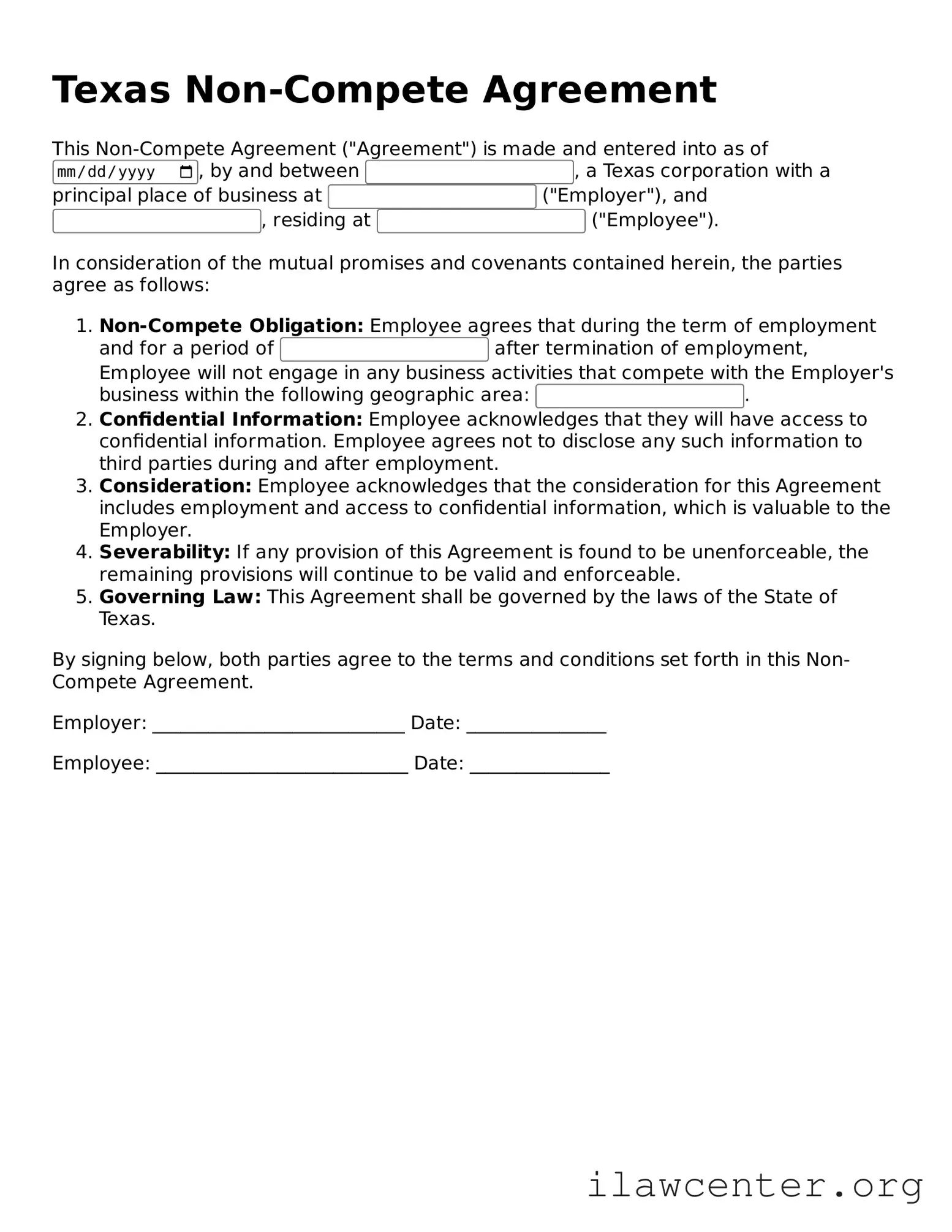
Texas Non-Compete Agreement

This Non-Compete Agreement ("Agreement") is made and entered into as of , by and between , a Texas corporation with a principal place of business at ("Employer"), and , residing at ("Employee").

In consideration of the mutual promises and covenants contained herein, the parties agree as follows:

  1. Non-Compete Obligation: Employee agrees that during the term of employment and for a period of after termination of employment, Employee will not engage in any business activities that compete with the Employer's business within the following geographic area: .
  2. Confidential Information: Employee acknowledges that they will have access to confidential information. Employee agrees not to disclose any such information to third parties during and after employment.
  3. Consideration: Employee acknowledges that the consideration for this Agreement includes employment and access to confidential information, which is valuable to the Employer.
  4. Severability: If any provision of this Agreement is found to be unenforceable, the remaining provisions will continue to be valid and enforceable.
  5. Governing Law: This Agreement shall be governed by the laws of the State of Texas.

By signing below, both parties agree to the terms and conditions set forth in this Non-Compete Agreement.

Employer: ___________________________ Date: _______________

Employee: ___________________________ Date: _______________

PDF Form Characteristics

Fact Name Description
Definition A Texas Non-compete Agreement is a contract that restricts an employee from working for competitors or starting a competing business for a specified period after leaving an employer.
Governing Law The Texas Non-compete Agreement is governed by Texas law, specifically under the Texas Business and Commerce Code.
Enforceability For a non-compete agreement to be enforceable in Texas, it must be reasonable in scope, duration, and geographic area.
Consideration Texas law requires that there be adequate consideration, such as a job offer or promotion, for the non-compete agreement to be valid.
Duration The duration of a non-compete agreement in Texas typically ranges from six months to two years, depending on the nature of the business.
Geographic Scope The geographic area covered by the agreement must be reasonable and directly related to the employer's business interests.
Employee Rights Employees have the right to negotiate the terms of a non-compete agreement before signing it.
Legal Challenges Non-compete agreements can be challenged in court, and courts may refuse to enforce overly broad or unreasonable agreements.

Instructions on Utilizing Texas Non-compete Agreement

Once you have the Texas Non-compete Agreement form in hand, you will need to carefully fill it out to ensure that all necessary information is provided. Follow these steps to complete the form accurately.

  1. Begin by entering the date at the top of the form. This is the date when the agreement will be executed.
  2. Next, fill in the name of the employer. This should be the full legal name of the company or organization.
  3. Provide the address of the employer. Include the street address, city, state, and zip code.
  4. Then, enter the name of the employee. Use the full legal name as it appears on official documents.
  5. Fill in the address of the employee. Make sure to include the complete address details.
  6. In the designated section, outline the scope of the non-compete. Clearly describe the activities or businesses that the employee is restricted from engaging in.
  7. Specify the duration of the non-compete. Indicate how long the agreement will be in effect after the employee leaves the company.
  8. Next, indicate the geographic area covered by the non-compete. Define the regions or locations where the restrictions apply.
  9. Sign the form in the signature section to confirm your agreement to the terms. Both the employer and employee should sign.
  10. Finally, date the signature to indicate when the agreement was signed.

Once the form is filled out, ensure that both parties retain a copy for their records. This will help in maintaining clarity and understanding of the agreement moving forward.

Important Facts about Texas Non-compete Agreement

What is a Texas Non-compete Agreement?

A Texas Non-compete Agreement is a legal document that restricts an employee from working for a competitor or starting a similar business for a specified period after leaving their current job. This agreement aims to protect the employer's business interests and confidential information. In Texas, these agreements must meet certain criteria to be enforceable, including being reasonable in scope and duration.

What are the key elements of a valid Non-compete Agreement in Texas?

For a Non-compete Agreement to be valid in Texas, it must contain specific elements. First, it should be part of an enforceable contract, such as an employment contract. Second, it must be reasonable in terms of geographic area, duration, and the scope of activities restricted. Lastly, the agreement should provide the employee with some form of consideration, such as a job offer or a promotion, in exchange for signing.

How long can a Non-compete Agreement last in Texas?

The duration of a Non-compete Agreement in Texas can vary, but it typically ranges from six months to two years. However, the length must be reasonable and related to the nature of the business and the employee's role. Courts may strike down agreements that impose overly long restrictions, so it's essential to ensure that the duration aligns with industry standards.

Can I negotiate the terms of a Non-compete Agreement?

Yes, you can negotiate the terms of a Non-compete Agreement. It's important to understand that these agreements are often negotiable, especially if you are a valuable employee. You may want to discuss the duration, geographic scope, and specific activities that are restricted. Having open communication with your employer can lead to a more balanced agreement that protects both parties' interests.

What happens if I violate a Non-compete Agreement?

If you violate a Non-compete Agreement in Texas, your former employer may take legal action against you. This could result in an injunction, preventing you from working for a competitor, or you may face financial penalties. It's crucial to understand the terms of the agreement and seek legal advice if you are unsure about your rights and obligations.

Are Non-compete Agreements enforceable in Texas?

Yes, Non-compete Agreements can be enforceable in Texas, provided they meet the legal requirements. Courts will evaluate the agreement's reasonableness and whether it protects legitimate business interests. If the agreement is deemed overly restrictive or unfair, it may be invalidated. Therefore, both employers and employees should approach these agreements with care and clarity.

Common mistakes

Filling out a Texas Non-compete Agreement form can be a critical step in protecting your business interests. However, many individuals make mistakes that can undermine the agreement's effectiveness. One common error is failing to clearly define the scope of the non-compete. Without specific details about the geographic area and the duration of the restriction, the agreement may be deemed unenforceable.

Another mistake is not considering the reasonableness of the terms. Texas courts often look for fairness in non-compete agreements. If the restrictions are too broad or unreasonable, they may not hold up in court. It is essential to ensure that the terms are not overly restrictive, as this could lead to legal challenges.

Some individuals overlook the importance of including consideration in the agreement. In legal terms, consideration refers to something of value exchanged between parties. If you do not provide adequate consideration, the agreement may be invalid. This could be in the form of a job offer, training, or access to confidential information.

Additionally, people often neglect to consult legal counsel before signing. A lawyer can provide valuable insights into the implications of the agreement and help you avoid pitfalls. Ignoring this step can lead to misunderstandings and potential legal issues down the line.

Another frequent error is not updating the agreement as circumstances change. If your role within the company evolves or if the business expands into new markets, the original terms may no longer be appropriate. Regularly reviewing and revising the agreement ensures it remains relevant and enforceable.

Finally, individuals sometimes fail to keep a copy of the signed agreement. This oversight can create problems if disputes arise later. Having a copy readily available allows you to reference the terms and conditions when needed. Always ensure that you retain a signed copy for your records.

Documents used along the form

When entering into a Texas Non-compete Agreement, several other forms and documents may be relevant to ensure clarity and enforceability. These documents can help outline the terms of employment, protect intellectual property, and establish the rights and responsibilities of both parties. Below is a list of commonly used forms that complement a Non-compete Agreement.

  • Employment Agreement: This document outlines the terms of employment, including job responsibilities, compensation, and duration of employment. It often includes confidentiality and non-compete clauses.
  • Confidentiality Agreement: Also known as a Non-disclosure Agreement (NDA), this form protects sensitive information shared between parties during and after employment.
  • Intellectual Property Assignment Agreement: This document assigns ownership of any intellectual property created by an employee during their employment to the employer, ensuring that all innovations are legally owned by the company.
  • Severance Agreement: This form outlines the terms under which an employee may receive compensation after leaving a company, often including clauses related to non-compete and confidentiality.
  • Independent Contractor Agreement: If a contractor is involved, this document defines the relationship between the contractor and the company, including any non-compete provisions that may apply.
  • Release of Claims: This document may be signed by an employee to waive any future claims against the employer, often in conjunction with a severance package.
  • Non-solicitation Agreement: This form restricts an employee from soliciting clients or employees of the company after leaving, often used alongside non-compete agreements.
  • Offer Letter: This letter formally outlines the job offer, including salary, benefits, and any conditions related to non-compete agreements.
  • Termination Agreement: This document details the terms of an employee's departure from a company, often including any obligations related to non-compete and confidentiality.

Each of these documents plays a crucial role in creating a comprehensive legal framework around employment relationships. Ensuring that all necessary forms are in place can help protect both the employer's interests and the employee's rights.

Similar forms

A Non-compete Agreement is a legal document that restricts an individual from engaging in certain activities that compete with a former employer. Several other documents share similarities with this agreement. Below is a list of eight such documents, highlighting their similarities.

  • Non-disclosure Agreement (NDA): Like a Non-compete Agreement, an NDA protects sensitive information. It prevents an individual from sharing confidential business information with competitors or the public.
  • Employment Agreement: This document outlines the terms of employment, including job responsibilities and restrictions. It often includes clauses related to non-competition and confidentiality.
  • Severance Agreement: A severance agreement may include a non-compete clause. It typically provides compensation to an employee upon termination while restricting future employment in similar fields.
  • Confidentiality Agreement: Similar to an NDA, this agreement ensures that proprietary information remains protected. It often accompanies employment contracts and non-compete agreements.
  • Intellectual Property Assignment Agreement: This document transfers ownership of intellectual property created during employment. It may include clauses that restrict the use of that property after leaving the company.
  • Partnership Agreement: In a partnership agreement, partners may agree to non-compete clauses to protect each other's business interests. This ensures that partners do not engage in competing businesses during and after the partnership.
  • Consulting Agreement: A consulting agreement may contain non-compete provisions to prevent consultants from working with competitors or starting similar businesses after the engagement ends.
  • Franchise Agreement: This document governs the relationship between a franchisor and franchisee. It often includes non-compete clauses to protect the brand and ensure that franchisees do not operate competing businesses.

Dos and Don'ts

When filling out the Texas Non-compete Agreement form, it’s important to approach the process carefully. Here are some guidelines to consider:

  • Do read the entire agreement thoroughly before signing.
  • Do consult with a legal professional if you have questions.
  • Do ensure the terms are reasonable and not overly restrictive.
  • Do clearly define the geographic area and time frame of the non-compete.
  • Do keep a copy of the signed agreement for your records.
  • Don't rush through the form without understanding its implications.
  • Don't sign the agreement if you feel pressured or coerced.
  • Don't ignore any clauses that seem unclear or unfair.
  • Don't forget to negotiate terms if they do not meet your needs.

Misconceptions

Understanding the Texas Non-compete Agreement can be tricky. Here are ten common misconceptions that often lead to confusion:

  1. Non-compete agreements are always enforceable in Texas. Many believe that all non-compete agreements are valid. However, they must meet specific criteria to be enforceable, including being reasonable in scope and duration.
  2. Signing a non-compete means you can't work in your field ever again. This is not true. A non-compete may restrict you from working with a specific employer or within a particular geographic area for a limited time, but it doesn't ban you from your profession entirely.
  3. Non-compete agreements are only for executives and high-level employees. While they are common in those roles, non-compete agreements can apply to various positions, including lower-level employees, depending on the nature of the business.
  4. Texas law allows for non-compete agreements without consideration. This is a misconception. For a non-compete to be enforceable, there must be consideration, meaning something of value must be exchanged, such as a job offer or training.
  5. All non-compete agreements must be in writing. While it is best practice to have a written agreement, verbal agreements can also be binding in some cases, though they are harder to enforce.
  6. Non-compete agreements can last indefinitely. Texas law requires that non-compete agreements have a reasonable duration. Typically, agreements lasting more than two years may be challenged.
  7. Employees can’t negotiate the terms of a non-compete. Many people think they must accept whatever terms are presented. However, employees can and should negotiate terms that they feel are unreasonable.
  8. Once signed, a non-compete agreement can never be challenged. This is false. If an employee believes the agreement is overly restrictive or unfair, they can seek legal advice and potentially challenge it in court.
  9. Non-compete agreements are the same as non-disclosure agreements. While both agreements protect business interests, they serve different purposes. A non-compete restricts employment, while a non-disclosure agreement protects confidential information.
  10. Non-compete agreements are only applicable in Texas. Many believe that non-compete agreements are unique to Texas. In reality, they exist in various forms across many states, each with its own laws and regulations.

Key takeaways

When considering the Texas Non-compete Agreement form, it is essential to understand the implications and requirements involved. Below are key takeaways to guide you through the process:

  1. Understand the Purpose: A non-compete agreement restricts an employee from working with competitors for a specified period after leaving the company.
  2. Know the Legal Requirements: In Texas, a non-compete agreement must be part of an enforceable contract, such as an employment agreement or a business sale.
  3. Define Reasonable Limits: The agreement should specify reasonable geographic and temporal limits. Overly broad restrictions may not be enforceable.
  4. Consider Consideration: There must be a valid consideration, such as a job offer or specialized training, for the agreement to be enforceable.
  5. Seek Legal Guidance: Consulting with an attorney experienced in employment law can help ensure the agreement meets all legal standards.
  6. Review State-Specific Laws: Texas law has specific guidelines regarding non-compete agreements, and it is crucial to be familiar with these regulations.
  7. Communicate Clearly: Ensure that all parties involved understand the terms and conditions of the agreement to avoid future disputes.
  8. Document Everything: Keep detailed records of the agreement and any related correspondence to protect all parties’ interests.
  9. Be Prepared for Enforcement: If necessary, understand the process for enforcing the agreement and the potential legal implications of a breach.

By keeping these points in mind, individuals and businesses can navigate the complexities of the Texas Non-compete Agreement form more effectively.