Time Card PDF Template

Time Card PDF Template

A Time Card form is a document used to track the hours worked by an employee during a specific pay period. This form helps ensure accurate payroll processing and maintains clear records of work hours. To get started, please fill out the form by clicking the button below.

Article Guide

Managing time effectively is crucial for both employees and employers, and the Time Card form plays a vital role in this process. This form serves as a record of hours worked, helping to ensure that employees are accurately compensated for their time. Typically, it includes sections for entering the employee's name, the dates worked, and the total hours for each day. Additionally, many Time Card forms have spaces for overtime hours, breaks, and even notes regarding specific tasks or projects. By keeping track of time in a structured manner, this form not only aids in payroll processing but also enhances accountability and productivity within the workplace. Understanding how to fill out and utilize the Time Card form effectively can lead to smoother operations and fewer discrepancies in paychecks.

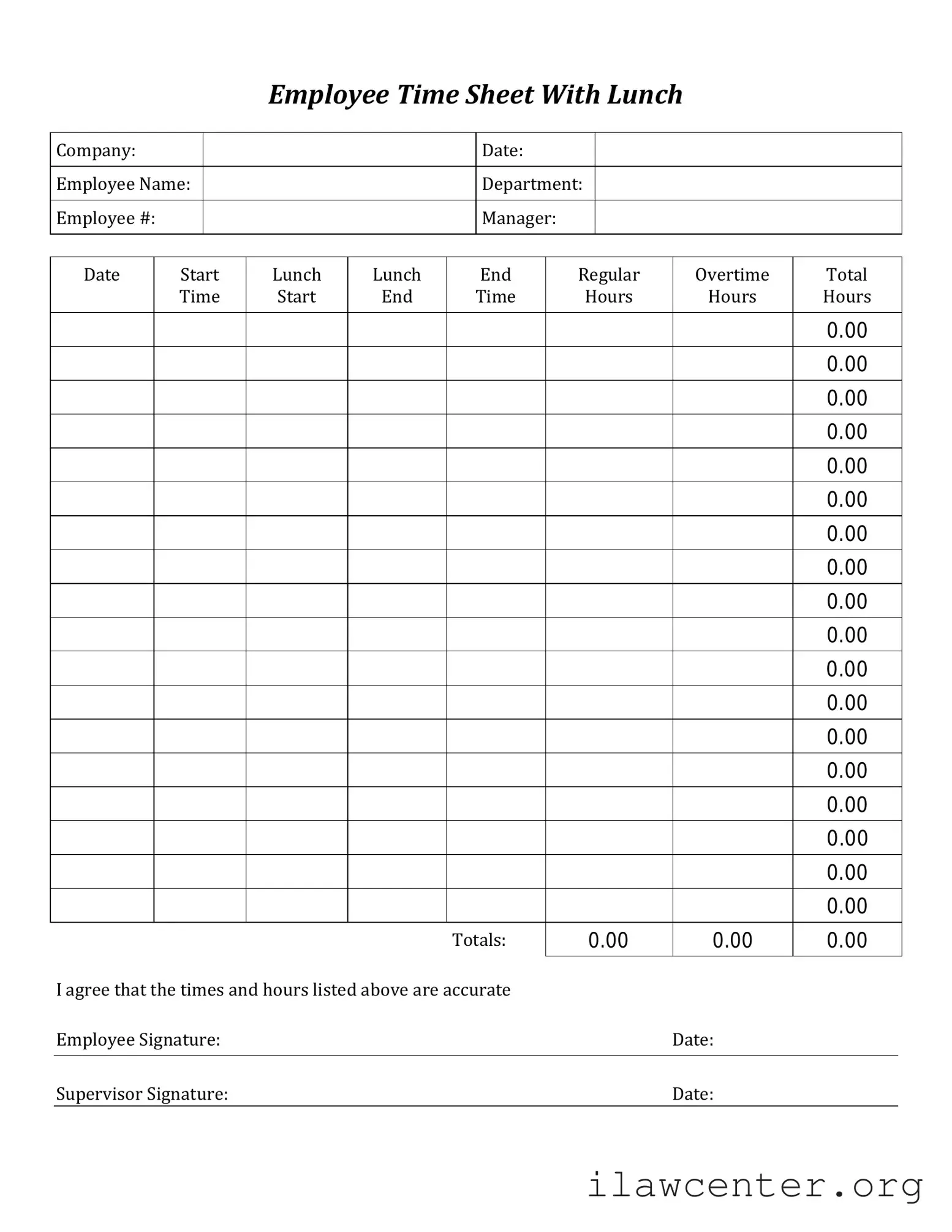
Time Card Preview

Employee Time Sheet With Lunch
Company:
Date:
Employee Name:
Department:
Employee #:
Manager:
Date
Start
Time
Lunch
Start
Lunch
End
Regular
Hours
Overtime
Hours
Total
Hours
Totals:
I agree that the times and hours listed above are accurate
Employee Signature: Date:
Supervisor Signature: Date:
0.00
0.00
0.00
0.00
0.00
0.00
0.00
0.00
0.00
0.00
0.00
0.00
0.00
0.00
0.00
0.00
0.00
0.00
0.00
0.00
0.00

File Properties

Fact Name Description
Purpose The Time Card form is used to record the hours worked by an employee during a specific pay period.
Employee Information It typically includes fields for the employee's name, ID number, and department.
Time Tracking The form allows employees to log their start and end times for each workday.
Overtime Calculation Some forms include sections for tracking overtime hours, which may be subject to different pay rates.
Signature Requirement Many employers require the employee's signature to verify the accuracy of the recorded hours.
State-Specific Regulations In California, for instance, employers must comply with the California Labor Code regarding timekeeping.
Submission Process Employees usually submit the completed Time Card form to their supervisor or payroll department for processing.
Record Keeping Employers are generally required to keep these records for a specified period, often three years.

Instructions on Utilizing Time Card

Filling out the Time Card form accurately is essential for tracking your work hours and ensuring proper compensation. Following these steps will help you complete the form efficiently.

  1. Begin by entering your name at the top of the form. Make sure it is clearly written.
  2. Next, provide your employee identification number, if applicable. This helps in identifying your records.
  3. Indicate the pay period by writing the start and end dates. This information is crucial for payroll processing.
  4. For each day of the week, enter the hours you worked. Be sure to include both start and end times.
  5. If you took any breaks, note the duration of these breaks next to the hours worked.
  6. Calculate the total hours worked for each day and write this total in the designated space.
  7. At the end of the week, sum all daily totals to find your overall hours for the pay period.
  8. Finally, sign and date the form to certify that the information provided is accurate.

Important Facts about Time Card

What is the purpose of the Time Card form?

The Time Card form is used to record the hours worked by employees during a specific pay period. It ensures accurate tracking of time for payroll purposes, allowing employers to calculate wages based on the actual hours worked. This form helps maintain transparency and accountability in the workplace.

How do I fill out the Time Card form?

To complete the Time Card form, start by entering your name and employee identification number at the top. Then, record your daily hours worked for each day of the pay period. Be sure to include any breaks or time off. Double-check your entries for accuracy before submitting the form to your supervisor for approval.

What should I do if I made a mistake on my Time Card?

If you notice an error after submitting your Time Card, notify your supervisor as soon as possible. Depending on the company's policy, you may need to fill out a correction form or submit a revised Time Card. It’s important to address mistakes promptly to ensure you are paid correctly.

When is the deadline for submitting my Time Card?

Each company has its own deadlines for Time Card submissions, typically set at the end of each pay period. Check with your supervisor or the payroll department for the specific due date. Timely submission is crucial to ensure that your hours are processed for payroll on schedule.

What should I do if I forget to submit my Time Card?

If you forget to submit your Time Card, reach out to your supervisor immediately. They will guide you on the next steps to take. Depending on company policy, you may still be able to submit your hours late, but it is important to communicate as soon as possible to avoid delays in your paycheck.

Can I submit my Time Card electronically?

Many companies now offer electronic submission options for Time Cards. Check with your employer to see if this option is available. If so, follow the provided instructions for electronic submission to ensure your hours are recorded accurately and promptly.
Common mistakes

Filling out a Time Card form is an essential task for employees, yet many make common mistakes that can lead to issues with payroll and record-keeping. One frequent error is forgetting to include all hours worked. Employees sometimes overlook overtime or additional hours worked on weekends or holidays. This can result in underpayment, which can be frustrating for both employees and employers.

Another mistake is not using the correct format for entering time. Some individuals may write times in a way that is unclear, such as using a 24-hour clock when a 12-hour clock is expected. This can lead to confusion and errors in calculating total hours worked. Always check the format required by your employer.

Many people also fail to sign their Time Card. A signature is often necessary to confirm that the hours reported are accurate. Without a signature, the form may be considered incomplete, which could delay payment. It’s a simple step that can easily be forgotten in a rush.

In addition, some employees neglect to report breaks taken during their shifts. Depending on company policy, breaks may need to be deducted from total hours worked. Not accounting for breaks can lead to discrepancies in pay. Always be aware of how your breaks affect your overall hours.

Another common mistake is not submitting the Time Card on time. Late submissions can disrupt payroll processes and lead to delays in payment. Setting a reminder can help ensure that you submit your Time Card promptly.

Some individuals may also make errors in calculating total hours. Simple math mistakes can lead to incorrect totals, which can affect paychecks. Double-checking calculations can prevent these errors from happening.

Additionally, failing to communicate any discrepancies with a supervisor can create problems. If there are issues with hours worked or if any mistakes are found, it’s important to bring them to the attention of a supervisor immediately. Open communication can help resolve issues quickly.

Lastly, not keeping a personal record of hours worked can be a significant oversight. Keeping your own log can help you verify the accuracy of the Time Card and provide a reference in case of disputes. This practice can ensure that you are paid fairly for your work.

Documents used along the form

The Time Card form is an essential document used to track employee hours worked, but it often accompanies other forms and documents that support payroll and human resource processes. Below is a list of five commonly used forms that work in conjunction with the Time Card form.

  • Employee Information Form: This document collects essential details about the employee, such as name, address, Social Security number, and tax information. It ensures that payroll is processed accurately and that the employee's records are complete.
  • Leave Request Form: Employees use this form to formally request time off, whether for vacation, personal matters, or medical reasons. It helps management track absences and plan workloads accordingly.
  • Overtime Approval Form: When employees work beyond their standard hours, this form must be completed to gain approval for overtime pay. It helps maintain compliance with labor laws and company policies regarding extra hours.
  • Expense Reimbursement Form: Employees submit this form to request reimbursement for work-related expenses incurred during their duties. It ensures that all expenses are documented and approved before payment is processed.
  • Payroll Change Form: This document is used to report any changes in an employee's payroll information, such as salary adjustments, tax withholding changes, or direct deposit updates. It ensures that payroll records remain accurate and up-to-date.

Utilizing these forms alongside the Time Card form streamlines payroll processes and helps maintain organized records. Each document plays a vital role in ensuring that employee information is handled efficiently and accurately.

Similar forms

  • Employee Attendance Record: Similar to the Time Card form, this document tracks the days an employee is present or absent from work. It serves as a formal record that can be used for payroll and attendance analysis.
  • Payroll Register: This document summarizes the earnings and deductions for each employee over a specific pay period. Like the Time Card, it is essential for calculating total compensation and ensuring accurate payments.
  • Work Schedule: A work schedule outlines the hours and days an employee is expected to work. This document complements the Time Card by providing a framework for when time is recorded.
  • Overtime Authorization Form: This form is used to request and approve overtime work. It is similar to the Time Card in that it records hours worked beyond the regular schedule, ensuring proper compensation.
  • Leave Request Form: Employees use this document to formally request time off. It is related to the Time Card as it impacts attendance records and may require adjustments to the time recorded.
  • Time Off Tracking Sheet: This document helps monitor all types of leave taken by employees. It is similar to the Time Card in that it tracks hours but focuses specifically on time away from work.

Dos and Don'ts

When filling out the Time Card form, it's important to follow some key guidelines to ensure accuracy and compliance. Here’s a list of what you should and shouldn’t do:

  • Do fill in your name and employee ID clearly.
  • Do record your hours worked each day accurately.
  • Do submit your Time Card on time to avoid delays in payment.
  • Do double-check your entries for any mistakes before submitting.
  • Do keep a copy of your Time Card for your records.
  • Don't forget to sign and date the form.
  • Don't leave any fields blank; complete all required sections.
  • Don't alter the form in any way that could cause confusion.
  • Don't submit your Time Card late; it can affect payroll processing.

By following these guidelines, you can ensure that your Time Card is filled out correctly and processed without issues.

Misconceptions

Understanding the Time Card form is crucial for both employees and employers. However, several misconceptions can lead to confusion. Here’s a breakdown of ten common misunderstandings:

  1. Time Cards are only for hourly employees. Many believe that only hourly workers need to fill out time cards. In reality, salaried employees may also be required to track their hours for various reasons, including project billing or compliance.

  2. Submitting a Time Card is optional. Some employees think that filling out a time card is a choice. However, it is often a mandatory process that ensures accurate payroll and project tracking.

  3. Time Cards only track hours worked. While the primary purpose is to log hours, time cards can also include information about breaks, overtime, and specific projects or tasks completed during the work period.

  4. All Time Cards look the same. Different organizations may have unique formats for their time cards. Variations can exist based on company policies, software used, or specific departmental needs.

  5. Once submitted, Time Cards cannot be changed. Although it’s best to submit accurate time cards, most employers allow corrections if errors are discovered after submission. Always check your company’s policy on amendments.

  6. Time Cards are only reviewed at payroll time. Some employees think that time cards are only checked during payroll processing. In fact, managers may review them regularly to monitor productivity and project timelines.

  7. Filling out a Time Card is quick and easy. While it may seem straightforward, accurately tracking time can be time-consuming, especially if done retroactively. Keeping up with entries daily can save time in the long run.

  8. Time Cards are not important for remote workers. Remote employees often think that time cards don’t apply to them. However, tracking time is equally important for remote workers to ensure transparency and accountability.

  9. All Time Card discrepancies are penalized. Some employees fear that any mistakes will lead to punishment. Most organizations prioritize education and correction over punishment, aiming to improve accuracy.

  10. Time Cards are only for tracking hours, not performance. While time cards focus on hours worked, they can also provide insights into employee performance, helping managers identify trends and areas for improvement.

By addressing these misconceptions, both employees and employers can navigate the time card process more effectively, ensuring a smoother experience for everyone involved.

Key takeaways

Filling out and using the Time Card form is essential for accurately tracking hours worked and ensuring timely payment. Here are some key takeaways to help you navigate the process effectively:

  1. Accuracy is key: Always double-check your entries to avoid errors that could delay payment.
  2. Be consistent: Use the same format for recording hours each week to maintain clarity.
  3. Include all hours: Don’t forget to account for overtime, sick leave, and vacation time when applicable.
  4. Submit on time: Adhere to submission deadlines to ensure that your hours are processed in the current pay cycle.
  5. Keep a copy: Retain a copy of your submitted Time Card for your records in case of discrepancies.
  6. Use clear language: Write legibly and use straightforward descriptions for any notes or comments.
  7. Follow instructions: Pay close attention to any specific guidelines provided by your employer regarding the Time Card.
  8. Check for updates: Stay informed about any changes to the Time Card process or policies from your employer.
  9. Communicate issues: If you encounter problems, reach out to your supervisor or HR for assistance.
  10. Review regularly: Periodically assess your time entries to ensure they reflect your actual hours worked.

By keeping these points in mind, you can streamline the process of filling out and using the Time Card form, making it a smoother experience for everyone involved.