Transmittal PDF Template

Transmittal PDF Template

The Transmittal Form is a document used to communicate the delivery of materials, such as drawings, samples, or specifications, to a recipient. This form ensures that all items are accounted for and provides a clear record of what has been sent. To streamline your process, consider filling out the Transmittal Form by clicking the button below.

Article Guide

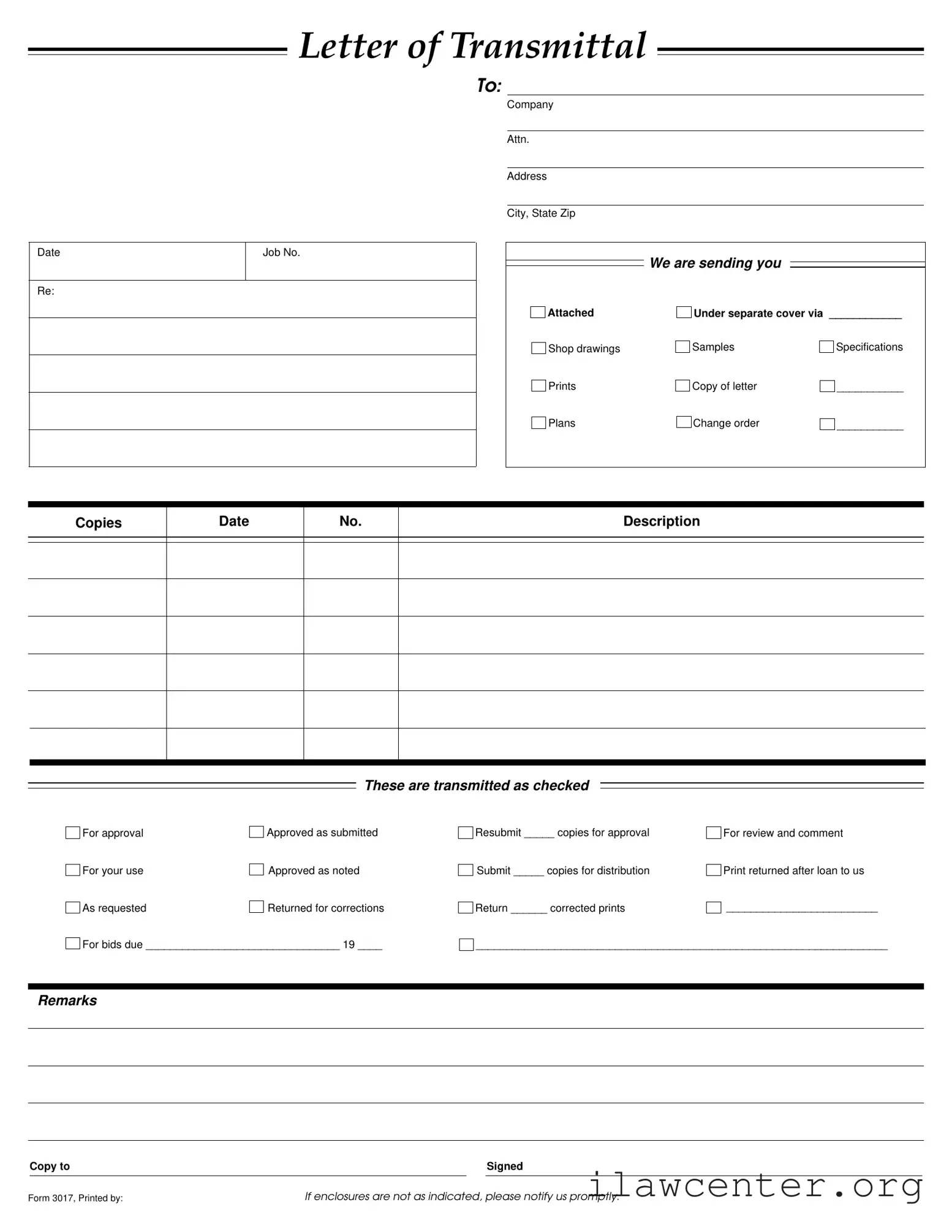
The Transmittal form serves as a crucial communication tool in various industries, particularly in construction and engineering projects. It facilitates the organized transfer of documents, ensuring that all parties involved are on the same page. This form typically includes essential details such as the date, job number, and recipient information, which helps in tracking the correspondence. Accompanying documents may range from shop drawings and specifications to samples and change orders, all of which are vital for project clarity. The form also outlines the purpose of the transmission, whether it is for approval, review, or corrections, and specifies the number of copies being sent. By clearly indicating the status of each document—such as "approved as noted" or "returned for corrections"—the Transmittal form minimizes misunderstandings and enhances workflow efficiency. Additionally, it provides a space for remarks and instructions, allowing for tailored communication based on the project's needs. Overall, this form is an indispensable component in maintaining clear and effective communication throughout the lifecycle of a project.

Transmittal Preview

We are sending you
Letter of Transmittal
To:
Attn.
Company
Address
City, State Zip
Job No.Date
Re:
Copies
Date Description
No.
Shop drawings
Prints
Plans
Attached
Specifications
___________
___________
Samples
Under separate cover via ____________
If enclosures are not as indicated, please notify us promptly.
Copy to Signed
Remarks
For approval
For your use
As requested
Approved as submitted
Approved as noted
Resubmit _____ copies for approval
Return ______ corrected prints
For review and comment
Print returned after loan to us
____________________________________________________________________
These are transmitted as checked
Copy of letter
Change order
Returned for corrections
Submit _____ copies for distribution
_________________________
For bids due ________________________________ 19 ____
Form 3017, Printed by:

File Properties

Fact Name Description
Purpose The Transmittal Form is used to send documents and materials between parties, ensuring clear communication about what is included.
Date Requirement The date on the form indicates when the documents are sent, which is crucial for tracking timelines.
Job Number A job number helps identify specific projects, making it easier for all parties to reference the correct documents.
Recipient Information Details about the recipient, including company name and address, ensure the documents reach the right person.
Attachments The form lists all items being sent, such as shop drawings, samples, and specifications, providing a clear inventory.
Review Options It includes checkboxes for approval status, allowing the recipient to easily communicate their review of the documents.
Resubmission Instructions If corrections are needed, the form specifies how many copies should be resubmitted for approval.
Copy Distribution It allows for specifying how many copies are to be distributed, ensuring everyone involved has the necessary documents.
Governing Law State-specific forms may be governed by local construction and contract laws, which vary by state.

Instructions on Utilizing Transmittal

Completing the Transmittal form accurately is essential for effective communication and documentation. Once the form is filled out, it will be sent to the designated recipient along with the relevant materials. The following steps outline the process for filling out the form.

  1. Begin by entering the date in the designated space at the top of the form.
  2. Fill in the recipient's name and title under "To:"
  3. Write the job number in the "Re:" section.
  4. Provide the company name of the recipient.
  5. Complete the address fields, including street address, city, state, and zip code.
  6. Indicate what is being sent by checking the appropriate boxes next to the items listed, such as shop drawings or samples.
  7. For each item sent, specify the number of copies and provide a brief description if necessary.
  8. Choose the appropriate status for each item being transmitted, such as "For approval" or "Returned for corrections."
  9. In the remarks section, include any additional information that may be relevant.
  10. Sign the form in the designated area to validate the transmission.
  11. Print your name and title below your signature.

If there are any discrepancies or missing enclosures, the recipient should be notified promptly to ensure clarity and maintain effective communication.

Important Facts about Transmittal

What is a Transmittal Form?

A Transmittal Form is a document used to send materials, such as shop drawings, samples, or specifications, from one party to another. It provides a clear record of what is being sent and ensures that all necessary information is communicated effectively. This form is essential for tracking the progress of projects and maintaining organization.

Why is the Transmittal Form important?

The Transmittal Form serves multiple purposes. It helps in documenting the items sent, clarifying the purpose of the transmission, and facilitating communication between parties. By using this form, you can ensure that nothing is overlooked, which can save time and prevent misunderstandings.

What information should I include on the Transmittal Form?

When filling out the Transmittal Form, include the date, job number, and company details. List the items being sent, such as shop drawings or change orders. Indicate the status of each item, such as "For approval" or "Returned for corrections." Finally, make sure to add any remarks that may be necessary for clarity.

How do I send the Transmittal Form?

You can send the Transmittal Form via email, postal service, or any other method that is suitable for your project. If you are sending items under separate cover, specify how you will send them in the designated area of the form. Ensure that you keep a copy for your records.

What should I do if the enclosures are not as indicated?

If you receive the Transmittal Form and the enclosures do not match what is indicated, it is important to notify the sender promptly. This ensures that any discrepancies can be addressed quickly, preventing delays in the project timeline.

Can I use the Transmittal Form for multiple purposes?

Yes, the Transmittal Form can be used for various purposes, such as submitting documents for approval, sharing information for review, or returning items for corrections. Its flexibility makes it a valuable tool in managing project documentation.

Common mistakes

Completing a Transmittal form can seem straightforward, but many people make common mistakes that can lead to confusion or delays. One frequent error is failing to provide the correct date. Without a clear date, recipients may struggle to track the timeline of the project, which can impact scheduling and communication.

Another mistake often seen is the omission of important details in the address section. If the company name, attention line, or address is incomplete or incorrect, the documents may not reach the intended recipient. This can cause unnecessary setbacks and may require resending documents.

People sometimes neglect to check the boxes that indicate the purpose of the transmission. Whether the documents are for approval, use, or corrections, failing to mark these can lead to misunderstandings about the recipient's next steps. Clarity is essential to ensure the process moves forward smoothly.

Additionally, some individuals overlook the importance of listing all attachments accurately. If the form states that certain documents are included but they are missing, it can create confusion and delay the project. It is vital to double-check that all items mentioned are indeed attached.

Another common oversight is not providing enough copies for distribution. When the form requests a specific number of copies for approval or distribution, failing to meet this requirement can hinder the review process. Always ensure the correct number of copies is prepared and noted.

People often forget to include remarks or additional notes that could clarify the purpose of the transmission. This section is an opportunity to provide context or special instructions. Leaving it blank may lead to unnecessary questions or misinterpretations.

Lastly, signing the form is a critical step that is sometimes overlooked. A missing signature can render the form invalid, causing delays in processing. Always ensure that the form is signed before submission to avoid any complications.

Documents used along the form

The Transmittal form is often used in various business and project management contexts to communicate important information. Along with this form, there are several other documents that can help facilitate clear communication and record-keeping. Here are a few commonly used forms that may accompany the Transmittal form:

  • Cover Letter: This document introduces the Transmittal form and provides context for the materials being sent. It often includes a brief summary of the contents and any specific instructions for the recipient.
  • Shop Drawings: These detailed drawings illustrate how specific components of a project will be constructed. They are often used by contractors to show the intended design and ensure that all parties are on the same page regarding the project's execution.
  • Change Order: This document formally outlines any changes to the original contract. It details modifications to the scope of work, costs, and timelines, ensuring that all parties acknowledge and agree to the changes.
  • Specifications: Specifications provide detailed descriptions of materials, workmanship, and quality standards required for a project. They serve as a guideline for contractors and help ensure compliance with project requirements.

Using these forms in conjunction with the Transmittal form can enhance communication and help keep projects organized. Each document serves a specific purpose, contributing to the overall efficiency of project management.

Similar forms

The Transmittal form serves a specific purpose in project communication. Several other documents share similarities with it. Here’s a list of five such documents:

  • Cover Letter: Like the Transmittal form, a cover letter accompanies documents, providing context and summarizing the contents. It serves to introduce the main document and clarify its purpose.
  • Delivery Receipt: This document confirms that items have been received. It often includes details about what was sent, similar to how the Transmittal form lists attached documents.
  • Memo: Memos communicate important information within an organization. They can outline actions needed, much like the instructions provided on a Transmittal form.
  • Shipping Manifest: A shipping manifest details the contents of a shipment. It parallels the Transmittal form by itemizing what is included and ensuring that all items are accounted for.
  • Request for Information (RFI): An RFI seeks clarification on project details. It often includes specific questions and context, resembling the way a Transmittal form conveys information about project documents.

Dos and Don'ts

When filling out the Transmittal form, attention to detail is crucial. Here are ten important things to keep in mind:

  • Do ensure all sections of the form are filled out completely.
  • Don't leave any fields blank unless absolutely necessary.
  • Do double-check the date and job number for accuracy.
  • Don't forget to specify what is being transmitted, such as shop drawings or specifications.
  • Do indicate the method of delivery clearly, whether it’s via email or hard copy.
  • Don't use vague terms; be specific about the contents being sent.
  • Do include any necessary remarks or additional information that may assist the recipient.
  • Don't overlook the importance of signatures; make sure the form is signed where required.
  • Do keep a copy of the completed form for your records.
  • Don't hesitate to reach out if you have questions about any part of the form.

Following these guidelines will help ensure that your Transmittal form is completed correctly and efficiently. It’s all about clear communication and thoroughness.

Misconceptions

Misconceptions about the Transmittal form can lead to confusion and inefficiencies in project management. Below is a list of eight common misconceptions, along with clarifications to enhance understanding.

  • The Transmittal form is only for sending documents. Many believe the form serves solely as a means of document transmission. In reality, it also communicates the purpose of the documents, such as whether they are for approval, review, or corrections.
  • All fields on the Transmittal form must be filled out. While it is important to provide relevant information, not every field is mandatory. Completing only the necessary sections can streamline the process.
  • The Transmittal form is not legally binding. Some assume that the form has no legal implications. However, it can serve as a record of communication and agreement between parties, which may be referenced in disputes.
  • Using a Transmittal form is optional. Many people think that the form is merely a suggestion. In many industries, using a Transmittal form is standard practice and may be required by contract.
  • Transmittal forms are only used in construction. While commonly associated with construction projects, these forms are utilized across various industries for transmitting important documents and information.
  • Once sent, the Transmittal form cannot be modified. There is a belief that the form is final upon submission. In fact, it can be updated if corrections or additional information are necessary.
  • The sender is solely responsible for the contents of the Transmittal form. Some think that only the sender bears responsibility. However, all parties involved should review the contents to ensure accuracy and clarity.
  • Transmittal forms do not require a signature. It is a misconception that signatures are unnecessary. A signature can provide verification and acknowledgment of receipt, enhancing the form's validity.

Key takeaways

When filling out and using the Transmittal form, keep these key takeaways in mind:

  • Complete all sections: Ensure that you fill in the date, job number, and company details accurately.
  • Specify attachments: Clearly indicate what documents you are sending, such as shop drawings or specifications.
  • Check the appropriate boxes: Mark the status of the documents being sent, such as "For approval" or "Approved as noted."
  • Provide clear remarks: Use the remarks section to add any additional information that may be necessary for the recipient.
  • Send copies as needed: Indicate how many copies you are sending for approval or distribution to avoid confusion.
  • Follow up on enclosures: If the enclosures do not match what is indicated on the form, notify the sender promptly.

By adhering to these guidelines, you can ensure that your communication is clear and effective.